

Forum Replies Created
-
AuthorPosts
-
George
ParticipantHey Lionel,
Thanks for reaching out!
These are two separate tasks with different ranges of possibilities. For the first task, which is simply to duplicate the content of Site A to Site B, this can be done rather easily using the built-in WordPress export tools. Check out this handy guide on our knowledgebase to learn how! ? https://theeventscalendar.com/knowledgebase/using-wordpress-export-tools-to-migrate-events-content/
Now, the second task you mention is keeping them in sync going forward. So while doing the one-time duplication above is easy, this continuous syncing is a bit trickier.
At this time, the only solution we have for continuous syncing of calendars is our premium add-on, iCal Importer. You can simply go to Site B and install iCal Importer on it—you do NOT need to install it on Site A. On Site B, you then just have it auto-import the events from Site A’s events feed, and they’ll stay in sync! Learn more here → https://theeventscalendar.com/product/ical-importer/
There may be other importer plugins that do this out there, but I do not know of any.
I hope this information helps!
GeorgeApril 26, 2016 at 9:03 am in reply to: Multilingual add events form / Community Events – qtranslate #1107136ParticipantHey Hannu,
I’m sorry to bear this news, but there is unfortunately no such way to make a multilingual Community Events submission form. 🙁 At this time, our plugins are not fully compatible and do not support WPML or qTranslate, or similar plugins.
Sorry to disappoint!
GeorgeParticipantHey @Angela,
Sorry to see this!
I don’t have this issue on my site, so I’m wondering if we can get started here by doing the following things:
1. Share your site’s “System Information,” which you can learn how to do on this page https://theeventscalendar.com/knowledgebase/sharing-sys-info/. Post that information and I’ll take a look.
2. Next, can you confirm exactly how this widget is added? Is it simply dragged into place in the “Appearance” menu in your wp-admin? Or are you using custom code of any kind to generate the widget?
3. Finally, for now—activate a default theme like Twenty Sixteen, then take a look at the widget HTML like you have in your screenshot. Do you see the same problem?
Thanks!
GeorgeParticipantHey Rasmus!
Thanks for reaching out. None of our plugins offer any sort of “newsletter” functions, unfortunately—can you elaborate a bit on what you are referring to?
Thank you!
GeorgeParticipantOh no! Thanks for reaching out Caroline—this is not intended behavior, so if there’s a bug here it’s something we can definitely get on top of and fix.
I don’t reproduce this problem on my own local site—which does not mean there’s not a bug, just that I need to do some more investigating here.
To that end, would you mind providing two bits of information here?
1. You mention “the importer”—I’m pretty sure you just mean the Facebook Importer, is that right?
2. Can you post your site’s “system information”? Here’s how → https://theeventscalendar.com/knowledgebase/sharing-sys-info/
Thanks!
GeorgeApril 26, 2016 at 7:36 am in reply to: Add add_filter to organizer and venues for importing custom data. #1107084ParticipantHey Geir,
Thanks for pointing this out—I agree that more hooks for these other post types would be handy.
You mentioned the existing event filters tribe_events_csv_import_event_additional_fields and tribe_events_importer_event_column_names — when you describe filters for Venues and Organizers, are you looking for exact analogues to these two event filters? Or are there other filters for Venues and Organizers that you would suggest, too?
Just curious to learn more about your needs and what you’re hoping to build with these filters—it’ll help me write up tickets for our developers to go and add these filters.
Thank you,
GeorgeParticipantHey Susan,
Thanks for reaching out!
You have posed numerous customization-related questions here, and while I will try to help, I do just want to highlight the fact that we unfortunately cannot help with customizing/tweaking/design-related questions. Please read more about this here → https://theeventscalendar.com/knowledgebase/what-support-is-provided-for-license-holders/
Now, despite that general policy, I will try to help with the things you listed and at least point you in the right direction to get started.
1. Change Events to Activities in all instances.
☝️ You can do this by following the steps on this page → https://theeventscalendar.com/knowledgebase/changing-the-word-events-to-something-else/
2. Change < Back to Events to < Statewide Activities.
☝️ This is a bit trickier to do, and may require theme customization. By default, our plugin only adds a link called “< All Events”—not “< Back to Events”. This may seem like a trivial difference, but it’s not, because that “< Back to Events” link you are referring to could be coming from your theme.
Now, the process in step #1 will at least change the text from “< Back to Events” to “< Back to Activities”. To modify the “Back to” part, though, I would recommend diving into your theme code to explore this might be coming from. Feel free to contact your theme developer for assistance there!
3. Add wording to Calendar View (Categories instructions).
☝️ Adding things to calendar views can be done in two primary ways. If you are just trying to add text before or after the views, then simply head to Events > Settings in your site’s wp-admin. Once here, head to the Display tab and then scroll down to “Advanced Template Settings”. You’ll have two text areas where you can add content before the Views and after the Views.
If you need to more than these textareas offer, then unfortunately you will have to write custom templates with your content added in them. You can learn how to do this here → https://theeventscalendar.com/knowledgebase/themers-guide/
In closing, the last two problems you mention are things related to the CSS design of your theme. Like all customizations and tweaks here, you will fundamentally have to take the reins on fixing these problems yourself, or contact your theme author for further theme design-related assistance.
As a quick example of things, let’s take a look at the book cover issue. You can make the book covers look better by adding the following CSS to the bottom of your theme’s style.css file:
.tribe-events-list .tribe-events-event-image img {

    width: auto !important;

}
Adding this will fix the book covers but will often leave a wide gap between the image and the text, though. 🙁 So further tweaking is required.
To write custom CSS like this on your site more easily, definitely check out a [free!] tool like Firebug if you use FireFox, or the Developer Tools for either Safari or Chrome. They have “Inspector” tools that let you zoom right over the element whose styles you want to change, like the book covers or the “See all” links and whatnot.
In closing, if you do not feel comfortable making these sorts of modifications on your own, then your best bet is to hire a professional developer to write the code for you. We have a list of great developers here → http://m.tri.be/18k1 (and have no affiliation with any of these folks—they’re simply some well-respected names in the community that we’ve compiled to share with folks).
Sincerely,
GeorgeParticipantHey Jake,
I’m really sorry to hear about this—this is actually a known and serious bug that is affecting numerous users. 🙁 We’ve got a dedicated development team trying to figure out the problem—stay tuned for more updates!
I’m sorry to bear this news, and for the fact that there isn’t much to be done at this time. Please let me know if you have any other questions, comments, or concerns that I can try to help with in the meantime.
Sincerely,
GeorgeParticipantHey Michael,
You simply head to the Attendees List of an event, and then use the “Export” button there. Learn more on this guide → https://theeventscalendar.com/knowledgebase/managing-your-orders-and-attendees/
Cheers!
GeorgeParticipantHey Michael!
Thanks for reaching out.
There is unfortunately no way to do this at this time from within our plugins. 🙁 Sorry to disappoint!
You could export all of the attendee information—which includes their email address—and then import this data into an email system to mass-email the folks; but our plugins don’t provide this themselves.
Thank you,
GeorgeParticipantHey David,
Thanks for reaching out. I unfortunately am not sure we can help much here, for the following two reasons:
1. We do not make this plugin and thus cannot offer any support for it, or answer questions about it: https://wordpress.org/plugins/the-events-calendar-shortcode/. So, for anything related to that plugin, please post those questions to the plugin authors.
2. We cannot help with custom coding. I only mention this because, unfortunately, if you are finding that CSS files are loading in places you don’t want them to, the only way to resolve this is to dive “under the hood” with custom coding and write custom code that prevents the various CSS files from loading where you don’t want.
You can learn more about our support policies on both fronts here by checking out this page → https://theeventscalendar.com/knowledgebase/what-support-is-provided-for-license-holders/
Please check out that page, and let me know if there is something I can try to help with here.
Sincerely,
GeorgeParticipantHey Andrew,
Thanks for reaching out.
1. Can you clarify exactly what you mean when you say, “When i add 2 to the event booking”? Can you share screenshots of the process you are doing to do this, if possible?
2. Next, can you clarify what you mean when you say, “I complete the event”—do you mean the event just passes? Or do you mean that you literally change something about the event post itself; changing its status or order status or something like that?
3. Finally, please post your system information to this thread. Here’s how to do that: https://theeventscalendar.com/knowledgebase/sharing-sys-info/
Thank you!
GeorgeParticipantHey Math,
Thanks for reaching out!
We do not make “WooCommerce Box Office”, so I unfortunately cannot speak to any of its features or capabilities. Your best bet is to contact the makers of that plugin directly for more information.
There is no integration between Event Tickets Plus and “WooCommerce Box Office” at all. Furthermore, Event Tickets Plus does not create events. The Events Calendar will create events; Event Tickets Plus only adds tickets to events.
I hope this helps,
GeorgeParticipantHey @Red Dog,
I agree that better support for recurring tickets would be nice, and we’ve got some things in the works that will hopefully be rolling out before we’re too far into 2017. 😉
For the time being, however, what you describe here is exactly what is possible and is the exact sort of thing I meant by my earlier description of the possibilities:
We would set up the recurring event on the Event Calendar with all of its details (ex: Sundays, 2pm, 7 weeks) and then we would set it up so that they can purchase “a” ticket that would technically look like t’s just for the first day but would be the price of the whole session. Then they bring their ticket to the first day for proof of purchase and we see them for the next 6 weeks.
☝️ That should work smoothly with our plugins as they currently stand.
Next, you ask this:
Could we select a class on a specific day and time and make “drop ins” available? For instance, if we know that 5 people have signed up for a 7 week session of a course so there’s space for 2 more to drop in whenever they want, we could allocate 2 additional “drop in” “tickets for some of those days?
Yes, this is possible but only if you were to “break off” the event from the recurring series. This won’t really be noticeable at all on the front-end—all it does is make the event a standalone, single event so that tickets can be added to it, instead of a sub-event of a larger recurrence series.
To break off a recurring event, you simply go to the “edit” screen of that single event instance; in the admin bar on the top of the wp-admin screen, you’ll find the “break off” button under the “edit event” button, as shown in this screenshot:
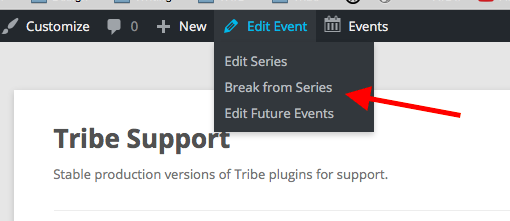
I hope this all helps! Let me know if you have any other questions, comments, or concerns.
Cheers,
GeorgeApril 25, 2016 at 4:36 pm in reply to: Advanced Post Builder is causing issues when saving custom quick edit input data #1106874ParticipantHey @Russell,
Thanks for this information. Sorry for what might be another obvious-sounding question, but just to be clear, when you have everything deactivated except for The Events Calendar, Events Calendar Pro, and Advanced Post Manager, are you still working with a custom field that you have custom-coded into place?
1. Or is all custom code that you added entirely removed?
I only ask for such clarification because I cannot recreate problems on my own local site with all the same plugin versions that you have.
For one additional question here, in your original post you write this:
When I update my post through the quick edit box, the meta data is updated but the frontend for the event list breaks format (see screenshots).
2. What do you mean about the “front-end”? All of the screenshots you posted are in the back-end, admin-facing admin column in your site.
3. What specifically are you updating?
4. Does it make a difference what you update?
Thanks for your patience here! Just trying to recreate your issues so I can try to back-engineer a solution. 🙂
Sincerely,
George -
AuthorPosts