
Home › Forums › Calendar Products › Events Calendar PRO › Upcoming Events Display Time of Event
- This topic has 4 replies, 3 voices, and was last updated 10 years, 5 months ago by
Support Droid.
-
AuthorPosts
-
April 26, 2016 at 5:09 am #1107025
Adam
ParticipantHello,
I am using 2 different upcoming events sections to show different Events for a client. The client would like to display the times for the upcoming events and currently it just shows the date and title and location of the event. The 2 different styles I am currently using are: List2 & Grid. Is there a way to quickly add the times for each event in the Upcoming Events section?
Thanks!
April 26, 2016 at 9:43 am #1107229George
ParticipantHey @Adam,
Thanks for reaching out!
1. Just to be clear, in your list view do you mean that you just do not have the date and time that are shown like, for example, in this screenshot:
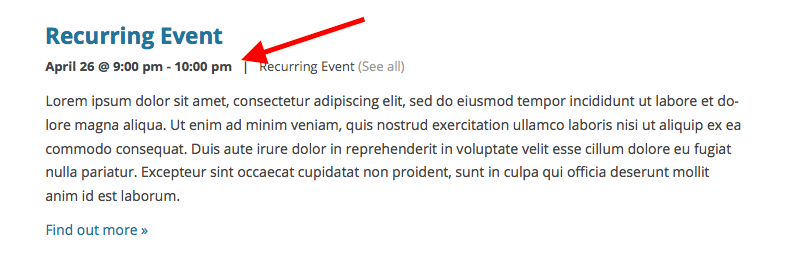
2. Next, can you link to your events pages where this is visible? I’ll take a look.
3. Finally, for now, can you post your system information here? Here’s how to do that → https://theeventscalendar.com/knowledgebase/sharing-sys-info/
Thank you!
GeorgeApril 26, 2016 at 9:49 am #1107238ParticipantHere are the 2 pages that I am working with:
http://new.kpcog.org/ – at the very bottom of the page you will see 6 upcoming events, this does not show the times
http://new.kpcog.org/ministries/grow-groups/ – this is the second example, different layout but doesn’t show the event times
I wasn’t sure if this was a setting within the plugin or a setting within the theme
SysInfo:
Home URL
http://new.kpcog.org
Site URL
http://new.kpcog.org
install keys
–
WordPress version
4.5
PHP version
5.6.14
pluginsLayerSlider WP version 5.6.2 by Kreatura Media(http://kreaturamedia.com/)
Contact Form 7 – Stripe Extension version 1.0 by ZealousWeb Technologies(http://zealousweb.com)
Contact Form 7 version 4.4.1 by Takayuki Miyoshi(http://ideasilo.wordpress.com/)
Envato WordPress Toolkit version 1.7.3 by Envato(http://envato.com)
Essential Grid version 2.0.9.1 by ThemePunch(http://themepunch.com)
The Events Calendar PRO version 4.1.2 by Modern Tribe, Inc.(http://m.tri.be/20)
Google Analytics Dashboard for WP version 4.9.3.1 by Alin Marcu(https://deconf.com)
WPBakery Visual Composer version 4.11.2 by Michael M – WPBakery.com(http://wpbakery.com)
Obfuscate E-mail version 3.5 by Scott Reilly(http://coffee2code.com/)
Slider Revolution version 5.1.6 by ThemePunch(http://themepunch.com)
Social Count Plus version 3.3.2 by Claudio Sanches(http://claudiosmweb.com/)
The Events Calendar version 4.1.2 by Modern Tribe, Inc.(http://m.tri.be/1x)
Webnus Causes version 1.0 by Webnus(http://webnus.net)
Webnus Sermons version 1.2.1 by Webnus(http://webnus.net)
WooCommerce version 2.5.5 by WooThemes(http://woothemes.com)
WP-PageNavi version 2.90 by Lester ‘GaMerZ’ Chan(http://lesterchan.net)network plugins
–
mu plugins
–
theme
Church Suite
multisite
–
settingsschema-version = 4.1.2
recurring_events_are_hidden = exposed
previous_ecp_versions = Array
(
[0] => 0
)
latest_ecp_version = 4.1.2
earliest_date = 2016-04-02 18:00:00
earliest_date_markers = Array
(
[0] => 95
)
latest_date = 2018-04-22 20:00:00
latest_date_markers = Array
(
[0] => 1886
)
stylesheetOption = tribe
tribeEventsTemplate = default
tribeEnableViews = Array
(
[0] => month
)
viewOption = month
tribeDisableTribeBar = 1
monthEventAmount = 6
enable_month_view_cache = 1
dateWithYearFormat = F j, Y
dateWithoutYearFormat = F j
monthAndYearFormat = F Y
dateTimeSeparator = @
timeRangeSeparator = –
datepickerFormat = 2
tribeEventsBeforeHTML =
tribeEventsAfterHTML =
donate-link =
postsPerPage = 10
liveFiltersUpdate = 1
showComments =
showEventsInMainLoop =
eventsSlug = events
singleEventSlug = event
multiDayCutoff = 00:00
defaultCurrencySymbol = $
reverseCurrencyPosition =
embedGoogleMaps = 1
embedGoogleMapsZoom = 10
debugEvents =
tribe_events_timezone_mode = event
tribe_events_timezones_show_zone =
disable_metabox_custom_fields = show
pro-schema-version = 4.1.2
last-update-message = 4.1.2
hideLocationSearch =
hideRelatedEvents =
week_view_hide_weekends =
weekDayFormat = D jS
eventsDefaultOrganizerID =
eventsDefaultVenueID = 60
eventsDefaultAddress =
eventsDefaultCity =
eventsDefaultState =
eventsDefaultProvince =
eventsDefaultZip =
defaultCountry =
eventsDefaultPhone =
tribeEventsCountries =WordPress timezone
America/New_York
server timezone
UTC
common library dir
/home/kingspointcog/public_html/new/wp-content/plugins/the-events-calendar/common/src/Tribe
common library versionApril 26, 2016 at 7:00 pm #1107512ParticipantThank you for sharing these links!
The lack of event times is a result of your theme’s specific styling and construction; to rectify this and get the times to be added somewhere in the theme design, please contact your theme’s creators for assistance in modifying the theme to show that information.
Thank you,
GeorgeMay 11, 2016 at 9:35 am #1113297KeymasterThis topic has not been active for quite some time and will now be closed.
If you still need assistance please simply open a new topic (linking to this one if necessary)
and one of the team will be only too happy to help. -
AuthorPosts
- The topic ‘Upcoming Events Display Time of Event’ is closed to new replies.