

Forum Replies Created
-
AuthorPosts
-
George
ParticipantThanks for the update, @Jonathan—I’m glad to hear that the issue was resolved.
Your suggestion about the “start sale” date being added to that div is a great one, too—it’s unfortunately not possible at this time without some custom coding, but is definitely the sort of thing that could end up as a plugin feature.
To help make that a reality, I would encourage you to suggest that idea on our UserVoice page, which can be found here → http://tribe.uservoice.com
Folks can add votes to ideas that they, too, would like to see in the plugins—we often incorporate ideas from this page into the plugins so definitely check it out!
Cheers,
GeorgeParticipantHey @MacKenzie,
Really sorry to hear about this—we actually indeed have a known and major conflict with the Sensei plugin and are working on hard on getting a fix out the door as soon as possible.
At this time such a fix is not available—I’m sorry about this! But we are working on this with urgency and trying to resolve the conflict.
Stay tuned for updates—I unfortunately don’t have an ETA for when the fix will arrive, but it’s hopefully not something that will take more than a week or two for us to resolve. We’re still unfortunately trying to identify the cause; once we do so, then we can fix it, but thus far we have yet to isolate the problem.
Sincerely,
GeorgeParticipantThanks for reaching out, Autumn!
I’m sorry to hear about these issues—when I test this on my own local site, I don’t have any issues using the WooCommerce ticket type, so I’m wondering if there’s something about your site’s specific configuration that might be causing the problem.
To help determine if this is the case, I’m curious:
1. You say, “I’m trying to get the ticket for this event” (emphasis mine)—do you mean to imply that other tickets on your site work as expected and don’t have this issue? Or does any ticket for any event you try have issues along these lines?
2. Next, can you post your site’s complete, un-edited “System Information”? It’s a helpful fingerprint that I will use to investigate this a bit more closely. Here’s how to post that info → https://theeventscalendar.com/knowledgebase/sharing-sys-info/
3 Have you been using tickets features for some time now without any issues? Have things been fine for a while, in other words, and then this issue arose only recently? Or have there been issues with event ticketing on your site since you installed the plugins to begin with?
Thank you!
GeorgeParticipantHey Brendan,
Thanks for reaching out. Our plugin files are all entirely self-contained in the zip files you can download for the plugins at http://theeventscalendar.com/my-account/downloads.’
We cannot help with custom development projects or give file-by-file walkthroughs of code, as elaborated upon on this page which I encourage you to check out → https://theeventscalendar.com/knowledgebase/what-support-is-provided-for-license-holders/
If you’re simply looking for where filters are applied and such, and results are retrieved, then there are a few things you can search for in your code editor of choice. Look for instances of WP_Query, for example. Look for anything hooked to the WordPress action pre_get_posts(). Look for instances of the function tribe_get_events().
Looking for instances of $wpdb should also be helpful.
Sincerely,
GeorgeParticipantHey Kyle,
Sorry to hear this!
I cannot recreate similar behavior no matter what I try, so I’m wondering if you could do two things here to help with the investigation of this problem:
1. First, post your site’s complete System Information. I know you listed some version numbers already, but the full System Information profile contains lots of other helpful information. You can learn how to post that information here → https://theeventscalendar.com/knowledgebase/sharing-sys-info/
2. Next, perform the complete set of troubleshooting steps outlined here → https://theeventscalendar.com/knowledgebase/testing-for-conflicts/. After EACH STEP in that process, check on your events views again and see if they still default to January 2016, or if they behave any other way.
Thank you!
GeorgeParticipantHey Matthew,
Your thinking is indeed correct here. You don’t event have to enter the license key on the development site, in fact, because the license key does not restrict or affect any plugin functionality whatsoever.
I hope this information helps!
— George
ParticipantHey Kelly,
These sp_-prefixed functions are deprecated legacy functions from back in the early days of our plugins, when Modern Tribe was still called “Shane and Peter, Inc.”—hence the s and p prefix. 😀
We’ll be removing these legacy functions at some point in the future but I’m glad this works for now!
I’m sorry to bear this news, but you will likely need to make similar edits like this each time you update The Events Calendar; an update will overwrite those core plugin files, so the function will be back in place, so you will have to remove it again.
I’m sorry about this!
Sincerely,
GeorgeParticipantHey @Jonathan,
Sorry to hear this!
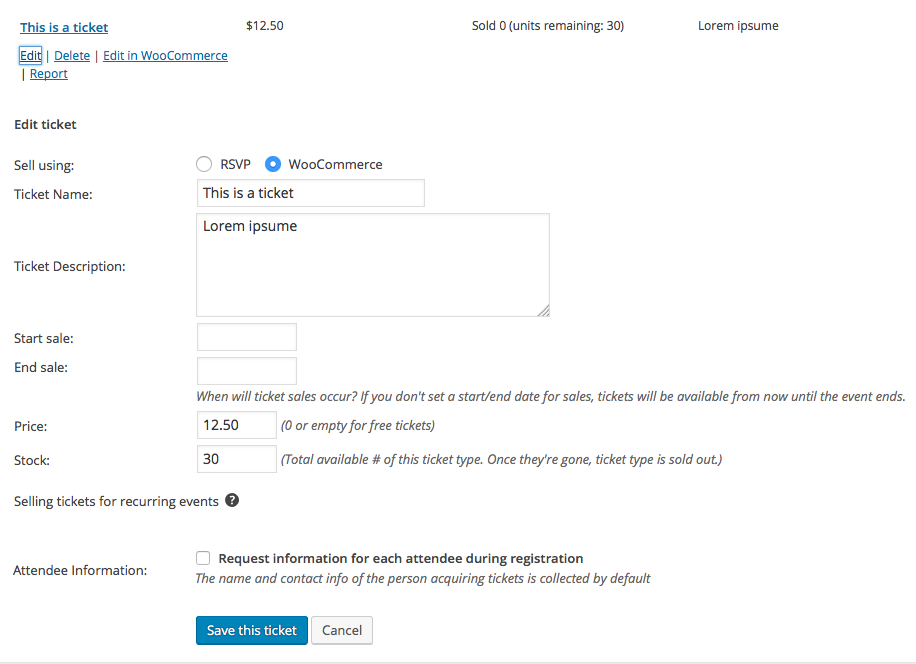
I don’t see anything outright problematic in your system information; I’m wondering if you could share a screenshot of the tickets in the event’s edit screen? If you scroll down to the tickets metabox in the edit-event screen, and click the “Edit” link under the tickets, the ticket settings will show up. Here’s an example screenshot from my site that is a screenshot of the type of data I’m referring to:
Thank you!
GeorgeApril 29, 2016 at 1:37 pm in reply to: Position custom widget content above standard event widget content #1108988ParticipantHi Stephen,
Thanks for reaching out!
Your single-event sidebar is a result of custom templates from your theme; I would recommend reaching out to the theme author for assistance with modifying this sidebar content.
— George
ParticipantHey Kelly,
Sorry to hear about this! This is be arising from the fact that we have a function called sp_get_option inside The Events Calendar at line 134 or so in this file: the-events-calendar/src/functions/template-tags/deprecated.php
The function looks like this:
if ( ! function_exists( 'sp_get_option' ) ) {

       /**

	* @deprecated

	*

	* @param        $optionName

	* @param string $default

	*

	* @return mixed

	*/

	function sp_get_option( $optionName, $default = '' ) {

		_deprecated_function( __FUNCTION__, '2.0', 'tribe_get_option()' );
return tribe_get_option( $optionName, $default );
}
}
This is a deprecated function, so you can literally just remove that code block entirely with no ill effect.
I’m sorry about this issue, but hope this solution helps!
— George
ParticipantHey Josh,
Thanks for reaching out!
While our plugins unfortunately would not enable the having of two separate calendars on the same site, you should indeed be able to style the calendar to look the one on that website with some extensive custom coding.
We cannot help with custom coding, so you would have to write the custom code yourself or hire a professional developer to do so for you, but it’s indeed possible. We have a list of great developers here → http://m.tri.be/18k1 (and have no affiliation with any of these folks–they’re simple some well-respected names in the community that we’ve compiled to share in situations like this one).
Cheers,
GeorgeParticipantThat’s interesting, @André. I’m sorry to hear about it, but it seems to reveal that there is something happening on the level of your server that is preventing some basic plugin functionality on your site.
I would recommend contacting your web host about both issues here, and inquiring about what might be causing this. Ask if they have any limitations in place for Cron jobs, or see any errors in their server logs for your site. They may be able to shed some light on these odd issues.
Thank you for your patience!
GeorgeParticipantSorry to disappoint—good luck with your search, though.
And Happy Friday! 🙂
GeorgeParticipantSorry to hear this, @Lara! This is not normal behavior and I cannot recreate any similar problems, so for starters here I am wondering if you can share some information about a few things to help us investigate the problem:
1. First, post your site’s complete, unedited “System Information” here. This article shows how to do that → https://theeventscalendar.com/knowledgebase/sharing-sys-info/
2. Next, can you confirm when this issue started happening? Has it always been the case, or has it only recently started happening? If only recently, can you remember what the last thing you did on your site was before these issues started arising? Plugin updates, theme updates, WordPress core updates, template modifications, anything like that.
I have some more questions based on the results of these first two questions—thank you in advance for providing this information!
Happy Friday,
GeorgeParticipantHey @Philly00,
Thanks for reaching out. The “Edit Upcoming” feature would indeed be useful for updating an event that has the same basic info but changes dates/times on a monthly basis.
Let’s say you start with a recurring event that recurs every Friday for a whole year.
Well, if you go to the instance of the event that happens on May 1st, and click “Edit Upcoming”, then the original year-long series is split into two series: one from the first event until the last event before May 1st, and one from May 1st until the end of the year.
Then you can edit each series independent of each other; so if the event was Fridays at 8pm for a while, then at May 1st this changes to be a 7pm start time instead, you can edit the start time of this second series from May 1st to the end of the year and all of the events within this series will be updated.
You could make similar adjustments every month; every week, or day even! 😉 But the point is that yes—clicking this “Edit Upcoming” link will break off the rest of the series starting at that event into its own new series. It will have the same data as the original series by default, which you can of course edits, which edits will then be propagated throughout the rest of this new series.
I hope this information helps!
George -
AuthorPosts