

Forum Replies Created
-
AuthorPosts
-
George
ParticipantHey BOUCHAIR,
Sure thing! First things first, we do have a thiry-day refund policy which you can learn more about here → https://theeventscalendar.com/knowledgebase/refund-policy/
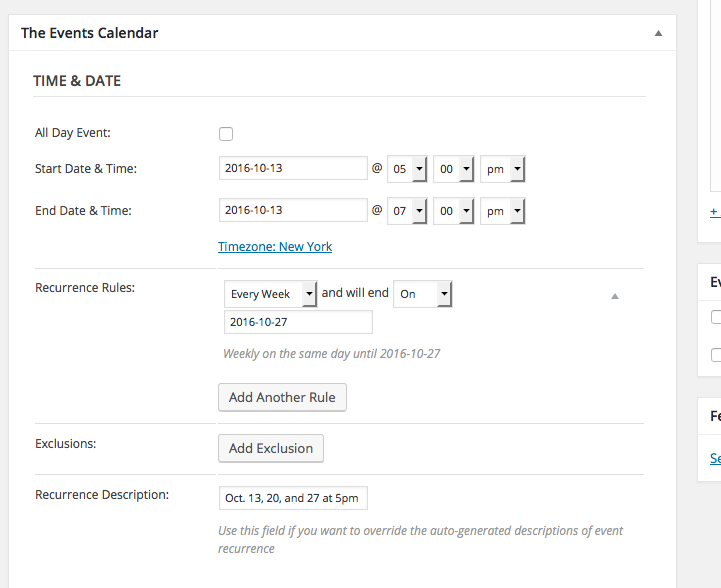
As for the exact configuration to make that event pattern you listed a reality, here’s a screenshot of how to do that with Events Calendar Pro’s recurring events feature:
Cheers!
GeorgeMay 2, 2016 at 5:49 pm in reply to: Events Calendar Pro – multiple events per day in widget #1109830ParticipantSounds good, Andreas! I’ll be closing up this thread for now, but open a new thread any time if other questions, comments, or concerns arise.
Sincerely,
GeorgeParticipantThanks for elaboration here, Sam, and for the screenshot!
I’m curious if you can provide just a bit more detail regarding this description of the issues:
However, if you go to http://www.memorialcity.com/entertain and look at the events, some are listed under “April” and some are under “May” and then back to “April” and “May” again.
Can you link to an event or two that have this specific behavior? I will then look at the month view and see what the behavior is in person.
I’m really sorry for the trouble here and the back-and-forth! I took a look again but wasn’t able to identify the issue—I’m sure I’m missing something, and am sorry about that, but if you can share links to the specific events behaving as you describe I will take a closer look and can hopefully identify the exact issue.
Thank you for your patience!
GeorgeParticipantInteresting findings, André. So we know that import works, sort-of, but there are two problems:
1. Not all events are retrieved.
2. The cron process / automated imports don’t seem to be working.I’m scratching my head over this behavior, and am sorry to say that at this time the best thing I can think of is something arising from the level of your web server.
I would thus recommend contacting your web host to see if they can spot any limitations on their end of things or any oddness in their server logs.
I will keep trying to think about what else could be causing these issues in the meantime, but wanted to encourage these actions to help move things forward.
Let us know what your web host’s support folks say, if you’re able to contact them.
Thank you for your patience!
GeorgeParticipantInteresting—if you’re not using this method already, I would recommend getting a solid text editor like Sublime Text. This editor or any similar one should have a “Find in Folder” feature. Search for the phrase “tribe_get_events(” without quotes—and yes, with just that one first open parentheses tag. It looks weird, but remove the quotes and it’s correct!
Best of luck with your tinkering!
GeorgeParticipantThank you for this information! I noticed that you’re using WooCommerce Tickets, version 3.12, which is a very outdated plugin. WooCommerce Tickets has long been replaced by a new pair of plugins that work together to provide ticketing functionality: Event Tickets and Event Tickets Plus.
I actually don’t see a license for WooCommerce Tickets in your account, so am not sure where that came from, but if you log into the account that has the WooCommerce Tickets license, there will automatically be an Event Tickets Plus there too, free of charge. You can use this to replace WooCommerce Tickets on your site with the pair of plugins Event Tickets and Event Tickets Plus. Check out this article to learn more about this process → https://theeventscalendar.com/knowledgebase/moving-to-event-tickets-plus/
I recommend this change because the old code from WooCommerce Tickets on your site could be playing a role somewhere here…it’s worth ruling out, at least!
Cheers,
GeorgeParticipantHey @globalbodyweighttraining,
Thank you for the follow-up. First, I should mention that we actually have a known conflict with the Sensei plugin, and are working hard on fixing this conflict.
In regards to the ticketing plugins, to be clear we have not dropped WooCommerce functionality—we’ve improved it and merged all of our disparate ticketing plugins into a new and singular ticketing framework. Just as The Events Calendar provides the “spine” and “core” of events functionality, then you can get add-ons like Events Calendar Pro and Facebook Importer that add extra features on top of this functionality, so too can you get basic “core” ticketing functionality with the Event Tickets plugin. Then you can add the Event Tickets Plus add-on to the site to get WooCommerce ticketing integration.
This combination of Event Tickets and Event Tickets Plus is essentially just the next version of the old WooCommerce Tickets plugin. I just wanted to make this clear in case it seemed that I was implying that they are different things and you have to abandon The Events Calendar on your site because of the changes!
Let me know if this information is helpful.
Sincerely,
GeorgeParticipantThanks for elaborating on this, Janet. We unfortunately can confirm issues with events even if they weren’t first imported via CSV, but that could indeed be another dimension to this problem.
Stay tuned—I’m sorry for the pace of our development on this, as I noted above it’s been difficult to pin down the problem because we’re working with a third party API (Eventbrite.com) and the results are inconsistent.
We’re working on it!
Sincerely,
GeorgeParticipantHey Brendan,
Thanks for reaching out. A comprehensive feature like you describe is unfortunately not possible at this time unless you were to custom-code it yourself. 🙁 I’m sorry to disappoint!
While we cannot help with writing custom code, I would suggest tinkering with the tribe_get_events() function, which you can read about here → https://theeventscalendar.com/knowledgebase/using-tribe_get_events/
By adding parameters to filter the results by author and such, I think you’ll have some success. Those parameter are the same ones used for WordPress’ own WP_Query class, so read up on that too for some insight on filtering by author → https://codex.wordpress.org/Class_Reference/WP_Query
I hope this information helps!
Thank you,
GeorgeParticipantHey @Esty,
I’m sorry to hear about this—we have a known major bug with Eventbrite that hinders our plugin’s ability to connect with Eventbrite.com’s API, but the “Venue”-related message you describe here isn’t normally what folks are reporting. So there could be another issue at play here.
To help investigate this, can you share your System Information with us? Here’s how → https://theeventscalendar.com/knowledgebase/sharing-sys-info/
Next, you ask this:
Isn’t it suppose to take the address i already entered at the event area?
The address of the venue is, indeed, supposed to be used without issue. If possible, can you link to the event on your site? I will check it out on the front-end just to see if anything problematic stands out.
Thank you!
GeorgeParticipantHey Alex,
Thanks for reaching out, and for your interest in our plugins.
There is unfortunately not a way to limit events to admin-only viewing unless you were to write custom code. 🙁 The only out-of-the-box features are to check the “Hide event from event listings” button when creating an event, but this will still reveal the event in Month View and other non-list views like Week View.
Sorry to disappoint!
GeorgeParticipantHey Butch!
Thanks for reaching out, and for your interest in our plugins. I will address your questions in the order you posed them:
1. Am I correct that to use the community add-on all I need is the Core Events plugin (free) and not the Pro? then purchase the community add-on?
Yes. You are correct—the only required plugin for Community Events is the core plugin itself, The Events Calendar. You do NOT need Events Calendar Pro or any other add-ons.
2. If the above is correct, would I benefit from having the Community and the pro?
Possibly. It depends what you need—if you need recurring events, and Map Views, and other Pro features, then it could indeed be worth the extra cost. If you don’t need these sorts of things, then there’s not really any gain that would justify the cost.
There’s a section on the Events Calendar Pro products page called “Is Pro right for you?”—it details the things that adding Pro would add to your site, so check it out for more details: https://theeventscalendar.com/product/wordpress-events-calendar-pro/
3. Can I use the facebook-add the pro add-on and/or the community-add-on?
I think what you’re asking here if you can use the Facebook Importer alongside the other plugins. Yes, you can use any of our add-ons alongside any other of our add-ons, and adding Facebook Importer to your site will NOT affect any functionality of Community Events.
However, if you are asking if adding the Facebook Importer add-on would let people import Facebook events on the Community Events submission form, then unfortunately no this is not the case. The Facebook Importer only exists and works in the wp-admin.
4. Will the filter bar work with the community add-on?
The community events add-on only adds the submission form. The Filter Bar plugin does not interact with the submission form at all. It just adds filters to the calendar views themselves.
Community-submitted events end up on the same calendar as all other events, so they will be filterable like normal and such, but the filter bar doesn’t interact with Community Events submission forms in any way.
5. Is there a way to have a single map that shows all upcoming events worldwide. geo located and linked to the event page?
No, you would unfortunately not be able to show ALL events. Events Calendar Pro will add a few dozen events at most, based on your settings, but it will not get ALL upcoming events.
6. Does the primary admin receive a notification when an event is added in either the Pro or community add-on?
When an event is submitted via Community Events, yes, you can configure it to email an admin.
I hope all of this information helps!
Sincerely,
GeorgeParticipantI totally agree, @Victor—we have this bug with Sensei and another major bug with Eventbrite and are devoting much of our resources to trying to resolve these problems as soon as possible. Your patience means a lot and I cannot apologize enough for the trouble.
Stay tuned! And let me know if you have any other questions/comments/concerns in the meantime.
Sincerely,
GeorgeParticipantThank you for this detail, Janet. I know you mentioned being swamped, so I hate to throw more questions your way, but whenever you get around to it, can you elaborate a bit more on what you mean by the following sentence:
I’m pretty sure I initially imported the events that do not sync via CSV.
I’m just not 100% certain what you mean here, but want to be so that I can employ this feedback.
Thank you for your patience with this—we’ve been working on this issue and I was even working with a developer over the weekend, we’re having a tough time pinning down the problems but making progress.
Sincerely,
GeorgeMay 2, 2016 at 9:24 am in reply to: Add add_filter to organizer and venues for importing custom data. #1109572ParticipantI unfortunately do not have a specific ETA for this, @Geir 🙁
Keep your eyes on official plugin updates and check out release notes on http://theeventscalendar.com/blog for a detailed overview of what’s included in a given release. The filter for build_organizer_array() is coming!
Sincerely,
George -
AuthorPosts