

Forum Replies Created
-
AuthorPosts
-
George
ParticipantThank you for clarifying this!
I now see what you’re trying to do; this is unfortunately not an out-of-the-box feature, and the “Custom Ticket Fields” from within The Events Calendar are not added to the “Custom Fields” of WooCommerce Orders.
The similarity in name of these items is something we might be able to help clarify, as it might imply some sort of relationship between these two things.
But there is unfortunately no such relationship at this time. 🙁
Sorry to disappoint about this first question—if there is anything else I can help with or help to address, please let me know.
Sincerely,
GeorgeParticipantHey Nadz,
All of that information is correct.
You said this: “it does allow frontend checkin”.
All of that information is correct but you cannot do check-ins on the front end. You can only check folks in when logged into the /wp-admin of your site.
Please note that we have a thirty-day refund policy, so you may find it easiest to just try out the plugins firsthand and see if they meet your needs. If in those four weeks you don’t find them a good fit, you can follow the steps here to get a full refund → https://theeventscalendar.com/knowledgebase/refund-policy/
Let me know if this helps!
Cheers,
GeorgeParticipantHey @Esty,
Thanks for your patience here with my delayed reply! I was tending to a health issue today and last night. Sorry for the delay.
I’m glad to hear that WooCommerce Tickets is deactivated; I definitely did not mean to imply that it was causing the issue, but just seeing that out-of-date code there, I had to point it out. Even when not causing an issue, out-of-date code can still sometimes be a factor in odd behavior.
Speaking of odd behavior, I’m surprised that the notice no longer reports venue issues, but instead reports Organizer issues.
I hate to request another plugin deactivation test, but I cannot reproduce your behavior on my own site, so to move forward with this issue, I would recommend deactivating WPML and any WPML add-ons.
Our plugins do not fully support WPML, so there could be some sort of issue/conflict with that affecting the retrieval of Organizer information.
While exploring the WPML deactivation, I would actually recommend proceeding with the complete set of steps outlined here → https://theeventscalendar.com/knowledgebase/testing-for-conflicts/
After EACH STEP in that event, try syncing the same with Eventbrite and see if anything improves.
Thank you for your patience here!
Sincerely,
GeorgeMay 3, 2016 at 11:24 am in reply to: Does Events Calendar Pro work with Buddypress… and one other question… #1110165ParticipantHey Bam!
Thanks for reaching out.
1. Does The Events Calendar Pro work with Buddypress?
Neither The Events Calendar nor any of our add-ons like Events Calendar Pro, Community Events, etc., work with BuddyPress, in terms of having any special integration with it or special support for BuddyPress features.
However, there also should not be any conflicts and they should be able to run alongside each other without issue.
2. Is there a way for individual users to view only their events?
There is unfortunately not a way to do this with any out-of-the-box features. 🙁 There is a feature with our Community Events add-on that lets users view a “My Events” list, which is a list of only the events that they submitted through the Community Events form. But this is the only feature along these lines.
Sincerely,
GeorgeParticipantHey Craig,
Thanks for reaching out!
It sounds like you simply want to hide the “All Events” link on events pages. Is this correct? If so, can you link to some pages and events on your site where this “All Events” link is visible? I will take a look and recommend how to hide it.
Thanks,
GeorgeParticipantHey Christina,
Thanks for reaching out!
If simply changing the theme caused the change in display, then your current theme is likely the culprit here in one of two ways: first, the theme could be pulling in image sizes of a smaller sizes or with different cropping configurations; or it could just be handling the images differently with its CSS.
There could also be some combination of these things.
I also noticed that the image src attributes are quite unique, and are using an array of sizes as shown in this screenshot:
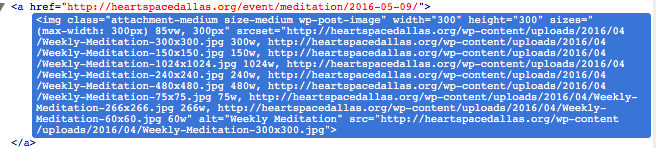
That’s not something our plugins do, so it could be another issue arising from your theme or possibly another plugin on your site.
I would recommend reaching out to your theme author for some insight on the size changes that arose after you activated that theme—I hope they can shed some light on the issues!
Thanks,
GeorgeParticipantNice—best of luck with your site!
ParticipantHey @Kevin,
Thanks for reaching out!
I do not have this behavior when I try adding multiple tickets to a cart on my local test site, so I’m wondering if there’s a theme or plugin code conflict at play here. To help investigate that, here are a couple important questions that will help shed light on this issue:
1. You say that the ticket price becomes 0.00, but in your screenshot there are two tickets—both with a quantity of 1—and both have a non-zero price. The top one is 144.00, the bottom 84.00. Why is this? Does the price become 0.00 somewhere else along the way?
2. Can you clarify if you have this problem with any set of tickets, or is it only the two tickets you describe here?
3. I would recommend doing ALL of the troubleshooting steps outlined on this page → https://theeventscalendar.com/knowledgebase/testing-for-conflicts/. After EACH STEP in that process, empty your cart, then try adding two tickets to it again—does the problem persist? Or does the behavior change anywhere along the way in that process?
Thank you!
GeorgeParticipantHey Cedric,
Thanks for reaching out. Just so I can understand your issue to as much certainty as possible, would you be able to take a screenshot of your fieldset configuration, and a screenshot of the “order details” you are referring to?
I only request this because “order details” can refer to a few different things, for example, and a screenshot will help me address your problem accurately. And a screenshot of the specific fieldset’s settings will help me try and recreate your exact issue.
Thank you!
GeorgeParticipantHey David,
Thanks for reaching out!
Have you tried using Events Calendar Pro’s built-in “Additional Fields” feature? You can read more about it here → https://theeventscalendar.com/knowledgebase/pro-additional-fields/
You mention adding an “Other” field, but then you mention being limited to only one field—can you elaborate on this limitation? Do you mean that you cannot any other fields using the methods shown in the “PRO Additional Fields” article I linked to above?
Thanks!
GeorgeParticipantThis reply is private.
ParticipantHey Tony,
Thank you for reaching out.
This and other connection issues have recently arisen with Eventbrite, and we are working hard on releasing a fix for these issues. I’m sorry that I don’t have a concrete solution at this time, nor a specific ETA for when the fixes will arrive, but I just wanted to make it clear that these are known issues and we are working on a fix. We will release it ASAP!
Please let me know if you any follow-up questions in response to this, or any other thoughts in the meantime.
Thanks for your patience while we work on fixing these Eventbrite issues.
Sincerely,
GeorgeMay 2, 2016 at 6:02 pm in reply to: How to develop recurring events with limited seating for each individual event? #1109834ParticipantHey @Somer,
I unfortunately cannot think of a simple straightforward solution; the best thing I could recommend would be to hire a professional developer to build out something custom for you. We have a list of great developers here → http://m.tri.be/18k1 (to be clear, we have no affiliation with any of these folks–they’re simply some well-respected names in the community that we’ve compiled to share in situations like this one).
Sorry to disappoint. 🙁 I hope this list is helpful!
Sincerely,
GeorgeParticipantHey Jake,
Thanks for your patience with my slower-than-normal response here.
Have you genuinely resolved this issue? If not, what specific issues still remain?
Thank you!
GeorgeParticipantHey Nadz,
You said, “Hi just read the community bundle plugin and it does allow frontend checkin”—can you take a screenshot of the specific thing you read that says this? I think that will help me understand what you’re asking for. 🙂
Thank you for your patience!
George -
AuthorPosts