Forum Replies Created
-
AuthorPosts
-
George
ParticipantHey Amy,
To work backwards here, making the price only show on the first event in a series is not possible without code customization, which we unfortunately will not be able to help with as elaborated upon here.
Sorry to bear this news!
In regards to the “invalid date” issue, it’s great news to here that things seemed to resolve themselves. I’m sorry I wasn’t able to determine the cause of these problems, but if they come back, please do indeed open a new thread here to report those issues.
Since the main issues — “invalid date” — is resolved, I will go ahead and close up this thread. Please open a new thread any time if other issues or questions arise!
— George
February 28, 2017 at 7:12 pm in reply to: Custom Event Attendee collecting fields not showing up #1247343ParticipantHey Katrina,
Thanks for confirming this. When it comes to the exact markup you’re looking for, all of the correct markup exists on the generated page you linked me to, and since you said you haven’t modified any files, the markup is ostensibly (and seems to be) totally fine within the files themselves.
So the best thing I can recommend here is the troubleshooting steps, though as noted above this is not quite feasible.
With that in mind, is there any way you could set up a staging site or development version of your site, or even a local copy of it? There are tons of ways to do this — you should first contact your web host to see if they offer any automated tools for generating this, or could set up one for you. If they can’t, then Googling should reveal a ton of ways to make local copies of WordPress sites, and there are indeed a number of products that make it easier, too.
Once you have a dev, staging, or local copy of your site, confirm the issue occurs, and then do the troubleshooting steps I linked to before on this dev/local site (https://theeventscalendar.com/knowledgebase/testing-for-conflicts/)
What are your thoughts on this? I only recommend this because of these important facts:
- We cannot recreate this problem ourselves
- No other customers are currently reporting this
- There are no JavaScript errors visible on your page
- There are no file modifications to the files
Thank you!
GeorgeFebruary 28, 2017 at 7:07 pm in reply to: “The URL provided did not have events in the proper format.” error #1247340ParticipantHey Colin,
I’m a bit confused about the issue here — apologies for my misunderstanding!
• You cannot import empty calendars, because there is nothing import.
• So Event Aggregator will not import any empty calendar no matter what. This is not a “bug”, this is by design.Does this help clarify things at all?
— George
ParticipantThis reply is private.
ParticipantThis reply is private.
February 28, 2017 at 6:38 pm in reply to: Ticket amount not counting down after tickets sold #1247330ParticipantThis reply is private.
February 28, 2017 at 9:48 am in reply to: Event Calendar Pro Event List Shortcode on Custom Post Type #1247068ParticipantThanks for clarifying.
Yep, as long as you have the most recent versions of The Events Calendar and Events Calendar Pro installed and activated, there shouldn’t be any issue with this.
If a certain Custom Post Type does not render the shortcode, then it is not the shortcode itself that’s failing — that custom post type is preventing shortcode output, either intentionally or because of a bug.
If you find this to be the case, please contact the makers of the problematic Custom Post Type and ask them why their post type does not render a shortcode. They should be able to help from there.
— George
ParticipantHi there,
You’re indeed not using Event Aggregator. But the license key field there is right under text that says “Event Aggregator”, indicating that it is the license key field for Event Aggregator. You cannot put your Events Calendar Pro license key there because Events Calendar Pro is not Event Aggregator.
Have you done the specific steps I recommended?
— George
February 28, 2017 at 9:36 am in reply to: Ticket amount not counting down after tickets sold #1247056ParticipantThis reply is private.
Participant😀
ParticipantSure Tanya, just modify the CSS so it looks like this instead of what I first shared:
body.post-type-archive-tribe_events .tribe-events-before-html:first-of-type,

body.single-tribe_events .tribe-events-before-html {

    display: none;

}
I was not able to see this on the List View like you say…can you share a link directly to where it’s still showing erroneously?
— George
February 27, 2017 at 3:26 pm in reply to: How to set like customer cannot edit attendee info? #1246540ParticipantHey @dd,
To make sure that folks cannot edit their information, all you have to do is this:
1. Go to Events → Settings → Tickets in your wp-admin
2. Scroll down to the “Login requirements” section
3. Make sure both options are NOT checked, as shown in this screenshot (click for a larger-sized image):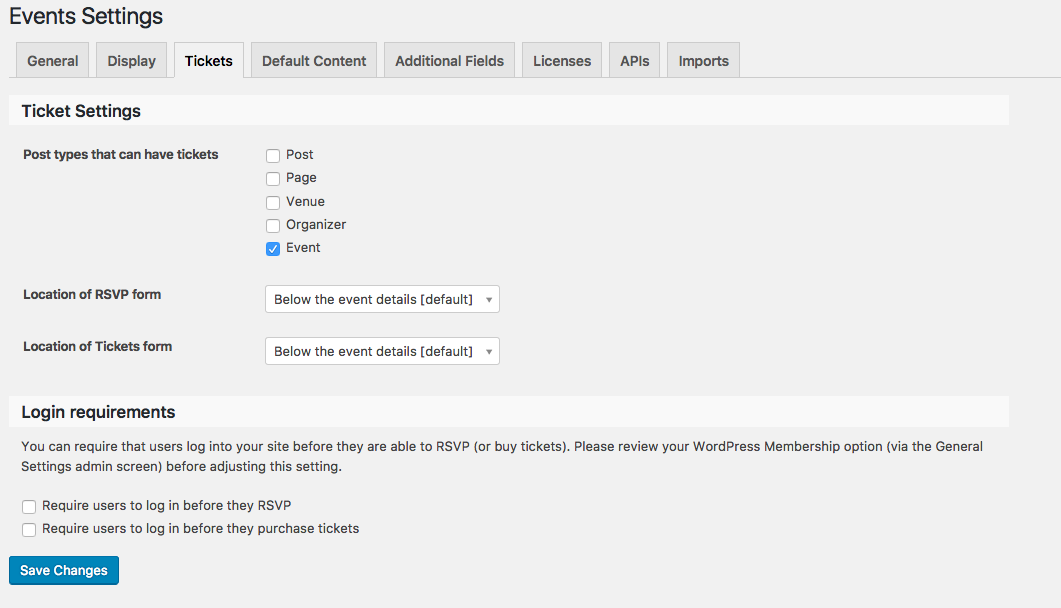
People will only be able to edit their ticket info if both options are checked, so just leave these unchecked and they can’t edit the tickets! 😀
Please let me know if this helps, and if there are any other issues or questions I can try to help with.
— George
February 27, 2017 at 3:04 pm in reply to: Single Page Event Not Rendering Properly On Optimizepress 2.0 Page #1246535ParticipantSorry to hear about this trouble, @David.
I totally understand the time crunch you mention being under — just to set your expectations, though, the pace of our support exchanges is usually one reply every 24–48 hours during the work week, as described on this page: https://theeventscalendar.com/knowledgebase/what-support-is-provided-for-license-holders/
I’m certainly happy to try and work more quickly than that — and will try to do so. On this note, thanks for your patience over the weekend — let’s get started with these issues!
The first thing I’m curious about is some clarification about what your expectations are.
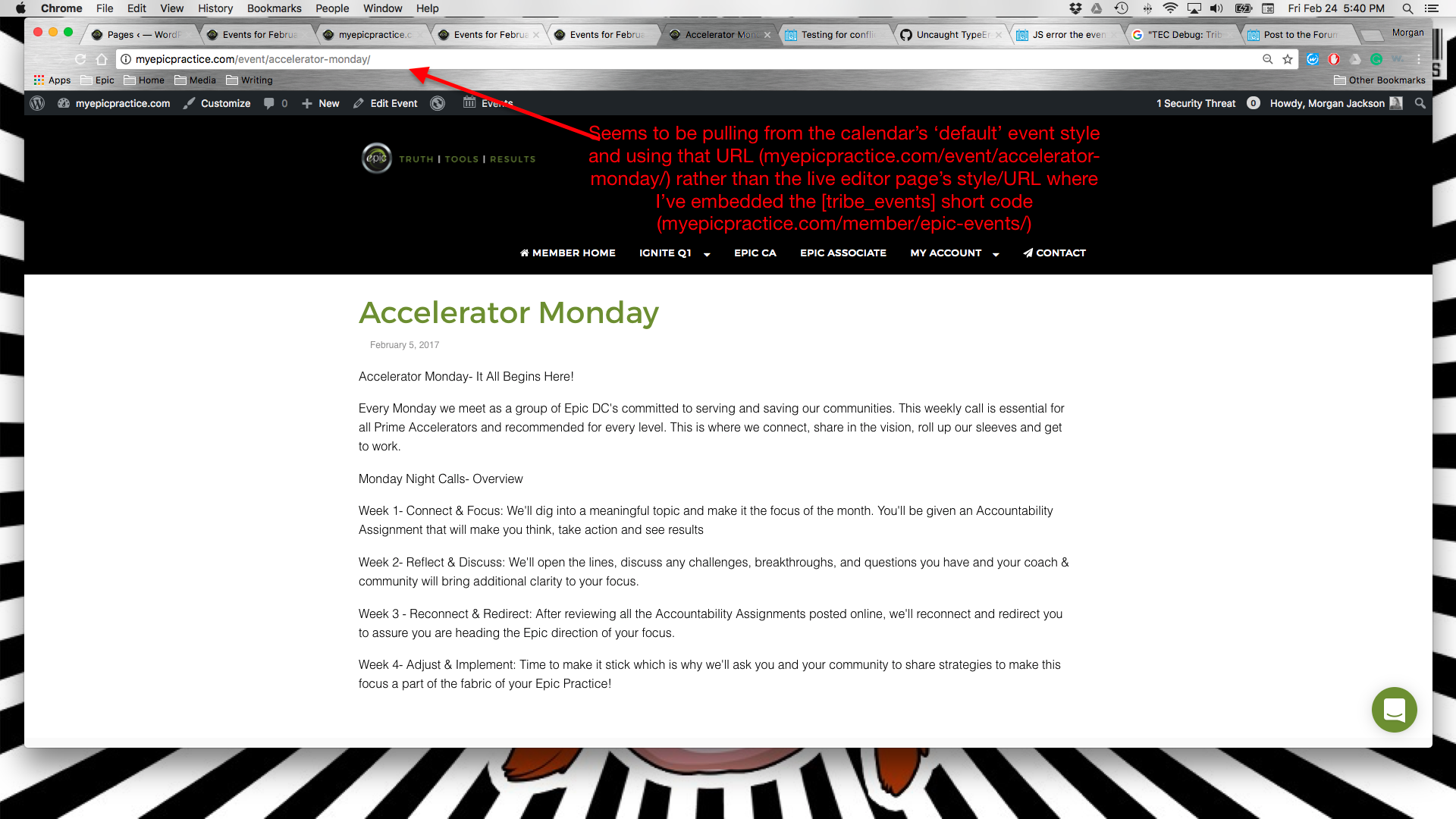
So first, let’s take a look at this screenshot of yours that you shared: https://theeventscalendar.com/content/uploads/2017/02/716f0b3bdf2e88a4.png
In that screenshot, the URL of the event is myepicpractice.com/event/accelerator-monday, and you say this about that fact:
seems to be pulling from the calendar’s default event style and using that URL (myepicpractice.com/event/accelerator-monday/) rather than the live editor page’s style/URL where i’ve embedded the [tribe_events] short code (myepicpractice.com/member/epic-events)
Please answer both of the following questions specifically:
1. To be clear, do your comments on that screenshot mean that you are expecting that event to actually exist at this URL:
myepicpractice.com/member/epic-events/accelerator-monday
instead of this one:
myepicpractice.com/event/accelerator-monday/2. Can you please clarify what the specific problem is in the screenshot other than the URL? What is wrong with the content of the page itself, specifically?
The answers to these two specific questions should help us get started here!
Thanks,
GeorgeParticipantHey Catherine,
This was a bug that we recently fixed.
If you find some events whose images aren’t importing, can you please share the Facebook.com URLs to those events? I will test and see what I find.
Thanks!
GeorgeParticipantI’m sorry to hear this, Donald.
1. How long has this issue been happening?
2. Who is your web host? How are you hosting your website, specifically? (i.e. if you’re using a service, please name that service — if you’re hosting it on your own, describe your hosting setup in-depth)
This is not something I have ever had happen on my site, nor do we have other reports of it, so this will take some investigation to learn more about…I apologize in advance for the time this might take, but am determined to help figure out and resolve these problems.
— George
-
AuthorPosts