How to set like customer cannot edit attendee info?

Home Forums Ticket Products Event Tickets Plus How to set like customer cannot edit attendee info?

Viewing 3 posts - 1 through 3 (of 3 total)
  • Author
    Posts
  • #1245719
    dd
    Participant

    Customer will fill in the Tshirt size at attendee info form, but they cannot change it once make payment.
    As your default see, attendee can edit, how to solve?

    Waiting.

    #1246540
    George
    Participant

    Hey @dd,

    To make sure that folks cannot edit their information, all you have to do is this:

    1. Go to Events → Settings → Tickets in your wp-admin
    2. Scroll down to the “Login requirements” section
    3. Make sure both options are NOT checked, as shown in this screenshot (click for a larger-sized image):
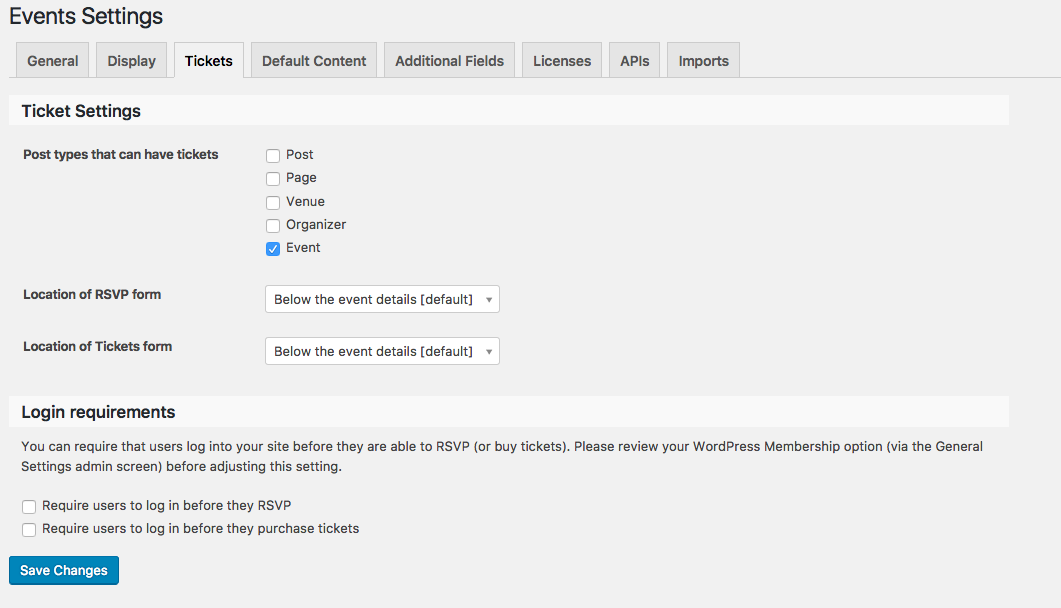
    People will only be able to edit their ticket info if both options are checked, so just leave these unchecked and they can’t edit the tickets! 😀

    Please let me know if this helps, and if there are any other issues or questions I can try to help with.

    — George

    #1257395
    Support Droid
    Keymaster

    Hey there! This thread has been pretty quiet for the last three weeks, so we’re going to go ahead and close it to avoid confusion with other topics. If you’re still looking for help with this, please do open a new thread, reference this one and we’d be more than happy to continue the conversation over there.

    Thanks so much!
    The Events Calendar Support Team

Viewing 3 posts - 1 through 3 (of 3 total)
  • The topic ‘How to set like customer cannot edit attendee info?’ is closed to new replies.