

Forum Replies Created
-
AuthorPosts
-
July 26, 2016 at 7:18 am in reply to: Fast forward Calendar Widget to next upcoming event not showing next event #1144149
George
ParticipantHey Florian,
Thank you for confirming the source of the plugin!
I have not been able to recreate any issues with this plugin, and so it seems definitive that Beaver Builder is breaking the functionality here somehow. I am not familiar with the Beaver Builder product and so unfortunately do not know the specific code within it responsible for this, but I hope their support team can be helpful with this issue!
Is there any way you can have widget areas on your site that are NOT the Beaver Builder widget areas even when Beaver Builder is active? It sounds like when you used non-Beaver Builder widget areas on your site, this plugin worked on widgets as expected. So maybe you could pose an additional question to the Beaver Builder folks along those lines: “How can I have a widget area that is just a default widget area, not a Beaver Builder widget area?” Something like that….
Sorry to disappoint here, Florian! Please let me know what you think and if there’s anything else I can try to help with.
— George
Participant😀
ParticipantHey @Larafarwell,
Thanks for your follow-up here.
This is an interesting issue and I am sorry that it has taken so long for some sort of resolution to come through…I have tried many of the standard approaches for looking into this, to no avail, and so I think that this point that our findings so far could indicate an issue on the level of the server.
Why? Well, I think it’s very telling that the issues do NOT appear on your production site, nor on my own testing site. They only appear thus far on your staging / testing site.
There are numerous things on the level of the server could be a factor. If you are interested in further pursuing this issue, then to help reveal what those specific problems might be I would recommend doing the following steps
1. Post your test site’s “System Information”. I know you’ve shared system information earlier in this thread, but sharing it anew will be helpful just so I can see if anything has changed on your site. (Here is how to post System Information, for reference → https://theeventscalendar.com/knowledgebase/sharing-sys-info/)
2. Download this plugin and install it on your test site ? https://wordpress.org/plugins/wp-crontrol/ Plugins like Facebook Events run their imports on “scheduled” events via the WP Cron function within WordPress. This plugin here lets us manually trigger those events instead of waiting for the scheduled version. This will be very helpful.
3. Once you have downloaded and installed WP Crontrol on your site, go to the Facebook Events page on facebook.com Make a new event there for testing purposes only—I am sorry if this is an inconvenience! But you can delete the event from your Facebook.com page after the next step.
4. Once that new test event on Facebook.com has been published, head back to your test site’s WordPress admin (/wp-admin) and head to Tools → Cron Events
5. On this “Cron Events” page, you should see a list of cron events. Look for one called tribe_fb_auto_import, and then click this event’s “Run Now” link. Here is a screenshot that shows where these things are located, for example (click to enlarge):
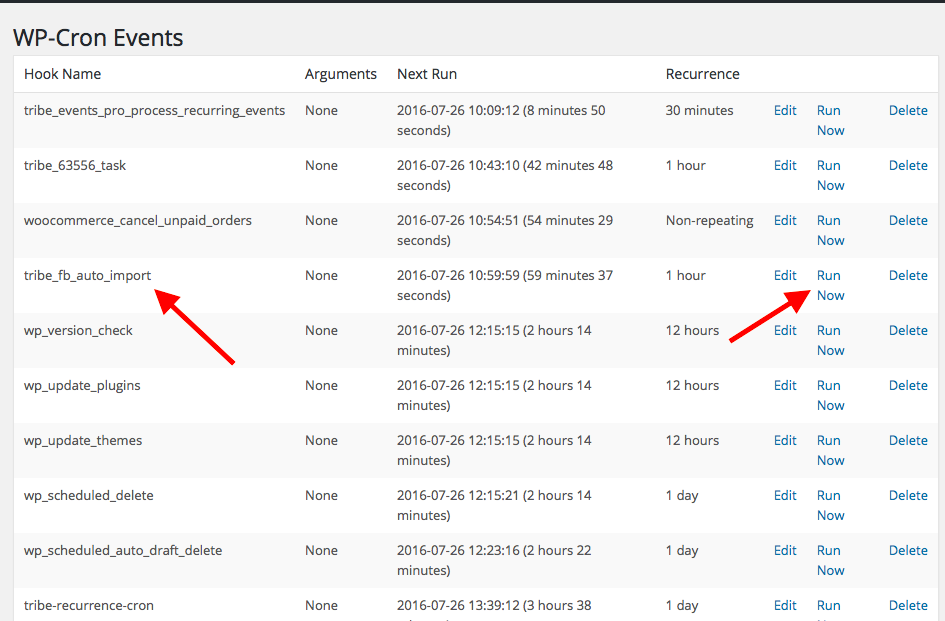
6. Once this event has run, go check on your wp-admin Events list.
7. Has the test event that you created in Step 3 been imported?
8. Has the test event that you created in Step 3 been duplicated?
9. If it has NOT been duplicated, then try clicking that “Run Now” link I mentioned in Step 5. Then, look to see if the event has been imported again or if only one instance of it remains.
10. Take a screenshot of the duplicated event if it duplicates…and let me know what you find!
These steps may seem like a lot of things to do, but I just wrote many steps to be as detailed in my description as possible. Don’t let the number of steps deter you! 😀 To recap, you essentially would just be doing the following things: install a free plugin, create a test event on facebook.com, run a test import, and then see what you find.
The steps I enumerated above are just a thorough description of each step along the way, but the process here is much easier than it might seem!
Please let me know if you’re able to do these steps, and if so, what you find.
Thank you for your continued patience with this issue!
GeorgeParticipantHey Enrique,
Thanks for looking into those troubleshooting steps. I am surely happy to try and help with continuing to identify the problems. To help with that, can you post your site’s System Information again? I know you posted it once already; but part of the steps I recommended involved upgrading the plugin versions, and I’m just curious how the version numbers are now.
In the meantime, what you found here does definitely indicate a problem coming from your theme:
I have also tried activating Twenty Sixteen theme and the filter works correctly. So the problem is between the plugin and theme.
Contacting the theme developer or theme support is the best thing to do here, so thank you for doing that!
Let me know about your new system information; I will look at that and see what I can learn from there. Next, can you also send a .zip of the theme that you have problems in? You can send the theme over email to support at theeventscalendar.com, but please include a link back to this forum thread for reference.
Thanks!
GeorgeParticipantThis reply is private.
ParticipantHey David,
Thank you for your patience with my reply.
In regards to your replies:
All of there events are conducted at there location which is yoga studio which is the business of the whole site. I think thats why client isn’t entering location. Can I hard code it into the event template? Any example? If I trying add location to all the events then it will be a long process.
Adding a venue through this plugin is the best way to add an event location. It could technically be hard-coded into the plugin. We unfortunately cannot help with writing custom code, but you can do this on your own or hire a professional developer to assist you.
The files you would need to edit are located in the /JSON_LD file inside The Events Calendar. You can find that folder within your The Events Calendar plugin files at this location:
the-events-calendar/src/Tribe/JSON_LD
As for the date issues, I cannot reproduce the same sort of behavior so I am going to investigate this further and see if our developers have insight as to why this might be happening.
Thank you!
GeorgeParticipantThanks for elaborating on these details a bit, Charles.
So, while sending a certificate like you describe is within the realm of technical possibility (i.e., it can be theoretically achieved with enough custom coding), it is only possible with some extensive custom coding at this time. 🙁
I cannot find any other plugins out there that provide this specific functionality, either.
I’m sorry to bear the bad news! When it comes to what actionable steps can be done from here, those are as follows:
• If having this feature on your site is essential, then you may find it worthwhile to hire a customizer to custom-build this for you. We have a list of great developers here → http://m.tri.be/18k1 (and we have no affiliation with any of these folks–they’re simply some well-respected names in the community that we’ve compiled).
• If you want to make a formal suggestion for this to be a feature in our plugins, then head over to our UserVoice page here ? http://tribe.uservoice.com On that page, you can submit your ideas and other folks in the community can vote on the idea, comment, share their own desires for how it would work in their opinion, etc. This UserVoice page is where many ideas in our plugins start, and then make it into the products down the road. To be candid and honest, even if that were to happen here, it usually takes several months at least for a feature as complicated as this one to be fully developed and released in the plugin—and it may not ever even make it out of the UserVoice page. 🙁
But the UserVoice page is the best way to make a case for this being a feature in the plugin, and I do hope you post there despite the caveats I mentioned above.
In the meantime, I’m sorry to have to bear the bad news in this thread, but hope the information I’ve shared helps you move forward nonetheless.
Let me know if you have any other thoughts on this issue, or if there’s anything else I can try to help with.
Sincerely,
GeorgeJuly 25, 2016 at 10:31 am in reply to: Hundreds of events created for each day of recurring event – how can I delete #1143714ParticipantHey Jeff,
Thanks for responding here. I am thinking about the details you mentioned regarding questions 2 and 3 above, but in the meantime I wanted to touch on what you mentioned here:
I’m not sure why there isn’t a way using sql or ftp to delete the entire calendar and start over.
You CAN definitely perform SQL on your database to wipe out all events, organizers, and venues, and start over again. You can do this SQL that you write yourself; with the help of your web hosting company; or with a plugin like the one mentioned in this article → https://premium.wpmudev.org/blog/reset-wordpress-website/
July 25, 2016 at 8:56 am in reply to: Hundreds of events created for each day of recurring event – how can I delete #1143667ParticipantHey Jeff,
1. You mentioned wanting a refund earlier in the thread. I want to keep helping here but don’t want it to feel like we’re dodging that refund request. Just to touch on that: if you ever just want to go through with the refund, and end your license and customer support and move on to another plugin or something, let me know here in the thread and I will process the refund immediately. Just didn’t want you to think we forgot about this.
Assuming we can still work on this a bit, though:
2. When you attempt to “Clean up” an event, are you going to the very first instance of that event in a series? So, for example, if you have an event that runs from August 1st until December 1st, are you going to the specific first event on August 1 and clicking “rebuild recurrence there”? Using the “Edit All” link that John described above?
3. Do you get a 404 literally every time you click the “rebuild recurrence” link?
Thanks,
GeorgeParticipantI appreciate the feedback, Dustin. If there are so many examples online of how to do a 301 redirect, then it may be tough to pick just one or two methods from our knowledgebase, but it’s definitely something we can look into and perhaps share links to other resources that include good redirecting information.
There are also some WordPress plugins that provide good 301 redirect functionality better than others, so that’s a great option to explore, too.
This thread is marked “resolved” so I will close it up for now. Open a new thread any time if other issues or questions arise.
— George
ParticipantNo worries at all Tim! I appreciate the update and am sorry that I didn’t think of ensuring that option was checked!
Thanks for sharing your solution. Open a new thread any time if other issues or questions arise.
Cheers
GeorgeParticipantThanks for the update! Caches can be weird sometimes! 😀
Best of luck with your site; if other issues or questions arise, open a new thread any time.
Cheers!
GeorgeParticipantThis reply is private.
ParticipantHey Charles,
Thanks for reaching out.
Our plugins do not offer any sort of “Certificate” functionality like you describe, nor do I know of any add-ons or other plugins out there that do this.
Could you elaborate a bit more on what exactly you mean here by “Certificate”? Is this something where, for example, after an attendee “Checks in”, they will be emailed a PDF that looks like a certificate saying “Congrats! You checked in at {Event title}”?
Or something different?
Just curious for more details — as noted, neither our plugins nor any others that I know offer the specific sort of functionality I described above, but if you elaborate a bit more on the specifics of the “certificate” features you are looking for, I might have some recommendations or know of possible opportunities.
Thanks!
GeorgeParticipantHey @Rob,
Thanks for reaching out! I’ll address your questions in order:
1. is the filter bar included in the PRO licence? If not is there a bundle?
Filter Bar is not included with Events Calendar Pro. There are bundles that include both Events Calendar Pro and Filter Bar, but if you check out all of the bundles on our “Bundles” page, you’ll see that there unfortunately is not a bundle that is just Events Calendar Pro and Filter Bar; other plugins are included. You can find this “Bundles” page here ? https://theeventscalendar.com/bundles/
2. is it possible to have in the same search bar the ‘date’ element (that is already in the search bar) and a checkbox category filter from the filter bar? I don’t like the fact that they are on different lines.
While this is technically possible if you were to make several code customizations, it is not possible with any “out-of-the-box” features. For example, there is not a simple option or checkbox you could click that would make this design so.
We are not able to assist with custom coding, unfortunately, but if you need this design modification and are not able to make the code changes yourself, we do maintain a list of highly-rated plugin customizers here ? http://m.tri.be/18k1 (and we have no affiliation with any of these folks–they’re simply some well-respected names in the community that we’ve compiled).
3. the main question: is it possible to have two calendars? I would like to have one for ‘events’, which are one-off seasonal, and the other for ‘classes’ which are recurring and all year round.
It is unfortunately not possible to truly have two separate calendars. The closest thing our plugins can support at this time would be to categorize all of the “alternative” calendar events in one single Event Category…then, you can link to this specific category of events, and the calendar will only show events in that category when they go to that link.
If that sounds confusing, here’s what I mean:
• example.com/events would be ALL events on your site
• But let’s say you wanted to have a “Classes” calendar that is just classes, without all of the other events from the main events calendar
• You could make all events that are Classes belong to the “Classes” event category. For any event that is not a class, do not put it into the “Classes” event category.
• example.com/events will still show ALL events
• but now there’s also example.com/events/category/classes, which you could link folks to, and this is a filtered version of the calendar that would only show events in the “Classes” category.☝️ Apologies for the long explanation here, just wanted to cover what our plugins are capable of at this time. They are not, unfortunately, capable of two truly separate calendars. 🙁
I hope all of this information helps!
Sincerely,
George -
AuthorPosts