

Forum Replies Created
-
AuthorPosts
-
July 27, 2016 at 6:36 am in reply to: Getting the date of the event printed on the order via Woo #1144556
George
ParticipantHey Kate,
Thanks for reaching out.
Adding start/end time/date to that snippet is, fortunately, pretty straightforward—you mainly just have to add a call to The Events Calendar’s tribe_events_event_schedule_details() function where you want the dates to show up.
To demonstrate this, I have modified that original snippet to include a call to this function. Check out this modified snippet here ? https://git.io/vKF8b
☝️ You’ll notice the function call on line 15 of this snippet. If you want to further tweak things from here, play around with the code on line 15 in this snippet.
Best of luck with your customizing! 😀
George
ParticipantHey Matt,
Thanks for reaching out! I’m sorry to say that the specific thing you mention here is not possible at this time:
Is there a way to have a category of events use a particular pages template settings.
However, you can change the general events template and this may help a bit with the situation you describe.
To see if this helps at all, head to Events → Settings → Display in your wp-admin and try different settings for the “Events template” option.
Do any of the templates help bring the menu display to something like you describe? If there is progress with any template, let me know what the template is and if it comes from your theme, for example—then a bit of extra custom coding on that template may be possible to help selectively show the menu based on category.
I unfortunately cannot promise success here, but it’s possible! Let me know what you find by trying different settings for that option.
Cheers,
GeorgeParticipantNo worries, @cchweb! Thanks for the update.
Please open a new thread any time if other issues or questions arise. In the meantime, best of luck with your project. 😀
George
ParticipantHey Donna,
Thanks for reaching out!
I’m sorry to bear this news, but our plugins unfortunately do not provide any features like this. 🙁
Adding a document-upload feature would be technically possible, but at this time only by way of writing some extensive code or hiring someone else to do so. We have more information on doing these sorts of customizations here ? http://theeventscalendar.com/customizations
I’m sorry to disappoint, but hope this information helps you move forward with your project. Please let me know if so and if there is anything else I can try to help with.
Sincerely,
GeorgeParticipantHey @Suhas,
Thank you for clarifying your goals here!
It is unfortunately not very easy to make the sort of customization you are trying to make here. We are not able to help with writing custom code, unfortunately, but I took a look and tried to make a customization anyways.
I was unfortunately not successful in my attempt. The problem is that you have to manipulate the list view query, which is not very simple. This is why that code snippet you found on our Knowledgebase is just a shortcode, because when you do this you do not have to manipulate the general list query, you can work with a specific query and it is much easier.
To implement the sort of customized pagination you want here, you would unfortunately have to write custom code for that on your own or hire a customizer to help you. We have more information about this here ? http://theeventscalendar.com/customizations
I’m sorry for the disappointing outcome here, @Suhas—I did try to make a snippet with the WP PageNavi plugin but was not able to make it work. 🙁
Please let me know what you think and if there is anything else I can try to help with.
Sincerely,
GeorgeParticipantThanks for chiming in, Seth!
Event Espresso is a very well-made product; I’d like to say our own plugins like Events Calendar Pro are, too. 😀
With that in mind, they should work pretty well alongside each other, especially with little tweaks like Seth and I mentioned.
Cheers!
GeorgeParticipantHey Rebecca,
So sorry for the delayed reply here!
Clicking “Activate” is indeed all you have to do to have Event Espresso and The Events Calendar running side-by-side. As far as how problematic this is, it depends: there are not really any known major issues, but there is also no major compatibility.
So, for example, The Events Calendar generates its calendar at /events/ on your site (e.g. example.com/events) — you can change the specific URL to anything you’d like, but this is the default.
With this in mind, then, for example, if Event Espresso is trying to use that /events/ URL, then this could lead to problems. So a workaround would be to change the The Events Calendar slug URL from /events/ to /calendar/ or something.
Little tweaks like this may need to be made to ensure compatibility, but generally speaking there should not be any major problems.
I hope this information helps! 😀 Let me know if so, and if there’s anything else I can try to help with.
Cheers,
GeorgeParticipantHey John,
Thanks for reaching out!
There is unfortunately no such arrangement at this time, but please do email us at support at theeventscalendar dot com with a link back to this thread. I will follow up with you there! 😀
Please make sure you link to this thread in your email!
— George
ParticipantHey @Amal,
Thanks for reaching out. I cannot recreate this behavior on my site—can you post your site’s System Information to this thread so I can investigate this a bit further?
Here is how to post that information ? https://theeventscalendar.com/knowledgebase/sharing-sys-info/
Thank you!
GeorgeJuly 26, 2016 at 9:06 am in reply to: We were unable to sync your event to Eventbrite. Here's what happened: #1144253ParticipantI’m sorry to hear about this, @Jessie! Syncing issues can arise for a number of reasons. I looked through the System Information you posted—there isn’t anything outright problematic there, so I’m wondering about a few things:
1. Does this happen with EVERY event you make? Or is it intermittent / sporadic / random?
2. Are you still able to import events from Eventbrite.com without issues? Or are there issues with that, too?
3. Can you share a link to the event in your screenshot on your WordPress site?
4. If the event in your screenshot has been posted to Eventbrite.com, can you share a link to the eventbrite.com version of the event, too?
Thank you!
GeorgeParticipantHey Suhas!
1. Can you clarify what sort of pagination you are looking for? By default there is already “previous” and “next” pagination, as shown in this screenshot:
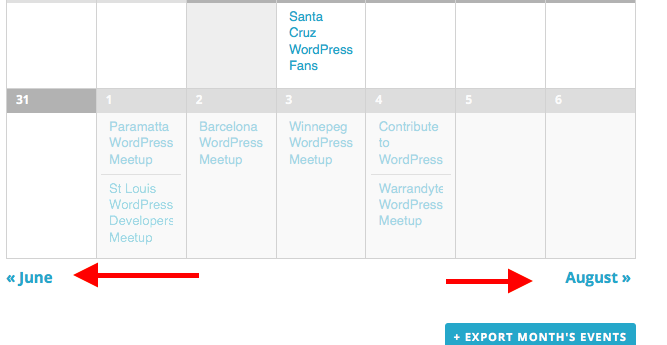
2. Can you clarify what calendar view you are trying to add this pagination to? You mentioned the list view and the “full list”, but your link goes to the month view on WP Shindig.
Just curious for some more details here so that I can best assist you in getting the pagination you want! 😀
Let me know about these two details and I will recommend some steps from there.
Cheers!
GeorgeParticipantHey @Sergio,
1. Can you clarify what you mean when you say, “i see on the featured event”? Please share a screenshot of what you are referring to. (You can do so by uploading the screenshots to this thread. If you have issues with that, you can upload to Imgur.com, Flickr.com, CloudUp.com, or any similar image-hosting site; then just share the links to those images here and I’ll take a look.)
2. Can you please share a link to the place on your site where this “featured event” can be seen?
3. Can you please post your System Information to this thread? Here is how to do that → https://theeventscalendar.com/knowledgebase/sharing-sys-info/
Please address each of the these three questions in the order they appear, so that we can provide as fast a support response as possible and help you get things working! 😀
— George
ParticipantHi @Mastres,
I do not see an email with the theme .zip attached to it — can you send that theme over email to us as I mentioned above?
Also, can you address question #2 that I wrote above regarding how this works?
As the WooCommerce support rep in that thread explained, this is an involved customization that is more appropriate for a developer you are hiring to help with you. Your theme is breaking the “show in main loop” functions, and so you should mainly be contacting the theme author for support.
Despite this, I will try to offer some more advice, but please email the theme and address question #2 above and I will attempt to identify the problem from there.
Thank you,
GeorgeJuly 26, 2016 at 7:31 am in reply to: Hundreds of events created for each day of recurring event – how can I delete #1144159ParticipantHey Jeff,
After running this command, if you look through your site’s wp_posts database table, do you see any “child events” or other events that you want to be deleted? If you do not find them there, then they do not exist.
As for a simple data diagram, the closest thing we have to that is the knowledgebase guide here ? https://theeventscalendar.com/knowledgebase/wordpress-post-meta-data/
The date and other information is stored in post meta. These fields exist in the wp_postmeta table.
If an event ID is 1868, then this is the post_id value that will be used in any table row referencing that event. So, if you want to delete the event with ID of 1868, delete it from the wp_posts table. Then look for any rows associated with post_id of 1868 in the wp_postmeta table, and delete those too.
I hope this information helps,
GeorgeParticipantMathew, this is an excellent insight and I greatly appreciate your chiming in on this!
We’re pretty certain David’s custom coding and/or his theme is the culprit here—earlier he mentioned this:
Its related to theme, just few tags related modifications..
Since I cannot reproduce the problems on my own site, nor on WP Shindig, I should have been a bit more vocal about these “tags related modifications” — my apologies for not thinking of that and being more clear, @DAVID!
I would recommend making a backup of these modifications somewhere on your computer; then temporarily remove them (without changing your theme) from your site so that your site is running NO template modifications.
In this state, do you get different results with the Google testing tool?
These specific steps will just help us confirm whether the issues are from your theme, or from your customizations to the theme.
Let us know what you find!
George -
AuthorPosts