
Home › Forums › Calendar Products › Events Calendar PRO › How can I add pagination
- This topic has 5 replies, 4 voices, and was last updated 10 years, 1 month ago by
suhas.
-
AuthorPosts
-
July 26, 2016 at 8:23 am #1144217
suhas
ParticipantHow can I add pagination in below link page?.
http://wpshindig.com/events/category/wp-meetups/
But not in a custom list with pagination(https://theeventscalendar.com/knowledgebase/custom-event-list-pagination/). I need to be in full list
July 26, 2016 at 8:49 am #1144239George
ParticipantHey Suhas!
1. Can you clarify what sort of pagination you are looking for? By default there is already “previous” and “next” pagination, as shown in this screenshot:
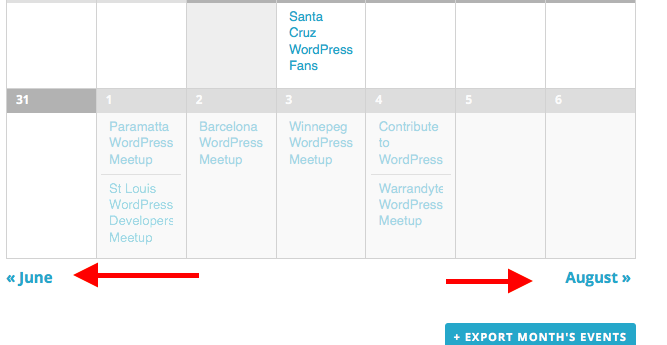
2. Can you clarify what calendar view you are trying to add this pagination to? You mentioned the list view and the “full list”, but your link goes to the month view on WP Shindig.
Just curious for some more details here so that I can best assist you in getting the pagination you want! 😀
Let me know about these two details and I will recommend some steps from there.
Cheers!
GeorgeJuly 26, 2016 at 9:04 am #1144250ParticipantHi George.
Thank you for a reply. I am not looking default pagination. It should be in the list. Here is the screenshot for actually what I want.
-
This reply was modified 10 years, 2 months ago by
July 26, 2016 at 5:05 pm #1144436ParticipantHey @Suhas,
Thank you for clarifying your goals here!
It is unfortunately not very easy to make the sort of customization you are trying to make here. We are not able to help with writing custom code, unfortunately, but I took a look and tried to make a customization anyways.
I was unfortunately not successful in my attempt. The problem is that you have to manipulate the list view query, which is not very simple. This is why that code snippet you found on our Knowledgebase is just a shortcode, because when you do this you do not have to manipulate the general list query, you can work with a specific query and it is much easier.
To implement the sort of customized pagination you want here, you would unfortunately have to write custom code for that on your own or hire a customizer to help you. We have more information about this here ? http://theeventscalendar.com/customizations
I’m sorry for the disappointing outcome here, @Suhas—I did try to make a snippet with the WP PageNavi plugin but was not able to make it work. 🙁
Please let me know what you think and if there is anything else I can try to help with.
Sincerely,
GeorgeAugust 17, 2016 at 9:35 am #1152660Support Droid
KeymasterThis topic has not been active for quite some time and will now be closed.
If you still need assistance please simply open a new topic (linking to this one if necessary)
and one of the team will be only too happy to help. -
This reply was modified 10 years, 2 months ago by
-
AuthorPosts
- The topic ‘How can I add pagination’ is closed to new replies.