

Forum Replies Created
-
AuthorPosts
-
George
ParticipantHey Dustin,
Thanks for reaching out.
We have a knowledgebase article here that covers the officially-recommended ways of doing what you describe ? https://theeventscalendar.com/knowledgebase/how-to-make-your-calendar-your-sites-home-page/
If those methods aren’t satisfactory, then there aren’t really any other officially-recommended ways of doing this. When it comes to SEO, the impact should be negligible if anything, because the redirect in this case is NOT a redirect of an old URL to a new URL—it’s just a redirect between two existing pages, the home page (e.g. example.com) to a sub-page (e.g. example.com/events).
— George
ParticipantHey Jens,
While I don’t have any specific ETA for those features, it will probably not be for at least another three months if all development goes exactly to plan.
I apologize for the vagueness, but just want to be honest because there are many projects in active development and so this will take several months before completion.
Sincerely,
GeorgeJuly 22, 2016 at 10:30 am in reply to: Hundreds of events created for each day of recurring event – how can I delete #1143072ParticipantI’m sorry to hear about all of this, Jeff!
I can process a refund, but am wondering if you could agree with me that it sounds like the new cleanup plugin is working well.
You mention this taking a week—to be clear, that week has been back-and-forth, troubleshooting, updating versions…
It’s only in the last 24 hours, with the sharing of the NEW manual cleanup plugin, that a real solution has been found here.
You mention that after the manual cleanup, you’re down “only” to 18,808. Note, however, that you started with 21,500. You were able to get 20,500 before the new plugin, but with the new plugin, in the last 24 hours alone you have already cleaned up an additional 11–12% of the total recurring events.
So it sounds like this new plugin is doing the job well. Surely not as quickly as is perhaps ideal, but given the 404 issues you described earlier, it sounds like this could be related to your server? It might be performing slowly with all of the events in the database…but as the plugin runs, and more events are removed, this performance may improve.
⚠️ Also, please note: I noticed that your site’s “Cleanup Recurring Events Before” option is set to 12 months, as is the “Cleanup Recurring Events After” option. This is a screenshot of the two options I am referring to:
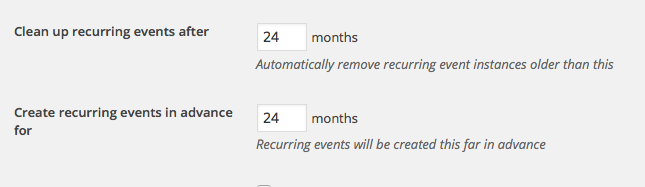
☝️ If you compress these options to something like 3 months, for example, then it might increase the number of events cleaned up with the manual “cleanup event recurrence” link in the new cleanup plugin.
I would recommend trying this and trying some more manual imports, and seeing how things behave. If you don’t want to, or do and don’t find much meaningful process, let me know and I can process a refund.
Sincerely,
GeorgeJuly 21, 2016 at 1:53 pm in reply to: Fast forward Calendar Widget to next upcoming event not showing next event #1142699ParticipantHey Florian,
Thanks for reaching out. If the widget does not work as expected in the specific Beaver Builder modules, but does in the default, WordPress-provided widgets menu, then unfortunately your best course of action here is to reach out to the Beaver Builder folks directly as to why their widget modules aren’t producing the same results as the “real” widget areas features.
I am sorry that we cannot produce a specific resolution here, but based on your findings, it seems clear that the Beaver Builder plugin is somehow altering the widget output.
Definitely reach out to them, and let me know if there is anything else I can try to help with in the meantime!
For one step here that might help reveal more about this issue, can you share with me the EXACT link to the page on which you found the “fast-forward to next month with events” code that you are trying to use?
I will take a look—perhaps I can share some updated version of that code that might work a bit better. This is not likely, so I don’t want to get your hopes, but will take a look and see if there is anything I can recommend.
Thanks!
GeorgeParticipantHey Jens,
Thank you for sharing this detail. While I can confirm that we are working actively on a set of tools for event promotion as described in that feature request you linked to, we unfortunately cannot be “paid” to speed it up and such.
I’m sorry to disappoint on that front, but do hope the code I shared above is helpful in some way.
Please let me know if you have any further thoughts or questions!
Sincerely,
GeorgeJuly 21, 2016 at 11:32 am in reply to: Hundreds of events created for each day of recurring event – how can I delete #1142614ParticipantHey Jeff,
I wanted to reach out to inform you that one of our developers has come up with a solution that may be a bit helpful here.
So, the thing is that the cleanup process SHOULD work once it is actually running on a specific event. The default “cleanup plugin” that I shared earlier with you does this on a scheduled “cron job”. For whatever reason, this not seem to be working well on your server. That could be happening for a number of reasons….
I tried to circumvent this problem by recommending the Crontrol plugin to allow you to manually trigger the action, but that didn’t help.
What MIGHT actually help is a new, modified version of that cleanup plugin that our developer Barry has cooked up just for you today.
You can download this new and (hopefully) improved version of that plugin here ? https://cloudup.com/cOqwwjLMHEB
I would recommend deleting the original cleanup plugin, and then installing this new version.
What’s new about this version? Well, now when you go to any recurring event, you will see a metabox like this in the “edit event” screen for that event:

☝️ Unlike my Crontrol recommendation, this manual cleanup link should actually cause the cleanup process to run for the recurring event.
Does this mean that there is still some manual processing you have to perform? Yes, unfortunately. But please note that the vast number of events on your site is not because of a lot of recurrence series—the previous bugs would just make these series never stop recreating, so even if you had, say, ten recurrence series, (which means you only have ten events to go to and click this “rebuild recurence” button on!), if each series produced 2,000 events erroneously then, boom, you have 20,000 events…in this example, you would go to the first event of each of the ten series and click the “rebuild recurrence”–you would NOT need to click that 20,000 times or anything like that. Perhaps this fact is obvious, but I just wanted to explicitly mention it in case it was a concern!
I hope this helps—try it out and let us know!
George
ParticipantHopefully our methods make sense and we can proceed with trying to solve your problem now. Let me know if you have further questions, but I will now proceed with the issues at hand. If the reasoning for getting system information wasn’t clear before, I do apologize for that lack of clarity and hope my explanations above reveal the value of having that information.
Part One: What the Errors Are
First, let’s review what actual errors are going on here. Please note there are Errors, and Warnings. Errors need to be fixed according to Google. Warnings are things that Google might recommend you do, but that will not break anything, will not hurt SEO, will have no search cost or page-load cost, etc.
We will ignore the warnings for now for the sake of prioritizing the “errors”. We can consider the warnings later, but need to address the errors first and should focus on them to be effective.
The errors with that event are as follows:
- Event Location: the event does not have a location value for the JSON LD location field.
- hCalendar dtstart: the event only provides a start date, and does not have a complete start time.
- hCalendar dtend: the event only provides an end date, and does not have a complete end time.
- hCalendar Location: this is the same as the Event Location field, but since it is absent another “location” error is flagged. So, i.e., if we solve the Event Location error it should solve this error as well.
Part Two: Fixing the Errors
1. Event Location and hCalendar Location
I took a look at the event itself on your site, http://www.yogagardensf.com/event/yoga-teacher-training-july/, and do not notice a venue specified for this event.- 1a) Is it correct that this event does not have a venue?
- 1b) If you add a venue, save the event, and then run it through the testing tool again, do the Event Location and hCalendar Location errors go away?
2. hCalendar dtstart
The event appears to be an “All Day” event, so while a start date is provided, a start time is not provided because, well, the event is “All Day.”- 2a) Can you confirm that the event is indeed an “All Day” Event?
- 2b) Can you try adding a start time, saving the event, and then having a look at the event in the testing tool and see if the dtstart error remains?
3. hCalendar dtend
The event appears to be an “All Day” event, so while an end date is provided, an end time is not provided because, well, the event is “All Day.”- 3a) Can you try adding an end time, saving the event, and then having a look at the event in the testing tool and see if the dtend error remains?
In Closing
There are numerous details tracking here, so please respond to the specific numbered questions in the format they are written in above if possible. So to answer question 2a, for example, be sure to preface your answer with 2a), like this:
2a) Yes, the event is an “All Day” event.
☝️ I don’t mean to impose this to be a stickler here, I just want to help resolve these issues for you as fast as possible and keeping the communication organized and focused is essential to that.
Thank you,
GeorgeParticipantThis reply is private.
July 21, 2016 at 8:41 am in reply to: Hundreds of events created for each day of recurring event – how can I delete #1142429ParticipantHey Jeff,
Unfortunately, as I have described above, the only next steps that could be taken would be operating on your database or the server itself. We cannot assist with things on that level, and it is best to work with your server administrators / database administrators / web host support team.
I will share this with issue with some developers on our team; they may have some insights as to why the cleanup plugin is not working as well as intended, or may be able to write SQL queries to help cleanup events.
But neither thing may be possible—I only mention this so that you can set your expectations and can get started on reaching out to the sorts of database- and server-involved folks I mentioned above, and get those conversations started.
In them meantime, stay tuned; I or another team member will post updates here when we have them.
Sincerely,
GeorgeParticipantThis reply is private.
ParticipantSure thing, @William. Stay tuned to plugin releases; we will be fixing this as soon as possible. Hopefully it’s not much more than a few weeks.
Stay tuned! I will re-open and update this thread when we are able to publish a fix. 🙂
— George
ParticipantHey Jeremy,
So sorry for the delay in writing that snippet! I don’t have any good excuse; I simply lost track of the thread on a busy day and dropped the ball.
Sorry for the trouble.
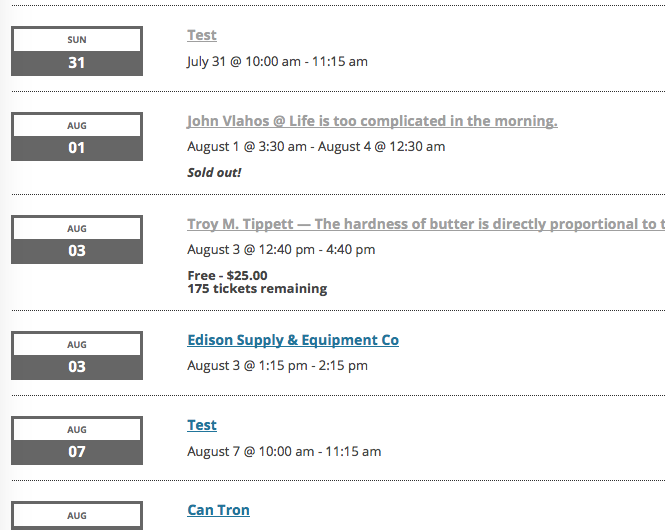
The snippet you were hoping for was one that achieves these features you mentioned in your old thread—you wanted this information in the [tribe_events_list] shortcode output:
I’m looking at showing if an event is sold out, how many tickets are available if not, and what the cost is.
I have made a snippet that does just that! Head to the Gist here and add the code from this Gist to your theme’s functions.php file ? https://git.io/vKidN
Here’s how that makes events look in the [tribe_events_list] shortcode output:
I hope this helps!
GeorgeJuly 20, 2016 at 12:04 pm in reply to: Can the Related Events be associated with a particular category? #1142083ParticipantHey Bruce,
Events Calendar Pro’s “related events” are retrieved by way of a function called tribe_get_related_posts(), which you can find in your Events Calendar Pro plugin files at this location:
events-calendar-pro/src/functions/template-tags/general.phpThat function uses the event categories of the event—and any tags as well—to find “related” / similar events.
1. Do your events have multiple event categories, typically? This may be producing the results you are getting.
2. If you want to enforce that only one category is “searched” for related events, this may be possible by adding a filter like the following to your theme’s functions.php file:
	if ( class_exists( 'Tribe__Events__Main' ) ) {

		/**

		 * Rework the related events tax_query.

		 *

		 * @param array $args

		 * @return array

		 */

		function tribe_limit_related_posts_args_to_one_cat( $args ) {
if ( ! is_array( $args ) || empty( $args ) ) {
return $args;
}// Remove the default tax_query;
unset( $args['tax_query'] );$args['tax_query'][] = array(
'taxonomy' => Tribe__Events__Main::TAXONOMY,
'field' => 'slug',
'terms' => array( 'barbecue' ),
);return $args;
}add_filter( 'tribe_related_posts_args', 'tribe_limit_related_posts_args_to_one_cat' );
}
☝️ Something like this would reduce the searchable event categories to just the event category whose slug is “barbecue”.
We are not generally able to help with writing custom code like I did above, so you may need to further tinker and refine that code, but let me know if this helps or is even addressing the problem you described here.
Thank you!
GeorgeParticipantHey @DAVID,
Thanks for reaching out. To try and help me identify the cause of these errors, can you post your site’s complete, un-edited System Information to this thread?
Here is how to do that → https://theeventscalendar.com/knowledgebase/sharing-sys-info/
You can post that information in a private reply if you would like to keep the information hidden from the public; only you and us on the support team can read the contents of private forum replies.
I’ll take a look and make further recommendations from there.
Thank you!
GeorgeParticipantHey there!
Your Events Calendar Pro license key will expire on March 20, 2017. Your Community Events license key will expire about a month later, on April 14, 2017.
Both are “Personal” licenses. If you upgrade either license (or both), then that specific license that you upgrade will also have its expiration “renewed” and pushed out another year.
So, if you upgrade the Events Calendar Pro personal license to business today, July 20, 2016, then it will not expire again until July 20, 2017.
I hope this helps! You can upgrade any time by using the “Upgrade to:” buttons found in http://theeventscalendar.com/license-keys
Cheers!
George -
AuthorPosts