

Forum Replies Created
-
AuthorPosts
-
George
ParticipantHey @Desical,
It is unfortunately not possible to have the Map View (or any aspect of the “main” calendar views, in fact) on the site home page. 🙁
I am sorry to bear that news!
You can learn about possible methods to approximate having the event calendar on the home page by reading this page → https://theeventscalendar.com/knowledgebase/how-to-make-your-calendar-your-sites-home-page/
Furthermore, you unfortunately cannot pull off something like the “regions” feature you describe with our plugins at this time, either this basic taxonomy or having the regions split across several pages 🙁
Please let me know if there is anything else I can help with!
Sincerely,
GeorgeParticipantHey Ryan,
Thanks for reaching out. You say, “please explain why the development of such a thing was not considered when creating this plugin.”
Why do you say this feature wasn’t considered—how would you be able to know that information? 😀
I can assure you it was, and is often re-considered! So it may end up in our plugins at some time.
For now, here are a few reasons why our plugins do not auto-erase events at this time:
1. The presence of past events does not interfere with exploring new events. In our Month and Week Views, we make it clear what day is the “current” day, and so at a quick glance a visitor can see what events are happening today or are upcoming. Past events are shown at a lower opacity, to further clarify how they have “passed”. In our List Views, the views start at the “Upcoming Events” view; so, the first event shown at the top of any list view is the next-approaching upcoming event. You cannot even see past events unless you actively page backwards by clicking “Previous Events.”
2. The fact that an event occurs on a certain date is not only relevant if this date is in the future. Having a record of what events occur when is useful regardless.
3. Technical difficulty: have some automatic “job” running that deletes any event as soon as it becomes a “past” event is not as easy technically as it may sound conceptually. It would rely on a cron job, for example, but as a WordPress plugin we can only hook into the WP Cron system. WordPress’ WP-Cron system is not a “true” cron, and so it can be challenging to have a system reliably cleaning out “past” events without making a significant performance impact on the site—especially if there are many events. This is further complicated if there are Events Calendar Pro recurring events; if singular instances of the series are past, it is not trivial to only remove those instances without affecting the entire series.
We have two temporary workarounds that might be helpful. Neither one actually DELETES past events, but hides them.
Here is a PHP code snippet that might work well → http://pastebin.com/uHCEjEiB
Here is a CSS method that targets the Month View specifically → https://theeventscalendar.com/knowledgebase/hide-past-events-on-the-events-calendars-month-view/
I hope all of this information helps!
Cheers,
GeorgeParticipantHey Jacqueline,
Thanks for reaching out.
We ourselves are makers of The Events Calendar, a piece of software that folks who own websites can use to make events calendars.
So, you probably found us by way of an opera house’s website. But we are not the opera house 😀
Sorry for the confusion! Try to locate the website of the specific opera house or theater you are looking for.
Best of luck!
GeorgeParticipantThanks for reaching out!
If you click the “Export” button seen on that view in your screenshot, you should be able to get all of the tickets (along with all of their attendee fields data) into a CSV file.
I hope that helps! 😀
GeorgeParticipantThis reply is private.
July 20, 2016 at 10:49 am in reply to: Hundreds of events created for each day of recurring event – how can I delete #1142048ParticipantHey Jeff,
Thanks for trying out that task. If that is not helping, then I would recommend consulting further with your web host as described above.
If you have backups of your site before the problem, then these may indeed be useful and you could restore your site to that pre-problem database; update to The Events Calendar 4.2.2 and Events Calendar Pro 4.2.2.1; and then try re-creating your recurring events series from scratch.
This is something you would have to work closely with your web host on—for example, you mention a file whose name is this:
backup_2016-07-19-1842_wwwuusharonorg_8e80181eac1b-db.gzYou would need to work with your web host (or system administrator) to ensure these files are the proper database backups. For example, that file includes the string backup_2016-07-19, which seems to be dating the file to July 19th; yesterday, in other words—so, well after the problems arose.
I’m sorry about the troubles in deleting these events. There are further steps that can be taken from here, but they are all on the level of the database and server, not something we could assist with in terms of the plugin code itself.
Please let me know what further thoughts you might have and if there is anything else I can try to help with.
Sincerely,
GeorgeParticipant😀
ParticipantThanks for posting, John! Congrats on the launch! I love how this has turned out. 😀
Would you be opposed to us putting it in the Showcase on our site? https://theeventscalendar.com/showcase/
Cheers,
GeorgeJuly 19, 2016 at 3:47 pm in reply to: Hundreds of events created for each day of recurring event – how can I delete #1141720ParticipantHey @Jeff,
I’m sorry to hear about the slow processing of that on your site. In thinking of other ways to improve the removal of all of those events, the only other thing I can think of would be to reach out to your web host’s support team to see if they can assist with removing those events on the level of the database.
If you clarify this perhaps, they may be able to go into your database and perform operations there to clear out these events. Other customers have had success with this, but it does depend greatly on your specific host and the scope of their customer support.
I am sorry for the limited number of options here, Jeff.
One thing worth noting additionally is that you might have success by installing the free WordPress plugin WP Crontrol, which can be found here → https://wordpress.org/plugins/wp-crontrol/
This plugin lets you manually run scheduled “WP Cron” events; the cleanup process in that helper plugin shared earlier is a WP Cron event, for example.
So, once you install WP Crontrol, you can see the cleanup task like as shown in the top of the table in this screenshot:
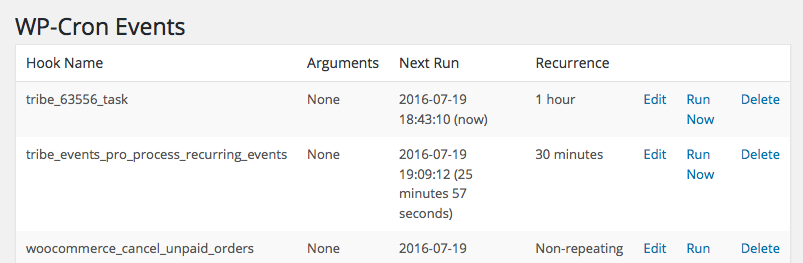
The task name to look for is tribe_63556_task. Click “Run”, but only ONCE at a time—do not click it a bunch of times in a row. And please do let it “work” for a few minutes. Check on the number of events after each time you click “Run”. If the number has decreased, then wait a few more minutes and click “Run” again.
I know that this is still not a very ideal method for cleanup, but I hope it helps.
Thank you,
GeorgeParticipantThis reply is private.
ParticipantThis reply is private.
July 19, 2016 at 2:48 pm in reply to: Customising the New Order E-mail to include ticket details #1141694ParticipantSure thing! 😀
ParticipantSounds good, Olivia. As noted, some improvements in clarity are planned and will hopefully arrive soon…in the meantime, do reach out by making a new thread any time if other questions or issues ever arise.
Cheers!
GeorgeParticipantHey Frederic,
I’m sorry to disappoint! 🙁
While these sorts of features may arrive at some point, there are not any plans for these features at this time.
So, it could be many months or beyond before something like these features arrive in our plugins—IF they ever do in the first place.
I hate to bear the bad news, Frederic, and we are happy to issue full refunds for your license if you follow the steps here → https://theeventscalendar.com/knowledgebase/refund-policy/
Please let me know if there is anything else I can try to help with.
Sincerely,
GeorgeParticipantHey Frederic,
Thanks for reaching out!
Our plugins unfortunately can not handle having multiple venues for one event, whether that event is recurring or not. 🙁 So what you describe here, including the handling of the event in the photo view and filter bar as you describe, is not possible.
I am sorry to disappoint!
Sincerely,
George -
AuthorPosts