

Forum Replies Created
-
AuthorPosts
-
George
ParticipantHey @Neil,
Our response times are one reply every twenty-four hours. Thank you for your patience.
When I try viewing the shop page on my own site, I have no issues with the checkout process. So from here, let’s try and identify where specifically things are going wrong with your products listing page.
1. Do you have any other pages whose slug or title is “Buy Tickets”? If so, does anything improve if you delete these other “Buy Tickets” pages? (Even if they are “drafts” and are not fully published, delete them.)
2. If “No” to #1, then does anything improve if you temporarily activate a default theme like Twenty Twelve, or Twenty Sixteen, etc.—and then check out the “Buy Tickets” page again?
If possible, please leave your site in the state where a default theme like Twenty Twelve or Twenty Sixteen is activated, and then let us know when it is in this state. I will take a closer look.
☝️ I will work quickly to look at your site in this state to minimize the amount of time that your site has a default theme active.
Thank you!
GeorgeParticipantThis reply is private.
ParticipantHey Juliet,
To fix the issue over the overlapping titles, you can add CSS like the following to the bottom of your theme’s style.css file:
h2.tribe-events-page-title {

    line-height: 1.8;

}
When it comes to making further edits to your design, this is unfortunately something you will have to take the reins on yourself. I say “unfortunately” because we cannot help with writing custom code, design modifications, etc.
There are many free resources online for learning the basics of HTML and CSS modification. http://css-tricks.com is one great example!
If you need to write custom CSS on your site, definitely check out a [free!] tool like Firebug if you use FireFox, or the Developer Tools for either Safari or Chrome.
Please let me know if there is anything else I can try to help with.
Sincerely,
GeorgeParticipantThis reply is private.
ParticipantHey @Matthew,
Thank you for this information.
It is odd that the file is named wp_config.php instead of wp-config.php — I know that may seem like a small difference, but it matters! 😀
It is also odd that there was only a “-sample” version of the file in there when you first looked.
That may indicate some deeper problems here, along with the specific error you report.
1. Can you confirm if that error arises on your site event without Events Calendar Pro activated? Or does it only happen when Events Calendar Pro is active on your site?
2. For now, one thing that might temporarily help is to try and add this line of code to your theme’s wp-config.php file:
define('WP_MEMORY_LIMIT', '3000M');☝️ Once you make this change, try installing and activating Events Calendar Pro again.
Thank you for your patience here!
George
ParticipantSure thing! 😀 Open a new thread any time if other issues or questions arise.
Cheers,
GeorgeParticipantGlad to hear that script helped, @Ken!
Open a new thread any time if other questions or issues arise. 😀
Cheers,
GeorgeParticipantHey Hedley,
When it comes to showing events in a page, the only options we currently provide are the “Widget shortcodes.” These shortcodes output the same content as a widget, but since they are shortcodes, you can put them in any post content, page content, etc., instead of being limited to putting them only in a sidebar.
You can learn more about the widgets, and their shortcode equivalents here:
• https://theeventscalendar.com/knowledgebase/pro-widget-shortcodes/
• https://theeventscalendar.com/knowledgebase/events-calendar-widgets/I hope this helps!
Cheers,
GeorgeParticipantThank you @Marylu!
1. Can you please post your site’s complete system information? Here is how to do that → https://theeventscalendar.com/knowledgebase/sharing-sys-info/
2. Can you head to Events → Events in your site’s wp-admin and confirm that events are listed there? If possible, share a screenshot of this list of events. Here is a screenshot of my own events in my site’s admin, for example:
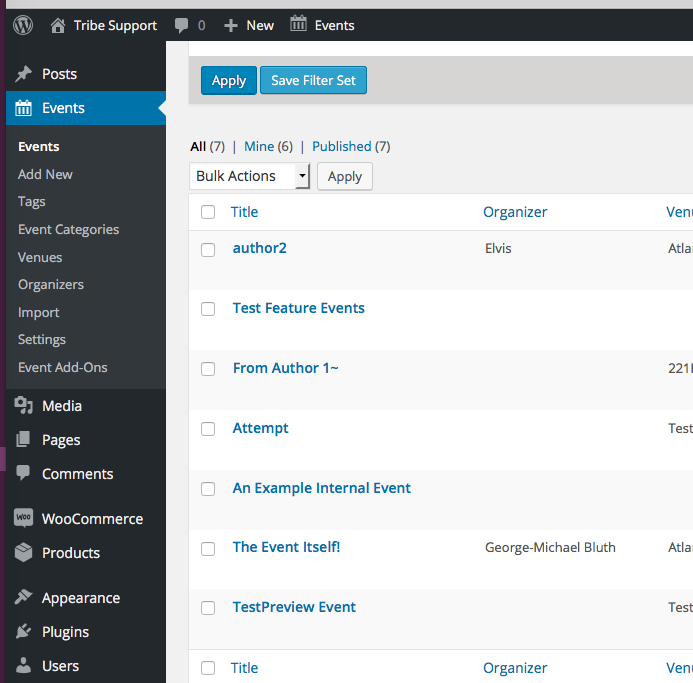
Thank you!
GeorgeParticipantHey Rich,
Glad to have helped with that first bit of CSS. When it comes to changing that text you mention, this is unfortunately a bit more complicated. 🙁
It’s indeed possible, but at this time you would have to manually edit a file within your copy of the Filter Bar plugin. This means you would have to re-customize the plugin after the next update, for example, because the auto-updates overwrite the existing files.
The file where you can edit this code is this one:
/the-events-calendar-filterbar/src/Tribe/Filter.phpAround line 236 of that file you’ll see the “Select an item” text, which you can change to whatever you’d like. Here’s what that block of code looks like, for reference: https://cldup.com/hehe_uiLrd-3000×3000.png
Sorry to disappoint in some respects on this second modification. Please let me know if there is anything else I can try to help with.
Sincerely,
GeorgeParticipantGlad to hear it!
Cheers and best of luck with your project,
GeorgeParticipant😀
ParticipantGlad to hear it!
Be sure to make back-ups of these code changes and/or possible bookmark this thread for future reference.
Best of luck with your project,
GeorgeParticipantThank you!
GeorgeParticipantNice! 😀
-
AuthorPosts
