

Forum Replies Created
-
AuthorPosts
-
George
Participant😀
ParticipantThanks for sharing this update! Glad to hear it’s resolved.
Best of luck with your project! 😀
GeorgeJuly 28, 2016 at 11:29 am in reply to: I purchased an upgrade to the wrong plugin, by mistake. #1145237ParticipantThis reply is private.
ParticipantExcellent! Thanks for sharing that update here.
Best of luck with your project,
GeorgeParticipantThis reply is private.
ParticipantHey Brian,
Thanks for reaching out!
Our plugins unfortunately do not provide this specific sort of “time-scheduling” feature. 🙁
You can manually create events that signify “blocks” of time you are available, and then sell tickets or offer free RSVPs on these blocks of time, but you cannot have dates “open” that folks can then select times on their own….
Sorry to disappoint!
Sincerely,
GeorgeParticipantHey Wayne,
Thanks for reaching out. I am sorry to hear about these problems! This sort of issue is caused by JavaScript issues.
• If you DEACTIVATE the “a2 Optimizer”, do these issues continue to happen? Or do those weird characters go away?
• If the weird characters go away once you deactivate “a2 Optimizer”, then the a2 Optimizer is the source of the problem.
We do not make a2 optimizer, so your best course of action is to contact the a2 Optimizer support team for further assistance regarding their product’s JavaScript conflicts.
Sincerely,
GeorgeParticipantHey Daren!
do I have to upgrade to Events Calendar Pro before I can purchase and install iCal importer? Or can I just purchase iCal importer and install with the standard / free version that came with my template?
You do NOT need to buy Events Calendar Pro! You can definitely just keep using the free / core version, The Events Calendar. Events Calendar Pro is not required.
However, I would recommend DELETING the version of The Events Calendar that comes with your theme, and instead just installing The Events Calendar directly on your site fresh from its official download source, which is here:
• http://wordpress.org/plugins/the-events-calendar
☝️ The reason I recommend this is because plugins that are included right inside themes can be out-of-date. This is a bad coding practice and so I would recommend replacing the theme version with the official version from WordPress.org as linked above.
Ensure you are using the most recent version of The Events Calendar (currently 4.2.3), and then go ahead and add iCal Importer! 😀
I hope this information helps.
Cheers,
GeorgeParticipantHi there,
You posted this to another thread here, where I have responded ? https://theeventscalendar.com/support/forums/topic/phone-number-in-rsvp/
I will close this thread so that we can keep the conversation in that other thread above.
Cheers!
GeorgeParticipantHey Brucet,
Thanks for reaching out!
I don’t want a phone number for each attendee, just the phone number for the person filling out the RSVP form
☝️ There is unfortunately no straightforward way to implement this at this time. The best solution is just to make sure the “phone number” attendee meta field is NOT “required”—this way, only the first phone field can be entered with all others for the remaining attendees being left empty.
If you create a test event with a phone number attendee field, I can take a look and try to recommend some CSS to make all phone fields BUT the first one invisible. This will give the illusion of there only being one phone number field. The field will still have to remain not “required”, so perhaps you will want to add text at the bottom of the event saying “Phone number required!” or something….
Let me know if you can create such a testing event; I will take a look and recommend CSS to hide all but the first phone number fields! 😀
— George
ParticipantHey @Juliet,
Thanks for reaching out.
The overlap issue you report is caused by your theme, and can only be fixed by writing custom CSS. We unfortunately cannot help with design tweaks, but I am happy to take a look and recommend a solution if possible nonetheless.
To do this, can you share a link to your site’s event page? You can post the link in a private reply if you do not want the link to be publicly visible.
Next, in regards to the @ time separator, head to Events → Settings → Display in your site’s wp-admin and look for this option:
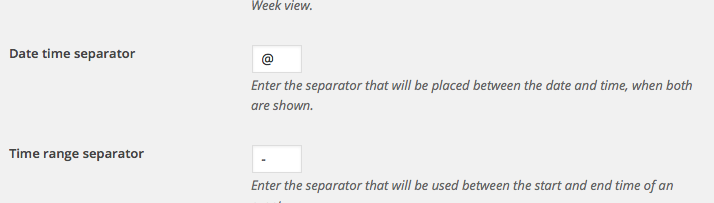
Change to whatever you’d like! 😀
Cheers,
GeorgeJuly 27, 2016 at 9:53 pm in reply to: Events always going trough a review even with publish immediately set #1144970ParticipantHey Andrea,
Thanks for reaching out. To address your concerns in reverse order, there are unfortunately no options for these two things you mention:
The other issue I am facing is that I would like to show the author of the event or to set it as default organizer, but I don’t find either of those options.
This may be possible with some custom coding. While we cannot help with custom coding, I may be help later on after we figure out the issue with the submission statuses first.
In regards to those issues:
1. Can you confirm that when you say, “submissions end up in the to be reviewed pile”, you mean that their status is literally set to “Pending Review”? Is it Pending Review, or “Draft”, or something else?
2. Can you post your site’s complete system information to this thread? Here is how → https://theeventscalendar.com/knowledgebase/sharing-sys-info/
ParticipantHey Rich,
Thanks for reaching out!
We are not using any lightboxes on our demo site, though maybe when I say “lightboxes” and you say “lightboxes” we have different things in mind? To help me understood what you’re referring to, can you share a screenshot a “lightbox” in effect on our demo site?
You can do so by uploading the screenshots to this thread. If you have issues with that, you can upload to Imgur.com, Flickr.com, CloudUp.com, or any similar image-hosting site; then just share the links to those images here and I’ll take a look.
As for the issues with filter bar directly, does anything improve if you add the following CSS to the bottom of your theme’s style.css file:
.tribe-filters-open #tribe_events_filters_wrapper,

.tribe-filters-open #tribe_events_filters_wrapper.tribe-events-filters-horizontal,

.tribe-filters-open #tribe_events_filters_wrapper.tribe-events-filters-vertical {

    position: relative !important;

}
I know that looks like a dense and odd bit of code, but try it out and let us know if this helps at all! 😀
— George
ParticipantHey Jens,
Thanks for reaching out.
You say, “and sorts them before showing the top 5.” Can you show a screenshot (either on your site or on our demo site at wpshindig.com/events) or some other clarification of what specific widget made a list of the “top 5” events?
Thank you,
GeorgeParticipantHey Kelli,
Thank you for reaching out!
We do offer some bundles as listed here → http://theeventscalendar.com/bundles
However, there is not a bundle of just those two plugins at this time.
I’m sorry to disappoint 🙁 Please let me know if you have any further questions that I can try to help with!
Sincerely,
George -
AuthorPosts