
Home › Forums › Welcome! › Pre-Sales Questions › Formatting of date and event categories
- This topic has 7 replies, 3 voices, and was last updated 10 years, 1 month ago by
Support Droid.
-
AuthorPosts
-
July 27, 2016 at 2:02 pm #1144858
Juliet
ParticipantHello,
The formatting of the date and the event categories is overlapping and does not look good. Can you let me know how I can add some more space between these two headings? I am unsure where to find the coding for these event pages in Wordress?
Another slightly different issue is that on the individual events the date format is: October 1 @ 1:00 pm – 3:30 pm. How can we replace the @ symbol as I would prefer a comma?
The screenshot below displays these issues.
Thanks
Juliet
July 27, 2016 at 9:58 pm #1144973George
ParticipantHey @Juliet,
Thanks for reaching out.
The overlap issue you report is caused by your theme, and can only be fixed by writing custom CSS. We unfortunately cannot help with design tweaks, but I am happy to take a look and recommend a solution if possible nonetheless.
To do this, can you share a link to your site’s event page? You can post the link in a private reply if you do not want the link to be publicly visible.
Next, in regards to the @ time separator, head to Events → Settings → Display in your site’s wp-admin and look for this option:
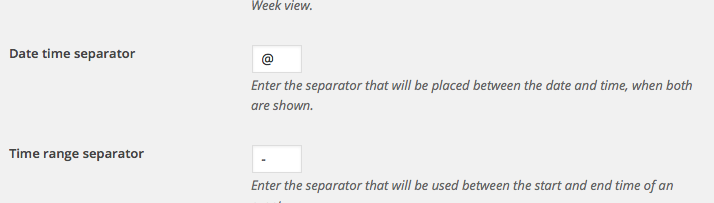
Change to whatever you’d like! 😀
Cheers,
GeorgeJuly 28, 2016 at 8:44 am #1145128ParticipantThanks for your support.
I’d actually really appreciate a very basic description of how to edit the backend of The Events Calendar pages as I am slightly confused on where this is done.
Here is the link that I was discussing in my previous comment:
http://fermentationfest.com/events/category/featured
I also want to change the design slightly on the individual event pages. I imagine this involves coding as well – but it would be great if you could let me know where to start on this!
http://fermentationfest.com/events/category/featured
I want to edit the fonts (size, colour and weight) in the titling. Delete the google calendar and Ical export buttons and edit the DETAILS section.
Thank you
Juliet
July 28, 2016 at 12:18 pm #1145272ParticipantHello,
The pages that I shared are not supposed to be ‘live’ but there was no other way of sharing them, I would therefore greatly appreciate if someone could look at them today as I will have to make them private again at 6pm.
Thanks
J
July 28, 2016 at 7:50 pm #1145418ParticipantHey Juliet,
To fix the issue over the overlapping titles, you can add CSS like the following to the bottom of your theme’s style.css file:
h2.tribe-events-page-title {

    line-height: 1.8;

}
When it comes to making further edits to your design, this is unfortunately something you will have to take the reins on yourself. I say “unfortunately” because we cannot help with writing custom code, design modifications, etc.
There are many free resources online for learning the basics of HTML and CSS modification. http://css-tricks.com is one great example!
If you need to write custom CSS on your site, definitely check out a [free!] tool like Firebug if you use FireFox, or the Developer Tools for either Safari or Chrome.
Please let me know if there is anything else I can try to help with.
Sincerely,
GeorgeJuly 29, 2016 at 6:21 am #1145494ParticipantHi George,
Thank you very much for this and I understand you cannot help further with the design elements, but I would be most grateful if you could tell me where to find the coding in the back end of the wordpress site as the event pages do not appear in the usual – Appearance – Editor section where I usually make edits to the page templates.
Your help in locating the template pages for these event pages would be most grateful.
Many Thanks
Juliet
July 29, 2016 at 8:26 am #1145565ParticipantHi Juliet,
Sure thing. The Appearance → Editor screen will usually only include theme files, not plugin files. So, while you can definitely find the style.css file here (where any CSS / design modifications go), for plugin files you will have to access those over FTP.
Those files are located in your site’s /wp-content/plugins directory. So, for example, the plugin files for The Events Calendar are located in /wp-content/plugins/the-events-calendar.
If you aren’t familiar with these terms, then the best thing I could recommend would be to check out free tutorials online about FTP, WordPress plugin file modifying, etc. Here is an example → http://www.wpbeginner.com/beginners-guide/how-to-use-ftp-to-upload-files-to-wordpress-for-beginners/
I hope this information helps!
GeorgeAugust 20, 2016 at 9:35 am #1154040KeymasterHey there! This thread has been pretty quiet for the last three weeks, so we’re going to go ahead and close it to avoid confusion with other topics. If you’re still looking for help with this, please do open a new thread, reference this one and we’d be more than happy to continue the conversation over there.
Thanks so much!
The Events Calendar Support Team -
AuthorPosts
- The topic ‘Formatting of date and event categories’ is closed to new replies.