
Home › Forums › Calendar Products › Events Calendar PRO › Looks like I'm not the only one with problems
- This topic has 16 replies, 4 voices, and was last updated 10 years, 1 month ago by
Marylu M.
-
AuthorPosts
-
July 27, 2016 at 11:50 am #1144801
Marylu M
ParticipantI followed the testing for conflicts as instructed.
I deactivated all plugins except Events and EPro. I activated theme 2016.
Same problem without activating any of my plug ins. 🙁
This has caused me to have NO current calendar for our church. People have been asking to schedule things and I don’t have the calendar format WITH the events in front of me. Kind of freaking out.I see below it says, “Yes, I deactivated and used 2014, so which one is it?
July 27, 2016 at 12:13 pm #1144817George
ParticipantHi Marylu!
Really sorry to hear about the trouble here.
Can you clarify what trouble you face, specifically?
You say:
Same problem without activating any of my plug ins
1. What is the problem, specifically?
Are you unable add events on your site by going to Events → Add New in your site’s /wp-admin?
2. Can you please post your site’s complete system information to this thread? Here is how to do that → https://theeventscalendar.com/knowledgebase/sharing-sys-info/
Cheers,
GeorgeJuly 27, 2016 at 12:21 pm #1144823ParticipantI posted a screen shot.
There is a calendar template, but ALL the events are missing. I cleared the cache and did what the EC by MT website said to do about finding the conflict and solving it.I went back to 2016 theme, 2014 theme just to be sure.
Still no events.
Deactivated all plugins except Events/EventsPro.
It is blank. Yes, I may have caused the problem, but not sure, and just need to get it fixed. PLEASEJuly 28, 2016 at 4:49 pm #1145367ParticipantThank you @Marylu!
1. Can you please post your site’s complete system information? Here is how to do that → https://theeventscalendar.com/knowledgebase/sharing-sys-info/
2. Can you head to Events → Events in your site’s wp-admin and confirm that events are listed there? If possible, share a screenshot of this list of events. Here is a screenshot of my own events in my site’s admin, for example:
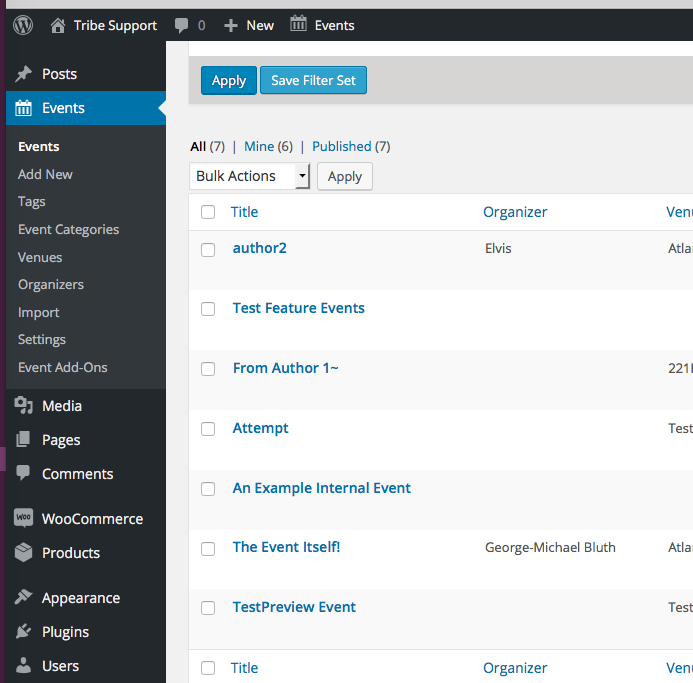
Thank you!
GeorgeAugust 2, 2016 at 1:03 pm #1146767ParticipantThis reply is private.
August 2, 2016 at 1:04 pm #1146768ParticipantI reactivated everything for now.
August 2, 2016 at 1:08 pm #1146770ParticipantYes, all the events are in the WP-admin database.
August 2, 2016 at 1:10 pm #1146772ParticipantI’m sorry I have not responded in a timely manner.
I have a hard time focusing and have to psych myself up all day to just look at the support/email pages. Then when I respond, it’s about time for me to leave during the day. Then I keep putting it off….I can’t do that because this is a live church website and I DO need to keep events current! Wish I could do a live chat or phone call.August 3, 2016 at 7:40 am #1147028ParticipantThank you for this information, Marylu!
This is an odd issue, because I see the events showing up fine in your events widgets on the home page.
1. If you head to the “Pages” list in your site’s /wp-admin, do you find any Pages whose title is “Events”? Click this link to see a screenshot of the specific “Pages” menu item I am referring to → https://cldup.com/LKTXJy2r3B-3000×3000.png. Click that “Pages” link in your admin, look through all the pages (there be multiple pages of pages!), and see if any are titled “Events”. If any page is titled “Events”, DELETE the page. This could be causing a conflict because if the title is “Events”, then it will try to use the /events/ URL slug, which The Events Calendar is trying to use. Just like physics, two things cannot occupy the same space: two separate pages cannot occupy the same URL slug. 🙂
2. If step #1 above does not help at all, then since I cannot recreate these issues, at this point I would recommend that you run the complete set of troubleshooting steps outlined here ? https://theeventscalendar.com/knowledgebase/testing-for-conflicts/
☝️ After EACH STEP in that process, have a look at your site’s /event page and see if the issues persist. If the issues persist, then continue with the troubleshooting process through completion….
3. If even step #2 does not reveal anything, then in your reply can you be sure to include your FULL system information? I’m sorry to request this again! But the system information you posted is not complete and cuts short after a few plugins are listed. If you look in the “System Information” pane in your wp-admin, you’ll notice there is a whole bunch of other info that did not make it into your forum post–try to highlight ALL of that information and paste the WHOLE block of information into your reply. Here is how to do that again, just for reference → https://theeventscalendar.com/knowledgebase/sharing-sys-info/
Thank you for your patience here! These issues are a bit odd so are taking some time to figure out, but I am determined to help resolve these issues.
Sincerely,
GeorgeAugust 3, 2016 at 8:24 am #1147072ParticipantThis reply is private.
August 3, 2016 at 8:44 am #1147099ParticipantPS, this calendar had been working for many months.
Not sure what or why it is not working as per previous comments on this thread.August 3, 2016 at 9:30 am #1147127ParticipantAnyone there? Still waiting for reply.
I’d really appreciate someone being dedicated to my issue until resolved, but in a quicker manner.
PLEASE, Yes, I’m begging!August 3, 2016 at 11:31 am #1147245ParticipantStill waiting. I need to leave work.
I will be back in office Thursday morning.
PLEASE help me get this solved.Google Calendar was much easier and had more bells and whistles, might have to go back to it.
I like the look of EC by MT, but if we can’t see it, forget it.August 4, 2016 at 9:34 am #1147595ParticipantOkay, so after not receiving enough information to fix this problem, I’m going back to Google Calendar. Never had a problem with it in 6-8 years. NEVER.
I needed this problem fixed, yes it’s probably my fault.
I’ll contact MT next week to find out how to cancel our ECPro plugin.
August 4, 2016 at 10:26 am #1147709ParticipantHey Marylu,
Thank you for your followups. I totally get the frustration when an issue like this is ruining your site!
For some context here, though:
1. There are no other reports of this behavior at this time, and we cannot recreate the problem at all. So, in other words, this issue is odd and is unique to your site. These issues are complicated puzzles and unfortunately take some to understand and work through.
2. Our support times are one reply every 24 hours. You can read more about this here: https://theeventscalendar.com/knowledgebase/what-support-is-provided-for-license-holders/
I definitely try to provide more urgent replies when possible, but it was not yesterday. I do apologize for the frustrations and totally get the annoyance, but just wanted to clarify how support works here.
With all of that being said, I can definitely process refunds for your purchases here and close your account.
Are you certain you would like to do that? Or would you like to continue investigating the odd and unique issues on your site? At this point, doing so will require only more technical / code-based testing, so if you are not keen on doing this I totally understand and can refund your orders.
Apologies for the frustrations here, Marylu. Please let me know what you think and what course of action you would like to proceed with.
Sincerely,
George -
AuthorPosts

- The topic ‘Looks like I'm not the only one with problems’ is closed to new replies.