

Forum Replies Created
-
AuthorPosts
-
September 12, 2016 at 9:23 am in reply to: I would like to make an event website for multiple regions and languages #1162849
George
ParticipantHey Erik,
Thanks for reaching out!
Our plugins unfortunately do not support more systems than approaches than whatever is available with WordPress out of the box. When it comes to different “topics”, this may be possible by just using different Event Categories. And different languages is possible with WPML if you are only using The Events Calendar and Events Calendar Pro—though our other plugins, including Event Tickets for example, unfortunately do not support WPML at this time (and so cannot be used in multiple languages).
Let me know if this information helps and what other questions you may have! Provide as much detail as possible; I will address your concerns in-depth.
Thank you,
GeorgeParticipantHello!
To do that, you unfortunately have to add some custom CSS to your site. You can do this by adding the following bit of CSS code to the bottom of your theme’s style.css file:
table.tribe-community-event-info tr#tribe-event-datepickers td br,

table.tribe-community-event-info tr#tribe-event-datepickers + tr td br {

    display: none !important;

}
I hope this helps! 😀
Cheers,
GeorgeParticipantHello!
Thanks for reaching out.
In regards to your issues, both of them are caused by your theme. To fix the first problem, where the top of some tooltips is being cut off, you just need to add some CSS like the following to the bottom of your theme’s style.css file to ensure that the tooltips show up correctly:
.recurring-info-tooltip,

.tribe-events-calendar .tribe-events-tooltip,

.tribe-events-week .tribe-events-tooltip {

    z-index: 9999 !important;

}
Now, in regards to the second issues, which are just that you would like to alter the way the tooltips look, this is essentially a design modification and we are unfortunately not able to provide much help with design modifications, code tweaks, etc. as per our support policy (read here).
However, you can still modify things with just a bit off CSS in your theme’s style.css file.
You will have to do the custom coding on your own, or hire a professional to assist you, but to help get you started, here is an example of some CSS code that will reduce the line height in the tooltips a bit:
.tribe-events-tooltip p {

    line-height: 1.5;

}
Here is how that makes things look:
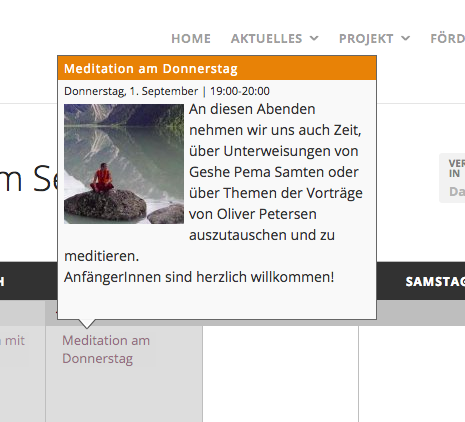
If you need help writing more custom CSS on your site, definitely check out a [free!] tool like Firebug if you use FireFox, or the Developer Tools for either Safari or Chrome. They have “Inspector” tools that let you zoom right over the element whose CSS you want to change (like the tooltips), and make it much easier to make modifications like I showed above.
Cheers,
GeorgeParticipantHey Chris,
Thanks for reaching out.
Responsiveness is mostly handled by and determined by your theme, not the plugin itself.
Can you share a link to a place on your site where a non-responsive event embed like the one you describe is visible? I will take a look and try to diagnose the problem more specifically, and if there is indeed a bug on our end I will notify our developers.
Thank you!
GeorgeParticipantHey @Mariasole,
Thanks for reaching out!
It unfortunately may not be possible to use the theme’s features on the events pages. I would recommend asking your theme developer about this, and seeing what their opinion is—they may be able to provide better assistance or add custom code for your theme to work as you hope.
One thing you can try, however, is to try changing the Events Template option for The Events Calendar and see if any particular page templates work better with the theme header features.
To do this, simply head to Events → Settings → Display in your site’s wp-admin. You will find the Events Template option here. Try out a different template option, save the changes, and then go back to the events page and try adding a custom theme header. See if anything improves. If not, return to the settings page, change the option to another template, and try again—and so on until you have tried all templates.
If this method still does not reveal a solution, then unfortunately there is not much else that can be done from the perspective of the calendar plugin itself, and I would recommend contacting the theme developer for further insight.
Let us know what you find!
Sincerely,
GeorgeParticipantHey Roger,
Thanks for reaching out. I am very sorry to hear about these issues.
No matter what I try, I cannot recreate your problems. So there is likely a theme or plugin conflict on your site hindering the creation of tickets.
To investigate this issue and find out what the culprit is, the best thing I can recommend you do is go through the complete set of troubleshooting steps on this page ? https://theeventscalendar.com/knowledgebase/testing-for-conflicts/
After EACH STEP in that process, try to create a new event ticket—does anything improve, anywhere along the way in that testing process?
Let us know what you find!
Thank you,
GeorgeParticipantHi Doug,
Thank you for reaching out. These forums here are our “Pre-sales Questions” forums, so we unfortunately cannot field technical support questions here.
It doesn’t currently appear that you have a premium license with us. If this is wrong, and you do have a premium license with us, then apologies for my misunderstanding! In this case, please log into the account on this site that has your premium license, and then post this question in a premium support forum.
If you indeed do not have a premium license, then please post your question in our free support forums here → http://wordpress.org/plugins/the-events-calendar
We check those forums a bit more than once per week, so hopefully we will be able to get to your question there.
Thank you,
GeorgePS
As for this specific issue, it looks to be caused by your current theme. I would recommend activating a default theme like Twenty Twelve or Twenty Sixteen, and then seeing how the calendar looks in that theme.
If issues persist in that default theme, then leave the default theme active and proceed with the rest of the steps outlined on this page → https://theeventscalendar.com/knowledgebase/testing-for-conflicts/
Check on the header appearance after each step. This process will reveal if there is a plugin on your site causing the issue, which may be the case if the theme is not the culprit.
ParticipantHello!
I am sorry to hear about this. Can you try temporarily installing The Events Calendar on your site and let me know if this helps at all?
You can find The Events Calendar here → https://wordpress.org/plugins/the-events-calendar/
Thank you!
GeorgeParticipantHey Ed,
Thanks for reaching out!
If there is a background image on your site, then this is dictated by your theme, not The Events Calendar.
Likewise, changing the image would require modifying theme code.
Can you share a link to the calendar page on your site where there is a background image? I will take a look and see if I can recommend anything.
However, in the meantime I would recommend contacting your theme developer for some assistance on changing the image.
Cheers,
GeorgeParticipantHey @Jeremy,
Thanks for reaching out.
4.2.6 is the latest version of The Events Calendar, so I am not sure why that message is popping up for you.
Can you share screenshots of the message you get to update? You can do so by uploading the screenshots to this thread. If you have issues with that, you can upload to Imgur.com, Flickr.com, CloudUp.com, or any similar image-hosting site; then just share the links to those images here and I’ll take a look.
Thank you!
GeorgeSeptember 12, 2016 at 8:10 am in reply to: Is this configuration possible with the Pro Plugin and the Filter Add-on? #1162801ParticipantHey Art,
Thank you for reaching out!
This exact configuration is not quite possible with our plugins out of the box. Custom coding would indeed unfortunately be required. 🙁
Does this information help you proceed with your project? Let me know, and also let me know if you have any other questions I can try to help with.
Thank you!
Sincerely,
GeorgeSeptember 12, 2016 at 8:09 am in reply to: Events are being posted twice or even three times #1162798ParticipantHey @Larafarwell,
Thank you for the udpate!
If you got to the “Cron Events” page I showed in my reply above (assuming you still have that Cron-management plugin installed), then do you see the tribe_fb_auto_import cron event listed there still?
If so, then can you paste your site’s System Information here yet again? I’m sorry to request it again—but enough time has passed since the start of this issue that it is worth looking into those things again, and seeing the complete profile of your system will be very helpful.
Thank you!
Sincerely,
GeorgeParticipantThanks for elaborating on all of this John. The value of better integration with our plugins and with Product Add-ons is clear — I am sorry that great integration is currently non-existent. 🙁
As I noted above, providing better support here is something we are working on. While I unfortunately don’t have any specific recommendations here, I would recommend staying tuned to plugin releases and would also encourage you to voice your thoughts on our UserVoice page here → http://tribe.uservoice.com
We pay close attention to the UserVoice page and use it as a way to determine what features to add, what things our customers are really concerned about, etc.
Sincerely,
GeorgeParticipantThank you for elaborating and sharing these details, @Dosmedia!
To be clear, I am not saying that this is not a problem—we are working on better WPML support and this is just one bug we need to fix.
I will consult with some team members who understand the technological aspect of this bug and will see if it makes sense to post this on the Known Issues page.
If it does, we will post it there sometime in the next week or so.
Thank you for reaching out and bringing this to our attention!
Cheers,
GeorgeParticipantHey Alan,
Thanks for reaching out.
We absolutely recommend that the client purchases the licenses, not the developer or contractor working on the site for them.
The site owner should always be the owner of the license. We elaborate on why a bit more on this knowledgebase post → https://theeventscalendar.com/knowledgebase/client-or-dev/
I hope this information helps!
George -
AuthorPosts