
Home › Forums › Calendar Products › Events Calendar PRO › Month view pop up
- This topic has 4 replies, 3 voices, and was last updated 10 years ago by
anjuly.
-
AuthorPosts
-
September 12, 2016 at 3:05 am #1162705
anjuly
ParticipantHello,
I have little problems with the month View hover:I’ll send you an attachment, so you can see that the upper part is cropped – so this is my first problem.
The second is: the font size and the Line Height of the body is too big – is it possible to adjust this like on shindig (see the second attachment).Thanks a lot – best Regards
JulySeptember 12, 2016 at 9:16 am #1162844George
ParticipantHello!
Thanks for reaching out.
In regards to your issues, both of them are caused by your theme. To fix the first problem, where the top of some tooltips is being cut off, you just need to add some CSS like the following to the bottom of your theme’s style.css file to ensure that the tooltips show up correctly:
.recurring-info-tooltip,

.tribe-events-calendar .tribe-events-tooltip,

.tribe-events-week .tribe-events-tooltip {

    z-index: 9999 !important;

}
Now, in regards to the second issues, which are just that you would like to alter the way the tooltips look, this is essentially a design modification and we are unfortunately not able to provide much help with design modifications, code tweaks, etc. as per our support policy (read here).
However, you can still modify things with just a bit off CSS in your theme’s style.css file.
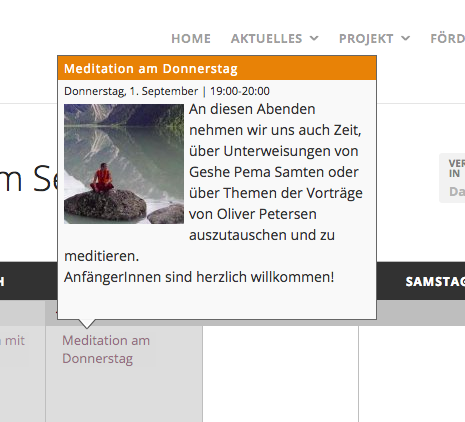
You will have to do the custom coding on your own, or hire a professional to assist you, but to help get you started, here is an example of some CSS code that will reduce the line height in the tooltips a bit:
.tribe-events-tooltip p {

    line-height: 1.5;

}
Here is how that makes things look:
If you need help writing more custom CSS on your site, definitely check out a [free!] tool like Firebug if you use FireFox, or the Developer Tools for either Safari or Chrome. They have “Inspector” tools that let you zoom right over the element whose CSS you want to change (like the tooltips), and make it much easier to make modifications like I showed above.
Cheers,
GeorgeSeptember 12, 2016 at 2:25 pm #1163010ParticipantHey George, thanks a lot for your quickly reply, but unfortunately both css-supports are not working in Firefox…!?
I tested this in Chrome and Safari and in this connection it works well.
Is there a possibility to change this in Firefox??
BR
JulySeptember 12, 2016 at 3:28 pm #1163041ParticipantHello,
I wrote the CSS above in Firefox, which is the browser I used, and it worked well. Neither thing is an edge-case CSS3 selector that only a few browsers support, so I am wondering if maybe there is a caching issue with your Firefox browser or something? Maybe in a few hours it will refresh and work fine?
The screenshots I took of things working were also taken in Firefox, and I just checked your events page in Firefox and it worked and looked fine.
As noted above and in our support policy we cannot help with custom coding. These issues come from your theme’s CSS, so please contact your theme developer for further assistance with these issues.
I am sorry, but hope that the custom code I provided continues to be helpful.
Sincerely,
George -
AuthorPosts
- The topic ‘Month view pop up’ is closed to new replies.