

Forum Replies Created
-
AuthorPosts
-
George
ParticipantHello!
You do NOT need Events Calendar Pro to use Community Events. You can use Community Events with just the core, free plugin The Events Calendar.
Cheers,
GeorgeParticipantHey @Dosmedia,
What did you find after doing all of the detailed steps that Geoff B. laid out in his last reply on that thread? You did not reply there. If those steps help you, then this may not be ready to go on the Known Issues page. That page is meant for only a few of our biggest, most clearly-defined bugs that affect many many people.
Let us know what you found by doing the steps Geoff B. recommended.
Thanks!
GeorgeParticipantHey @Merijn,
Thanks for reaching out!
If you only need to have “RSVPs” on your site, which are free and do not cost any money or have any checkout process, then you do not need the Event Tickets Plus add-on. You can get buy with just the core Event Tickets plugin.
If you need to sell tickets for money, and charge for those tickets on your site, then you would need Event Tickets Plus.
I hope this helps to clarify things!
GeorgeParticipantThis reply is private.
ParticipantHey Ed,
Thanks for reaching out.
The current recurrence system will indeed not be very easy to use for your configuration here for the following reasons: the “recurring events” system is meant for recurring events. Recurrence implies some semblance of patterns.
The event configuration you list here, however, does not have any patterns—it is basically three events at different days and times, with no pattern in their recurrence.
To pull off something like this with our recurring events features, then, you would have to get clever and use custom recurrences and exclusions. Trying to describe this verbally would be challenging, so the best way to show how to construct this is with a screenshot like the following:
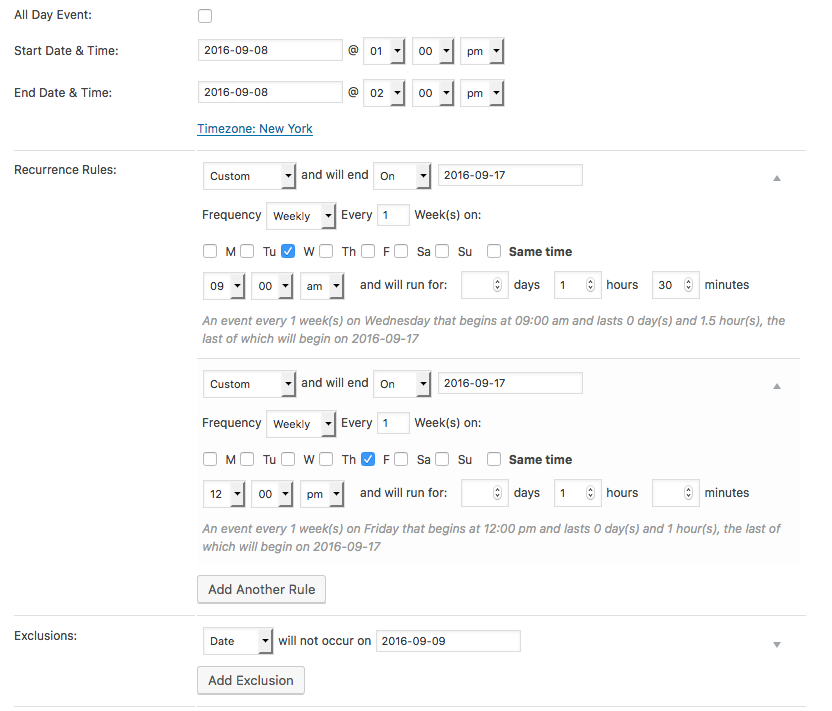
To review:
• The first/original event date is Thursday Sept 8, 2016 1:00pm-2:00pm
• Then there is a “weekly” custom recurrence for Wednesdays. But we set the end date for this custom weekly recurrence so that only one Wednesday event is generated, the event on Wednesday Sept 14.
• For this Wednesday event, we do NOT use the same time as the original event; a custom time is chosen.
• Next, there is a “weekly” custom recurrence for Friday. We set the end date for this custom weekly recurrence so that only two Friday events are generated, ending with the last event here which is Friday Sept 16.
• This Friday Sept 16 event is again NOT at the same time as the original event, so a custom time is chosen.
• BUT since the first event is on a Thursday, this custom Friday recurrence means two Friday events are generated. We only want one Friday event to exist, on Friday Sept 16, so we add an Exclusion for Friday Sept 9.This is all shown in the screenshot above, so please consult that for reference.
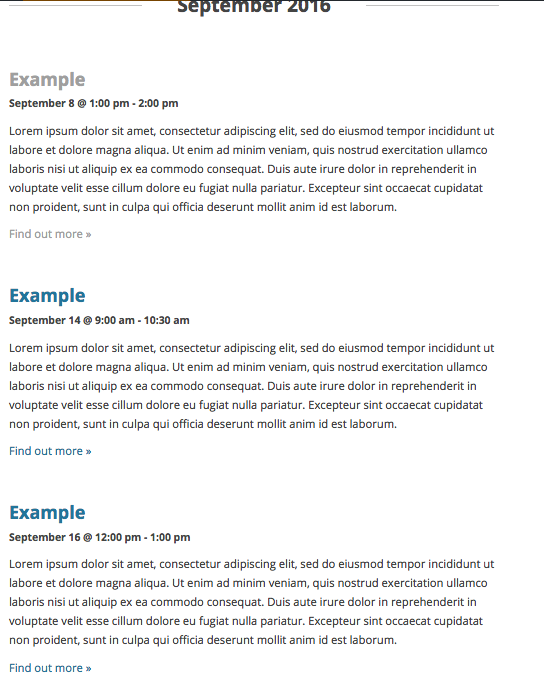
These generate a three-event series exactly as you describe. Here is a screenshot showing them generated on the front-end:
Cheers,
GeorgeParticipantHey Jens,
Thanks for reaching out.
There is unfortunately no sure-fire way to contact folks on UserVoice. We do not have any of their account information, email addresses, etc., nor would we share them if we did have them as that’s a breach of privacy.
There are two main things I can think of:
• Make an account on UserVoice yourself, and reply in comments to users whose own comments pique your interest.
• Search online for usernames of folks you want to contact. Folks often use the same username in numerous places, so maybe by finding the same user on another platform you can unearth more details about contacting them, finding their website, etc.
Best of luck with your searching!
GeorgeParticipantHey Ashlee,
Thanks for reaching out!
The answer here is a sort-of “yes”, and sort-of “no”. It’s “no” in the sense that our plugins themselves do not have any pre-population features, unfortunately. 🙁
However, there is some basic pre-population that WooCommerce itself does in that last phase of the checkout process. If the customer is returning customer, for example, or has an account on the site and is logged into that account while making the purchase, then their billing/shipping details should be auto-filled.
I hope this information helps!
GeorgeParticipantHey Colleen,
Thanks for reaching out. This feature currently does not exist — the Facebook Event functionality and Community Events functionality are wholly separate from each other at this time, and there is not a way to add a “Facebook Event number” field to the community event submission form.
Unfortunately, the only to add a field like this would be with some extensive custom coding. I say “unfortunately” because we are not able to help with custom coding. If you would like to add a custom field to your submission forms, check out our Themer’s Guide to see if you can make the customization yourself. If not, then I would recommend checking out our “Customizations” page to learn about how you can go about realizing the customized submission form → http://theeventscalendar.com/customizations
Sorry to disappoint!
Sincerely,
GeorgeParticipantSure thing Pau—best of luck with your project!
— George
ParticipantNo worries Pau, thanks for reaching out!
When it comes to these customizations, we unfortunately cannot help with customizations or design tweaks as stated in our support policy which you can read here.
Removing the excerpts is rather simple, though, so I can share some code for this. To hide those excerpts, just add CSS like the following to your site:
#tribe-events .tribe-events-list-photo-description {

    display: none !important;

}
To adjust the number of columns, you’ll unfortunately have to do a bit of CSS customizing AND some JavaScript customizing. To do this, set SCRIPT_DEBUG to TRUE on your client’s WordPress Site. Then, head to this JavaScript file within Events Calendar Pro and make modifications to get the layout to suit your client’s needs:
events-calendar-pro/src/resources/js/tribe-events-photo-view.js⚠️ Be sure to make backups of all customizations to this file, because you will lose those customizations each time you update the plugin and will need to add the customizations back after each update.
Best of luck with your customizations!
GeorgeParticipantHey John,
Thanks for reaching out.
Our ticketing plugins unfortunately don’t have any built-in support for product add-ons at this time. It is not just because of being a “virtual product”—it’s related to a few different technical things.
Better support for premium ticket add-ons is something we are actively working on, but in the meantime, I’m curious: you mention having tried adding product add-ons, can you clarify exactly how you are going about doing this? Are you using a specific WooCommerce extension to add product add-ons, for example? If so, which one? Are you just using built-in WooCommerce features to link the products? If so, share screenshots of your process. (You can do so by uploading the screenshots to this thread. If you have issues with that, you can upload to Imgur.com, Flickr.com, CloudUp.com, or any similar image-hosting site; then just share the links to those images here and I’ll take a look.)
If I understand what process you’re using, I may be able to offer some insight.
Thank you!
GeorgeSeptember 6, 2016 at 8:37 am in reply to: Events on WordPress No Longer Sync with Eventbrite & Vice Versa #1160376ParticipantThis reply is private.
September 6, 2016 at 8:33 am in reply to: Ticket questions saved as cookies, is there an alternative? #1160374ParticipantSure thing, Shaun—thanks for your patience!
Best of luck with your project,
GeorgeAugust 31, 2016 at 12:06 pm in reply to: Ticket questions saved as cookies, is there an alternative? #1158415Participant😀
ParticipantThanks for posting, Nico—let us know what you find, David!
— George
-
AuthorPosts