
Home › Forums › Calendar Products › Events Calendar PRO › Custom Recurrence – Multiple Dates & Times
- This topic has 4 replies, 4 voices, and was last updated 10 years ago by
cityofpoco.
-
AuthorPosts
-
September 6, 2016 at 3:58 pm #1160706
cityofpoco
ParticipantI am trying to create an even in the Pro version which will recur on different dates and times. I’ve reviewed the posts at: https://theeventscalendar.com/support/forums/topic/recurring-events-with-complicated-datestimes/
I’m not seeing the settings the posts refer to. If I select Custom-> Weekly, it creates events for every week up until the end data I specify instead of just one occurrence on the data I specify. I also don’t see where I can tell it how many occurrences I want it to run.
Am I missing something? Does anyone have a screenshot of how I can set this up?
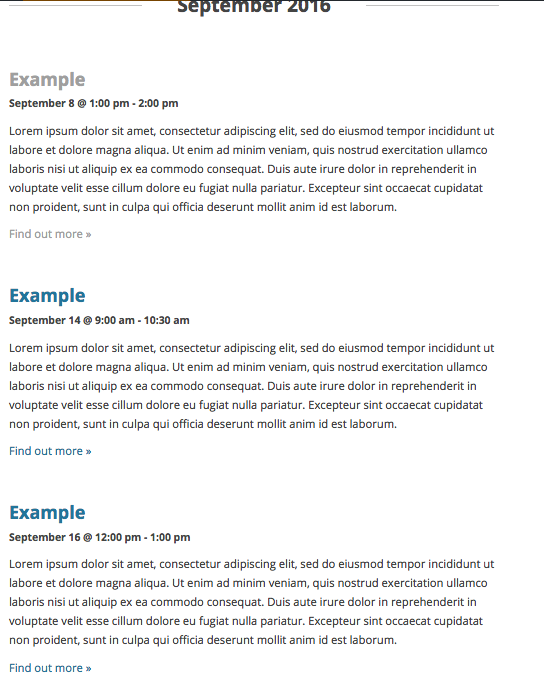
Sept 8, 2016 1:00pm-2:00pm
Sept 14, 2016 9:00am-10:30am
Sept 16, 2016 12:00pm-1:00pmThanks.
September 6, 2016 at 4:02 pm #1160708ParticipantIf I select Custom->End after 1 event, it doesn’t let me select the date I want. I’m confused.
September 7, 2016 at 10:16 am #1161079George
ParticipantHey Ed,
Thanks for reaching out.
The current recurrence system will indeed not be very easy to use for your configuration here for the following reasons: the “recurring events” system is meant for recurring events. Recurrence implies some semblance of patterns.
The event configuration you list here, however, does not have any patterns—it is basically three events at different days and times, with no pattern in their recurrence.
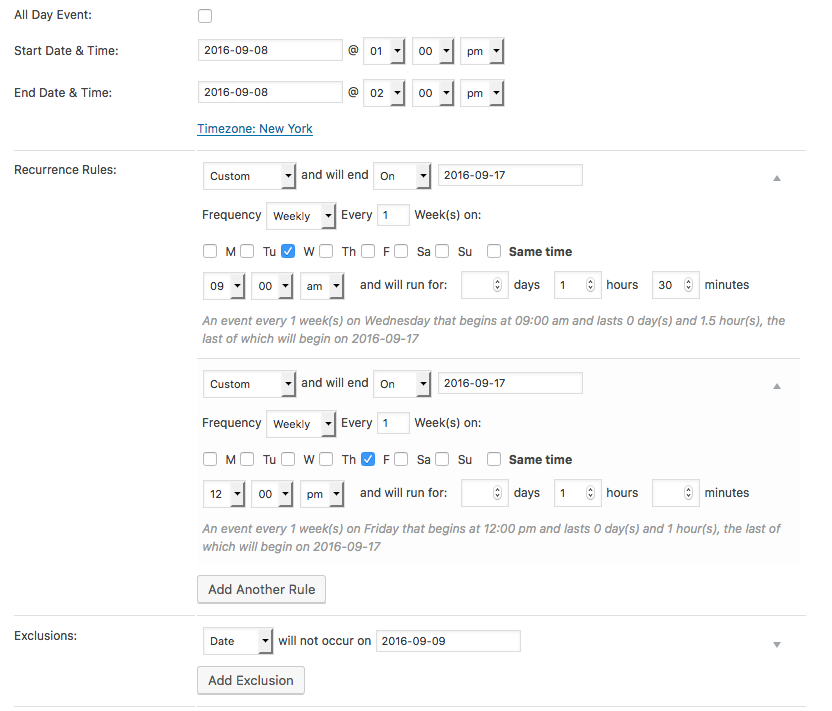
To pull off something like this with our recurring events features, then, you would have to get clever and use custom recurrences and exclusions. Trying to describe this verbally would be challenging, so the best way to show how to construct this is with a screenshot like the following:
To review:
• The first/original event date is Thursday Sept 8, 2016 1:00pm-2:00pm
• Then there is a “weekly” custom recurrence for Wednesdays. But we set the end date for this custom weekly recurrence so that only one Wednesday event is generated, the event on Wednesday Sept 14.
• For this Wednesday event, we do NOT use the same time as the original event; a custom time is chosen.
• Next, there is a “weekly” custom recurrence for Friday. We set the end date for this custom weekly recurrence so that only two Friday events are generated, ending with the last event here which is Friday Sept 16.
• This Friday Sept 16 event is again NOT at the same time as the original event, so a custom time is chosen.
• BUT since the first event is on a Thursday, this custom Friday recurrence means two Friday events are generated. We only want one Friday event to exist, on Friday Sept 16, so we add an Exclusion for Friday Sept 9.This is all shown in the screenshot above, so please consult that for reference.
These generate a three-event series exactly as you describe. Here is a screenshot showing them generated on the front-end:
Cheers,
GeorgeSeptember 29, 2016 at 9:35 am #1170469Support Droid
KeymasterHey there! This thread has been pretty quiet for the last three weeks, so we’re going to go ahead and close it to avoid confusion with other topics. If you’re still looking for help with this, please do open a new thread, reference this one and we’d be more than happy to continue the conversation over there.
Thanks so much!
The Events Calendar Support Team -
AuthorPosts
- The topic ‘Custom Recurrence – Multiple Dates & Times’ is closed to new replies.