

Forum Replies Created
-
AuthorPosts
-
George
ParticipantHey Jordan,
As someone who bought iCal Importer, you automatically have a license for Event Aggregator in your account for free.
I can refund that iCal Importer license for you, and so then you can go ahead and buy a new Event Aggregator license if you like this conceptually.
But I just want you to know you already have an Event Aggregator license! 😀 Head to http://theeventscalendar.com/license-keys to find it. This article covers how to move to Event Aggregator from iCal Importer → https://theeventscalendar.com/knowledgebase/moving-to-event-aggregator/
Cheers,
GeorgeParticipantHey Joe,
Thanks for reaching out.
First question is does the Events Calendar, Events Calendar PRO, and Community Events plugins all need to be on the same release version?
YES — They need to be of the same Major Release version. This is dictated by the first two numbers in the version number. So, for example, you could use versions 4.3.1, 4.3.0, and 4.3.0.1 of different plugins all together fine. But you could not use 4.2.1, 4.1.2, 4.3.1, and 3.12.2 together without issues. I hope this example is clear!
I upgraded Community Events but not PRO (pending license renewal) and my datepicker popup is all jacked up. […] I fully understand this could be a different plugin or theme conflict but I wanted to rule out any version conflict right off the bat.
This could be a combination of version number mismatch and some sort of conflict elsewhere on the site; in other words, a conflict that only arises given another layer of conflict via the mismatched versions.
I am not certain, to be honest, but cannot recreate this problem myself so I would recommend the following things:
1. Ensure all of your plugins are up-to-date, with version 4.3.0.1 for The Events Calendar and version 4.3 of everything else at this time.
2. If issues persist after updating, then do the complete set of steps on this page → https://theeventscalendar.com/knowledgebase/testing-for-conflicts/ After EACH STEP in that process, check on the datepicker and see if issues persist. If things clear up anywhere along the way, let us know.
I hope this information helps, Joe — keep us posted on what you find!
— George
ParticipantHey Nicky,
Our plugins don’t provide any specific feature for this, but you may be able to use the built-in WordPress import/export tools to accomplish what you’re hoping to.
To learn how to use those tools, check out this guide on the topic that we put together → https://theeventscalendar.com/knowledgebase/using-wordpress-export-tools-to-migrate-events-content/
I hope that article helps! 😀
— George
ParticipantHey Wim,
Thank you for this suggestion! I do agree that some more controls would be a nice feature. There is no plan at this time for such features, but if you would like to see changes in the plugin, please do post your ideas on our UserVoice page here → http://tribe.uservoice.com/
If there’s anything else I can try to help with, let me know! 😀
— George
October 19, 2016 at 9:55 am in reply to: Switching view does not work since the last update #1179218ParticipantHey Esteban,
Sorry to hear about this!
I went to the link you provided, http://cuidalotuyo-test.hq.colegio-escribanos.org.ar/, to look at the issue firsthand. But it gave me an error:
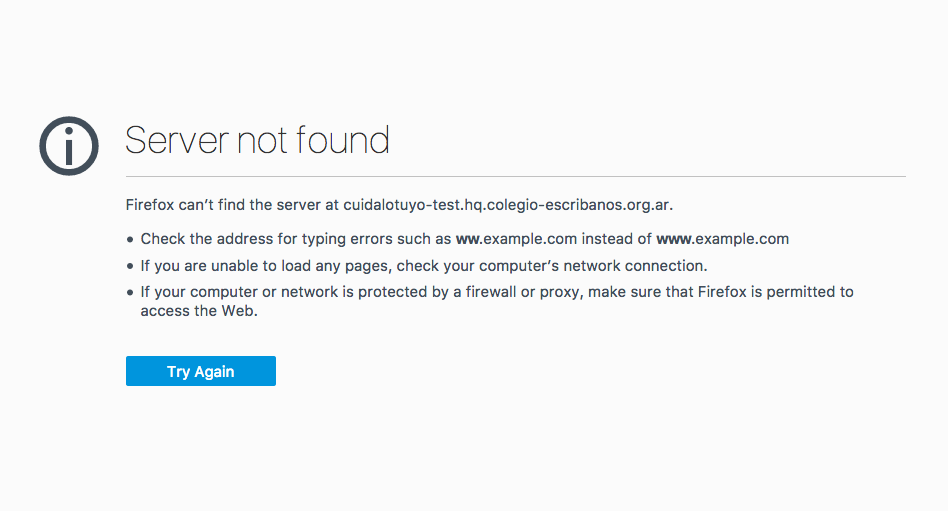
Can you provide a working link to your site’s events page so I can see this firsthand? I will take a closer look and try to identify the problem! 😀
— George
ParticipantHi Alex,
The date pickers and location pickers should indeed still work, so based on what you described, it sounds like there is a JavaScript error in the admin of your site.
I would recommend performing the steps on this page → https://theeventscalendar.com/knowledgebase/testing-for-conflicts/
After EACH STEP in that process, check out the “Add New Event” screen you describe here; does anything improve with these two issues you described?
Let us know what you find in this testing!
— George
October 19, 2016 at 9:51 am in reply to: Using Events Calendar Pro on Multisite Install but only one site. #1179215ParticipantHi Alex,
Thanks for reaching out.
You need a Multisite License to “Network Activate” a plugin, individually activate the plugin on 11 or more sub-sites, or do automatic updates on any number of sub-sites.
You can read more about this here → https://theeventscalendar.com/knowledgebase/multisite-license/
If you are only using the plugin on one single sub-site, though, then you do not need a Multisite License and a Personal License is fine.
I hope this helps!
GeorgeParticipantHi Raya,
Sorry for the trouble here!
You say, “I’m having the same issue.” — can you clarify what you mean and what other instance of these issues you are referring to on our forums or otherwise?
In your account I see one license key for Filter Bar.
1. What do you see when you try activating this license key? Please share a screenshot of when you try entering it in your site’s Events settings. (You can do so by uploading the screenshots to this thread. If you have issues with that, you can upload to Imgur.com, Flickr.com, CloudUp.com, or any similar image-hosting site; then just share the links to those images here and I’ll take a look.)
2. Next, what do you see when you go to http://theeventscalendar.com/license-keys? Please share a screenshot of what you see on this page.
I will use this information and try to resolve these issues! 😀
Thank you,
GeorgeParticipantHey Virginio,
Thanks for reaching out.
We do not make the plugin “BuddyPress Events Calendar” so unfortunately aren’t able to confirm how it works — I would recommend contacting the support team of the creators of “BuddyPress Events Calendar.”
Our own plugins, like The Events Calendar, Events Calendar Pro, etc., do not have any specific integration with BuddyPress features.
I hope this information helps!
GeorgeParticipantHi Brett,
Thanks for reaching out.
I do not see any unanswered applications in our queue, so perhaps there is a problem of email delivery here?
I would encourage you to:
1. Specify the name of the organization here.
2. Have them re-submit an application.Thank you!
GeorgeParticipantHey Kim,
I am sorry for the trouble here.
I cannot reproduce this behavior, and we have no reports of this from other customers, so this seems to be unique to your site.
1. Can you please share links to event pages on your site where there are tickets with “Additional Information” fields? I will look at them up front.
2. Can you please share a screenshot of where you expect to see attendee information, but do not see it? You can do so by uploading the screenshots to this thread. If you have issues with that, you can upload to Imgur.com, Flickr.com, CloudUp.com, or any similar image-hosting site; then just share the links to those images here and I’ll take a look.
3. Can you please confirm when this issue started happening? Did it all work fine before, and then you updated to 4.3 this week, and suddenly it breaks?
Thank you!
GeorgeOctober 19, 2016 at 9:40 am in reply to: Show Attendees additional information Order on-hold? #1179202ParticipantThanks Kim,
I will close this thread and continue in that other thread you linked to.
— George
October 19, 2016 at 9:36 am in reply to: Why in comments: During scheduled import, the limit of HTTP requests was reached #1179199ParticipantThanks for this info, @4smartbiz.
So, we recently confirmed a bug where if the limit was reached, there would be too many logs reported. Our developers are working hard on fixes and we’ve currently got a fix for this bug in the code-review/testing phase, so hopefully it’ll come soon.
Now, in your case it seems the problem is that the limit isn’t actually being hit. We have not had reports of this sort of error at this time, and I cannot recreate that. I will work with our developers on this to investigate it and see what we find.
To help us investigate you mention this:
It occurs one time each day for each of the Facebook pages it is trying to import from.
1. Can you share the list of Facebook pages you’re importing from? If this is not data you want to share, I understand; no worries. But it would help us test this—let me know! (Even if there are many pages, you can paste all of the URLs here).
Next, you mention this:
I am set to import once per day at 2:30’ish pm.
2. Can you confirm if you’ve been set to import “once daily” since you first activated Event Aggregator? Or have you used the “on-demand” import method at all thus far along the way?
Thank you for your patience here! We are actively investigating this.
Sincerely,
GeorgeParticipantHey Christoph,
I wanted to inform you that our developers are working hard on a fix for this and there is currently a fix in the code review and testing phase already. Hopefully, if all goes to plan, we can publish a fix some time this week.
Stay tuned!
Thanks so much for your patience,
GeorgeParticipantThis reply is private.
-
AuthorPosts