

Forum Replies Created
-
AuthorPosts
-
George
ParticipantHey Michael,
Our recurring events engine unfortunately has some difficulty supporting events that recur within the same day, and this is generally not supported.
However, for some more insight on these issues, can you post a screenshot of the whole “Time & Date” section of the edit screen for the recurring event you’re having trouble with? This screenshot should show the complete time, date, and recurrence settings for the event — I will use this information to try and recreate the same event on my own site, and see if I find the same problems you do.
Here is an example of what a “Time and Date” screenshot I’m asking for might look like → https://cldup.com/JLJmZjrBFx-3000×3000.png
Thanks!
GeorgeParticipantHey Joe,
Thanks for reaching out.
Is it possible to create an event in the plugin, then in the content area, use Visual Composer to create a complete page filled with content, and have multiple pages also associated with that one event.
Our plugins do not currently have any specific support for the sort of extra content you describe in your post — multi-page events, for example.
While I can’t speak to the capabilities of Visual Composer, our plugins do not have any support on their own or specific integrations with Visual Composer to enable what you describe.
Custom code may indeed be needed.
To be certain about to what extent Visual Composer might be helpful here, I would recommend contacting the Visual Composer team for specific insight about the capabilities of their product.
If they say it won’t be possible, too, then you would indeed probably have to write custom code; you could write that custom code yourself or hire a professional developer to do it for you. We have a list of great developers here → http://m.tri.be/18k1 (and have no affiliation with any of these folks—they’re simply some well-respected names in the community that we’ve compiled to share in situations like this one).
Sorry to bear some disappointing news here — let me know what think, and if there’s anything else I can try to help with! 😀
— George
ParticipantHey Ken,
Thanks for reaching out!
We don’t currently have any such features in our plugins. The closest thing we currently have is the “Additional Attendee Info” feature of Event Tickets Plus, which lets you collect extra information from attendees when they add tickets to their carts.
This is typically used to, for example, collect their t-shirt sizes or meal choices or number of guests, or something like that. But you could also use it to collect “survey”-style information, like how they feel about something, or other personal information.
If the surveys you want to do are only for after the ticketed event occurs, though, then this of course won’t work well for your needs. 🙁 But just wanted to mention it as a possibility.
Please let me know if there are any other issues or questions I can try to help with!
Sincerely,
GeorgeNovember 18, 2016 at 9:41 am in reply to: Tickets Disappear From Website a few hours before event begins #1194596ParticipantThis reply is private.
ParticipantThanks for clarifying this, @ccisatnu, I appreciate it!
I’ve been trying to recreate this problem but I can’t seem to do so. When I am editing a single event in the wp-admin, here’s what I see (click for a larger-sized image):
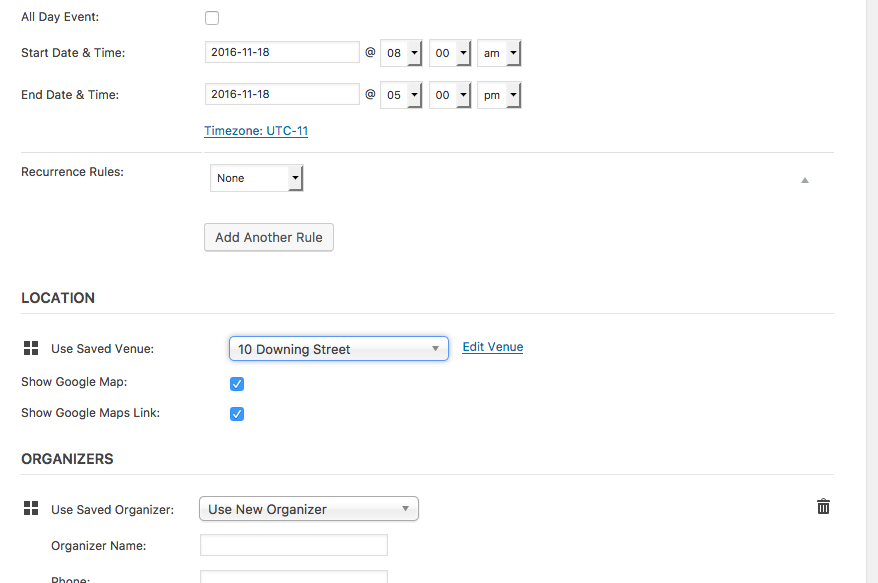
☝️ The checkboxes show up fine and work fine, too.
I’ve checked our bug system and these forums and also don’t see any other reports of the behavior you describe, so this currently appears to be limited to your site only.
With this in mind, the best steps I can think of doing would be to do the complete set of troubleshooting steps outlined on this page → https://theeventscalendar.com/knowledgebase/testing-for-conflicts/
After EACH STEP in that process, go back to the screen in your screenshot above where you’re editing a single event and see if anything changes with the Venues checkbox behavior you reported here — there may be a theme or plugin conflict on your site, and these steps should reveal if that’s the case (or definitively rule it out!).
Let us know if you’re able to do this testing and, if so, what you find!
Thanks,
GeorgeNovember 18, 2016 at 8:35 am in reply to: Exporting iCal to yahoo. Must open yahoo cal like Google export button #1194542ParticipantAwesome, thanks for clarifying.
When it comes to The Events Calendar, there are no built-in “export” links for Outlook or Yahoo, so you would have to write custom code to add those export links (or hire someone to write that custom code for you).
We have a list of great developers here → http://m.tri.be/18k1 (and have no affiliation with any of these folks—they’re simply some well-respected names in the community that we’ve compiled to share in situations like this one).
Please let me know if there are any other issues or questions I can try to help with!
Sincerely,
GeorgeNovember 17, 2016 at 9:55 am in reply to: For how many events/organizers I can use Event Aggregator without problems? #1194013ParticipantHey Mat!
Can I run the import for 500 organisations 100 times a day or am I restricted to 100 events a day?
The former; you can run 100 imports per day, and are not limited to 100 events per day. So, yes, if you have a batch of 500 pages, then technically you can import from this body of 500 pages 100 times a day.
However, this has some problems:
Are there problems with big amounts of organisations where I would like to import events?
YES, there are performance issues with importing from lots and lots of Facebook pages. This has basically nothing to do with our plugins themselves, but mainly with your site’s server and other web infrastructure, and the size of the HTTP request needed to import from hundreds of pages at once.
Once you start importing from more than a few dozen sources at a time, you will start to see your site’s performance severely negatively impacted by the sheer volume of data trying to be crunched. There is no way around these problems other than to soup up your website’s hosting infrastructure and/or break the massive imports up into smaller batches.
I hope this information helps! Please let me know if there are any other issues or questions I can try to help with.
— George
November 17, 2016 at 9:52 am in reply to: Exporting iCal to yahoo. Must open yahoo cal like Google export button #1194011ParticipantHey Jess,
Thanks for reaching out.
We do not make the All in One Calendar plugin — we make a different on called The Events Calendar. Our pro plugin, Events Calendar Pro, only works with The Events Calendar, not the All in One Calendar plugin or any other calendar plugins.
If you’re looking for the All in One Calendar plugin folks, we’re unfortunately not them. 🙁 So I would encourage finding their website and contacting their team.
If I am misunderstanding things here and you do need our help, apologies — let me know in more detail how we can help and I will try to do so! 😀
George
November 17, 2016 at 9:46 am in reply to: Importing edited event creates new event / end date & time not being imported #1194009ParticipantThis reply is private.
November 17, 2016 at 9:22 am in reply to: I need to refund my all purchased (Bundle Plugins). #1193989Participant😀
ParticipantHey there,
Sorry to hear about these issues — we have fixed the SSL/mixed-content issues in our lost Maintenance Release, version 4.3.3, which you are running as shown in your site’s “System Information”. So, if you activated that SSL Insecure Content Fixer plugin just to address our plugins’ prior issues, I would recommend now removing that plugin altogether as our plugins have fixed this internally.
In regards to the issue you report here, can you clarify exactly what you mean when you say this:
the option for displaying the venue on a Google map was not showing
I’m not quite sure what specific option are you referring to — is this visible when editing a single venue in the wp-admin, for example?
If possible, please share a screenshot of the page you’re on when you encounter this issue — I’m sorry to request this, but I’ve been trying to recreate this JS error to no avail in my wp-admin and want to make sure I’m not overlooking the specific location you are referring to.
You can share screenshots by uploading images directly to this thread. If you have issues with that, you can upload to Imgur.com, Flickr.com, CloudUp.com, or any similar image-hosting site; then just share the links to those images here and I’ll take a look.
Thanks!
GeorgeNovember 17, 2016 at 9:14 am in reply to: I need to refund my all purchased (Bundle Plugins). #1193978ParticipantSure thing, @sarun, we can totally help here — to get started, can you submit a formal refund request on this page? → https://theeventscalendar.com/knowledgebase/refund-policy/
Once you do that, we’ll continue the conversation over email, so I will close this forum thread for now.
Cheers!
GeorgeParticipantHey Julie,
Thanks for reaching out!
This is unfortunately a known issue that we are actively working on fixing — while I don’t have a specific ETA for the arrival of the fix, we hope to publish one very soon.
I will update this thread when the fix is available — stay tuned!
Sincerely,
GeorgeParticipantHello!
Yes, tickets that are sold on your site with our plugins get added to the same WooCommerce Cart as any other products on your site — and all can be “checked out” in one purchase, all there in the same shop and same cart.
Does this help at all? Let me know if so, and if there are any other issues I can try to help with!
Sincerely,
GeorgeParticipantHello!
I wanted to inform you that we’ve just published a series of updates to our products that fixes a number of issues.
We’ve fixed the Private Browsing-related issues reported here.
Learn more about this release—version 4.3.3—in the official release notes here → https://theeventscalendar.com/maintenance-release-events-calendar-4-3-3-event-tickets-4-3-3-premium-plugins/
Thanks for your patience while we fixed this!
George -
AuthorPosts
