
Home › Forums › Calendar Products › Events Calendar PRO › JavaScript error on admin screens
- This topic has 5 replies, 4 voices, and was last updated 9 years, 10 months ago by
ccisatnu.
-
AuthorPosts
-
November 17, 2016 at 8:42 am #1193958
ccisatnu
ParticipantEarlier today I was posting events for the first time since my site updated to Events Calendar Pro v4.3.3 and I noticed that the option for displaying the venue on a Google map was not showing.
I had that problem in the past and in that case, it was being caused by an insecure content error that was preventing the plugin’s .js files from loading. Running the SSL Insecure Content Fixer plugin fixed the error.
Now when I check my browser’s error console, I see a different error message:
Uncaught TypeError: $(…).bumpdown is not a function in events-admin.js?ver=4.3.3:147
This error appears with SSL Insecure Content Fixer active and inactive.
Do you have any suggestions on how to fix this error? Thank you for any help you can offer.
November 17, 2016 at 9:18 am #1193981George
ParticipantHey there,
Sorry to hear about these issues — we have fixed the SSL/mixed-content issues in our lost Maintenance Release, version 4.3.3, which you are running as shown in your site’s “System Information”. So, if you activated that SSL Insecure Content Fixer plugin just to address our plugins’ prior issues, I would recommend now removing that plugin altogether as our plugins have fixed this internally.
In regards to the issue you report here, can you clarify exactly what you mean when you say this:
the option for displaying the venue on a Google map was not showing
I’m not quite sure what specific option are you referring to — is this visible when editing a single venue in the wp-admin, for example?
If possible, please share a screenshot of the page you’re on when you encounter this issue — I’m sorry to request this, but I’ve been trying to recreate this JS error to no avail in my wp-admin and want to make sure I’m not overlooking the specific location you are referring to.
You can share screenshots by uploading images directly to this thread. If you have issues with that, you can upload to Imgur.com, Flickr.com, CloudUp.com, or any similar image-hosting site; then just share the links to those images here and I’ll take a look.
Thanks!
GeorgeNovember 17, 2016 at 1:45 pm #1194123ParticipantHi George:
Thank you for checking into this. The attached screenshot shows what I see on the Add Event screen. When I scroll down to the LOCATION section, I can select a venue from the dropdown, but I don’t see the “Show Google Map” or “Show Google Maps Link” checkboxes.
In the situation you mentioned in your message–when editing a single venue in the wp-admin–I’m able to see those two checkboxes.
November 18, 2016 at 9:16 am #1194574ParticipantThanks for clarifying this, @ccisatnu, I appreciate it!
I’ve been trying to recreate this problem but I can’t seem to do so. When I am editing a single event in the wp-admin, here’s what I see (click for a larger-sized image):
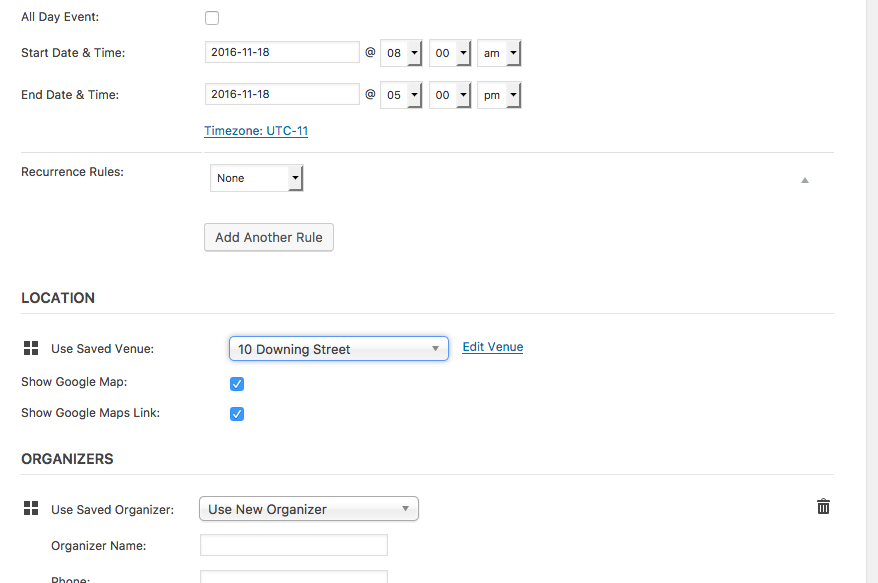
☝️ The checkboxes show up fine and work fine, too.
I’ve checked our bug system and these forums and also don’t see any other reports of the behavior you describe, so this currently appears to be limited to your site only.
With this in mind, the best steps I can think of doing would be to do the complete set of troubleshooting steps outlined on this page → https://theeventscalendar.com/knowledgebase/testing-for-conflicts/
After EACH STEP in that process, go back to the screen in your screenshot above where you’re editing a single event and see if anything changes with the Venues checkbox behavior you reported here — there may be a theme or plugin conflict on your site, and these steps should reveal if that’s the case (or definitively rule it out!).
Let us know if you’re able to do this testing and, if so, what you find!
Thanks,
GeorgeDecember 10, 2016 at 8:35 am #1204358Support Droid
KeymasterHey there! This thread has been pretty quiet for the last three weeks, so we’re going to go ahead and close it to avoid confusion with other topics. If you’re still looking for help with this, please do open a new thread, reference this one and we’d be more than happy to continue the conversation over there.
Thanks so much!
The Events Calendar Support Team -
AuthorPosts
- The topic ‘JavaScript error on admin screens’ is closed to new replies.