
Home › Forums › Calendar Products › Event Aggregator › Importing edited event creates new event / end date & time not being imported
- This topic has 30 replies, 4 voices, and was last updated 9 years, 10 months ago by
Chris Adams.
-
AuthorPosts
-
November 8, 2016 at 4:31 am #1189029
Chris Adams
ParticipantHi,
I’ve just upgraded TEC Pro to the latest version, de-activated iCal Importer, and run through setting up Event Aggregator. All seems fairly smooth but I have run into a couple of things as follows:-1. Once I have run an import and I go to Google Calendar, then I update the time of an event, after I have run the importer again it creates a new event for the event that has had it’s time updated – i.e. it duplicates it. Is this intended?
2. When creating a new event in Google (say it is set to start at 11am and finish at 12am) it imports the event but the start and end time are the same (11am).
Please can you let me know if these are bugs your end, they seem to be…
Thanks,
ChrisNovember 8, 2016 at 6:48 pm #1189453George
ParticipantHey Chris,
Thanks for reaching out!
To address things in reverse order here, what you describe in issue #2 is actually a known bug that emerged recently and that we are working urgently on — we hope to publish a fix as soon as possible, and while I don’t have a specific ETA, I will post updates on the arrival of that fix to this thread when they are available.
In regards to your first question, you should be able to modify this behavior by adjusting the “Update Authority” setting in your Event Aggregator settings — check out this knowledgebase article to learn more about that setting on the options for it that are available ? https://theeventscalendar.com/knowledgebase/event-aggregator-import-settings/
The “Overwrite my event with any changes from the original source” option for the Update Authority should be helpful here.
Let me know if this information helps!
Sincerely,
GeorgeNovember 9, 2016 at 5:41 am #1189559ParticipantOk , look forward to notification of the bug fix.
For the other issue I previously had it set to “Preserve the most recent change in each event field, whether that change occurred on my site or at the original source.” So I have changed that to “Overwrite my event with any changes from the original source”, tested it yet it still creates a new event (duplicate) when I change the times. If I just change other content such as the event name then it is OK though and updates the original event…November 9, 2016 at 5:26 pm #1190070ParticipantThanks for your feedback Chris, and for your patience here while we work on that first bug. Stay tuned to this thread — I will post updates, as mentioned above.
In regards to your other issue, this sounds like it is itself a bug:
yet it still creates a new event (duplicate) when I change the times.
I will investigate this and try to recreate this problem, and will report back on my findings — I may rope in the assistance of a developer on our team, as well.
Thank you,
GeorgeNovember 10, 2016 at 12:57 am #1190163ParticipantOk – thanks, look forward to hearing back from you.
November 10, 2016 at 5:15 pm #1190686ParticipantHi Chris,
Thanks for your patience here. I wanted to report that I have been doing extensive testing today with Event Aggregator and have not been able to reproduce the issues you describe.
For me, if I change the event time/date and try to re-import, in the import preview it will not list the events whose time/date have been modified — but upon doing the import, I will see message like this (click for a larger-sized image):
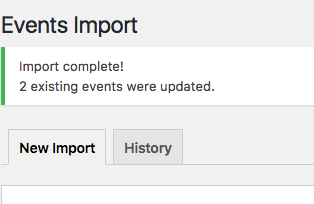
☝️ Then, the events will have their start times/dates adjusted, but a new event will NOT be created.
This is what my Update Authority is set to (click for a larger-sized image):
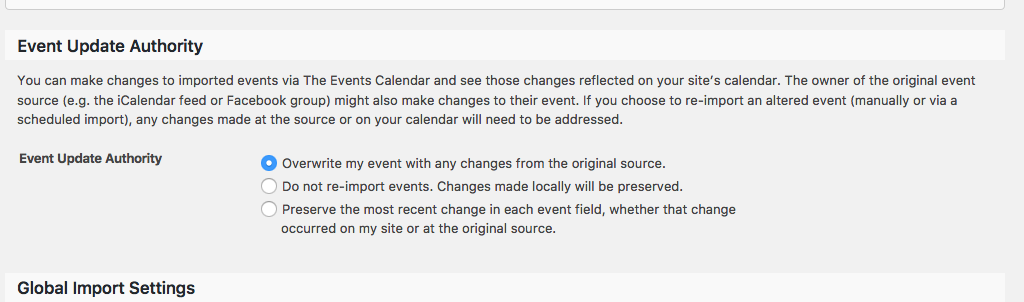
To be clear, I am doing one-time imports. Are you, too? Or are you using Scheduled Imports? If so, what is your schedule (or an example of one)?
Thank you!
Sincerely,
GeorgeNovember 11, 2016 at 2:00 am #1190782ParticipantThanks for your response. A couple of things.
1. I have been manually testing & so running a scheduled import prior to your note above.
However following your response I removed the scheduled import completely (obv leaving all the events that had previously been imported in place).
2. I also have the ‘Overwrite my event’ Update Authority setting set.On Google Calendar I changed a previously imported event END time to a different time, and then ran the one time import. It didn’t make a duplicate event (but then due to the bug that I reported in this thread it also doesn’t register the end time anyway). I then went back into Google Calendar and altered the start time. I ran another one time import and hey presto it duplicated the event. Worth also noting that in my global import settings The default post status for events’ is set to draft, as my client wishes to check new events before having them posted live. AS such the new (duplicate) event that was created was in the Drafts area of the Events list.
Attached is a screenshot of the import notification after I ran it.
For the time being I have re-added the scheduled import as this is a live site and my client needs it to be synched.
Chris
November 11, 2016 at 3:59 am #1190820ParticipantAAARRRGGGHHHH.
Now the scheduler isn’t even updating events at all. My client had an event that has had to be cancelled today. the scheduled import didn’t update it. when i ran the scheduled import manually import it didnt clock the changes. I have had to delete the scheduled import and run a one time import, which at least updated the calendar.
This is a real faff. I WANT to feel confident and use your products but it seems there are just issues on top of issues 🙁November 11, 2016 at 2:00 pm #1191176ParticipantThis reply is private.
November 14, 2016 at 3:53 am #1191757ParticipantPlease do investigate further George, I will keep in mind your offer of a refund, but I’d really like to have this working as it should – I look forward to your hopefully swift findings.
ChrisNovember 14, 2016 at 4:43 am #1191767ParticipantUPDATE
My client made some further changes to their Google calendar this morning and waited for half an hour (it is set to scheduled import every 30mins) yet 2hrs later it hadn’t seemed to have updated. I checked the history and indeed it looks like this:-Every 30 Minutes about 3 hours ago
Every 30 Minutes about 5 hours ago
Every 30 Minutes about 8 hours ago
Every 30 Minutes about 11 hours ago
Every 30 Minutes about 14 hours ago
Every 30 Minutes about 16 hours agoIs this something I need to hit my web hosting company about or is this also recognised as an issue?
ChrisNovember 14, 2016 at 7:40 am #1191843ParticipantHey Chris,
Thanks for this information and for your patience — I am in dialogue with our development team and strategists trying to zero in on these problems. The information you’ve provided is helpful — in regards to the times you list here, that may be indicative of an issue, but may also just be related to the lack of updates on the calendar in the interim time windows between each import…
For now, I’m curious:
1. Are your events on Google Calendar entered directly, by hand, into your Google Calendar? Or are they themselves imported from something like, say, Outlook 365, which we’ve had some funky issues with thus far — or imported from any other app or feed into the Google Calendar?
2. If possible, is there any way you could share the public Google Calendar URL you’re importing from? You can post that here in a “Private Reply” so that you only you and us on the support team can see the content of the reply…
Thank you!
GeorgeNovember 14, 2016 at 7:54 am #1191858ParticipantThis reply is private.
November 14, 2016 at 10:24 pm #1192273ParticipantThis reply is private.
November 17, 2016 at 1:33 am #1193737ParticipantThis reply is private.
-
AuthorPosts
- The topic ‘Importing edited event creates new event / end date & time not being imported’ is closed to new replies.