

Forum Replies Created
-
AuthorPosts
-
George
ParticipantHey Eveline,
Thanks for reaching out.
Our plugins unfortunately don’t provide any functionality like this at this time. 🙁
The closes thing you could do is have one event that “starts” on the first day of the whole seminar series and “end” on the last day of the whole series. Then, create a ticket for each different day.
So, let’s say that you have a seminar that starts on the 25th of November with 2 sessions that day, 2 sessions on the 26th, and then 3 sessions on the last day, the 27th.
The best out plugins could do at this time for what you describe is to create one event that starts the 25th, ends the 27th. On this event, then, you could create 7 different tickets: one ticket for each of the sessions. In the ticket description, just specify what time/day the ticket is for.
Something like:
• Session 1 — Ticket for Session 1, November 25th 8am Session
• Session 2 — Ticket for Session 2, November 25th 12pm Session
• Session 3 — Ticket for Session 3, November 26th 10am Session
• Session 4 — Ticket for Session 4, November 26th 3pm Session
and so on…Sorry to disappoint; I hope this helps in some way though. Please let me know if there are any other issues or questions I can try to help with.
Sincerely,
GeorgeNovember 21, 2016 at 3:21 pm in reply to: Exporting Events Calendar from Website to Facebook Business Event Page #1195557ParticipantHey Jillian,
We unfortunately don’t provide any tools at this time that allow for the migrating of events from WordPress to Facebook — only the other way around, from Facebook to WordPress.
Sorry to disappoint! 🙁
Please let me know if there are any other issues or questions I can try to help with.
Sincerely,
GeorgeParticipantHey Pat,
Thanks for reaching out.
You’ve posted a file name and some jQuery — can you please clarify what your question is or what the aims of your thread are?
I’m not quite sure, but want to make sure I understand your questions and goals so I can best help out.
Provide some more detail and let us know what’s up! 😀
Thanks,
GeorgeParticipantHey Armando,
Thanks for reaching out.
You can indeed customize the display of information on the Month View or any calendar view, but this is something we are unfortunately not able to help with as a matter of support. Please check out our support policy for more information on that → https://theeventscalendar.com/knowledgebase/what-support-is-provided-for-license-holders/
I’m happy to point you in the right direction though! You may have some luck, for example, by using the methods in our Themer’s Guide here to modify the display of event content → https://theeventscalendar.com/knowledgebase/themers-guide/
Also, to make it easier to write custom CSS on your site, definitely check out a [free!] tool like Firebug if you use FireFox, or the Developer Tools for either Safari or Chrome. They have “Inspector” tools that let you zoom right over the element whose layout/appearance you want to change.
Thanks for reaching out. The features you are trying to implement are possible, but would unfortunately require many code customizations to implement 🙁
So to implement the features you describe, you would have to write custom code or hire a professional developer to do it for you. We have a list of great developers here → http://m.tri.be/18k1 (and have no affiliation with any of these folks—they’re simply some well-respected names in the community that we’ve compiled to share in situations like this one).
I’m sorry that we’re not able to provide a ton of help with customizing the display or appearance of event content — I do hope this information helps, though. Please let me know if so and if there is anything else I can try to help with.
Sincerely,
GeorgeParticipantHey Paul,
Thanks for reaching out.
What you’re trying to do here may indeed be possible, but unfortunately only by way of some custom code. I wrote a custom code snippet for you here:
add_action( 'user_register', 'tribe_disable_apm_plugi_nag_for_users', 10, 1 );function tribe_disable_apm_plugi_nag_for_users( $user_id ) {
$user_id = absint( $user_id );if ( $user_id && intval( $user_id ) > 0 ) {
update_user_meta( $user_id, '_tribe_apm_plugin_nag', true );
}
}
☝️ Try adding this to your theme’s functions.php file and see if this helps prevent the presence of that notice for new users. This could should disable that upon the creation of a new user account in WordPress.
— George
ParticipantHi @3mediaweb,
There is indeed no “out of the box” support for what you describe here, nor any special add-on we make or know of, so unfortunately custom coding or other solutions are required.
The thread you linked to is from 2012, so it may not be the best way forward, but generally speaking yes you could use a custom field or even an Event Category to mark an event as “cancelled” (but not deleted/trashed).
Once you mark events as cancelled, you can use CSS to add strikethrough or other styles to those events.
We are not able to help with custom snippets and implementations like this, as per our support policy → https://theeventscalendar.com/knowledgebase/what-support-is-provided-for-license-holders/
However, to write custom CSS on your site, it should fortunately not be too complicated — definitely check out a [free!] tool like Firebug if you use FireFox, or the Developer Tools for either Safari or Chrome. They have “Inspector” tools that let you zoom right over the element whose styles you want to change (like an event marked as “Canceled”).
Best of luck with your custom feature development! Please let me know if there are any other issues or questions I can try to help with.
Sincerely,
GeorgeParticipantHi Jeanine,
Thanks for reaching out.
We’re unfortunately not able to help with custom designs, layouts, etc., as per our support policy here → https://theeventscalendar.com/knowledgebase/what-support-is-provided-for-license-holders/
I only mention this because there’s a limited amount of insight we can provide, and I just want to set your expectations early! 😀
As for the mockup you shared, yes, this is possible — however, not by any means that come “out of the box” with our plugins. You’d have to write some extensive custom CSS to get the coloring, shapes, fonts, and layouts in order. And to get all of the elements positioned as shown in the mockup, you may need to write custom PHP as per our Themer’s Guide here → https://theeventscalendar.com/knowledgebase/themers-guide/
I hope this information helps! You would have to write that custom code or hire a professional developer to do it for you. We have a list of great developers here → http://m.tri.be/18k1 (and have no affiliation with any of these folks—they’re simply some well-respected names in the community that we’ve compiled to share in situations like this one).
Cheers,
GeorgeNovember 21, 2016 at 1:53 pm in reply to: Release 4.3.3 – Fresh installs have permalinks – what does that mean? #1195528ParticipantHi Martin,
This refers to a bug where some permalinks for things like the Photo View, etc., weren’t working upon a new installation. This is good news, and just refers to a bug that some people experienced being fixed.
It should not affect you at all and you shouldn’t notice any issues on your site with the various View permalinks.
Does this information help at all? Let me know! 😀
— George
November 21, 2016 at 1:50 pm in reply to: Related events – pro only or available in standard version? #1195527ParticipantHey Cliff,
This is indeed a feature only available in Events Calendar Pro. Sorry to disappoint!
Please let me know if there are any other issues or questions I can try to help with.
Sincerely,
GeorgeNovember 21, 2016 at 11:23 am in reply to: Exporting iCal to yahoo. Must open yahoo cal like Google export button #1195439ParticipantHey Jess,
Our plugins allow for exporting events in the almost-universally-used .ics file format; this is an acceptable format for importing into any major calendar app, from Google Calendar and Apple iCal to Outlook and Yahoo Calendar, and all sorts of stuff in between!
There are many specific services we could name, but to keep things simple only put two buttons for now.
If you feel strongly about having more features in our plugins, please do post your opinions on our UserVoice page because other users can “vote” ideas there up or down; we take this feedback seriously and often use it to make product and design decisions, and so for example if a ton of people are requesting a Yahoo Calendar button, we could see that and it could play a signifcant role in providing better support for that in the future.
You can find our UserVoice page here → http://tribe.uservoice.com
Cheers!
GeorgeNovember 21, 2016 at 11:19 am in reply to: Importing edited event creates new event / end date & time not being imported #1195436ParticipantSure thing, Chris. I really appreciate your patience here and want to confirm that the other bugs mentioned in this thread are still actively in progress and fixes should arrive soon.
As for your two follow-up questions:
if my client, for example, goes to their Google Calendar and then makes an update, then goes to the website Events page then will that (no matter what else is happening) force wp-cron job to do it’s work
Yes, if the timing is right and it makes sense given the import schedule chosen. What I mean is this:
• Let’s say you’ve got the import scheduled every half-hour.
• A scheduled import runs.
• 5 minutes later, your client does the steps you mention.
• In this case, because it has not been at least a half hour since the last import, then no, a cron import won’t run.However:
• Let’s say you’ve got the import scheduled every half-hour.
• A scheduled import runs.
• 40 minutes later, your client does the steps you mention.
• In this case, it’s been at least a half hour since the last import, so a cron import should be triggered and run.
Also just for the sake of clarification, is it the /events/ page that needs to be loaded for the schedule to work?
Pretty much any page will do — it doesn’t really matter. Doing one front end page load and one admin page load should be plenty, regardless of what those specific pages actually are.
If you have caching enabled on your site, refreshing caches first and then doing a page load may also be helpful or necessary.
I hope this information helps!
GeorgeParticipantThis reply is private.
ParticipantFor this issue, can you do each of the following things?
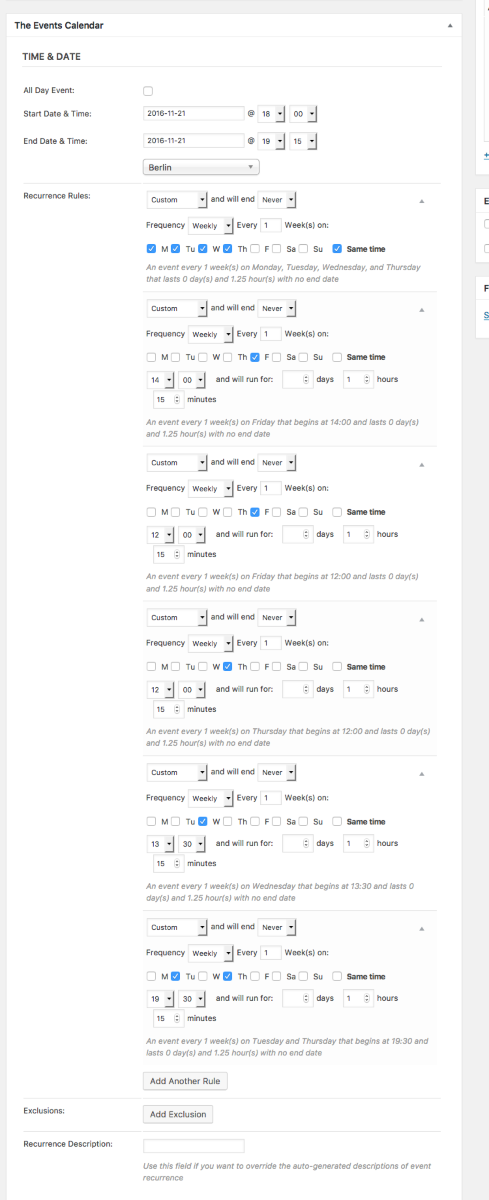
1. Review the screenshot I posted above. Do you agree that my “Time & Date” settings for my test event exactly match the “Time & Date” settings of your event?
2. Next, can you confirm if there is any difference on your site if you head to Events → Settings in your wp-admin and try toggling this option on and off (click for a larger-sized image):
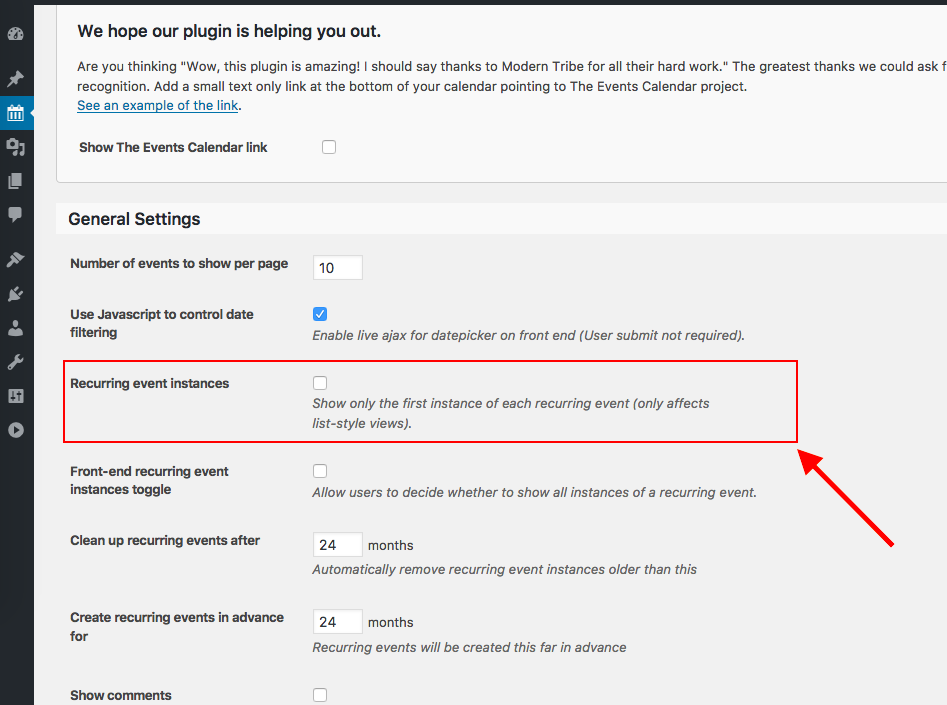
☝️ For me, my event had the same problem you describe where not all event instances would show up in the List View. But once I un-checked the option in the above screenshot and saved changes, all events showed up fine in List View and I could not recreate your issue.
Let me know what you think!
GeorgeParticipantHi Michael,
Thanks for this information.
I have taken your screenshot and used it to recreate your event exactly on my own local site. Here is a screenshot of my “Time & Date” settings for the event (click for a larger-sized image):
 Participant
Hi Aviva,
“Tickets” in Event Tickets Plus are indeed WooCommerce “products”. This means that, yes, you can often extend functionality by using normal WooCommerce Extensions as long as those extensions work with all types of WooCommerce products.
Now, each given Extension may have its own nuances, and may or may not work well with our ticketing plugins to varying degrees depending on that specific Extension.
I hope this helps!
George -
AuthorPosts