

Forum Replies Created
-
AuthorPosts
-
George
ParticipantHey Matthias,
Sorry to hear this!
I cannot recreate this discrepancy, so I’m wondering if perhaps your outdated version of The Events Calendar is related at all here. To test this, please update your site’s version of The Events Calendar to its most recent version, which as of now is 4.3.3
If that doesn’t help, then I’m curious: can you identify any sort of pattern for the events on which the View Details link doesn’t show up? Is it only events where the attendee didn’t add info, for example? Anything at all you can identify as something they have in common…?
Thanks!
GeorgeParticipantThis reply is private.
ParticipantHey Fabio!
Happy to answer these questions, though a bit out of order as follows:
Does this plugin allows WooCommerce to sell tickets as products?
Yes! Tickets are of the “products” type within WooCommerce.
My hostess at the event will scan the ticket that customer prints or displays it on mobile screen. Is there a mobile app that does that?
Yes! There are ton of free apps out there for Android and iOS devices — we don’t specifically recommend or endorse any specific one, but if you search for “QR Code” in any smartphone app store you’re sure to find a ton of good, free options.
If so, does this app automatically marks this ticket as “checked in”, preventing a re-use of the ticket?
Yes! Once checked-in, a ticket is marked as such and cannot be re-checked-in. One ticket = one check-in for that ticket only.
I hope this info helps; please let me know if there are any other issues or questions I can try to help with.
Sincerely,
GeorgeParticipantHey Walter,
We have a “year” view and a “summary” view planned on the horizon, both of which should arrive some time in early to mid 2017, but neither of these are similar to the “posterboard” view you mentioned and there aren’t specific plans for that at this time.
If you would like to advocate for the implementation of this feature, please do make your voice heard on our UserVoice page here → http://tribe.uservoice.com
☝️ We pay close attention to the activity on this page, and often use the data here to inform our product decisions. So if you submit the idea for this sort of “posterboard” view, for example, and many people vote the idea up, that greatly increases the likelihood of something like this ending up in our plugins.
Sorry to disappoint about it not existing or being planned for at this time, though. Please let me know if there are any other issues or questions I can try to help with.
Sincerely,
GeorgeParticipantHey @arno,
It’s unfortunately not possible to do this without custom coding beyond the scope of support. 🙁
So to make this work as you describe, you would have to write that custom code or hire a professional developer to do it for you. We have a list of great developers here → http://m.tri.be/18k1 (and have no affiliation with any of these folks—they’re simply some well-respected names in the community that we’ve compiled to share in situations like this one).
With all the above things being said, you might have some basic success by adding this custom code snippet that I wrote for you to your theme’s functions.php file:
function tribe_add_events_to_search_results( $query ) {if ( ! is_admin() && $query->is_main_query() ) {
if ( $query->is_search ) {
$query->set('post_type', array( 'post', 'tribe_events' ) );
}
}
}add_action( 'pre_get_posts', 'tribe_add_events_to_search_results' );
☝️ Let us know if this helps at all!
— George
ParticipantGood question Josh—at this time our plugins unfortunately don’t support that sort of feature in the Attendee Information fields; “stock” management, basically, or limits.
This is something we hope to eventually roll out in our plugins at some point in late 2017 or beyond, but it’s unfortunately not possible at this time and isn’t coming soon. 🙁
Sorry to disappoint! Please let me know if there are any other issues or questions I can try to help with.
ParticipantThis reply is private.
Participant2. If Testing the Option Above Doesn’t Help
If testing the option above does not help at all, then since we cannot recreate these issues, I would recommend doing the following things:
1. Deactivate ALL PLUGINS on your site except for ONLY The Events Calendar and Events Calendar Pro.
2. When The Events Calendar and Events Calendar Pro are literally the only 2 plugins active on your site, then also activate a default theme like “Twenty Twelve” or “Twenty Sixteen”.
3. When your site is in this state, make a new test event with the exact same event configuration that you’ve been trying for this recurring event…
4. Does anything improve with the behavior of this event on your site in this state?
Thanks so much for your patience and persistence here!
— George
ParticipantSorry to hear this, Michael!
Since we cannot recreate these issues, I have two recommendations to make.
There is one more thing I’d recommend checking, and if that fails then I would recommend some manual testing.
1. Testing One More Option
• Make sure the “show only the first instance…” option we mentioned above is left disabled, so that all event instances will show in list view.
• Then, head to Events → Settings in your wp-admin and try setting the “Create recurring events in advance for” option to something like 3 or 4 months. Here is a screenshot of that option (click for a larger-sized image):
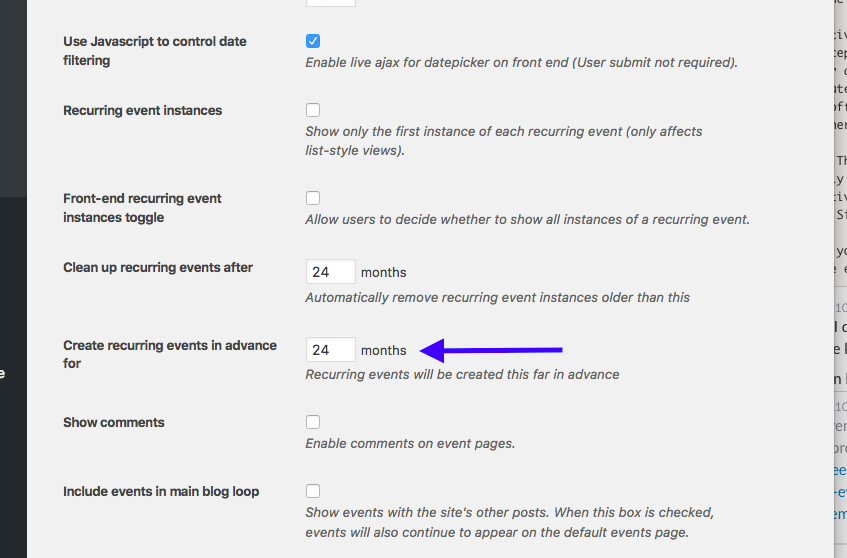
☝️ It looks like you currently have this set to “1” month, which may not be long enough time for your event to generate its other future instances
• Once you’ve changed this option, create a NEW test recurring even with the same exact configuration that you’ve tried thus far.
• When you try this, does anything improve with these issues?
ParticipantHey @Gpfinley,
Our plugins sort of support multiple calendars — you can read about the specifics here: https://theeventscalendar.com/knowledgebase/can-you-have-multiple-calendars/
However, there is not a way to have “separate” calendars in a true sense; with the methods in the article above—which are the only methods available—there is still one main “body” of events in your wp-admin, and there’s only the appearance of “separate” calendars on the front end.
Have a look at that article above and let me know if it helps at all!
Cheers,
GeorgeParticipantThanks for reporting this, I am glad to hear about this progress. You report wanting to have a site with “both secure and nonsecure resources” — this is unfortunately not something our plugins are currently handling well, and while we have rolled out a number of fixes for this, there appears to be some persisting bugs that we are working on.
So things should generally work okay for now, but in specific situations where you’re trying to roll out HTTP front-end, HTTPS back-end, issues will likely arise.
I’m sorry about the trouble arising from that; I will update this thread with news about the bug fix and when it is coming. At this time, there is not a specific launch date but hopefully before 2017 is upon us. 🙂
Sincerely,
GeorgeParticipantThis reply is private.
December 1, 2016 at 8:54 am in reply to: For how many events/organizers I can use Event Aggregator without problems? #1200381ParticipantHi Mat,
If you specify the schedule to run an import every half hour, then the cron job will run every half hour if there are events and if the WP_Cron job can run. If you specify it to be hourly, then it’ll be hourly. Likewise with “once daily”, and so on.
WP_Cron is not TRUE server-side cron, so the actual running schedule may be different than every half hour. If this sounds a little weird, check out the following resources:
• First, check out my responses to Chris in this other forum thread; I go into some more detail about the expectations of importing and the WP Cron jobs → https://theeventscalendar.com/support/forums/topic/importing-edited-event-creates-new-event-end-date-time-not-being-imported/#post-1194009
• Next, read this page to learn more about WP Cron yourself if you are interested, and want verify the claims I am making → https://developer.wordpress.org/plugins/cron/
I hope this info helps!
— George
ParticipantThanks for updating, @Irina!
I am using all the same versions of our software as you are, but cannot reproduce the issue you describe here where the “View Your Tickets” link is a 404.
We have no other reports of this behavior at this time.
With these facts in mind, then, there are two main things I would recommend for you to do:
1. First, try the steps recommended in this Knowledgebase article: https://theeventscalendar.com/knowledgebase/fixing-http-404-errors/
2. If the steps in that article don’t help at all, then do the complete set of steps recommended in this Knowledgebase article → https://theeventscalendar.com/knowledgebase/testing-for-conflicts/ After EACH STEP, go back to the single event page with a “View your Tickets” link, refresh the page, and try the link again—see if anything improves anywhere along the way in the process.
I am sorry to recommend these steps, @Irina! The reason for it, though, is that you are the only person reporting these issues at this time, and we cannot recreate these issues. So it seems like there is a plugin or theme code conflict on your site which may be causing the issues you’re facing.
The issues I recommended above will help prove if that’s the case or not.
Let us know what you find!
Thanks,
GeorgeParticipantThanks for sharing, Thomas! I would recommend removing that plugin, or contacting its creators to see if you can add an exception so that wp-admin/ajax.php is enabled in a way that won’t cause this conflict.
If you have further thoughts or questions, please open a new thread on these forums and we’ll pick up the conversation from there.
Best of luck with your project,
George -
AuthorPosts