

Forum Replies Created
-
AuthorPosts
-
George
ParticipantHi Sergio,
You may indeed be able to do that, but it will unfortunately require custom coding.
We cannot help with any custom coding—we are not able to help with modifying how our plugins look or behave.
⚠️ Please read this page before responding: https://theeventscalendar.com/knowledgebase/what-support-is-provided-for-license-holders/
Now, with all this being said, I’m happy to at least try and point you in the right direction!
1. Determine where the “Meta title” and “meta description” fields in your wp-admin are coming from.
2. If those fields are coming from the Yoast SEO plugin, for example, then contact the Yoast SEO team for information about how to add those fields via custom code. If those fields are coming from your theme, though, then contact the support team for that theme for information about how to add those fields via custom code.
3. Once you learn how to add the custom fields via code, you can use our Themer’s Guide methods to add that code to the default-template.php file within the-events-calendar/src/views/. Here is the themer’s guide ? https://theeventscalendar.com/knowledgebase/themers-guide/
We will not be able to provide more assistance on this custom coding than what is elaborated upon above, but I hope this information helps you get started!
Best of luck with your custom coding,
GeorgeParticipantHey Maia,
It’s true that using that WooCommerce PDF Invoice extension may help you manually send PDF Invoices to customers, or might allow customers to log into their accounts and download invoices if they want.
But to my knowledge there is no functionality that the Extension would provide where invoices are automatically emailed to customers via our ticketing plugins.
For further questions about that Extension, I would recommend contacting the support team for that Extension.
But no, at this time it is not possible to have our plugins automatically include PDF invoices in the tickets/RSVPs emails customers receive after checking out with tickets or with making RSVPs.
I am sorry to disappoint!
GeorgeParticipantThanks for reaching out, Sahil!
You posted this same question in another thread more recently, which I have responded to here: https://theeventscalendar.com/support/forums/topic/customizing-calendar-plugin-for-our-client/#post-1255123
Check out that other thread there — we can continue the conversation there.
I will close this thread in the meantime to help keep things organized and such.
See you in the other thread!
Cheers,
GeorgeParticipantHey boxChilli,
Thanks for reaching out!
The best course of action here is to request a refund for the original licenses over on this page → https://theeventscalendar.com/knowledgebase/refund-policy/
What we can do is refund those licenses, and then once refunded you can “buy new” licenses on your new account (even though it’ll all cost the same, etc.)
This process won’t take long and we’ll get things sorted out promptly. ?
Once you use that form to file a refund request, we’ll be able to continue the conversation and any follow-up questions you might have over email, so I will close this forum thread for now.
See you over email! ?
— George
ParticipantHey @K,
Thanks for reaching out!
The best course of action is indeed to request a refund over on this page → https://theeventscalendar.com/knowledgebase/refund-policy/
But don’t worry! This process won’t take long and we’ll get your account sorted out promptly. 😀
Once you use that form to file a refund request, we’ll be able to continue the conversation and any follow-up questions you might have over email, so I will close this forum thread for now.
See you over email! 😀
— George
ParticipantHey Brett,
Thanks for reaching out!
We unfortunately don’t have any features like this at this time. ?
I’m sorry to disappoint!
Please let me know if there are any other issues or questions I can try to help with.
— George
ParticipantHey Elena,
Thanks for reaching out!
We unfortunately don’t have any features like this at this time. 🙁
I’m sorry to disappoint!
Please let me know if there are any other issues or questions I can try to help with.
— George
ParticipantHey Maia,
Thanks for reaching.
Our ticketing plugins — Event Tickets and Event Tickets Plus — will send tickets or RSVP confirmations via email, but unfortunately not as PDFs. They’re just emails that the user can print if they’d like, or just show on their phone at the event check-in or something, but there is not a PDF invoice for the tickets or RSVPs with these plugins at this time.
I am sorry if this is disappoint news, but I hope this information helps you move forward with your project!
Please let me know if there are any other issues or questions I can try to help with.
Sincerely,
GeorgeParticipantHi Sam,
Thanks for sharing that image. It shows that, indeed, your post editor for the Events post type is heavily customized/altered by way of some other plugin, or perhaps your theme.
To get to the bottom of these issues, what I would recommend doing is the complete set of troubleshooting steps on this page → https://theeventscalendar.com/knowledgebase/testing-for-conflicts/ After EACH STEP in that process, check back on your edit screen for the Events post type and see if anything improves along the way.
Let us know what you find!
GeorgeMarch 16, 2017 at 9:09 am in reply to: Cannot create new venue/organizer, text tab not working on front end #1255147ParticipantThis reply is private.
ParticipantSounds good Patrick. Since the primary issue of this thread — getting our ticketing plugins activated and existent on your site — is resolved, I will close this thread.
But don’t worry! If any other issues arise at any time, please don’t hesitate to open a new thread! 😀
Best of luck with your project!
GeorgeParticipantHi Sahil,
Thanks for reaching out.
It’s a bit difficult to answer the question, “how customizable are your plugins”, because this really depends on the development skills of the customizer and the resources you’re willing to devote to those customizations. In theory there’s basically no limit to how customizable our plugins are — the code is GPL-licensed, for instance, and so you can totally rewrite vast chunks of the plugin if you really wanted to for your project.
There are a few things to note though:
1. We cannot help with custom coding in any way, as elaborated upon here: https://theeventscalendar.com/knowledgebase/what-support-is-provided-for-license-holders/
2. We cannot provide any customer support whatsoever for customized code; if you customize a template and that template breaks after an update, for example, that’s not something we can help with.
With all these caveats and notes out of the way, I’ll try to answer your question a bit more usefully. 🙂
Our plugins are very customizable when it comes to front-end templates, because of their templates system which you can read about here: https://theeventscalendar.com/knowledgebase/themers-guide/
Our plugins also have a huge number of useful filters and actions that you can hook into for customization — there’s no singular reference of all of these hooks, because there is simply too many of them, but if you do a “search” or grep within our plugin files for any instance of the term apply_filters( or do_action( you will find all of our plugin’s filters and actions, respectively.
In regards to the specific sort of thing you mentioned in your post here, the only way I can think of this being truly implemented would be to have each site have its own instance of The Events Calendar. Then, on the “main site” that pulls in events from all those other sites, have The Events Calendar with Event Aggregator activated. Then set up Event Aggregator to import the calendar feeds from those other sites — you may have to do the imports manually, unfortunately, but this is the best way I can think of doing this.
I hope this information is helpful!
Cheers,
GeorgeMarch 16, 2017 at 8:44 am in reply to: Eventbrite imported event registration form is too narrow #1255117ParticipantHi Anatoli,
We cannot help at all with modifying the appearance or behavior of our plugins, and we do not offer any support for custom code that we share.
Please read this page to learn more about these rules: https://theeventscalendar.com/knowledgebase/what-support-is-provided-for-license-holders/
I’m not trying to shut the conversation down here, I just want to set your expectations honestly and clearly — as noted, modifying the content of iFrames is very tricky and so this is something that you may have to mostly take the reins on yourself.
I was happy to deviate from our policies to provide some custom code to at least try and help you get started in the right direction — but indeed further refinement and custom coding may be required from here. 🙁
Now while everything above is true, I’m still happy to try and help a bit to the extent that I can! 😉 And so, for example, in looking at your error message I think you’ll be able to get the code working as desired if you remove this content from line 4 of the code there:
<?php↑ This PHP tag is not necessary and is indeed causing the error. For reference, here’s a screenshot showing the exact line of code I’m asking you to remove (click for a larger-sized image):
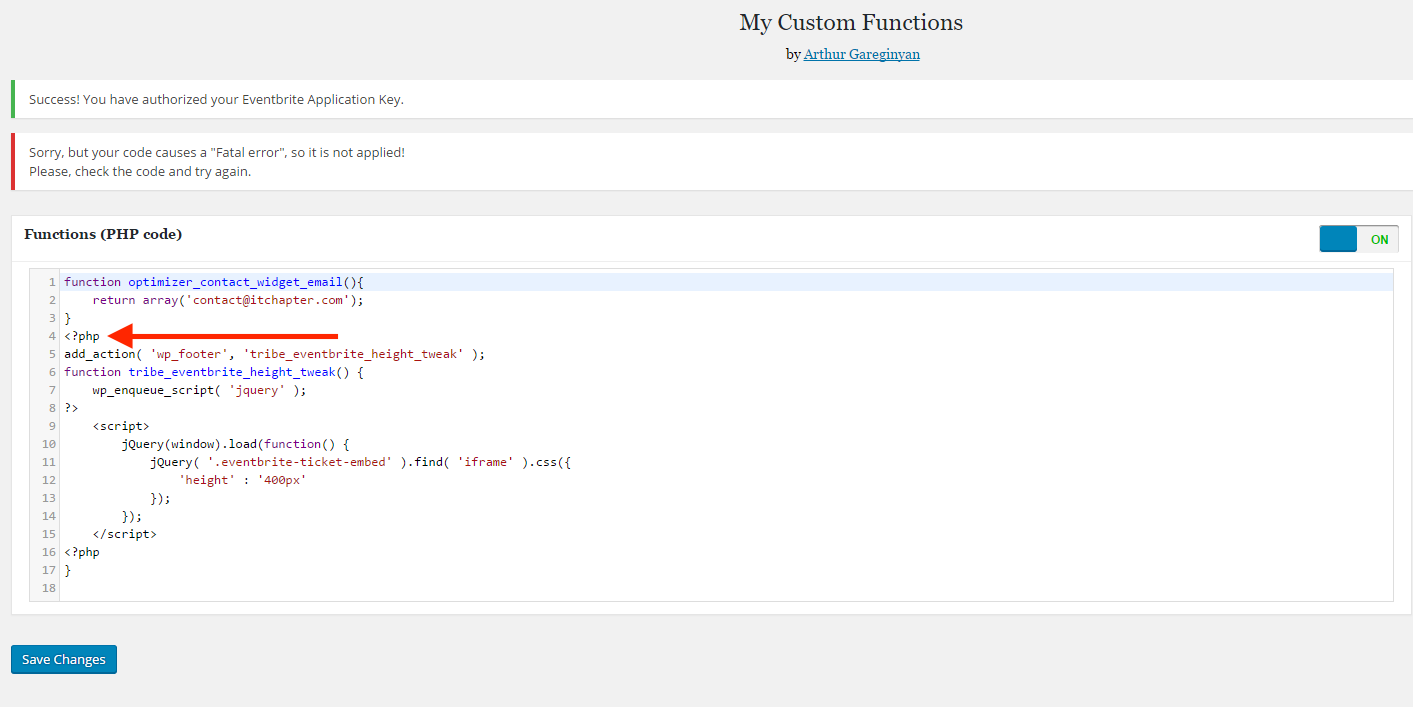
↑ Just remove that <?php text so that line 4 is just a blank, empty line.
Let us know if that helps — if it does not totally resolve your issues, then unfortunately you will need to take the reins on finding a more robust solution to this tricky problem. 🙁
— George
ParticipantHey Erik,
You can indeed import all of the attendees into a CSV file using the “Export” button that sits right atop the list of attendees.
You cannot, however, only export those attendees who have checked-in. All attendees are included in the exported CSV file.
Now, there is a column in the exported CSV called “Check In”. If the attendee in a given CSV row has checked in, then this column for them will be marked “Yes”. If they haven’t checked in, it’ll be blank.
I hope this information helps you move forward with your project!
Cheers,
GeorgeParticipantSure thing — best of luck with your customizations! 😀
— George
-
AuthorPosts