

Forum Replies Created
-
AuthorPosts
-
Geoff B.
MemberGood evening Toni and welcome back!
Thank you for reaching out to us.
We are sorry to hear about the issues you are facing with events published by Shop managers.
I would love to help you with this topic.As a first troubleshooting step, could you please provide us with your complete system information in a private reply using the instructions found in the following link?
https://theeventscalendar.com/knowledgebase/sharing-sys-info/
Secondly, could you take a look at your settings under Events -> Settings -> Community ?
More specifically, pay attention to the Default status for submitted events setting.If it is set to anything else than Published, it means that you have to approve the events as an admin before they are visible.
Secondly, you might want to take a look at the Shop manager’s role permissions. Depending on their permission to publish posts or events, they might not be able to achieve true publication.
Let me know how that goes.
Best regards,
Geoff B.MemberGood evening Miriam and welcome back!
Thank you for reaching out to us.
I would love to help you with this topic.I believe the simplest way to achieve this is to follow the instructions found in our knowledge base: https://theeventscalendar.com/knowledgebase/change-the-wording-of-any-bit-of-text-or-string/
Please make sure you read all the way to the end and tweak the snippet to change “keyword” to the word of your choice.
Let me know how that goes.
Best regards,
Geoff B.MemberGood evening Aurélien and welcome back!
Thank you for reaching out to us.
I would love to help you with this topic.In case you did not already know, we actually have a setting for that very purpose under Events -> Settings -> Tickets (Location of Tickets form).
As noted, the default location of the RSVP and ticket forms is below the event meta. There are four possible locations where the forms can be displayed. Here is each location with its corresponding action hook:
Above the content
tribe_events_single_event_before_the_contentBelow the content
tribe_events_single_event_after_the_contentAbove the meta
tribe_events_single_event_before_the_metaWhile the names of the action hooks are self-descriptive, here is a visual reference of a real single event with each action hook’s location:
[caption id="attachment_1151506" align="aligncenter" width="703"]
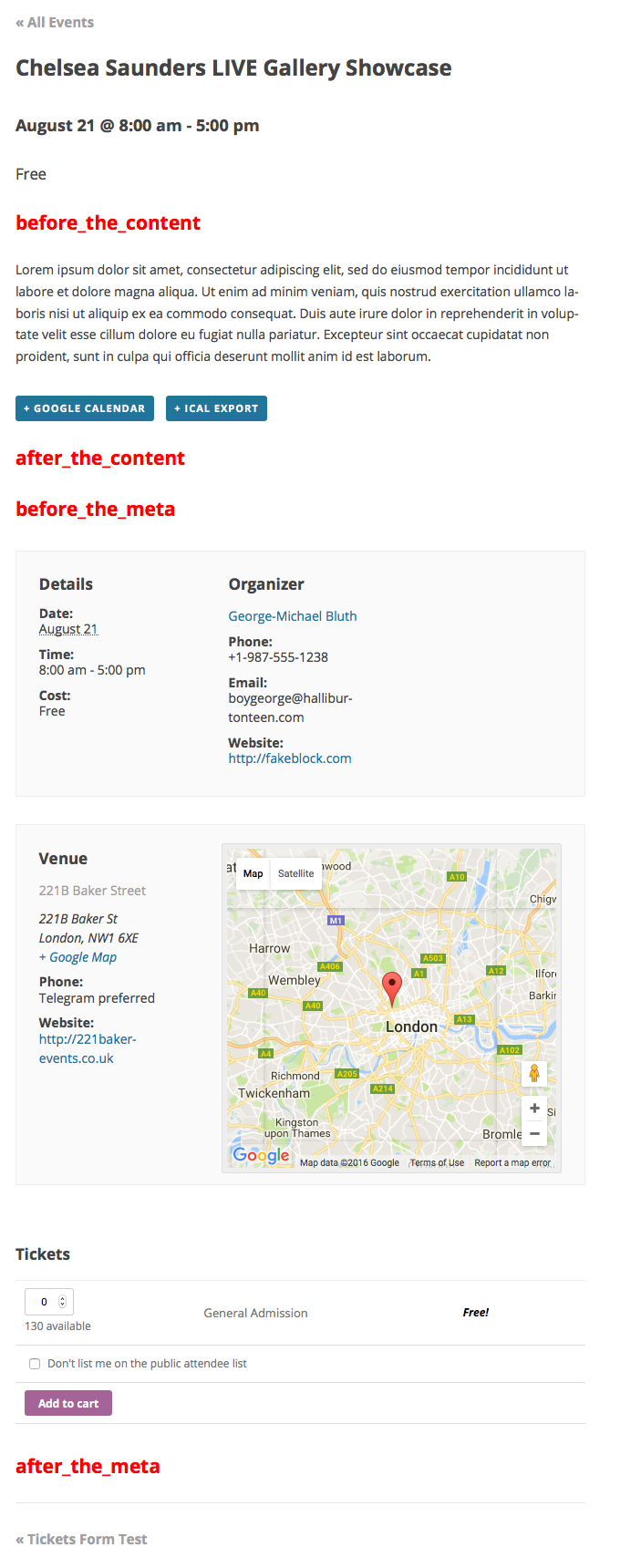 These content hooks display on every single event, and are the locations to where you can move the tickets and RSVP forms.[/caption]
if ( class_exists( 'Tribe__Tickets_Plus__Commerce__WooCommerce__Main' ) ) {
// Remove the form from its default location (after the meta).
remove_action( 'tribe_events_single_event_after_the_meta', array( Tribe__Tickets_Plus__Commerce__WooCommerce__Main::get_instance(), 'front_end_tickets_form' ), 5 ); }if ( class_exists( 'Tribe__Tickets_Plus__Commerce__WooCommerce__Main' ) ) {
// Place the form in the new location (before the content).
add_action( 'tribe_events_single_event_before_the_content', array( Tribe__Tickets_Plus__Commerce__WooCommerce__Main::get_instance(), 'front_end_tickets_form' ), 5 ); }Let me know if that helps.
Have a great day!
Geoff B.
MemberGood evening Dan and welcome to the Events Calendar Support forum!
Thank you for reaching out to us.
I would love to help you with this topic.What is going on is that when you activate Event Tickets, by default the cost field disappears.
You can workaround this.
You could apply the following snippet in the functions.php file of your theme (without the PHP tag at the top): https://gist.github.com/GeoffEW/69f8a033fb614c78b3de45a197431135
If needed, you can supplement it with the following snippet https://gist.github.com/GeoffEW/b440feef873af841d023c0bf0839e93f
Let me know how that goes.
Best regards,
Geoff B.MemberGood evening Luis and welcome to the Events Calendar forum!
Thank you for your interest in our products.
We’ll be glad to answer your questions.The short answer is yes, you can do that.
There are a couple of ways to achieve this, but the simplest is probably to use our Pro widgets shortcodes: https://theeventscalendar.com/knowledgebase/pro-widget-shortcodes/As you can see, the “limit” parameter will help you achieve your goal.
Let me know how that goes.
Best regards,
Geoff B.MemberGood evening Lara and welcome back!
Thank you for reaching out to us.
I would love to help you with this topic.At this time we do not have a specific integration with Constant Contact.
But you can cast your vote and add your comments for it here: https://tribe.uservoice.com/forums/195723-feature-ideas/suggestions/6051671-integration-with-constant-contactWith that in mind, I believe Zapier interfaces with both WordPress and Constant Contact. So I believe it would be exploring as a solution.
The other possibility is to use the fact that our calendar offers a calendar only RSS feed: https://theeventscalendar.com/knowledgebase/events-rss-feed/
https://theeventscalendar.com/knowledgebase/subscribing-calendars-via-rss/
https://theeventscalendar.com/knowledgebase/customize-rss-feed/You can read about this approach here: https://rvtechsolutions.com/how-to-easily-import-your-blog-content-into-your-constant-contact-emails/
Other than that, we are actively looking at enhancing our integration with different email solutions.
Let me know if that helps.
Have a great day!
Geoff B.
October 6, 2017 at 10:10 pm in reply to: Translation approval permission for Image Widget Plugin #1360662MemberGood evening Oliver and welcome back!
Thank you for reaching out to us.
I have pinged Leah to see if she does indeed have the power to do so.As you might know, we typically do not have that power over plugins that are hosted for free on wordpress.org.
The fastest way to get access would be to go through the glotpress process: https://make.wordpress.org/polyglots/tag/editor-requests/
I find that Slack is the best way to reach out to your locale’s team.
Have a good weekend,
Geoff B.
MemberGood evening Brad and welcome to the Events Calendar Support forum!
Thank you for reaching out to us.
We are sorry to hear about the shortcodes not working out for you.
I would love to help you with this topic.As a first troubleshooting step, could you please provide us with your complete system information in a private reply using the instructions found in the following link?
https://theeventscalendar.com/knowledgebase/sharing-sys-info/
Here are the list of our official shortcodes in the meantime:
- https://theeventscalendar.com/knowledgebase/pro-widget-shortcodes/
- https://theeventscalendar.com/knowledgebase/embedding-calendar-views-tribe_events-shortcode/
Finally, there should be an option to make your homepage the calendar in wp-admin under Settings > Reading
Hang in there!
Geoff B.
MemberGood evening Stephen and welcome to the Events Calendar Support forum!
Thank you for reaching out to us.
We are sorry to hear about the calendar not displaying properly on your install.
I would love to help you with this topic.I am noticing that you are using an older version of PHP. Although that technically still works, I would highly recommend upgrading to at least PHP 5.4+ (7 or more if you can).
This will ensure a faster and smoother running website.
You will also want to review your PHP max_execution_time = 0 setting to a value of 300.
Finally, I believe that your issue could be resolved by trying out different settings for Events Template under Events -> Settings -> Display.
If that does not work, could you Try temporarily reverting back to a default WordPress theme such as twenty-sixteen to see if the issue persists.
Best regards,
Geoff B.
MemberGood evening Terry,
Thanks so much for getting in touch!
I’m afraid that we’re not equipped to provide technical support for our free the Events Calendar users here in our pre-sales forum.
But, the good news is that you are still welcome to consult this forum and all our premium forums to your liking and browse it for solutions, snippets and tutorials.
We’d be more than happy to assist you at one of the following locations:
- On the WordPress.org support forum for the Events Calendar.
- If you’re a current premium license holder for one of our premium offerings, please log in to your account and submit a post to the appropriate forum for the affected product.
With that in mind, 404 issues are typically caused by one of the following reasons:
- Needing to re-save your permalinks (do this after every other step)
- Making sure your default view is also checked in the checkbox section under Events -> Settings -> Display
- Changing the Events Template under Events -> Settings -> Display
- Making sure you do not have a “real page” that matches the same slug as the one found for Events slug under Events -> Settings -> General
Have a good weekend,
Geoff B.
MemberGood evening Pete,
I am glad you were able to make some progress.
Would it be possible to share a copy of that CSV file (in a .zip format via a Google Drive or Dropbox link) ?
Have a good weekend,
Geoff B.
MemberGood evening Ana,
Thank you for writing back.
That totally does answer my question.The best way to handle this is:
- Install your the Events Calendar + the Events Calendar Pro plugins on the website the developer is hosting and building for you
- Add your Event Aggregator license on there
- Still on the new site, go to Events > Import
- Select “Import from other URL” and input your current site
This will literally migrate all of your events to the developper’s site.
You can read about this here: https://theeventscalendar.com/knowledgebase/import-from-feed-or-url/At some point down the line, close to the migration you will need to:
- Freeze your current site (stop adding events)
- Make sure all the events are on the site the developer is hosting
- Stop the import on the developer site
At that point, you will simply be able to overwrite your current site AND have all of your events in there.
But, as always, before overwriting anything, make a complete file and database backup.
Have a good weekend,
Geoff B.
MemberGood evening and welcome back!
Thank you for reaching out to us.
We are sorry to hear about the weird login requests you are receiving.
I would love to help you with this topic.As a first troubleshooting step, could you please provide us with your complete system information in a private reply using the instructions found in the following link?
https://theeventscalendar.com/knowledgebase/sharing-sys-info/
Secondly, by the looks of it, I believe you would benefit from using a plugin such as Theme my login: https://wordpress.org/plugins/theme-my-login/
This will let you keep the login on the front-end as well as add a captcha (among many things).
Let me know if that helps.
Have a great day!
Geoff B.
MemberGood evening Denis and welcome to the Events Calendar Support forum!
Thank you for reaching out to us.
I would love to help you with this topic.The full view calendar (like the month view) does not currently support multiple categories. The only way to use multiple categories currently is with Pro widget shortcodes: https://theeventscalendar.com/knowledgebase/pro-widget-shortcodes/
The good news is that this feature is planned for future release. Unfortunately, I cannot commit to a release date at this point. But stay tuned, you will be contacted when the it is released.
Have a good weekend,
Geoff B.
MemberGood evening Miguel and welcome back!
Thank you for reaching out to us.
I would love to help you with this topic.There are a couple of ways to handle this:
- Try playing around with different Events Template settings from Events -> Settings -> Display to see if that helps.
- Try adding the following CSS rule to your style.css file or in your Custom CSS metabox:
.events-single #content #primary {

    padding: 0px 20px;

}
Let me know how that goes.
Best regards,
Geoff B. -
AuthorPosts