

Forum Replies Created
-
AuthorPosts
-
November 10, 2017 at 9:31 am in reply to: Getting the error g.tribe_has_attr is not a function #1380064
Geoff B.
MemberThis reply is private.
MemberThis reply is private.
MemberGood afternoon Sharmane and welcome back!
Thank you for reaching out to us.
I would love to help you with this topic.Simply head over to Events -> Settings -> Display.
Once you are there, scroll all the way down until you see the Advanced Template Settings section.
Let me know how that goes.
Best regards,
Geoff B.MemberGood afternoon Beatriz and welcome to the Events Calendar Support forum!
Thank you for reaching out to us.
I would love to help you with this topic.I want to duplicate this calendar in another of my websites
I believe we have just the thing.
I would recommend getting a license for our Event Aggregator Service: https://theeventscalendar.com/product/event-aggregator/
It lets you do many great things, including importing from another Calendar
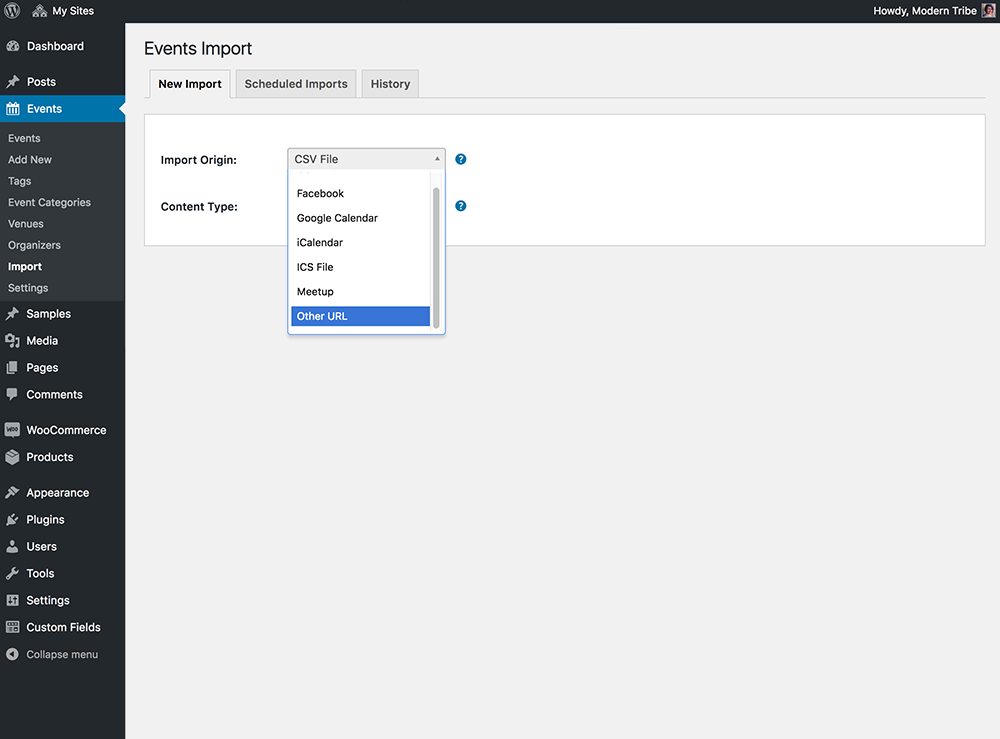
Let me know if that helps.
Have a great day!
Geoff B.
November 9, 2017 at 7:07 pm in reply to: Events page broken when WPML is active on Pro theme #1379604MemberThis reply is private.
MemberThis reply is private.
MemberGood evening Israel and welcome back!
Thank you for reaching out to us.
We are sorry to hear about the tickets not being sent out.
I would love to help you with this topic.The first thing I would recommend is to check your setting under Events -> Settings -> Tickets to make sure that the proper options are selected at the very bottom of the page.
Secondly, that type of issue is typically solved by having the system send tickets from any chosen email address by simply installing, configuring and testing the following plugin: https://wordpress.org/plugins/easy-wp-smtp/
Using a real SMTP server with authentication will bypass the built-in WP mail functionality altogether.
Please make sure you configure and test the settings using the plugin’s built-in tool.
Let me know if that helps.
Have a great day!
Geoff B.
November 9, 2017 at 5:53 pm in reply to: Calendar won't advance to next month using bottom navigation #1379582MemberHey Lance,
I am super stoked to hear that you are making progress on this.
I could not agree with you more. If you were able to switch to PHP 7+ in the near future, not only would that help making your site future-proof, but it would also offer awesome performance.
With that in mind, we are fairly limited in our abilities to support server level upgrade procedures.
On a personal note, when it comes down to that, I am a big fan of letting the web host pitch in.
Some web hosts are unable to do this (for several reasons).If all else fails, a rather extreme approach is to get a brand new hosting plan elsewhere that has PHP 7 installed. Several of them offer to move your site for free. In the end that might take up less of your time 🙂
But here again, extreme caution and backups (including of your emails) is advised.
I wish I had a better answer for you, but for now it’s the best one I have unfortunately.
Let me know how that goes.
Best regards,
Geoff B.November 9, 2017 at 5:43 pm in reply to: TEC 4.6.3: Missing Translation in Event Submission form #1379576MemberHey Oliver,
That is super cool with us.
We WILL get them translation up and running again.Stay tuned!
Have a great day!
Geoff B.
November 9, 2017 at 5:42 pm in reply to: Getting the error g.tribe_has_attr is not a function #1379575MemberThis reply is private.
November 9, 2017 at 5:39 pm in reply to: Order processed, payment taken but no tickets allocated #1379574MemberThis reply is private.
MemberGood evening Lars and welcome back!
Thank you for reaching out to us.
I would love to help you with this topic.The simplest way to address this is to carefully read the following and adapt the snippet found at the very bottom of that page to your needs: https://theeventscalendar.com/knowledgebase/change-the-wording-of-any-bit-of-text-or-string/
Let me know how that goes.
Best regards,
Geoff B.MemberGood evening Amy and welcome back!
Thank you for reaching out to us.
Unfortunately, this is not possible at the moment since access related to the support forums is tied to a WordPress user account (which only allows for one email).
Perhaps a solution for now would be to tie the account to a “neutral” email address ?
I wish I had a better answer for you, but for now it’s the best one I have unfortunately.
Best regards,
Geoff B.
MemberGood evening Amanda and welcome back!
Thank you for reaching out to us.
I would love to help you with this topic.Normally, unchecking all the checkboxes found at the bottom of the page under Events -> Settings -> Tickets should do the trick.
You could apply the following snippet in the functions.php file of your theme (without the PHP tag at the top): https://gist.github.com/jesseeproductions/9ff8863230e5a05b9303#file-tribe-tickets-plus-prevent-emails-php
But first to be extra safe, before making any changes to your functions.php file, you should make a backup of that file.
Let me know if that helps.
Have a great day!
Geoff B.
MemberGood evening Amy and welcome back!
Thank you for reaching out to us.
I would love to help you with this topic.There are a couple of ways to go about this:
- Using a template override of the photo view. You might want to read our Themer’s guide to get a sense of how that works.In a nutshell, find the photo view file and remove the elements you do not want.
- Using CSS to hide these elements.
Try adding the following CSS rule to your style.css file or in your Custom CSS metabox:
.tribe-events-photo .tribe-events-sub-nav, .tribe-events-photo #tribe-events-footer .tribe-events-button {display: none !important}Let me know how that goes.
Best regards,
Geoff B. -
AuthorPosts