

Forum Replies Created
-
AuthorPosts
-
Geoff B.
MemberThis reply is private.
November 17, 2017 at 8:03 am in reply to: Calendar won't advance to next month using bottom navigation #1385605MemberGood morning Lance,
No worries, it was merely a suggestion.
Either way, there is always a chance upcoming upgrades might fix your issue.Another solution, when something like this happens, is to actually revert back to a previous version of the plugin.
I recommend reading the following: https://theeventscalendar.com/knowledgebase/downgrading-plugin-past-version/
Either way, we typically recommend running any upgrades on a test or staging server if you have one. This helps to prevent pesky bugs from showing up on your live site.
You are welcome back in our support forums any time 🙂
For now, I am going to close this thread.
Have a great week!
Geoff B.
MemberGood morning Stefan,
I am super stoked that worked.
You are welcome back in our support forums any time 🙂
For now, I am going to close this thread.
Have a great week!
Geoff B.
November 16, 2017 at 8:17 am in reply to: The calendar does not appear at all just the discription #1384636MemberHey Paul,
I am super stoked that you managed to get this working for you!
You are welcome back in our support forums any time 🙂
For now, I am going to close this thread.
Have a great week!
Geoff B.
November 15, 2017 at 11:46 pm in reply to: Events page broken when WPML is active on Pro theme #1384275MemberGood evening Bastien,
I made many tests on my end and the only thing that was successful in getting something to display was to remove the calls being made by the functions.php file of your theme (and adjusting the header accordingly).
So I do not believe this has to do with your customizations of the Events Calendar being deprecated. It sounds more like something is going very wrong whenever the WordPress Archives are being used (which our plugin relies on).
Also note that I’ve taken a deep look at the Translation Management page in WPML and couldn’t find where to translate both the “events” and “event” slug.
For now it is not possible to translate the “events” slug. Only the “event” one.
Technically, the method to do that would be to use the same one as for the date format translation, but we still have to work on this.The translation for “event” under the Multilingual setup tab of Translation management works great however (you might have to empty WPML’s cache and re-save your permalinks for that to kick in).
So in other words, this is not the cause of the issue. The issue in this case is theme-based.
You can try temporarily reverting back to a default WordPress theme such as twenty-sixteen to see what I mean.I realize this is not awesome, but it sounds like your best bet would be to dequeue all the includes from your theme one-by-one until you find the culprit(s).
Best regards,
Geoff B.
MemberGood evening Sally and welcome back!
Thank you for reaching out to us.
We are sorry to hear about the Geolocation not working properly on your install. Yikes!
I would love to help you with this topic.It sounds like the issue is caused by some of the calls to Google maps not being made through the API.
What that means is that in spite of your Google API key AND dedicated IP, some of these calls are still going through your webhost’s IP address.
The good news is that is issue has been flagged to be bumped to a higher priority.
We apologize for the inconvenience caused by this glitch.Alas, I cannot guarantee when it will be fixed, as it’s in the development team’s hands now.
They need to assign it, code it, test it, and schedule it for release.But rest assured that you will be contacted as soon as a fix is available.
Thank you for your patience as we see this through.In the meantime, there are still a couple of things that you could do:
- Typically the latitude and longitude do not need to be entered manually. Simply checking the box and saving fetches the coordinates automatically. I would recommend testing that approach since it would save a ton of time.
- I realize this is not great, but switching to an actual VPS hosting (Virtual Private Server) would fix the issue. There is a lot of competition in that area and the prices are now really interesting. Not to mention many hosts offer to move your site to them for free.
It might feel overkill, but at this point in time, it sounds like it would be the most time-efficient solution.
I wish I had a better answer for you, but for now it’s the best one I have unfortunately.
Best regards,
Geoff B.
MemberGood evening and welcome to the Events Calendar Support forum!
Thank you for reaching out to us.
We are really sorry to hear about Event aggregator not working properly on your installation. Yikes!
As per your request, I went ahead and processed your refund. It might take a couple of days to show up on your end.
With that in mind, we are always looking to improve our products and services.
As such, if you do not mind, we would like to get a bit more info on your imports.Using a private reply, could you please provide us with URLs you were trying to import from.
That way we can run some tests on your end.Finally, no obligation on your end, but if you could also your complete system information using the instructions found in the following link, it would really help us.
https://theeventscalendar.com/knowledgebase/sharing-sys-info/
Best regards,
Geoff B.
MemberGood evening Robert,
Thank you for trying it out.
It appears somehow the dates tied to your license were backdated.I just fixed that and I believe you should now be able to see your license and download the plugin.
Let me know how that goes.
Best regards,
Geoff B.MemberGood evening Sean,
Thank you for all the info.
The first thing I would recommend, since you are using Yoast, is to read the following article: https://theeventscalendar.com/knowledgebase/titles-in-yoast-seo/
Try adding the following CSS rule to your style.css file or in your Custom CSS metabox:
.events-archive header.entry-header {display: block !important;}Let me know how that goes.
Best regards,
Geoff B.November 15, 2017 at 10:20 pm in reply to: Event is not showing on the calender on the Date of the Event #1384252MemberGood evening Breda,
I am super stoked to hear that!
You are welcome back in our support forums any time 🙂
For now, I am going to close this thread.
Have a great week!
Geoff B.
MemberHey there Johannes,
Just a fair warning, this extension actually does not work with Event Tickets Plus 4.6 (where the whole interface was rebuilt). But it works great with previous versions.
With that in mind, it is not meant to add attendees. It merely allows you to add or edit attendee information.
There are a couple of things that you could try to add attendees:
- With a plugin such as “Shop as a customer” and make a new order using the desired customer’s profile.
- Edit the WooCommerce transaction to increase the quantity of tickets sold in the order. Once that is done, use the attendee data editor.
Removing attendees is a tad trickier. For now, you could simply edit their attendee info to “cancelled” or some other string of your choosing.
That being said, I can totally see how this could be a cool feature to have.
I recommend you suggest it in our <u>User Voice forum</u>. That way other customers can vote for it!I have also relayed your ideas to the author of that extension.
Best regards,
Geoff B.
November 15, 2017 at 10:09 pm in reply to: Events Calendar 4.6.4 Update Presents C.Dependency Uncaught TypeError #1384242MemberHey there Pablo,
This is now pending release. So it should not be long.
As a side note, we typically recommend testing any upgrades in a staging/testing environment first to prevent such mishaps.
With that in mind, if you still encounter such problems, the best solution is usually to revert back to the previous version of our plugins.
I recommend reading the following: https://theeventscalendar.com/knowledgebase/downgrading-plugin-past-version/
Best regards,
Geoff B.
MemberGood evening Abi and welcome to the Events Calendar Support forum!
Thank you for reaching out to us.
I would love to help you with this topic.do I need to do this in the CSS, if so how do I access changing the CSS?
For the most part the answer is yes. CSS should handle most of your needs.
In order to gain full power on your site’s look and feel, I would highly recommend reading the following articles:
- https://theeventscalendar.com/knowledgebase/wordpress-customizer/
- https://theeventscalendar.com/knowledgebase/using-google-chrome-developer-tools/
- https://theeventscalendar.com/knowledgebase/changing-fonts-and-colours/
- https://theeventscalendar.com/knowledgebase/styling-events-widgets/
With that in mind, another approach is to customize the different views to your liking by editing their files. You might want to read our Themer’s guide to get a sense of how that works.
– Move the date selection button and change the styling. (events from date button, with the calendar selection)
Using the tutorial on developper tools, look for the following CSS class and investigate all of its sub-elements with the inspector: tribe-bar-disabled
– Remove the Title (Upcoming Events)
Add a display:none rule on .tribe-events-list h2.tribe-events-page-title
– Change the Styling of the Month header – “November 2017”
Investigate the tribe-events-list-separator-month class and all its sub-elements.
– Change Colour of “Recurring Events (see all)” it’s currently in black against a black background so you can’t see it.
Perhaps you could try the Customizer tutorial to help with that.
The following CSS class controls it .event-is-recurring
– Hide or remove the “+Export Events” Button.
Add a display:none rule on .tribe-events-ical
– Move it down and centre it. At the moment you can’t see the title of the event as it goes behind my top nav menu.
This might actually benefit for trying out different settings for Events Template under Events -> Settings -> Display.
If not this one will likely require several rules to work in a responsive (mobile-friendly) way.
The element to play with is #tribe-events-pg-template, .tribe-events-pg-template– Hide or remove the “+Google Calendar” and ” +ICAL Export” buttons
Add a display:none rule on .tribe-events-gcal
– Change the background colour and styling of how the detail of the event displays.
The customizer or different settings for the stylesheet under Events -> Settings -> Display might help.
Let me know how that goes.
Best regards,
Geoff B.MemberGood evening Christophe and welcome to the Events Calendar Support forum!
Thank you for reaching out to us.
I would love to help you with this topic.If I go to the January page, I am seeing events until Épiphanie day: http://www.noelahaguenau.fr/events/2018-01/
Perhaps you found the solution to your issue since last contacting us.
Can you confirm ?Best regards,
Geoff B.
November 15, 2017 at 9:29 pm in reply to: The calendar does not appear at all just the discription #1384239MemberGood evening Paul,
It seems like your email was sent prior to completion for some reason.
In the meantime, here is a more visual approach to trying the settings I recommended.
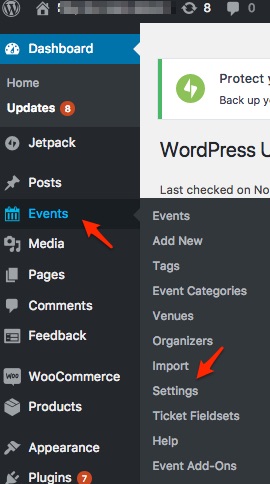
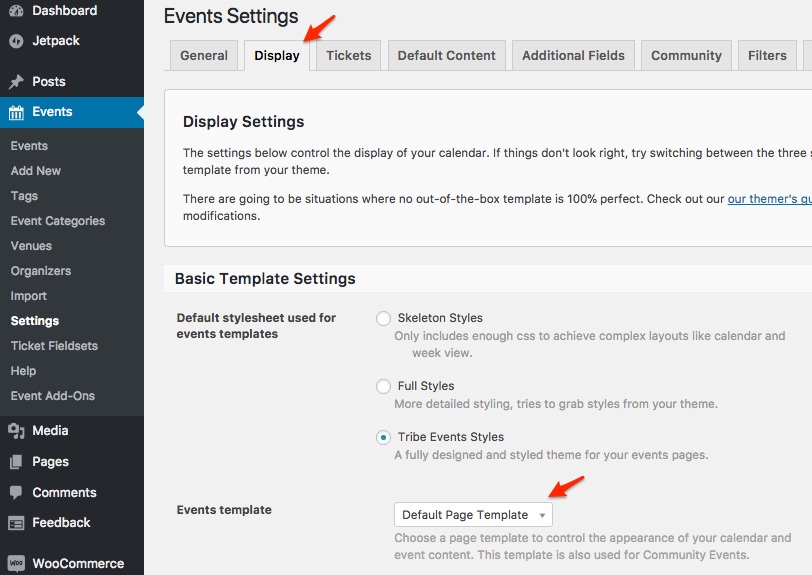
Let me know how that goes.
Best regards,
Geoff B. -
AuthorPosts