

Forum Replies Created
-
AuthorPosts
-
Geoff B.
MemberGood evening Matthew and welcome back!
Thank you for reaching out to us.
I would love to help you with this topic.The good news is that you can customize any of the Events Calendar’s views to your liking.
You might want to read our Themer’s guide to get a sense of how that works.
In short, you need to:
- Locate the view files you want to change (in this case the list view)
- Locate the view files that contain the information you would like to add to the list view (single-event view would be a great choice)
- Steal the code and paste it in the List view file code
- Upload the modified view file back to your WordPress theme
Let me know how that goes.
Best regards,
Geoff B.MemberGood evening Zackery and welcome to the Events Calendar forum!
Thank you for your interest in our products.
We’ll be glad to answer your questions.The short answer is yes.
You can read about it here: https://theeventscalendar.com/?s=wpml&submit=Search&post_type%5B%5D=tribe-knowledgebaseLet me know if that helps.
Have a great day!
Geoff B.
MemberGood afternoon Max and welcome to the Events Calendar forum!
Thank you for your interest in our products.
We’ll be glad to answer your questions.You are correct. Both solutions will work, but there are some caveats:
- Obviously, the business license will only work for up to 3 sites on your multisite install
- Using a business license on a multisite installation works, but you will not be able to use the “automated” plugin updates. You will have to perform those manually: https://theeventscalendar.com/knowledgebase/multisite-license/
Let me know if that helps.
Have a great day!
Geoff B.
MemberGood afternoon Paul and welcome to the Events Calendar Support forum!
Thank you for reaching out to us.
We are sorry to hear about the month name not showing. Yikes!
I would love to help you with this topic.But prior to that, please note that Private threads are usually private at our customers’ request.
Therefore, it is desired behavior that you cannot see their content, even if you are logged in.
The good news is that this also means other customers cannot see your private threads.That said, let’s focus on finding the cause of your issue.
Could you please send me a copy of the latest version of your WordPress theme / child theme via a link to a .zip file link (stored Dropbox or Google Drive) so that I can run some tests on my end? I recommend a private reply for that purpose.
Please ensure you are using the latest files as found on your actual website.
This way I will get access to any updates or customizations you might have made.Secondly, it looks like you have several Javascript errors on that page which might not be helping.
Most of them are related to your the API key missing: https://theeventscalendar.com/knowledgebase/setting-up-your-google-maps-api-key/Additionally, could you temporarily remove all caching from your site, in case this is interfering?
Finally, would you mind trying out different options for Events Template under Events -> Settings -> Display to see if that helps.
Let me know how that goes.
Best regards,
Geoff B.MemberGood afternoon Nicole and welcome back!
Thank you for reaching out to us.
We are sorry to hear about the issues you have experienced while simply trying to publish your events. Yikes! I would love to help you with this topic.
Based on what I am seeing on your site, it looks like there is a substantial amount of mixed content errors being generated. This might not be the cause of your struggles, but it’s worth fixing anyway.
I would recommend using the following plugin for that purpose: https://wordpress.org/plugins/ssl-insecure-content-fixer/
Secondly, would you mind taking a look at /wp-admin/edit.php?page=tribe-common&tab=community&post_type=tribe_events on your site?
I have a feeling that the default status is set to “pending review”.
Let me know how that goes.
Best regards,
Geoff B.MemberGood afternoon Paul
Thank you for following up.
You will be glad to know that I did read your message fully.
That said, we do have a fairly large number of snippets and GitHub repos, making it hard to know which snippet you did try.As for the second link, this extension is indeed part of the solution as it adds the attendee information to tickets.
So let’s focus on fixing the other part (sending a copy to the organizer).
For that purpose, could you please send me a copy of the latest version of your WordPress theme / child theme via a link to a .zip file link (stored Dropbox or Google Drive) so that I can run some tests on my end? I recommend a private reply for that purpose.
I am also noticing that you are using modified versions of our plugins, at least when it comes to the name. To leave no stone unturned, please include all 4 of these plugins in that same folder.
Please ensure you are using the latest files as found on your actual website.
This way I will get access to any updates or customizations you might have made.With that in hand, I should be able to get to the bottom of the issue.
Hang in there!
Geoff B.
MemberGood afternoon Gregor,
I am glad to see you are making progress.
The short answer is that you can translate the filters too 🙂
To achieve this:- Head over to Translate texts in admin screens » and look for – custom-fields under – tribe_events_calendar_options
- Expand the items and check the fields you want to translate
- Scroll down and hit “Apply”
You will now find these to be translatable within the string translation interface.
Have a good weekend,
Geoff B.
MemberGood afternoon Sarah!
I am super stoked to hear that!
You are welcome back in our support forums any time 🙂
For now, I am going to close this thread.
Have a great weekend!
Geoff B.
MemberGood evening Patrick and welcome back!
Thank you for reaching out to us.
I would love to help you with this topic.Is it possible to add an additional button with external link in the event calendar overview?
Absolutely. In fact, you can customize any view to your liking.
You might want to read our Themer’s guide to get a sense of how that works.Basically, you edit the view’s code, add code for your button and upload the modified file back in your WordPress theme’s folder.
On a related note, you might be interested in the following: https://theeventscalendar.com/knowledgebase/make-links-event-go-straight-event-website/
Let me know if that helps.
Have a great day!
Geoff B.
June 28, 2018 at 9:47 pm in reply to: Error updating events tickets plus & events calendar pro plug-in & column issue #1564259MemberGood evening Maribeth and welcome back!
Thank you for reaching out to us.
We are sorry to hear about
I would love to help you with this topic.What is going on is that there are too many columns fighting for space on that screen (typically as a result of the SEO plugin).
The good news is that this can easily be fixed.
What you need to do is head over to the Screen Options menu (located at the top right of that screen) and uncheck unnecessary boxes. The display should return to normal.
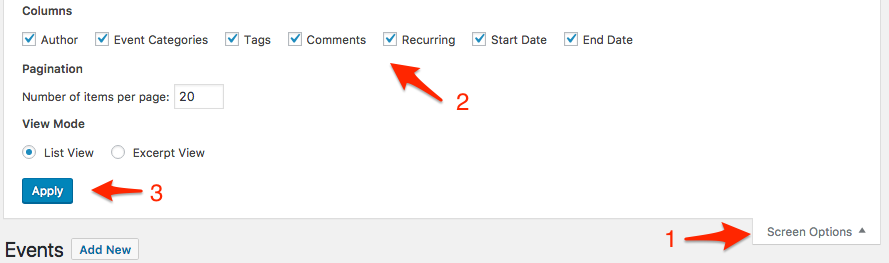
Additionally, there are a couple of other warnings on your installation that I would recommend addressing for a smoother website experience.
- You should inquire to your web host about upgrading the PHP version you are using preferably to 5.6+, ideally 7+
- Event Rocket is known to break parts of the Events Calendar and has been unsupported for over 2 years. I would recommend deactivating it.
Let me know how that goes.
Best regards,
Geoff B.MemberGood evening Paul and welcome back!
Thank you for reaching out to us.
I would love to help you with this topic.I would want the organizer to receive a notification email whenever a ticket is purchased.
You could apply the following snippet in the functions.php file of your theme (without the PHP tag at the top): https://gist.github.com/vicskf/c807167bd0a89a13af7f9ad8d351d184
But first, to be extra safe, before making any changes to your functions.php file, you should make a backup of that file.
The attendee’s information should be in the email.
You could use the following https://theeventscalendar.com/extensions/add-event-and-attendee-information-to-woocommerce-order-details/
The other option, of course, would be to manually create an email template.
Let me know how that goes.
Best regards,
Geoff B.MemberGood evening Chris and welcome to the Events Calendar forum!
Thank you for your interest in our products.
We’ll be glad to answer your questions.The short answer is: absolutely.
You could apply the following snippet in the functions.php file of your theme (without the PHP tag at the top): https://gist.github.com/cliffordp/c4fb2ea8fb5ca44973ff06e6facc9742
But first, to be extra safe, before making any changes to your functions.php file, you should make a backup of that file.
Let me know how that goes.
Best regards,
Geoff B.MemberGood evening and welcome to the Events Calendar Support forum!
Thank you for reaching out to us.
I would love to help you with this topic.As a first troubleshooting step, could you please provide us with your complete system information in a private reply using the instructions found in the following link?
https://theeventscalendar.com/knowledgebase/sharing-sys-info/
There are typically two levels at which you can set the time format:
- Under /wp-admin/options-general.php
- Under Events -> Settings -> Display
Tweak those to your liking 🙂
Let me know how that goes.
Best regards,
Geoff B.MemberGood evening Melanie and welcome back!
Thank you for reaching out to us.
We are sorry to hear about the tickets not being received.
I would love to help you with this topic.My first recommendation would be to head to Events -> Settings -> Tickets.
Once there, take a look at the When should tickets be emailed to customers? setting.
Sometimes, the WooCommerce order needs to change state before the ticket is email.
If the correct condition is met and you are still not receiving an email, the next logical step would be to look at WP Mail.
More specifically, you can have the system send tickets from any chosen email address by simply installing, configuring and testing the following plugin: https://wordpress.org/plugins/easy-wp-smtp/
Using a real SMTP server with authentication will bypass the built-in WP mail functionality altogether.
Please make sure you configure and test the settings using the plugin’s built-in tool.
Let me know if that helps.
Have a great day!
Geoff B.
MemberGood evening Arne and welcome to the Events Calendar forum!
Thank you for your interest in our products.
We’ll be glad to answer your questions.The short answer is that you can “fake it”: https://theeventscalendar.com/knowledgebase/can-you-have-multiple-calendars/
As an alternative, you could use the newest member of our family, Loxi: https://loxi.io/
It is not exactly the same as the Events Calendar, for the purpose of having multiple calendars that really look and feel separate, it is probably more efficient.
Let me know if that helps.
Have a great day!
Geoff B.
-
AuthorPosts