
Home › Forums › Calendar Products › Events Calendar PRO › Error updating events tickets plus & events calendar pro plug-in & column issue
- This topic has 6 replies, 2 voices, and was last updated 8 years, 3 months ago by
Lisa.
-
AuthorPosts
-
June 28, 2018 at 12:43 pm #1563991
Lisa
ParticipantAlso the list of events on the back end is not correct again. The columns are too narrow.
Thank you in advance for your help~========================
PLEASE LEAVE FOR SUPPORT
Reporting the same issue as: https://theeventscalendar.com/support/forums/topic/cant-update-2/June 28, 2018 at 9:47 pm #1564259Geoff B.
MemberGood evening Maribeth and welcome back!
Thank you for reaching out to us.
We are sorry to hear about
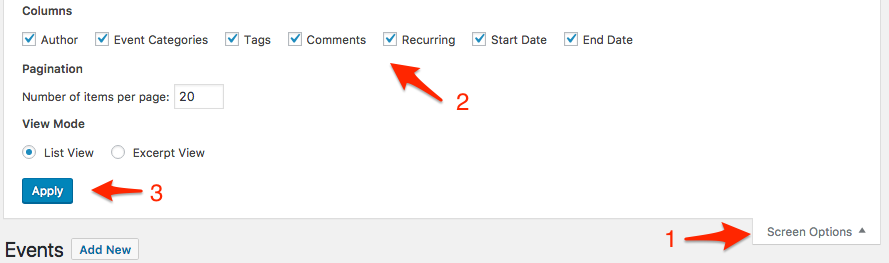
I would love to help you with this topic.What is going on is that there are too many columns fighting for space on that screen (typically as a result of the SEO plugin).
The good news is that this can easily be fixed.
What you need to do is head over to the Screen Options menu (located at the top right of that screen) and uncheck unnecessary boxes. The display should return to normal.
Additionally, there are a couple of other warnings on your installation that I would recommend addressing for a smoother website experience.
- You should inquire to your web host about upgrading the PHP version you are using preferably to 5.6+, ideally 7+
- Event Rocket is known to break parts of the Events Calendar and has been unsupported for over 2 years. I would recommend deactivating it.
Let me know how that goes.
Best regards,
Geoff B.July 2, 2018 at 8:28 am #1565946ParticipantThank you – this worked great for viewing the events columns correctly. Any ideas on why I can’t update the two plug-ins?
Thank you.
July 2, 2018 at 10:10 am #1566083MemberGood afternoon Maribeth,
I am glad you were able to fix the display.
As for the plugin updates, it looks like there are 2 things that are potentially not helping:
- Based on the system information I have, I would strongly advise upgrading your PHP version at least to 5.6+ (preferably 7+). Several plugins (including ours) are no longer going to support older versions of PHP. You might want to reach out to your web hosting company about that.
- It looks like you are running personal licenses on a multisite installation.
Although this is totally allowed, it does come with a caveat: you cannot upgrade our plugins automatically. You will need to do so manually (download the files and upload them). You can read about that here: https://theeventscalendar.com/knowledgebase/multisite-license/
Let me know if that helps.
Have a great day!
Geoff B.
July 3, 2018 at 8:34 am #1566798ParticipantHi Geoff,
Thank you for your reply. I had updated the PHP version to 5.6 then to 7+ yesterday and this did not help. I am still getting an error.
We may be technically “multi-site” because we had set up a testing server before we went live, but this testing server is not being used. I am not sure why it’s an issue with updates now, since we’ve had these plug-ins for a few years? We are a non-profit public library with one website: http://www.hchlibrary.org
As I look at the instructions to update manually, I have to delete all files and data? This makes me extremely uncomfortable with our live site, even if I have a backup in place.
Is there another workaround for this? Thank you.
July 3, 2018 at 9:08 am #1566847ParticipantIf not, then I will wait for the next update, perhaps it will work then. Thank you for your assistance.
July 3, 2018 at 10:20 am #1566993MemberGood afternoon Maribeth,
Kudos on the PHP upgrade. If nothing else, you will notice that your site will run much faster now.
We may be technically “multi-site” because we had set up a testing server before we went live, but this testing server is not being used. I am not sure why it’s an issue with updates now, since we’ve had these plug-ins for a few years
I am not sure either, but what I can tell you is that try to update a personal license on a network install automatically is not supposed to work.
To make things smooth, you would have to revert to a non-network installation of WordPress. That would be the only workaround.
As I look at the instructions to update manually, I have to delete all files and data? This makes me extremely uncomfortable with our live site, even if I have a backup in place.
I can understand the sentiment. Even though the procedure is 100% safe, it is always wise to back up your files and database first.
Some people also like to activate a “Maintenance Page” plugin to make sure their web users are not impacted.
Let me know how that goes.
Best regards,
Geoff B.July 25, 2018 at 9:35 am #1583214Support Droid
KeymasterHey there! This thread has been pretty quiet for the last three weeks, so we’re going to go ahead and close it to avoid confusion with other topics. If you’re still looking for help with this, please do open a new thread, reference this one and we’d be more than happy to continue the conversation over there.
Thanks so much!
The Events Calendar Support Team -
AuthorPosts
- The topic ‘Error updating events tickets plus & events calendar pro plug-in & column issue’ is closed to new replies.