

Forum Replies Created
-
AuthorPosts
-
Geoff B.
MemberGood afternoon Jonathan,
Thank you for writing back, for the link and for the screenshot.
You are absolutely right. For past events, it should read exactly as you said.
I have researched this some more and it turns out it is a bug!
Unfortunately, I cannot commit to a release date for a fix at this point. But you will be contacted as soon as there is one.Thank you for bringing this to our attention.
Best regards,
Geoff B.
MemberBon après-midi Jean-Philippe,
Merci de nous écrire.
Vous pouvez modifier la taille des images à l’aide d’une simple règle de CSS. Ex:
.tribe-events-list .tribe-events-event-image {

width: 76%;

}
En espérant que ça puisse vous aider.
Salutations,
Geoff B.
July 28, 2016 at 12:40 pm in reply to: Attendee list not saving if more than 5 people but 5 people an under are ok? #1145284MemberGood afternoon Oliver and welcome to the Events Calendar Support forum!
Thank you for reaching out to us.
We are sorry to hear about the attendee list not capturing information over 5 users on your install.
I would love to help you with this topic.The good news is that is not normal behaviour and I was not able to reproduce this on my end.
That means that we should be able to get to the bottom of this quickly.Thank you for your patience as we troubleshoot this.
As a first troubleshooting step, could you please provide us with your complete system information in a private reply using the instructions found in the following link?
https://theeventscalendar.com/knowledgebase/sharing-sys-info/
Secondly, to expedite things, could you send me a screenshot of your attendee information form (so that I can perform additional tests).
Best regards,
Geoff B.
MemberGood evening Amanda and welcome back!
Thank you for reaching out to us.
I would love to help you with these requests from your client.The short answer is that this is possible to achieve.
However, depending on their exact needs, that will be accomplished via a third-party plugin or some template customization.I would recommend taking a look at the following 3 links (but there is way more) as a starting point:
- https://docs.woocommerce.com/document/automated-follow-up-emails-docs/email-triggers-and-events/
- https://www.skyverge.com/blog/how-to-add-a-custom-woocommerce-email/
- https://codecanyon.net/item/woocommerce-email-center/13907681
Let me know if that helps.
Have a great day!
Geoff B.
July 28, 2016 at 12:28 pm in reply to: Installing E Pro calendar is in conflict with DesignThemes Core Features Plug #1145275MemberGood afternoon Milan and welcome to the Events Calendar Support forum!
Thank you for reaching out to us and for your system information.
We are sorry to hear about the error message you are getting. Yikes!
I would love to help you with this topic.Could you please send me a copy of your WordPress theme / child theme in a .zip file link (via Dropbox or Google Drive) so that I can run some tests on my end (in a private reply)?
Hang in there as we figure out what is going on.
Best regards,
Geoff B.
MemberGood afternoon Juan,
Thank you for writing back and for answering my questions.
Only the first two tickets (from 9) show the “view details” option with the custom fields info. It’s quite strange, since the buyer insists that she did filled all custom fields for all 9 tickets before moving on to the checkout page.
With your permission (and collaboration), I’d like to dig a bit deeper into this.
For that purpose, could you please send me a copy of your WordPress theme / child theme in a .zip file link (via Dropbox or Google Drive) so that I can run some tests on my end (in a private reply) ? What could be even more awesome is a .zip file of the actual database (so that we know for sure).
Is there a way to have that TICKETS email sent to all attendees, not just to the buyer’s email?
Thank you for that clarification. The short answer is that right now, there is no built-in way to do this.
This could totally be achieved via some template customization. You might want to read our Themer’s guide to get a sense of how that works.
We also have a huge collection of snippets to draw inspiration from: https://theeventscalendar.com/knowledgebase/ and in our premium support forums.I would recommend the 3 following links as a starting point:
- https://docs.woocommerce.com/document/automated-follow-up-emails-docs/email-triggers-and-events/
- https://www.skyverge.com/blog/how-to-add-a-custom-woocommerce-email/
- https://codecanyon.net/item/woocommerce-email-center/13907681
That being said, I can see how this would be a cool feature to have built-in.
If you don’t mind, you can suggest it or cast your vote on other features in our User Voice forum.That way other users get to vote for it.
Let me know if that helps.
Have a great day!
Geoff B.
MemberBonjour Amélie,
Merci de nous répondre.
Voici ce que je vous propose:
- Allez sous Réglages > Général (dans l’interface WordPress) et jetez un coup d’oeil au réglage pour Format d’heure. Vous devriez pouvoir voir les différentes options qui affichent “min” ou pas. Assurez-vous de choisir une option qui vous convient.
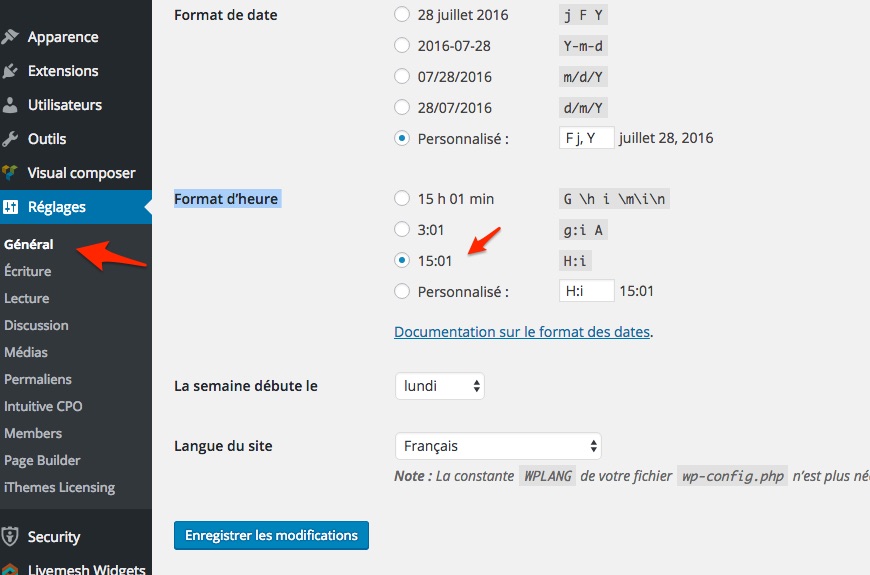
- Si jamais ça ne fonctionnait pas, il est possible que le format de la date soit défini à même votre thème WordPress. Le plus simple dans ce cas serait de me fournir un lien vers un fichier .zip qui contient ce thème (à l’aide d’un lien Dropbox, Google Drive, etc…). Comme ça je pourrais y jeter un coup d’oeil.
Salutations,
Geoff B.
July 28, 2016 at 11:59 am in reply to: possible to simplify the community 'add events' form? #1145266MemberGood afternoon Paul,
Thank you for writing back. It’s unfortunate that the NGO program won’t work out for you guys.
I imported via CSV all our old data. Almost 8000 entries. The import option worked fine, but the agenda/event page itself refuses to load now…
I’m sorry to hear that the import did not go well for you. There could be a couple of things at play here:
- Depending on your server’s specs (timeout value, allocated memory, PHP settings, etc) , that might be too many entries at a time for one import. This means potential corruption in the DataBase. You might want to experiment with breaking your import in smaller chunks (500 or 1000 at a time for example) and see how that goes.
- You might need to re-save your permalinks after an import
Let me know if that helps.
Have a great day!
Geoff B.
MemberGood afternoon Kate,
Thank you for writing back, for running some tests and for the system information.
I think you are on the right track. It looks like your Webhost is preventing WordPress emails from being sent (which is not all that uncommon).
Yes, the Easy WP SMTP plugin should help with that. However, it needs to be configured properly (and tested – through its interface).
Simply installing the plugin will not solve anything.I recommend reading the following: https://wp-ecommerce.net/easy-wordpress-smtp-send-emails-from-your-wordpress-site-using-a-smtp-server-2197
If your webhost does not allow you to connect to an actual email address on your sever, you can use a Gmail account instead.
Let me know how that goes.
Best regards,
Geoff B.MemberBefore I forget, in the meantime (and I realize this is less than perfect), simply re-saving the ticket in WooCommerce will fix the displayed price.
MemberGood afternoon Fred,
As promised, I followed up with my Sales discount test.
It looks like you are 100% right. This very specific scenario does not appear to update the price on our end.This is a legitimate bug and I just opened a ticket for it.
Unfortunately, I cannot commit to a release date for a fix at this point. But you will be contacted as soon as there is one.Thank you once again for following-up on this and allowing us to improve!
Best regards,
Geoff B.
MemberGood afternoon Sean,
Thank you for writing back.
I do see your point.The way this is set up currently is that as soon as there is a ticket related plugin (EventBrite Tickets, Event Tickets or Event Tickets Plus) that is activated, the cost field is hidden from the Event.
You can override that behaviour with the following snippet (which will force the cost field to reappear AND be used): https://gist.github.com/GeoffEW/69f8a033fb614c78b3de45a197431135
As for your question, normally you should not loose anything by deactivating the plugin (but I always recommend a database backup before trying out things).
That being said, with the above snippet, you actually don’t need to turn it off at all.
Let me know how that goes.
Best regards,
Geoff B.MemberGood evening Joseph and welcome back!
Thank you for reaching out to us.
We are sorry to hear about your struggles with CSS rules.
I would love to help you with this topic.As a first step, could you please provide us with your complete system information in a private reply using the instructions found in the following link?
https://theeventscalendar.com/knowledgebase/sharing-sys-info/
Secondly, could you provide me with a link to your actual calendar. What I am seeing on http://hcisdpac.org/ does not seem to match ?
Best regards,
Geoff B.
MemberGood evening Lucy,
Actually, deleting the plugin should not impact your Database.
But, you are right. You can never be too cautious.
Before attempting anything, I always recommend making a backup of the database (and having the ability to restore the said backup if something goes wrong).phpMyAdmin is a great way to do this. But, if this is slightly out of your comfort zone, you might want to try a third-party plugin such as Updraft Plus for that very purpose.
Let me know how that goes.
Best regards,
Geoff B.MemberBonsoir Amélie,
Merci de nous écrire.
En fait, l’affichage du temps suit les règles établies par les réglages de WordPress et de notre plugiciel. Il se peut aussi que le tout soit établi par votre template / thème.
Vous serait-il possible de me faire suivre un lien où votre calendrier est affiché ?
De plus, en attendant, voici un petit article fort instructif sur les formats d’heure et de date: http://www.wpbeginner.com/beginners-guide/how-to-change-date-and-time-format-in-wordpress/
Vous trouverez nos réglages sous Events -> Settings -> Display
Salutations,
Geoff B.
-
AuthorPosts