

Forum Replies Created
-
AuthorPosts
-
Geoff B.
MemberGood evening Eliu,
Thank you for writing back.
I believe I know why it’s not working in your case.
You see, your site is set to use Español de México (under Ajustes > Generales). Our plugins are only about 4% translated for that version of Spanish.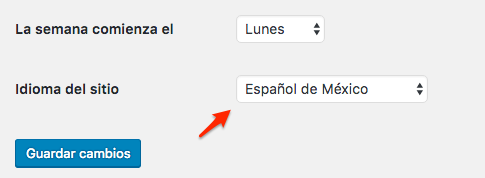
We have 2 solutions for you:
- Change that setting to Español (from Spain) and most of the calendar should get translated.
- Download and unzip the following files > Upload them to your /wp-content/languages/plugins/ folder (they are a copy of the Spanish from Spain files that I relabeled) Mexico
Let me know how that goes.
Best regards,
Geoff B.MemberGood evening Yvette,
I’m super stoked that this worked out for you.
You are welcome back on our support forums any time 🙂
For now, I am going to close this thread.
Have a great week!
Geoff B.
MemberGood evening Mitchell,
Thank you for writing back.
I would love to answer your questions.
– I installed the Bulk Delete plugin but could not find the “deleted_event” post type. Only types I could find were Post, Page, Project, tribe_venue, tribe_organizer, tribe_events. What am I missing here?
I am not sure exactly why you can’t find deleted events on your install.
In any case, I believe you are a prime candidate for the second solution: the snippet.Would you mind temporarily adding the following piece of code to your theme’s functions.php (without the opening <?php statement): https://gist.github.com/GeoffEW/5ca8736e9969dba7908622f31b932321
– If an event is updated or deleted from the iCal calendar, will that event be updated or deleted in the Events Calendar?
This will depend on a few things, but the when an event is deleted or updated from the master iCal calendar, your Events Calendar should reflect that.
Of course, there are instances where that does not work for a variety of reasons, but most of the time it should follow the calendar properly.
And if not, we are definitely interested in finding out why.Let me know how that goes.
Best regards,
Geoff B.MemberGood evening Ann,
Thank you for the files. This allowed me to run some tests.
The good news is I have found the cause of the page titles disappearing under certain browsers (e.g.: Safari).
The culprit is a glitchy CSS rule. Please add the following rule as a workaround until we fix that:
.tribe-events-list h2.tribe-events-list-event-title {

display: inline !important;

}
As for the second issue (the links not leading to the correct events or venue), I can see the issue on your install, but I am unable to reproduce it using your WordPress theme.
This leads me to believe that specific issue might be lying elsewhere.
As such I have a bunch of follow-up questions for you:
- Could you try re-saving your permalinks (without changing them) ?
- Could you tell me what your settings are under Events -> Settings -> Display for Events template ?
- Do you actually have any Event created using the theme’s built-in “Event” post type ? The reason I am asking is because our plugin usually requires complete exclusivity over the following slugs (unless you change them in Events -> Settings -> General):
Let me know how that goes.
Best regards,
Geoff B.MemberGood evening Abby,
No worries, I totally understand.
But I am looking forward to it when you are ready.Furthermore, it might be worth looking into the version of the Total theme you are using.
There is a possibility that downgrading to a previous version of that theme might help as a workaround.Have a great week!
Geoff B.
August 29, 2016 at 2:00 pm in reply to: Marking event as hidden does not hide it in widget list #1157260MemberGood evening Peter,
Thank you for writing back, running some tests and sending screenshots.
This is super helpful.This made me reconsider my own testing environment.
It turns out I had a snippet in place that prevented me from reproducing the bug! (https://gist.github.com/GeoffEW/4a134f9fb8052577814092c4497e2fa0)This snippet prevents the list of events from being displayed until you click on the “dot” in the mini-calendar.
My apologies for this and for any inconvenience this has caused so far.
I opened a bug ticket for this.
It is too early to give you a bug fix release date, but since this one is a biggie, it should receive a lot of attention.You will be contacted as soon as there is a workaround or fix for this.
Hang in there as we fix this.
Best regards,
Geoff B.
August 27, 2016 at 8:53 am in reply to: Does Event ticket plus works with wc marketplace to split money with vendors? #1156672MemberGood morning @longinus,
Thank you for your interest in our products.
This is a great question and I will run some additional tests on it.
Technically speaking when you use our Event Tickets Plus premium add-on alongside WooCommerce, by default our plugin creates virtual “hidden” simple WooCommerce Products.
Of course, this behaviour is customizable, plus you can manually edit these tickets products just like you would edit any other WooCommerce product.
So in theory, I believe it should work, but I’ll run some tests.
That being said, we do have another plugin which handles multiple event organizers (including the ability to submit events) and the ability to split commission amongst them. I’m not sure if that is what you are looking for, but I recommend checking it out:
- https://theeventscalendar.com/product/wordpress-community-events/
- https://theeventscalendar.com/product/community-tickets/
Finally, you could run tests for yourself since we do offer a risk-free refund policy on all of our plugins.
Let me know if that helps,
Geoff B.MemberGood morning Ann and welcome back,
Thank you for reaching out to us and being so thorough in your testing.
You are absolutely right, it does indeed look like this is a theme conflict.
If nothing else, you might be able to fix this by downgrading to the previous version of their theme.In the meantime, could you please send me a copy of the latest version of that theme in a .zip file (in a private reply) via a dropbox or Google drive link ?
Hang in there!
Best regards,
Geoff B.
MemberGood morning Patrice,
Thank you for your interest in our products.
We would love to answer your questions about our Event Tickets Plus premium add-on.1. Are their confirmation emails to the buyers with the details of the event within the email?
There are 2 emails sent out to buyers:
- The usual order confirmation from your e-commerce plugin (e.g.: WooCommerce invoice)
- An email containing the ticket(s)
By default, there is some information about the event included in both of these emails.
The good news is that both of these emails are customizable to your liking (depending on what you would like to see in there).In fact, we already have several nice snippets of code to achieve different customizations.
Could you expand on what information you would need to be displayed on each of these emails so that I can point you in the right direction ?2. Is there a way to automatically remind the attendees via email about an upcoming event? (Set and forget?)
Some of our customers achieve that via a third-party plugin such as https://woocommerce.com/products/follow-up-emails/. But in the end, that depends on the e-commerce plugin you are using alongside our Event Tickets Plus solution.
That being said, there is currently no built-in feature for that, but it’s planned as future feature: https://tribe.uservoice.com/forums/195723-feature-ideas/suggestions/8391186-reminder-emails-for-x-days-before-event
3. Can attendees log in and cancel an event they have already paid for using Stripe?
Once again, that will completely depend on the e-commerce plugin you are using. This is because our plugin hands-over all of the transactional part of things to the e-commerce plugin of your choice.
The most popular being WooCommerce, mainly because of all of its added extensions AND the fact that Automattic is now behind it.
There several Stripe payment gateways and, to my knowledge, they all work properly.
You might have to validate which of these offer order cancellation capabilities.Let me know if that helps,
Best regards,
Geoff B.MemberGood morning Eliu and welcome back,
Thank you for reaching out to us.
How to translate all the Events Calendar to SPANISH?
That is a great question and I believe I have some pretty good news for you.
Most of our plugins are already translated to Spanish.You can see the translated files, download them and contribute to them here: http://translations.theeventscalendar.com/projects
Additionally, I would recommend reading the following: https://theeventscalendar.com/knowledgebase/changing-the-language-on-your-calendar/
If you cannot find what you are looking for or are looking for even more customization in your translations, you might want to look at the following YouTube video to get you started: https://www.youtube.com/watch?v=1xqcxncNmT0
Let me know how that goes and if you have any follow-up questions ?
Best regards,
Geoff B.MemberGood morning Yvette and welcome to the Events Calendar forums,
Thank you for reaching out to us.
There are a couple of ways to accomplish what you are looking for:
- Replace the labels/strings in the language files of the Event Tickets and Event Tickets Plus plugin. You could then save these custom files under /wp-content/languages/plugins/
- Use a code snippet in your child theme’s functions.php : https://theeventscalendar.com/knowledgebase/change-the-wording-of-any-bit-of-text-or-string/
Let me know if that helps.
Best regards,
Geoff B.MemberGood morning Ann and welcome to the Events Calendar,
Thank you for reaching out to us and bringing this to our attention.
You are absolutely right. This is a glitch.
We are sorry for the inconvenience this might be causing.As such, a bug ticket has been opened.
Although it’s too early to provide you with a release date for a fix, I can promise you that you will be contacted as soon as it’s out.Thank you once again for your patience and for helping us make our products better.
Best regards,
Geoff B.MemberGood morning Leah and welcome to the Events Calendar forum,
Thank you for reaching out to us and kudos for finding the fix to your situation!
For now I am going to close this thread, but please know that you are welcome back on our forums at any time!
Best regards,
Geoff B.MemberThis reply is private.
MemberGood evening Sarah,
Thank you for the theme files.
This leads me to a first follow-up question, to make sure we are on the same page.The files you sent me are for Bridge 9.1.3
I know for a fact that version 10 of that theme is out. Could you just confirm which version you are using exactly on your site ?If you are unsure, could you head over to Appearance > Themes and hover over the Bridge theme until you see “Theme details”. At that point, simply click on it. The version number should be revealed.
As per the issue with the word “Archive”, you can go ahead and simply select the “Default Events Template” from the dropdown and add the following CSS rule to your theme’s custom CSS. Otherwise, you are right, it gets hidden under the header. Of course, you are welcome to play with that margin to your liking.
#tribe-events-bar {

margin-top: 140px;

}
On top of that, I would recommend switching to “Full styles” and adding the following CSS rule under Appearance > Custom CSS
.tribe-events-calendar th {

color: #fff !important;

}
Let me know how that goes
Geoff B.
-
AuthorPosts