

Forum Replies Created
-
AuthorPosts
-
Geoff B.
MemberGood evening Valentina and welcome to the Events Calendar forum!
Thank you for your interest in our products.
We’ll be glad to answer your questions.Yes, you can control what excerpt is controlled in the “Excerpt” metabox of any Event.
I suggest you give the following blog post a read. It should answer your question (especially the part at the bottom): https://theeventscalendar.com/the-trouble-with-excerpts/Let me know if that helps.
Have a great day!
Geoff B.
MemberThis reply is private.
MemberGood evening Mickey,
Thank you for writing back.
Did the navigation menu display when you browsed the URL I sent?
I actually did not receive that URL for some reason. But I ran some additional tests specifically with the menu and the header in mind while using the blank page and I can see what you mean.
Here are all the plugins we are using with the site. Maybe the last one is the problem?
I do not think the last plugin is the issue here.
I have given this some thought and I am pretty sure that what is going on is that Divi is not recognizing the Calendar page as a “Page”.The reason for this is because it is not actually a real page, but rather some complex use of the WordPress archive template.
In other words, you have 3 options ahead of you:
- Through the use of a Divi child theme, augment the conditionals in the header.php of Divi so that it treats the calendar page the same way as it does the blank page template
- Get a copy of our the Events Calendar Pro premium add-on when version 4.3 comes out
- Hire one of our recommended customizers to do the customization for you.
I am afraid that this is as far as I can provide support in this context.
We unfortunately do not offer support for our free plugin in this premium add-ons forum.
But, the good news is that you are still welcome to consult this forum to your liking and browse it for solutions, snippets and tutorials.
If you don’t mind, in the future could you please post your support questions here: https://wordpress.org/support/plugin/the-events-calendar so that they can get the required attention?
Best regards,
Geoff B.
MemberGood evening Jason,
I’m super stoked that we found a solution for all of your issues.
You are welcome back on our support forums any time 🙂
For now, I am going to close this thread.
Have a great weekend!
Geoff B.
MemberBonsoir Alexander,
Super! Je suis bien heureux d’apprendre que ce n’était qu’un problème passager.
Pour ce qui est des autres questions, je vous inviterais à ouvrir un autre billet, si ça ne vous gêne pas.
En effet, nous tâchons de limiter la teneur des billets à un sujet, autant que possible.Vous n’avez qu’à rédiger le contenu du billet en français et il devrait m’être acheminé 🙂
Bon week-end,
Geoff B.MemberGood evening Tony and welcome to the Events Calendar Support forum!
Thank you for reaching out to us.
We are sorry to hear about the struggles you have been experimenting while setting up Event Tickets Plus.
I would love to help you with this topic.To use Event Tickets Plus tickets in a post, page or other custom post type, you need to:
- Have the free Event Tickets plugin installed
- Have our Event Tickets Plus premium add-on installed
- WooCommerce installed
Then, head over to Events -> Settings -> Tickets and make sure the desired post types are checked.
Hit “Save Changes”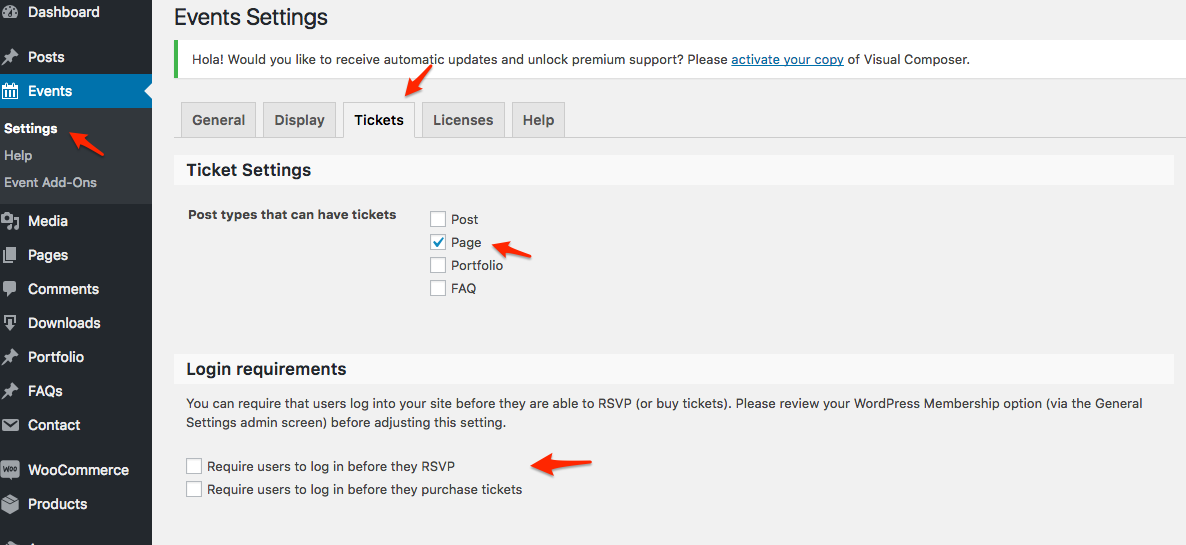
Let me know how that goes.
Best regards,
Geoff B.MemberGood evening Jerry Lee and welcome back!
Thank you for reaching out to us.
I would love to help you with this topic.The good news is that you can achieve exactly what you are looking for.
This is possible because we literally hand-off all of the transactional aspect of tickets to WooCommerce.The simplest solution is:
- To make sure that all of your members are created as users in WordPress
- To make sure that all of these members are assigned to a specific WordPress role or user group: https://theeventscalendar.com/knowledgebase/admin-roles-and-permissions/
- To have a plugin that manages discounts based on role/group/membership for logged-in WordPress users
As an alternative you could use the complete WooCommerce memberships plugin (if you want to integrate and automate membership management in your system to): https://woocommerce.com/products/woocommerce-memberships/
In other words, there will not be 2 separate processes. Your members, by being logged-in and being recognized as members will automatically get special prices
Let me know if that helps.
Have a great day!
Geoff B.
MemberGood evening Rafael,
Thank you for writing back.
Here are the latest files I am using for Brazilian Portuguese in case that helps. tribe-events-community-pt_BR
It looks like your login page is now properly translated. Kudos on that!
Would you mind telling me which text is still not translating ?Another thing the user to add a Event in community the login is not from woocommerce? Where the user make a registration?
That is a great question. Technically any WordPress user (including WooCommerce customers) can have access to that login.
You can control that under Events -> Settings -> Community (scroll all the way down to access control)
A lot of our customers also use Community Events in combination with the Theme my login plugin: https://wordpress.org/plugins/theme-my-login/
This gives them more control over the front-end experience while also providing the option for front-end registration.Let me know if that helps.
Have a great day!
Geoff B.
MemberGood evening Avinash,
Thank you for following up and welcome back!
Let me know how that goes.
Best regards,
Geoff B.October 7, 2016 at 1:57 pm in reply to: Abandoned Cart Suggestion for Attendee Information? #1173896MemberGood evening Brian,
I am glad that my advice helped you move closer to your goals.
You can probably add CSS classes to each attendee field using some template customization. You might want to read our Themer’s guide to get a sense of how that works.
More specifically, you should probably work with the following:
- /event-tickets-plus 3/src/views/meta.php
- /event-tickets-plus 3/src/views/meta/ (all the files of that folder)
With the same process you could probably send the data elsewhere as well.
As an alternative, you could hire one of our recommended customizers to do the customization for you.
Let me know if that helps.
Have a great day!
Geoff B.
MemberGood evening Christian,
As promised, I have a solution for you. Actually, I even have a second one.
- Here’s a link to a working snippet https://gist.github.com/GeoffEW/c1e4a2096b9af920b79cda20096ae486
- You can use the following plugin, which hides the ticket forms areas everywhere and lets you reinsert it where you want using the [event_tickets_forms_display] shortcode https://theeventscalendar.com/content/uploads/2016/08/tribe-snippet-tickets-shortcode-2016-08-11.zip
Let me know how that goes.
Best regards,
Geoff B.MemberGood evening Math and welcome back!
Thank you for reaching out to us.
I believe I understand what you’re asking for, but we’re limited in helping with customizations.
However, I can try to help point you in the right direction.- You can probably achieve what you are trying to do via a template customization. You might want to read our Themer’s guide to get a sense of how that works.
- You can hire one of our recommended customizers to do the customization for you.
I wish I had a better answer for you, but for now it’s the best one I have.
Let me know if that helps.
Have a great day!
Geoff B.
October 7, 2016 at 11:07 am in reply to: Changing the "all" text in permalinks for recurring events #1173856MemberGood afternoon Stephane,
Great news, the snippet has been updated and should now work! https://gist.github.com/barryhughes/eef63b959317d96ba4de28bebfd4d3e0
Let me know how that goes.
Best regards,
Geoff B.October 7, 2016 at 11:01 am in reply to: Can I make "lower class" of events that appear on calendar but don't have page #1173853MemberGood afternoon Yoni,
Thank you for writing back.
If I’m not mistaken, the Event Calendar Pro does allow for custom fields.
That is correct. You can also add custom fields using a plugin such as Advanced Custom Fields.
In this case, would I still need the Community Events Add-on? If so why?
(assume that I do not need to allow user to submit events from the front end. I am happy for them to email me their event and I load the events myself manually)You are right again. The Community Events add-on is only useful if you plan on letting users submit events from the front-end.
But if you don’t mind the manual entry of events submitted by email or contact form, then you don’t need it.Best regards,
Geoff B.
MemberBonjour Alexander,
D’accord, merci de préciser.
Vous avez entièrement raison. Il s’agit d’un bogue qui s’est glissé dans la version 4.2.7
Nous allons corriger le tout lors d’une prochaine mise à niveau et nous vous contacterons dès que c’est fait.En attendant, j’ai une solution pour vous:
- Téléchargez le plugin suivant: https://theeventscalendar.com/content/uploads/2016/09/tribe-snippet-tickets-email-options-2016-08-30.zip
- Assurez-vous de bien cocher la case pertinente (voir capture d’écran)
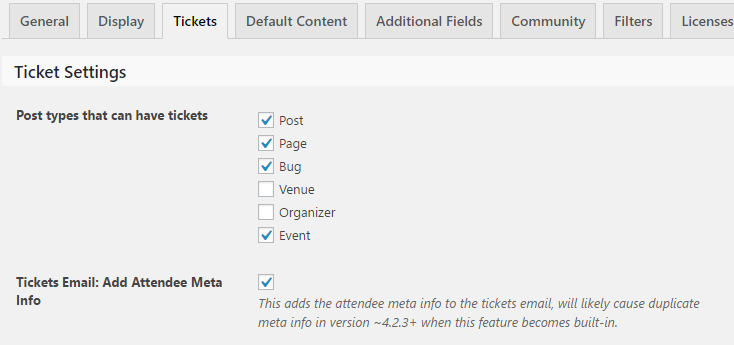
N’oubliez pas de désactiver ce plugin lorsque le bogue sera corrigé.
Salutations,
Geoff B.
-
AuthorPosts