

Forum Replies Created
-
AuthorPosts
-
Geoff B.
MemberGood afternoon Jesse and welcome to the Events Calendar Support forum!
Thank you for reaching out to us.
Kudos on coming up with that change via JavaScript AND for sharing it for everybody’s benefit!
I have shared it with our code Ninjas and I believe this is a legit bug.
Alas, I cannot guarantee when it will be fixed, as it’s in the development team’s hands now.
They need to assign it, code it, test it, and schedule it for release.The good news is that you will be contacted as soon as a fix is available.
Thank you for your patience as we see this through.Best regards,
Geoff B.April 24, 2017 at 10:16 am in reply to: QR Check-In Not Working Qr code has not been added since the last major update #1273532MemberGood afternoon Vladimir and welcome to the Events Calendar Support forum!
Thank you for reaching out to us.
We are sorry to hear that you are struggling with QR code check-in as well.
I would love to help you with this topic.Although the issue seems similar, the cause can be quite different.
The good news is that there is no known bug with the QR code check-in.I have tested it thoroughly and it works. It will more be a matter of finding out why it does not work for you. Can you:
- Tell me which QR code app you are using ?
- Confirm if you are logged-in the WordPress site with a user that has at least the “Edit post” capacity ? (admin user or custom role)
- Send me a copy of the latest version of your WordPress theme / child theme via a link to a .zip file link (stored Dropbox or Google Drive) so that I can run some tests on my end ? I recommend a private reply for that purpose.
Please ensure you are using the latest files as found on your actual website.
This way I will get access to any updates or customizations you might have made.
Hang in there!
Geoff B.
MemberGood afternoon Todd and welcome back!
Thank you for reaching out to us.
I would love to help you with this topic.Actually, the answer is yes. The fix is now pending QA.
In the meantime, you can workaround that with some CSS.
That part will change from site to site, but if I could have temporary credentials to login to your “Submit Event” interface (via a private reply), I could help you with that.Hang in there!
Geoff B.
MemberGood evening Tony and welcome to the Events Calendar Support forum!
Thank you for reaching out to us.
We are sorry to hear about the imports failing on you. Yikes!
I would love to help you with this topic.The other issue you are referring to was caused by running out of allowed imports (over 100 a day).
There could be a few things at play here, so thank you for your patience as we troubleshoot to find out what is going on.
You mentioned that the scheduled import is not working. Is that true for all of them or does it initially work and then break at some point (i.e.: after the “Star family home” import in this case) ?
If you completely delete one of these scheduled imports and recreate it from scratch, does that work any better ?
Finally, in the setup process, were you asked to authorize the FB token (which needs to be re-authorized about every 2 months) ?
Hang in there!
Geoff B.
April 24, 2017 at 9:15 am in reply to: Recurring Event in a list: "See all" link doesn’t work when translated #1273477MemberThis reply is private.
MemberGood morning Marion,
I am super stoked that this did the trick.
You are welcome back in our support forums any time 🙂
For now, I am going to close this thread.
Have a great week!
Geoff B.
MemberGood morning Matthew,
This is awesome to hear. I am mostly glad things worked out for you.
You are welcome back in our support forums any time 🙂
For now, I am going to close this thread.
Have a great week!
Geoff B.
MemberThis reply is private.
MemberGood evening Paul,
What Chris is saying might prove helpful (thank you Chris).
But I believe you said that you had logged in with an administrator account if I remember.The emails are still not getting through somehow. You might want to install something like Easy WP SMTP: https://wordpress.org/plugins/easy-wp-smtp/
I have seen cases were the ticket email were not making it because of WP Mail (that plugin fixes that problem by using a “real” email address).
Otherwise, another solution would be to send me actual unused QR Codes that you are getting via email (even a screenshot should work).
Hang in there!
Geoff B.
MemberGood evening James and welcome to the Events Calendar Support forum!
Thank you for reaching out to us.
I would love to help you with this topic.Some advanced CSS should do the trick.
Try adding the following CSS rule to your style.css file or in your Custom CSS metabox:
/* start at 8:00 AM */

.tribe-week-grid-inner-wrap > .tribe-week-grid-block:nth-child(-n+8),

.tribe-week-grid-hours > div:nth-child(-n+8) {

display: none;

}
/* end at 10:00 PM */
.tribe-week-grid-inner-wrap > .tribe-week-grid-block:nth-child(11),
.tribe-week-grid-hours > div:nth-child(11) {
display: none;
}Let me know if that helps.
Have a great day!
Geoff B.
MemberGood evening Sarah and welcome to the Events Calendar Support forum!
Thank you for reaching out to us.
I would love to help you with this topic.What is probably going on is that the archive template (often found in archive.php) of your WordPress theme is kicking in.
There are basically 3 approaches to solving this:
- Simply hide that title altogether on calendar-related pages (via CSS)
- Try different settings under Events -> Settings -> Display for Events Template and see if that helps.
- Taking a look at your WordPress theme.
Could you please send me a copy of the latest version of your WordPress theme / child theme via a link to a .zip file link (stored Dropbox or Google Drive) so that I can run some tests on my end ? I recommend a private reply for that purpose.
Please ensure you are using the latest files as found on your actual website.
This way I will get access to any updates or customizations you might have made.Have a good weekend,
Geoff B.
MemberGood evening Bonita and welcome to the Events Calendar forum!
Thank you for your interest in our products.
We’ll be glad to answer your questions.1. Is it possible to have a Sale Price and Regular Price on tickets? We have an “Early Bird” discount on our ticket sales.
Yes, absolutely. This can be adjusted via the WooCommerce product (ticket) directly.
2. Do the tickets incorporate into the WooCommerce Products, or are they managed separately?
We integrate very simply.
All of the transactional aspect of the tickets are handled by WooCommerce. We do the rest.At heart a ticket is simply a simple and virtual product.
3. Do we have to use the Events Calendar, or can we use only the Events Tickets Plus plugin?
You do not need to use the Events Calendar if you do not want to.
Tickets will work on posts and pages as well.However, you will need to install our free Event Tickets plugin first: https://theeventscalendar.com/product/wordpress-event-tickets/
Let me know if that helps.
Have a great day!
Geoff B.
MemberGood evening Anthony and welcome back!
Thank you for reaching out to us.
I would love to help you with this topic.I am having trouble finding any documentation on how to check people into my events.
The best article on that topic is https://theeventscalendar.com/knowledgebase/managing-your-orders-and-attendees/
I think i am trying to use to many things to achieve a simple goal and need to understand how the paid tickets plugin works. Does the tickets plus plugin allow me to check in guests and if so how? Thanks
The check-in process can be boiled down to 2 options (after people have received their tickets via email):
- Being logged-in with the sufficient WordPress role, if you are logged in and looking at the attendees screen, you can click on the “check-in” button manually.
- Still while being logged-in with the sufficient WordPress role, you can use any QR code reader app. Scanning the code will check-in the attendee.
Note that some of these applications use their own browsers, so you will have to make sure you are logged-in the application’s browser.
I want to sell tickets on the site, have them emailed immediately to the attendee and then when they arrive, scan the tickets to check them in with a smartphone.
You can have them immediately emailed to attendees using the proper settings under Events -> Settings -> Tickets
If there is an issue with the tickets being sent, we could work on that together.
Let me know if that helps.
Have a good weekend,
Geoff B.
MemberGood evening Paul and welcome back!
Thank you for reaching out to us.
I would love to help you with this topic.It appears that the default CSS for the ECP widget is all new, right?
Actually, we have not recently change that specific CSS.
Perhaps it is a combination of: your theme (Canvas) and the settings under Events -> Settings -> Display ?We have a STICKY event on the home page for an upcoming event and it is NOT displaying in a footer widget on the home page.
This will depend mostly on the widget’s settings. Mainly on the filters that are there.
Would you mind sharing a screenshot of your Upcoming widget settings.
And to leave no stone unturned, could you share a screenshot of your Edit Event page, so that I can try to reproduce this on my end ?
And the default styling on the CALENDAR WIDGET is really weird.
Any suggestions on how to fix this?For now, I can’t see what the calendar looks like, since there are no events to show.
I would however love to see it in action.Could you please send me a copy of the latest version of your WordPress theme / child theme via a link to a .zip file link (stored Dropbox or Google Drive) so that I can run some tests on my end ? I recommend a private reply for that purpose.
Please ensure you are using the latest files as found on your actual website.
This way I will get access to any updates or customizations you might have made.Have a good weekend,
Geoff B.
April 21, 2017 at 2:47 pm in reply to: After Update Today, Image on Single Event Page Now Showing in Event List #1272911MemberGood afternoon Stephen and welcome back!
Thank you for reaching out to us.
We are sorry to hear about that surprising layout on your list view. Yikes!
I would love to help you with this topic.I believe what is going on is that your list view is displaying an unfiltered version of your “Event description”, including images.
I believe that the solution will be to use manual excerpts for events that do not have much text.
You can read the following article about that topic: https://theeventscalendar.com/the-trouble-with-excerpts/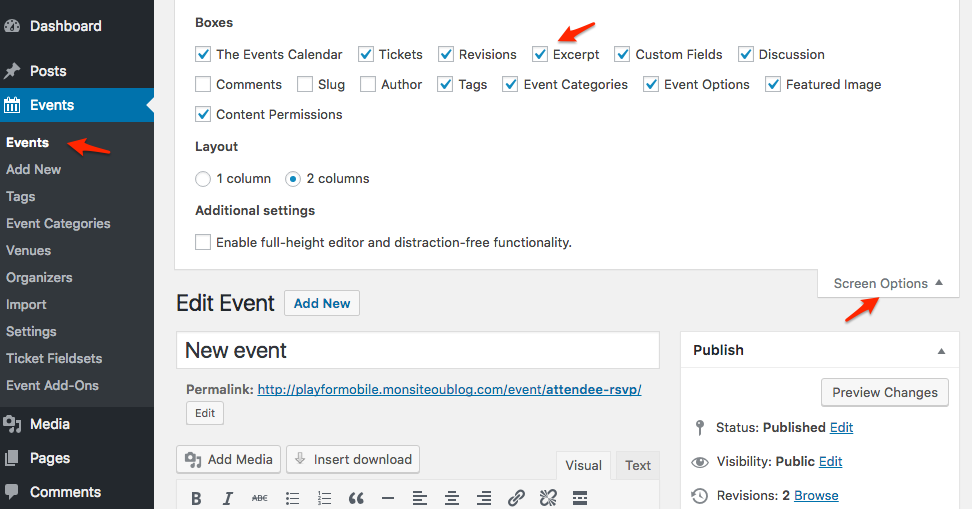
Let me know if that helps.
Have a great day!
Geoff B.
-
AuthorPosts