

Forum Replies Created
-
AuthorPosts
-
May 23, 2017 at 4:31 pm in reply to: Event Edit Screen Shakes & New License for Tickets Plus Fails to Renew #1288038
Geoff B.
MemberGood evening Jonathon,
Thank you for writing back.
When I visit my account, it shows that I paid for this already and it’s still asking me to renew?
Alas, it does not seem like the screenshots made it for some reason.
Would you mind re-sending them via a link to something like Google Drive, Cloudup or Dropbox ?I will be better able to help you when I see the screenshot.
So, I’ve gone in and deactivate, deleted,
re-installed and have paid the $89 (which I though it should be $79 for renewal?)You are correct.
For many years we did offer a 79$ renewal discount.Unfortunately, we have phased out that this discount over the course of the last year.
In other words, $89 is the correct pricing.
Hang in there!
Geoff B.
MemberGood evening Nik,
Thank you for writing back.
4.3.10 is for me not so outdated. ?
I totally get where you are coming from. However, there have been major changes to WordPress since then. Changes that do impact the way our plugins operate.
What I meant is that the 4.3.x branch is older (soon 2 years). 4.3.10 is just the most recent update of that branch.
What do you mean by “…issue with the quotation marks…” exactly?
When I did a copy-paste of your answer () on my test installation, I received a result not unlike
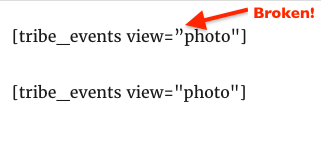
I am not certain if you also entered the code like that in the page, but if you did (perhaps because of the way your computer is setup), the view argument will simply be ignored.
Either way, please make sure both quotation marks are “straight” (I find the “Text” tab to be useful to help spot these – or a decent text editor).
Let me know how that goes.
Best regards,
Geoff B.MemberGood evening Mark,
Thank you for your understanding.
Let me know how that goes.
Best regards,
Geoff B.May 23, 2017 at 12:23 pm in reply to: Issues with Events Ticket Plus and Woocommerce multilingual #1287904MemberGood afternoon Andrei,
I am glad to hear we are making progress on this one.
As for your additional attendee fields not showing up, there could be a couple of things at stake here:
- Perhaps there is some conflict with another WooCommerce customization (in regards to the “Add cart” code. Usually, this is theme-based.
- Just for the record, the fields actually do not show until the quantity is set to “1” (or more).
It looks like your system info did not make it for some reason.
Would you mind simply pasting them over in a private reply ?Could you also please send me a copy of the latest version of your WordPress theme / child theme via a link to a .zip file link (stored Dropbox or Google Drive) so that I can run some tests on my end ? I recommend a private reply for that purpose.
Please ensure you are using the latest files as found on your actual website.
This way I will get access to any updates or customizations you might have made.Finally, would it be possible to have the URL of such an event on your site ?
Hang in there!
Geoff B.
MemberGood afternoon Greg,
All fixed I believe.
Let me know.
Cheers,
Geoff B.MemberGood afternoon Heinz,
Keep us posted if there is any other question you have.
Best regards,
Geoff B.
May 23, 2017 at 11:51 am in reply to: Recurring Events (See all) link shows events all out of order. #1287888MemberGood afternoon Natasha,
As it turns out, Community Events uses it’s own hook.
Try this one: https://gist.github.com/GeoffEW/8cac9a50a1b12b535912d938c6a5f5ab
Let me know how that goes.
Best regards,
Geoff B.MemberGood afternoon Lisa,
I am super stoked that we managed to fix all of your issues.
You are welcome back in our support forums any time 🙂
For now, I am going to close this thread.
Have a great week!
Geoff B.
May 23, 2017 at 11:42 am in reply to: Reducing width of events in Weekly calendar view when there are overlaps #1287881MemberThis reply is private.
MemberThis reply is private.
May 22, 2017 at 11:14 pm in reply to: Event Edit Screen Shakes & New License for Tickets Plus Fails to Renew #1287517MemberThis reply is private.
May 22, 2017 at 11:01 pm in reply to: How can I display upcoming events in a row on my homepage using Photo view? #1287516MemberGood evening Edward and welcome back!
Thank you for reaching out to us.
I would love to help you with this topic.The best way to accomplish what you are looking for is indeed to go for an equal grid approach.
You might want to read and apply this: https://theeventscalendar.com/knowledgebase/change-photo-view-to-equal-height-grid/
Once that is done, you could then display the photo view for a specific category (e.g: homepage) as per the instructions found here: https://theeventscalendar.com/knowledgebase/embedding-calendar-views-tribe_events-shortcode/
Let me know if that helps.
Have a great day!
Geoff B.
MemberGood evening Nick and welcome to the Events Calendar forum!
Thank you for your interest in our products.
We’ll be glad to answer your questions.I believe you will want to read the following articles:
- https://theeventscalendar.com/knowledgebase/making-members-calendar/
- https://theeventscalendar.com/knowledgebase/admin-roles-and-permissions/
Let me know if that helps.
Have a great day!
Geoff B.
MemberHello again Michael,
Unfortunately, I hit the “Send” button a bit too quickly.
To answer your last question getting your hands on a copy of the Events Calendar Pro will let you add our Advanced widgets or full calendar views to just any page as you can see here:
- https://theeventscalendar.com/product/wordpress-events-calendar-pro/
- https://theeventscalendar.com/knowledgebase/pro-widget-shortcodes/
- https://theeventscalendar.com/knowledgebase/embedding-calendar-views-tribe_events-shortcode/
Have a great day!
Geoff B.
MemberGood evening Michael and welcome to the Events Calendar forum!
Thank you for your interest in our products.
We’ll be glad to answer your questions.Try adding the following CSS rule to your style.css file or in your Custom CSS metabox:
.tribe-events-calendar td.tribe-events-past div[id*="tribe-events-daynum-"], .tribe-events-calendar td.tribe-events-past div[id*="tribe-events-daynum-"] > a {

color: #252525 !important;

font-size: 24px !important;

}
In order to gain full power on your site’s look and feel, I would highly recommend reading the following articles:
- https://theeventscalendar.com/knowledgebase/using-google-chrome-developer-tools/
- https://theeventscalendar.com/knowledgebase/changing-fonts-and-colours/
- <u>https://theeventscalendar.com/knowledgebase/styling-events-widgets/</u>
Let me know how that goes.
Best regards,
Geoff B. -
AuthorPosts