

Forum Replies Created
-
AuthorPosts
-
Geoff B.
MemberGood evening Hayley and welcome to the Events Calendar Support forum!
Thank you for reaching out to us.
We are sorry to hear about the ticket not showing up on your pages.
I would love to help you with this topic.This is usually caused by the presence of a start sale date in the ticket.
Until that date is met, the ticket will simply not display.Try removing that date, re-saving the ticket and updating the page.
Let me know how that goes.
Best regards,
Geoff B.July 3, 2017 at 10:48 pm in reply to: Recurring event ticket numbers only applies to first event in series #1315735MemberGood evening Andy and welcome back!
Thank you for reaching out to us.
I would love to help you with this topic.Actually, for the time being, this is the correct behaviour.
Having one set of the tickets for the complete series is the only option that will work unfortunately.The reason for this is that we do not yet fully support recurring events with Event Tickets Plus.
You can read about that here: https://theeventscalendar.com/product/wordpress-event-tickets-plus/The good news is that we are working on that feature.
However, I cannot provide you with a release date at this point.In the meantime, the only workaround is to create the series and then break the individual events from the series. Once that is done, you will be able to create separate tickets in each event.
I realize this is not a great workaround, but for now, it is the only one there is.
Best regards,
Geoff B.
MemberGood evening Nathan,
Sorry about the confusion.
What I am observing is that something is off on your install as to how our plugin interprets the date in the recurring event rules (see screenshot)
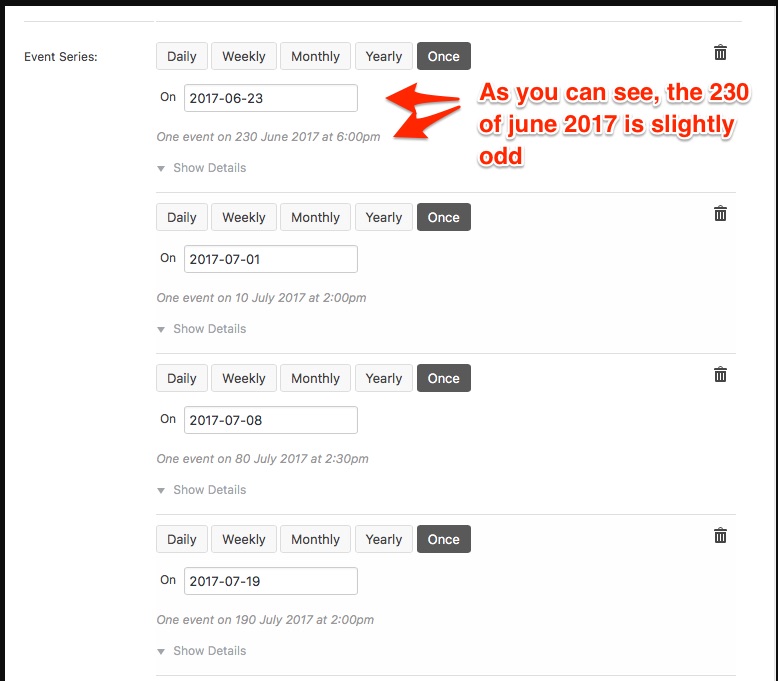
I am not 100% sure where this is coming from.
But, my best hunch is that this is time format related.A good place to start would be to change the WP date format temporarily to j. F Y instead of jS F Y. This can be achieved under Events -> Settings -> Display as well as the date picker format being set to yyyy-mm-dd.
Finally please make sure that this matches your settings under Settings > General in wp-admin.
Another cause could be if there is some type of conflict at play.
This is usually because of:- A conflict with another plugin
- A conflict with your WordPress theme
- A template customization for the Events Calendar that requires updating
When it comes to that type of issue, it is preferable to troubleshoot in a staging environment if you have one.
A first quick test is to simply temporarily revert back to a default WordPress theme such as twenty-sixteen to see if the issue persists.
The next step would be to go through our testing for conflicts procedure and let us know what you find out.
Basically the goal here is to revert back to a bare WordPress installation to see if the problem persists. It also allows us to pinpoint what the cause of the issue is.
But, before you do that, there are 2 things I would advise:
- Make a backup of your database
- Consider activating a “Maintenance Page” plugin if you are doing this on your live site (to minimize impact on your visitors)
Let me know how that goes.
Geoff B.
July 3, 2017 at 10:28 pm in reply to: Problems with calendar main page translation using WPML #1315730MemberThis reply is private.
July 3, 2017 at 10:18 pm in reply to: Ticket end date reverts to 5pm day before event no matter what we set it to #1315723MemberGood evening Danielle,
I am super stoked to hear that!
You are welcome back in our support forums any time 🙂
For now, I am going to close this thread.
Have a great week!
Geoff B.
MemberGood evening Mark,
Thank you for writing back.
I ran some further investigation and interestingly enough, if you refresh the page after navigating through months in French, the content then displays correctly in French for that month.
Could you tell me if there is any caching done by either a plugin or at the web host level ?
Secondly, I am noticing the following warning in the Console view of the Google Chrome Developer tools: The key “” is not recognized and ignored. You might want to look into that. I believe this might be theme-based.
Try temporarily reverting back to a default WordPress theme such as twenty-sixteen to see if that helps.
When it comes to that type of issue, it is preferable to troubleshoot in a staging environment if you have one.
But, before you do that, there are 2 things I would advise:
- Make a backup of your database
- Consider activating a “Maintenance Page” plugin if you are doing this on your live site (to minimize impact on your visitors)
Last but not least, if you could try using a directory-based language selection instead of a domain-based one to see if that changes anything. You will have to re-save your permalinks.
Let me know how that goes.
Best regards,
Geoff B.July 3, 2017 at 9:55 pm in reply to: RSVP Error "Fill in the RSVP Confirmation Email and Name Fields" #1315716MemberGood evening Kymiel,
Thank you for the info and the files.
The first thing I am noticing is that there are several errors in the Console view of the Google Chrome’s developer tools on the example event you have provided.
Since I am unable to replicate the issue with the same version of Avada as you.
By the sound of it, it looks like there is some type of conflict at play.
This is usually because of:- A conflict with another plugin
- A conflict with your WordPress theme
- A template customization for the Events Calendar that requires updating
Try deactivating Event Tickets Extension: Additional Email Options version 0.3.0 as a first step. I believe this extension is deprecated.
When it comes to that type of issue, it is preferable to troubleshoot in a staging environment if you have one.
The next step would be to go through our testing for conflicts procedure and let us know what you find out.
Basically the goal here is to revert back to a bare WordPress installation to see if the problem persists. It also allows us to pinpoint what the cause of the issue is.
But, before you do that, there are 2 things I would advise:
- Make a backup of your database
- Consider activating a “Maintenance Page” plugin if you are doing this on your live site (to minimize impact on your visitors)
Let me know how that goes.
Geoff B.
July 3, 2017 at 9:45 pm in reply to: To Begin Using Event Ticket Pro & Calendar Pro Please Install Latest Version #1315711MemberThis reply is private.
MemberGood evening Laura and welcome to the Events Calendar forum!
Thank you for your interest in our products.
We’ll be glad to answer your questions.I believe you will find all that you are looking for here: https://theeventscalendar.com/knowledgebase/do-you-offer-discounts-for-nonprofit-organizations/
Best regards,
Geoff B.
MemberGood evening Yan and welcome to the Events Calendar Support forum!
Thank you for reaching out to us.
We are sorry to hear about the issues you have bumped into while using our plugins with WPML.
I would love to help you with this topic.As you know, we do not fully support Event Tickets Plus integration with WPML yet: https://theeventscalendar.com/knowledgebase/wpml-support/
This feature is scheduled to be release later this year. Initially we planned for spring, but there was some pushback.
In the meantime, you could get it to partially work, but this is unsupported.
To achieve that, you will need:
- WooCommerce multilingual
- Some manual intervention
After creating the ticket AND saving the event, head over to WPML > Support > Troubleshooting page.
Once you are there, you should see several cleanup buttons. I would recommend:
- Clearing WPML cache
- Using the button that forces language assignment to items (which is what is creating the issue). This can also be accomplished by deactivating and reactivating WPML.
Your ticket will now magically appear.
The only downside is that the tickets you create in other languages are not really translations of the initial ticket. They are completely independent new tickets.
* We also need to send downloadable and customized PDF tickets in email. In order to do that we used the DK PDF as per your recommendation here https://theeventscalendar.com/extensions/view-print-download-pdf-tickets/
Anyway, it doesn’t look as expected. The “download PDF tickets” checkbox is missing (screenshot attached) therefore we have no download link in our mails. Any idea if this could be related to WPML too?
That is odd, I just tested things out on my end and it does display nicely.
Can you tell me which version of Avada you are using ?I you have not already done so, I also highly recommend reading and using the following guides:
- https://theeventscalendar.com/knowledgebase/setting-up-the-events-calendar-with-wpml/
- https://theeventscalendar.com/knowledgebase/creating-translations-for-events-using-wpml/
Hang in there!
Geoff B.
MemberGood evening Matthias and welcome to the Events Calendar Support forum!
Thank you for reaching out to us.
I would love to help you with this topic.You could apply the following snippet in the functions.php file of your theme (without the PHP tag at the top): https://gist.github.com/GeoffEW/a63180206b4ebb3a1f30511228816652
If that does not work, it means that something needs to be adjusted in your Eventica Theme or child theme.
Could you please send me a copy of the latest version of your WordPress theme / child theme via a link to a .zip file link (stored Dropbox or Google Drive) so that I can run some tests on my end ? I recommend a private reply for that purpose.
Please ensure you are using the latest files as found on your actual website.
This way I will get access to any updates or customizations you might have made.Hang in there!
Geoff B.
MemberGood evening Adam and welcome back!
Sorry for the delay.
You are right, unfortunately we do not offer support during weekends.Thank you for reaching out to us.
I would love to help you with this topic.– clicking on “view tickets” opens a new window that says mydomain.com/?tribe_view_ticket_order=(ordernumber).
Actually, this is a 2 step process.
- Clicking on the first link brings you to mydomain.com/eventname/tickets
- Clicking on the link found on that page (View ticket) does bring you to mydomain.com/?tribe_view_ticket_order=(ordernumber)
Normally step 2 should result in your ticket displaying.
Since that is not your case, it looks like there is some type of conflict at play.
This is usually because of:- A conflict with another plugin
- A conflict with your WordPress theme
- A template customization for the Events Calendar that requires updating
When it comes to that type of issue, it is preferable to troubleshoot in a staging environment if you have one.
A first quick test is to simply temporarily revert back to a default WordPress theme such as twenty-sixteen to see if the issue persists.
The next step would be to go through our testing for conflicts procedure and let us know what you find out.
Basically the goal here is to revert back to a bare WordPress installation to see if the problem persists. It also allows us to pinpoint what the cause of the issue is.
But, before you do that, there are 2 things I would advise:
- Make a backup of your database
- Consider activating a “Maintenance Page” plugin if you are doing this on your live site (to minimize impact on your visitors)
– DK PDF isn’t showing the additional menus I think it should; it only displays a few of the tabs that appear in your options.
That is very odd. Normally, 2 things happen:
- You do get an additional checkbox under Events -> Settings -> Tickets to include the PDF button
- You have all the normal DK PDF options here mydomain.com//wp-admin/admin.php?page=dkpdf_settings
<span style=”font-size: 0.875rem;”>Can you check both places ?</span>
– My tickets are displayed on custom post type (not a tribe event), but I’m not sure that should matter, as there’s the ETPlus option to sell tickets on any type of page/post type.
You are correct, that should not matter.
<span style=”font-size: 0.875rem;”>Let me know how that goes.</span>
Geoff B.
MemberGood evening Toni and welcome to the Events Calendar forum!
Thank you for your interest in our products.
We’ll be glad to answer your questions.You are correct, the Event Cost price is not meant to accept free text.
The good news is that there are a couple of ways around this:
- Depending on your scenario, you could use Event Tickets or Event Tickets Plus to add tickets to the event.
You can then decide wether or not you want this to be transactional or not.
- You could grab a copy of the Events Calendar Pro.
That will let you add custom fields to your events (among other things).
You could then tweak the different views to use the custom field’s value for display in place of the Event Cost.You might want to read our Themer’s guide to get a sense of how that works.
Let me know if that helps.
Have a great day!
Geoff B.
July 3, 2017 at 6:32 pm in reply to: Automated Emails not being generated for Events since Woo Commerce update 3.1 #1315672MemberGood evening and welcome back!
Thank you for reaching out to us.
We are sorry to hear about the tickets no longer being sent on your site. Yikes!
I would love to help you with this topic.The first thing I would recommend is to update all of your extensions to the latest versions.
The tricky thing with extensions is that they do not “update notices” automatically.You literally have to check manually.
For example, you will need to update to version 1.01 of Event Tickets Plus Extension: Enhance Woo Order Templates
Secondly, could you try temporarily deactivating WooCommerce Order Status Control to see if that helps ?
Normally, tickets are now sent based on the settings found under Events -> Settings -> Tickets (at the bottom of the page).
Let me know how that goes.
Best regards,
Geoff B.MemberGood evening George,
Thank you for writing back.
To avoid that, you need to place the modified view in your child theme, as explained in our themer’s guide.
The path will be something like: [your-theme]/tribe-events/modules/meta/details.php.
Let me know how that goes.
Best regards,
Geoff B. -
AuthorPosts