

Forum Replies Created
-
AuthorPosts
-
July 4, 2017 at 8:59 pm in reply to: To Begin Using Event Ticket Pro & Calendar Pro Please Install Latest Version #1316133
Geoff B.
MemberThis reply is private.
July 4, 2017 at 8:51 pm in reply to: Automated Emails not being generated for Events since Woo Commerce update 3.1 #1316130MemberGood evening Carole,
Thank you for writing back.
I am glad that things started working again on your end.Let’s now tackle the error messages you are getting.
By the sound of it, it looks like there is some type of conflict at play.
This is usually because of:- A conflict with another plugin
- A conflict with your WordPress theme
- A template customization for the Events Calendar that requires updating
When it comes to that type of issue, it is preferable to troubleshoot in a staging environment if you have one.
A first quick test is to simply temporarily revert back to a default WordPress theme such as twenty-sixteen to see if the issue persists.
The next step would be to go through our testing for conflicts procedure and let us know what you find out.
Basically the goal here is to revert back to a bare WordPress installation to see if the problem persists. It also allows us to pinpoint what the cause of the issue is.
But, before you do that, there are 2 things I would advise:
- Make a backup of your database
- Consider activating a “Maintenance Page” plugin if you are doing this on your live site (to minimize impact on your visitors)
Could you also tell me which version of Divi you are using and could you please send me a copy of the latest version of your child theme via a link to a .zip file link (stored Dropbox or Google Drive) so that I can run some tests on my end ? I recommend a private reply for that purpose.
Please ensure you are using the latest files as found on your actual website.
This way I will get access to any updates or customizations you might have made.Let me know how that goes.
Geoff B.
MemberGood evening George,
I am super stoked to hear that. Kudos!
You are welcome back in our support forums any time 🙂
For now, I am going to close this thread.
Have a great week!
Geoff B.
MemberGood evening Barry and welcome back!
Thank you for reaching out to us.
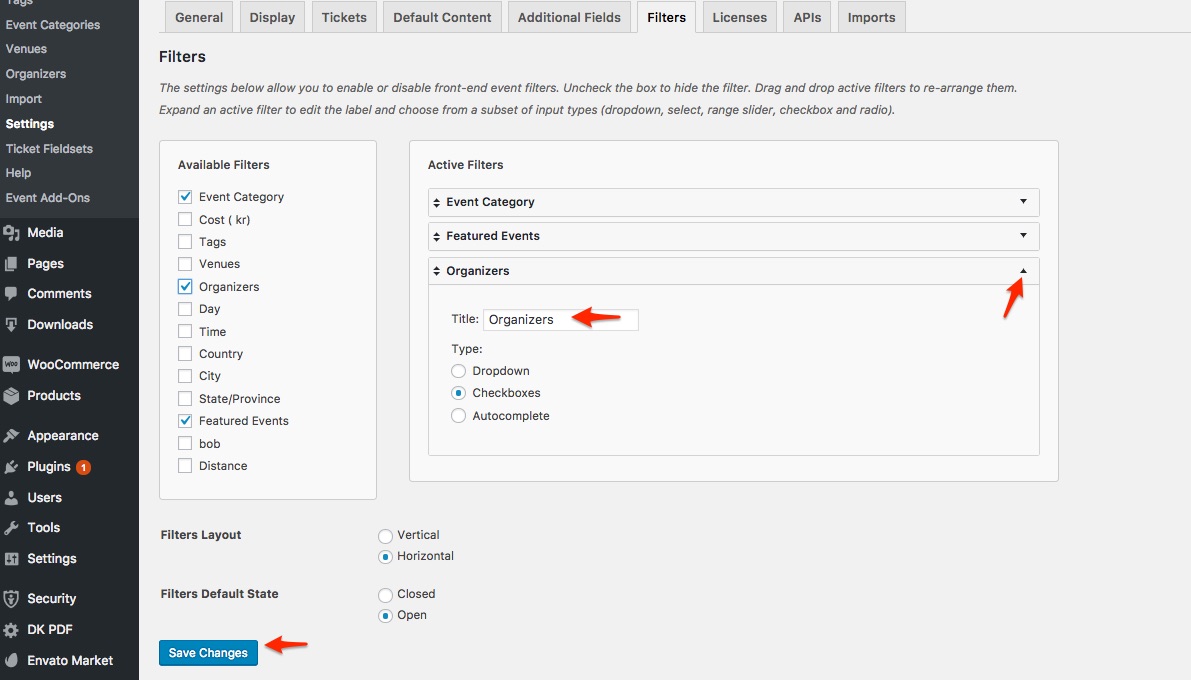
I would love to help you with this topic.I want the horizontal and vertical display of Filter Bar fields to say REPs and not Organizers above the select box.
You can simply change the label (see screenshot)
And finally, how can I preserve the tribe_singleton edit?
The short answer is you cannot do template overrides for admin views for now (unless you hack the core files like you did). So that means that updates will crush your changes.
But you can accomplish this via a functions.php snippet in your WordPress theme.
You could apply the following snippet in the functions.php file of your theme (without the PHP tag at the top): https://theeventscalendar.com/knowledgebase/relabeling-the-venue-organizer-sections-in-event-meta/
Let me know how that goes.
Best regards,
Geoff B.MemberGood evening Luc and welcome back!
Thank you for reaching out to us.
We are sorry to hear about the issues you have bumped into while using our plugins with WPML.
I would love to help you with this topic.The first thing you should know is that we do not fully support Event Tickets Plus integration with WPML yet: https://theeventscalendar.com/knowledgebase/wpml-support/
This feature is scheduled to be release later this year. Initially we planned for spring, but there was some pushback.
In the meantime, you could get it to partially work, but this is unsupported and it sounds like you are already on your way for that.
Ideally on a staging / testing server (or at least a database backup), I would recommend upgrading the all of your plugins to the latest version, including Event Tickets and Event Tickets Plus to see if that helps.
Finally, it is possible that this is caused by some customization found in your theme.
Try temporarily reverting back to a default WordPress theme such as twenty-sixteen to see if the problem goes away.Let me know how that goes.
Best regards,
Geoff B.July 4, 2017 at 8:21 pm in reply to: Event Organizer Website URL to directly link from "dt" list output #1316114MemberGood evening Toshihiro and welcome back!
Thank you for reaching out to us.
I would love to help you with this topic.Just to set expectations, the scope of our support is mostly to get our customers started on the right track and to help them in case of issues.
We unfortunately do not provide complete support for customization.
With that in mind, it sounds like what you are trying to do is already done by the following extension: https://theeventscalendar.com/extensions/make-organizer-names-link-to-organizer-website-urls/
Let me know if that helps.
Have a great day!
Geoff B.
MemberGood evening Edward and welcome to the Events Calendar Support forum!
Thank you for reaching out to us.
I would love to help you with this topic.Just to confirm, did you apply the following snippet in the functions.php file of your theme (without the PHP tag at the top) ?: https://gist.github.com/cliffordp/81f23a207ab483c9e7c6d910f9b29c0a#file-functions-php
Could you please send me a copy of the latest version of your WordPress theme / child theme via a link to a .zip file link (stored Dropbox or Google Drive) so that I can run some tests on my end ? I recommend a private reply for that purpose.
Please ensure you are using the latest files as found on your actual website.
This way I will get access to any updates or customizations you might have made.Hang in there!
Geoff B.
MemberGood evening Russell and welcome back!
Thank you for reaching out to us.
We are sorry to hear about the issues you are experiencing with the tickets for these customers.
I would love to help you with this topic.Since the Resend Tickets option is not displaying, it looks like the tickets were indeed never sent or that the normal process (and triggers) to set the order status to completed was not followed (at least for those orders).
Can you tell me if there is any common point between all of these orders ? (date, payment gateway, etc..)
If you have any piece of code that handles the status of the order “Automatically”, I would recommend disabling that for now as we troubleshoot.
The other possibility is that there are some customizations in your WordPress theme that require some updating. Either customization of our plugins or of WooCommerce.
Could you please send me a copy of the latest version of your WordPress theme / child theme via a link to a .zip file link (stored Dropbox or Google Drive) so that I can run some tests on my end ? I recommend a private reply for that purpose.
Please ensure you are using the latest files as found on your actual website.
This way I will get access to any updates or customizations you might have made.Hang in there!
Geoff B.
MemberGood evening Martin and welcome to the Events Calendar forum!
Thank you for your interest in our products.
We’ll be glad to answer your questions.The simple answer is yes. You can use Event Tickets Plus “standalone” (without the Events Calendar).
You will still need to install our free Event Tickets plugin, as Event Tickets Plus is an add-on for our free Event Tickets plugin.
Let me know if that helps.
Have a great day!
Geoff B.
MemberGood evening and welcome to the Events Calendar Support forum!
Thank you for reaching out to us.
I would love to help you with this topic.In order to gain full power on your site’s look and feel, I would highly recommend reading the following articles:
- https://theeventscalendar.com/knowledgebase/wordpress-customizer/
- https://theeventscalendar.com/knowledgebase/using-google-chrome-developer-tools/
- https://theeventscalendar.com/knowledgebase/changing-fonts-and-colours/
- https://theeventscalendar.com/knowledgebase/styling-events-widgets/
More specifically, you are looking to style the .tribe-button CSS class.
Let me know if that helps.
Have a great day!
Geoff B.
MemberAnd make sure you check out this one too: https://wordpress.org/plugins/rating-widget/
MemberGood evening Markus and welcome to the Events Calendar Support forum!
Thank you for reaching out to us and for your fantastic words.
We are glad you like the plugins.I would love to help you with this topic.
Any plugin that supports custom post types should work.
As far as I know the most popular one seems to be https://wordpress.org/plugins/wp-postratingsI would recommend using the ratings on the events of a specific category rather than on the tickets.
Let me know if that helps.
Have a great day!
Geoff B.
MemberGood evening Daniel and welcome to the Events Calendar Support forum!
Thank you for reaching out to us.
I would love to help you with this topic.If I understand correctly, you are able to do all that you need, you just want to make sure nobody ever sees a specific category on the main calendar page.
The proper way to do this is with a bit of customization.
Either some code in the functions.php file of your WordPress theme or via a theme override (view customization).You might want to read our Themer’s guide to get a sense of how that works.
Additionally, I believe this other thread could help you achieve what you are looking for: https://theeventscalendar.com/support/forums/topic/hide-category-from-main-calendar-but-not-category-calendar/
Let me know how that goes.
Best regards,
Geoff B.MemberThis reply is private.
July 3, 2017 at 10:57 pm in reply to: How can I pull out the event date from calendar page to style it like list view? #1315737MemberGood evening Reynaldo and welcome back!
Thank you for reaching out to us.
I would love to help you with this topic.The best solution to what you are trying to achieve is a template override (view customization).
You might want to read our Themer’s guide to get a sense of how that works.Basically, you can literally steal code from any view and incorporate it in another view’s php file.
Once that is done upload the modified file back in to your WordPress theme’s /tribe-events/ folder.Let me know if that helps.
Have a great day!
Geoff B.
-
AuthorPosts