

Forum Replies Created
-
AuthorPosts
-
Geoff B.
MemberGood evening Andras and welcome to the Events Calendar Support forum!
Thank you for reaching out to us.
I would love to help you with this topic.I highly recommend reading the 3 following articles on translation:
- https://theeventscalendar.com/knowledgebase/translating-the-events-calendar/
- https://theeventscalendar.com/knowledgebase/how-to-override-plugin-language-files/
- https://theeventscalendar.com/knowledgebase/incomplete-translations/
When translation file strings are not kicking in, it is usually caused by one of the following things:
- Your translation files are not up to date
- You are using some customized translation files that have been placed in the /wp-content/languages/ or /wp-content/languages/plugins/ folder. These might not be updated and will override any other file.
- The strings are translated, but are considered “fuzzy”
In the first 2 cases, the solution is to update your translation files using the pot file. You can do this by using the Poedit software and heading to Catalog > Update from pot file.
In the last case, you will need to make them “unfuzzy” using Poedit.
Let me know if that helps.
Have a great day!
Geoff B.
MemberGood evening and welcome back!
Thank you for reaching out to us.
We are sorry to hear about this error message creeping up on you! Yikes!
I would love to help you with this topic.1) I just recieved the following error Message on HELP option:
This message is actually not as scary as it looks.
What the message is saying is that you have some security/permission restrictions on your server.More specifically, the plugin is try to keep a log of things at /tmp/. What is probably going on is that either the plugin is unable to create the folder or that it does not have the proper permissions to create and update files located in that directory.
The first thing I would recommend is to create a /tmp/ folder manually under your root html folder.
As an alternative, you could simply deactivate the log under Events > Help
2) Add to this, every day I have a problem about translation.
This probably means that you have auto-updates activated. You can turn these off, at least for translations (https://buddypress.org/support/topic/disable-automatic-translation-updates/)
Another thing you might want to try is to simply update the /wp-content/languages/plugins/ using Poedit (Update from pot file).
This way, WordPress will not see these files as needing to be updated.
Let me know how that goes.
Best regards,
Geoff B.MemberBonsoir Sandrine,
Merci de nous écrire et bienvenue dans nos forums.
La façon la plus simple de supprimer l’affichage du mot gratuit est de coller le bout de code suivant (sans la balise <? php située au haut du code) dans le fichier functions.php de votre thème): https://gist.github.com/GeoffEW/b440feef873af841d023c0bf0839e93f
Salutations,
Geoff B.September 11, 2017 at 7:10 pm in reply to: Failed to download the Event Ticket Plus plugin after purchase #1347814MemberGood evening Saikat,
I am glad you were able to get your copy of the plugin.
I opened a ticket with our awesome Dev team to make sure they take a look into that.
Thank you for bringing this to our attention.
You are welcome back in our support forums any time 🙂
For now, I am going to close this thread.
Have a great week!
Geoff B.
MemberGood evening Nathan,
I am super stoked to hear that.
You are welcome back in our support forums any time 🙂
For now, I am going to close this thread.
Have a great week!
Geoff B.
MemberGood evening Renato and welcome back!
Thank you for reaching out to us.
I would love to help you with this topic.First off, I think you should know that pretty permalinks are typically vital to proper behaviour of our plugins.
With that in mind, if you have managed to get the plugins working fine without them, that is awesome!
As a first troubleshooting step, could you please provide us with your complete system information in a private reply using the instructions found in the following link?
https://theeventscalendar.com/knowledgebase/sharing-sys-info/
Secondly, could you take a look at your settings under Events -> Settings -> Display (specifically the first 2 settings). Try changing them temporarily to see if that helps.
Hang in there!
Geoff B.
MemberGood evening Saikat and welcome back!
Thank you for reaching out to us.
<span style=”font-size: 0.875rem;”>I would love to help you with this topic.</span>Where is the location to add an image to be displayed in this area.
That is a great question.
You can pick and choose images for tickets by hovering over the ticket and clicking the Edit in WooCommerce link.
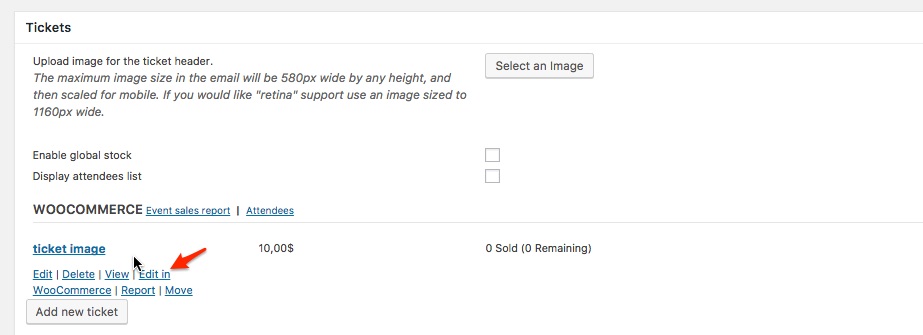
Once you are in the WooCommerce product Find and select Set product image and select the image of your choice. Make sure you update the product.
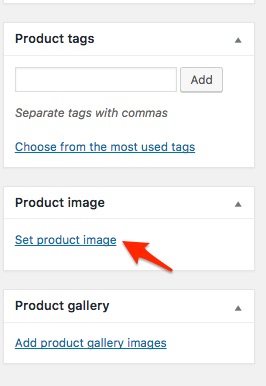
Let me know how that goes.
Best regards,
Geoff B.MemberGood afternoon Kelly,
I am super stoked to hear that this CSS helped out.
You are welcome back in our support forums any time 🙂
For now, I am going to close this thread.
Have a great week!
Geoff B.
MemberGood evening Mary and welcome back!
Thank you for reaching out to us.
I would love to help you with this topic.First off, kudos on finding the culprit.
For some reason, it looks like with your theme or theme settings, the standard CSS from WooCommerce is not kicking in on that button or rather is using white as a border color.Try adding the following CSS rule to your style.css file or in your Custom CSS metabox:
.page-wrapper .woocommerce a.button {border: 1px #d3ced2 solid !important;}Let me know how that goes.
Best regards,
Geoff B.MemberGood evening Gaëlle and welcome back!
Thank you for reaching out to us.
I would love to help you with this topic.I bought your plugin I was developing my site and url was http: // beta … now the site is no longer in beta and the url is http: // www …
so I can not update your plugin. How can I do?You will be glad to know there is a perfect solution for that:
- https://theeventscalendar.com/knowledgebase/using-one-license-live-dev-sites/
- https://theeventscalendar.com/knowledgebase/moving-your-license-keys/
In addition, I have a display problem (see attachment). I do not know if this is due to the plugin update, but the events on my page do not appear at all like that. the calendar view in the sidebar of my pages is not at all like before, the heads are too large. can you help me solve my problems?
I am not exactly sure how it looked before, so that is a bit tricky.
But I will help you to the best of my abilities.As a first troubleshooting step, could you please provide us with your complete system information in a private reply using the instructions found in the following link?
https://theeventscalendar.com/knowledgebase/sharing-sys-info/
Hang in there!
Geoff B.
September 8, 2017 at 10:51 pm in reply to: Failed to download the Event Ticket Plus plugin after purchase #1346969MemberGood evening Saikat and welcome back!
Thank you for reaching out to us.
We are sorry to hear that you were met with that message.
I would love to help you with this topic.This is usually a temporary message that can pop-up when we are doing some maintenance on our end. We apologize for the inconvenience.
The great news is that it never lasts long.
Normally, you should be able to download your plugins now.Have a good weekend,
Geoff B.
September 8, 2017 at 10:48 pm in reply to: Calendar changing language when advancing months. #1346966MemberGood evening Allan and welcome back!
Thank you for reaching out to us.
We are sorry to hear about the language changing on you.
I would love to help you with this topic.As a first troubleshooting step, could you please provide us with your complete system information in a private reply using the instructions found in the following link?
https://theeventscalendar.com/knowledgebase/sharing-sys-info/
If you are using WPML, please make sure that you have read the following.
- https://theeventscalendar.com/knowledgebase/setting-up-the-events-calendar-with-wpml/
- https://theeventscalendar.com/knowledgebase/creating-translations-for-events-using-wpml/
Secondly, you might have to head over to the Help > Troubleshooting page from the WPML menu.
Once there, clear WPML’s cache and re-save your permalinks.
Hang in there!
Geoff B.
MemberBonsoir Brigitte,
Merci de nous écrire.
Afin de vous aider à cerner le problème, pourriez-vous partager vos informations système avec nous (dans une réponse privée): https://theeventscalendar.com/knowledgebase/sharing-sys-info/ ?
De mon côté, je n’ai pas de carré blanc (sur la page d’accueil – je ne sais pas si c’est bien à cet endroit que vous le voyez). Pourriez-vous me confirmer si ce souci persiste de votre côté et sous quel navigateur ?
Par ailleurs, il est tout à fait possible de réduire la taille de la vue par semaine.
Une des choses à faire est de cacher les heures inutiles avec du CSS: https://gist.github.com/GeoffEW/badc00e12c439fb2bd8c050b98b481a2L’autre truc pour contrôler la taille de la vue au complet est de modifier la règle CSS suivante:
.tribe-events-grid .tribe-scroller {

height: 300px !important;

}
Bon week-end,
Geoff B.MemberGood evening Nick and welcome to the Events Calendar Support forum!
Thank you for reaching out to us.
We are sorry to hear about the 404 error message you are getting. Yikes!
I would love to help you with this topic.There are 2 other things worth trying:
- Head over to Events -> Settings -> General and change the slug for the main view (events) to something like (calendar or calendar-page). Re-save your permalinks.
- Try temporarily reverting back to a default WordPress theme such as twenty-sixteen
Let me know if that helps.
Have a great day!
Geoff B.
MemberGood evening Darius and welcome back!
Thank you for reaching out to us.
I would love to help you with this topic.Regarding the title, I believe you will want to read the following since you are a Yoast user: https://theeventscalendar.com/knowledgebase/titles-in-yoast-seo/
As for the featured image on facebook, this is also mostly dependent on Yoast’s settings (for Archives in this case).
What is going on is that an image from a previous event is being used as a fallback.
If setting up Yoast to get a default image seems a bit cumbersome, you could use a little trick to workaround the issue as explained by my colleague Geoff here: https://theeventscalendar.com/support/forums/topic/set-featured-image-for-events-list/#post-1222358Let me know how that goes.
Best regards,
Geoff B. -
AuthorPosts