Event Ticket images not showing in cart

Home Forums Ticket Products Event Tickets Plus Event Ticket images not showing in cart

Viewing 4 posts - 1 through 4 (of 4 total)
  • Author
    Posts
  • #1347304
    Saikat Dey
    Participant

    Once a ticket is “added to cart” there is no image noted on the cart page next to products. In the Chrome inspector this is the code reference: img-woocommerce-placeholder.wp-post-image.
    But image for other woocommerce product showing on the cart.

    You may try to add an event : https://www.thirdbell.in/events/ and a woocommerce product https://www.thirdbell.in/shop/ to reproduce this issue.

    Where is the location to add an image to be displayed in this area. I search this forum and cannot locate anything. Please help.

    #1347748
    Geoff B.
    Member

    Good evening Saikat and welcome back!

    Thank you for reaching out to us.
    <span style=”font-size: 0.875rem;”>I would love to help you with this topic.</span>

    Where is the location to add an image to be displayed in this area.

    That is a great question.

    You can pick and choose images for tickets by hovering over the ticket and clicking the Edit in WooCommerce link.
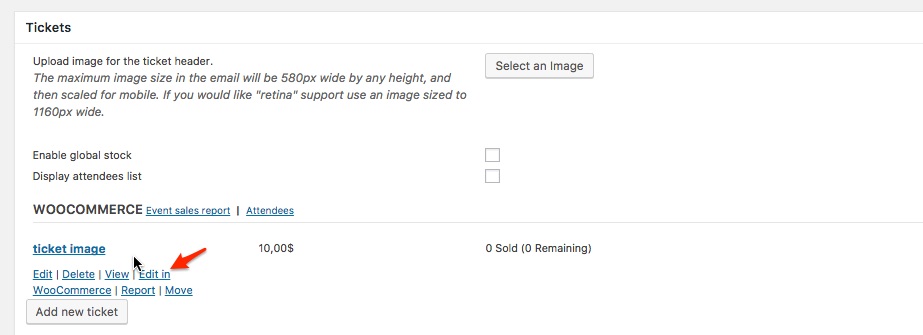
    Once you are in the WooCommerce product Find and select Set product image and select the image of your choice. Make sure you update the product.
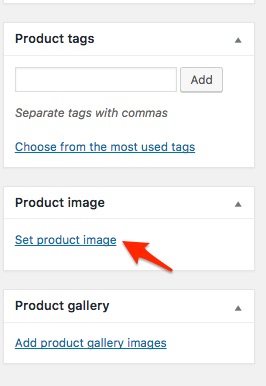
    Let me know how that goes.

    Best regards,
    Geoff B.

    #1348018
    Saikat Dey
    Participant

    Thanks for your help.

    #1348081
    Geoff B.
    Member

    Good afternoon Saikat,

    I am super stoked that this was helpful to you.

    You are welcome back in our support forums any time 🙂

    For now, I am going to close this thread.

    Have a great week!

    Geoff B.

Viewing 4 posts - 1 through 4 (of 4 total)
  • The topic ‘Event Ticket images not showing in cart’ is closed to new replies.