

Forum Replies Created
-
AuthorPosts
-
Geoff
MemberThis reply is private.
January 23, 2017 at 7:49 am in reply to: Address for Venue on Single Event Sidebar is ALL SMUSHED TOGETHER! #1222339MemberHello Jennifer,
Thanks for reaching out and I hope you had a great weekend. 🙂
Sorry about the styling issue here — it definitely looks like there’s a little conflict with the theme that’s squishing things together and I see exactly what you mean.
Will you please try adding this to the Appearance > Customize > Advanced CSS screen:
.single-tribe_events .tribe-events-event-meta .tribe-events-address span {
display: inline-block;
margin: 0px 3px;
}
That should space things out a bit. Here’s a screenshot of how that looks when I tested it out on your site.
Will this work for you as well? Please let me know.
Cheers,
GeoffMemberHi Alex,
Thanks for getting in touch and so sorry to hear about the purchasing issues!
Just to clarify, we do not sell a plugin called “Users” but we do sell the following plugins:
https://theeventscalendar.com/products/
The email address you mentions refers to this site: http://iplusstd.com/
I see one of the products listed on that site is called Event Booking Pro. Is that what you are looking for? If so, you might want to reach out to that email address because I do not believe our plugins are what you are looking for.
We do have one plugin called Events Calendar Pro and another one called Event Tickets Plus, so I can see how easy it would be to mistake our products for that other one.
Cheers!
GeoffMemberHi @danieldekay,
I was just checking out your site — nice work! I really like the text styling on the calendar’s Month View. It’s super clean and nicely color coded.
Were you able to resolve the issue of month names showing in the calendar widget instead of weekday names? It seems to be correct when I see it (screenshot) but perhaps I am looking in the wrong place and you can point me in the right direction.
Cheers!
GeoffMemberMy pleasure! Thanks for following up and I hope you enjoy using The Events Calendar. 🙂
I’ll go ahead and close this thread but let us know if any other questions come up and we’d be happy to help.
Cheers!
GeoffMemberHey Julian,
Thanks for following up and I hope you had a great weekend. 🙂
Ah, those screenshots make a lot more sense — thanks so much!
I seem to get the correct options when selecting one of the options:
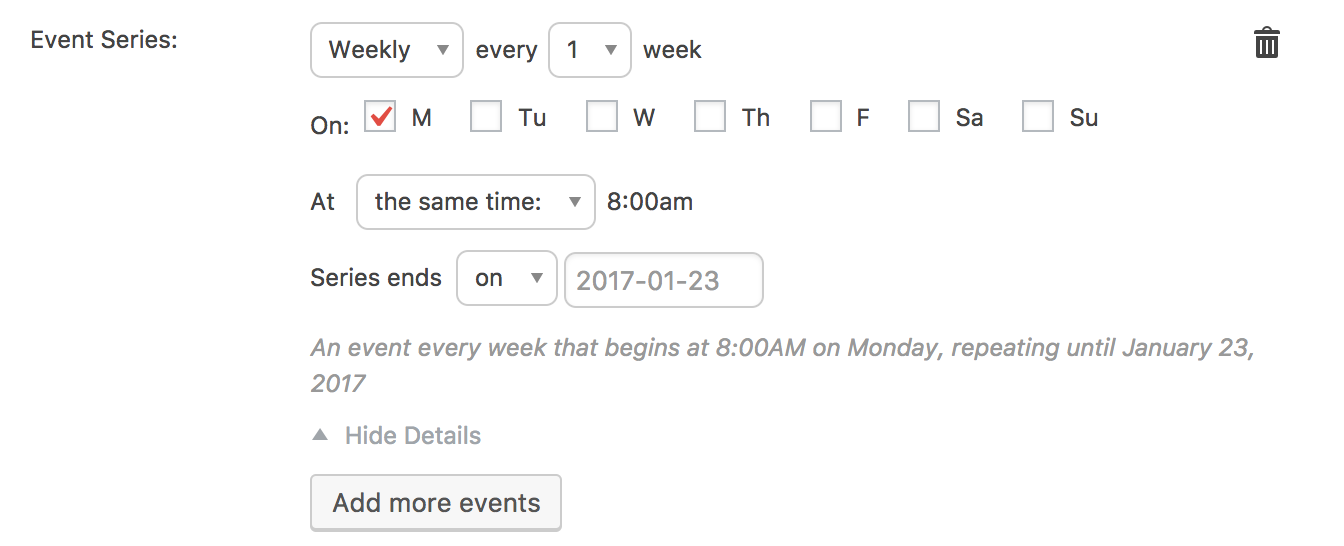
And, what’s crazier still, is that you and I have nearly identical system information because we are both testing on a default theme with no other plugins installed.
That makes me think possibly that an error occurred when the plugins were installed and perhaps a file is either missing or corrupted from the process. That would certainly explain a difference between our sites.
Would you be willing to re-download the plugins? You can locate both The Events Calendar 4.4.0.1 and Events Calendar PRO 4.4 here on our site by logging in and heading to My Account > Downloads. From there, if you could manually re-install the plugins following these instructions, that would be awesome.
Hopefully that does the trick but, if not, please let me know and we can look at other possibilities.
Thanks!
GeoffJanuary 23, 2017 at 7:04 am in reply to: Purchased Event Calendar Pro in November. Cannot update. #1222321MemberHi Paul,
Thanks for following up!
The license is currently registered to: http://www.nvitmarketing.com. You can move the license to another site by following the instructions outlined here:
https://theeventscalendar.com/knowledgebase/moving-your-license-keys/
Does that make sense and will it work for you? Please let me know. 🙂
Cheers,
GeoffMemberHey Jonathan,
Thanks for following up!
You will indeed continue to see an alert on the Plugins screen in the WordPress admin when an update is available for the plugins. However, you can always stay updated with what’s new either by following us on Twitter (we announce updates there) and our blog (we publish release notes there).
We also have a page dedicated to our releases, which includes the latest release notes:
https://theeventscalendar.com/release-schedule/Cheers!
GeoffMemberHi Krystyna and thanks for following up!
In that case, you’ll need to move the license between sites, or choose to keep it on one site instead of the other. The other option, of course, is to purchase another license so that both have licenses.
I do want to emphasize the point I made earlier, though, that the license is not needed for the plugin to work. You can still use the calendar on the site even if the license key is not activated on one it.
Cheers!
GeoffMemberHi @Julian,
Thanks for getting in touch and sorry for the trouble here with locating recurring event options in the plugin!
Those screenshots do not appear to be from Events Calendar PRO but something about drawing sheets.
If you head to Events > Add New from the WordPress admin, you should see options in the event editor for adding a recurrence to events like this:
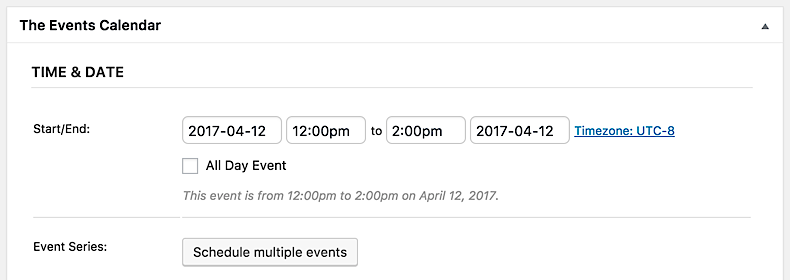
Do you see those options in that screen? If not, will you please head to Events > Help, copy the System Information on that screen and paste it here for me in a private reply? That will allow me to check some of your settings for clues.
Thanks so much!
GeoffMemberHowdy Jonathan!
You absolutely get to continue using the plugin even after the license period is up. The code is all yours and the plugin will continue to do its thing.
That said, there is always a risk when updating other components of your site (including WordPress itself) and keeping other components (like Events Calendar PRO) static because there could be compatibility issues moving forward. However, if you’re always testing updates responsibly in a test environment, then you should be never be caught off guard.
2. Let’s say I don’t renew it after a year, then I wait until several new releases and THEN update, will that present problems jumping multiple versions ahead?
Again, there’s always a risk. We actively develop and maintain our plugins to ensure they are both complaint to the latest versions of WordPress but also added new and exciting features, and that can have an impact on past versions to the point where you may see a significant jump from a way past version. I’d say that’s generally true of any plugin, theme or even WordPress though.
Does this help answer your question? Please let me know. 🙂
Cheers!
GeoffJanuary 20, 2017 at 10:58 am in reply to: Purchased Event Calendar Pro in November. Cannot update. #1221633MemberHey Paul,
Sorry for the trouble here with updates!
I see your license is currently registered for:
http://www.nvitmarketing.comI couldn’t tell from the screenshots that were provided, but is that the same site where you are seeing the message about being out if installs? If not, then you will want to move your license from nvitmarketing.com and to the one where you would like to enable automatic updates.
As a side note, you can always access the latest version of Events Calendar PRO by logging into your account here on our site and heading to My Account > Downloads. From there, you can install the update manually following these instructions.
Cheers!
GeoffMemberYes, it’s absolutely possible to add a license key to both your test and production sites. We have more information on setting that up here:
https://theeventscalendar.com/knowledgebase/using-one-license-live-dev-sites/
As a side note, the license key is not needed for the plugins to function — they merely activate automatic updates for plugin releases. 🙂
Does this help answer your question? Please let me know.
Cheers!
GeoffMemberHowdy Ben,
The Events Calendar does have a hosted iCalendar feed built into the plugin that allows you to subscribe to the calendar in Google Calendar.
There is a caveat in that the iCalendar feed only holds data for up to 30 events at a time. That said, there is a way to link to the feed in Google Calendar in such a way that it contains event data for the entire year, which is noted in this thread:
Does this help answer your question? Please let me know. 🙂
Cheers!
GeoffJanuary 20, 2017 at 10:32 am in reply to: filter bar not showing at shortcode AND events-page #1221613MemberExcellent! I’m so glad to hear everything is working smoothly and I appreciate you following up to let us know. Let us know if any other questions come up and we’d be happy to help. 🙂
Cheers,
Geoff -
AuthorPosts