

Forum Replies Created
-
AuthorPosts
-
Geoff
MemberHey Michael,
Sorry for the trouble here! I’d be happy to look into this with you.
Is this the page that is showing past events?
http://orpheusnyc.org/calendar/
If so, it appears that all of the events in the Upcoming Performances list are indeed upcoming.
Is there a link you can provide me that shows me an example of where past events are being displayed with upcoming events? That would help a lot.
Thanks so much!
GeoffMemberHey Derrick,
Thanks for getting in touch — I hope you had a great weekend!
I was just checking out your site — nice job, it looks wonderful. 🙂
As I was looking around at the links you provided, it appears that the header in the default List View is appearing correctly. Here is a screenshot of what I see.
Is that correct? If so, were you able to correct it on your own? Or perhaps I’m not looking in the right place and, if that’s the case, please do let me know and help point me in the right direction.
Cheers!
GeoffMemberHey there!
It looks like this thread is a duplicate of another one you posted as king the same question here:
I’m going to go ahead and close this thread and we will be sure to reply to your other thread as soon as we can, in the order that we received it.
In the meantime, I would suggest checking to see if the missing ticket number and QR code are related to testing on a local WordPress installation and test again on a server in a development environment. If you could try that as well as the steps outline in this guide and update your other thread with the results, that will help us when we get to your thread. 🙂
Thanks so much!
GeoffMemberHi Benjamin,
Thanks for getting in touch!
That’s a great question. While there isn’t a way to simply embed The Events Calendar into Facebook, you could create a new tab on your Facebook page that includes text and a link to the calendar on your website. Here is a link to Facebook’s instructions for how to do that:
https://developers.facebook.com/docs/pages/tabs
Or, if you would prefer, you could publish events to Facebook first, then use our Event Aggregator service to automatically import events from Facebook into The Events Calendar on a scheduled basis.
If you go that route, it’s worth noting that Event Aggregator is already built into The Events Calendar. You simply purchase a license and enter the license on the Events > Settings > Licenses screen. There’s nothing else to install. 🙂
Does this help answer your question? Please let me know.
Thanks!
GeoffMemberHi Gary,
Definitely sorry to see you go, but I’m totally happy to help you here.
I’ve gone ahead and issued a refund for your orders and the funds should be back in your account within 5-10 business days.
Sorry again that our plugins didn’t meet your needs, but I hope they will for another project down the road and I appreciate you giving them a try.
Cheers,
GeoffMarch 6, 2017 at 7:21 am in reply to: I want to purchase a second license for events calendar pro #1249858MemberThis reply is private.
MemberHi Pim,
Yeah, the CSS I provided was only meant to target the main calendar because you had mentioned the issue was on your /events page. You can change it to target any calendar page or post like this:
.template-event-page,
.single single-tribe_events .html_minimal_header #main > .avia-builder-el-0, .av_minimal_header + #main .container_wrap_first {
margin-top: 50px !important; /* or whatever value you'd like */
}
It’s worth noting that the theme’s navigation and header styles are ultimately what are causing the overlap. It’s hard for me to test for sure whether that code above works, but here’s a screenshot of what I was able to see. Hopefully it does the trick but, if not, I would suggest reaching out to the theme developer for further guidance on which classes to target with CSS.
I also have a question regarding the event lists. Is it possible to show
how many spots/seats are left available?Are you selling tickets for your events? If so, then we have a free plugin for RSVPs called Event Tickets that will show how how many spots are left in an event and an upgraded version called Event Tickets Plus that will allow you to sell paid tickets for events and also show how many seats are left.
If you’re using another plugin or service to reserve seats, then you may need to customize the calendar or its templates to integrate the two.
Let me know if you have any other questions about the styling issue you originally raised and I would be happy to help as best I can. 🙂
Cheers!
GeoffMemberHi Andy,
Thanks for following up — I hope you had a great weekend!
The easiest way to convert your recurring events into individual evens is to click the “Edit Single” link beneath the title of the event in WordPress:
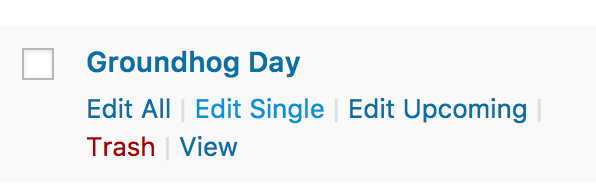
Clicking that link will open a dialog window asking you if you are sure you want to edit the post because doing so will break the event out of the recurring series and make it an individual event. You can do that for each event.
Does this make sense and will it work for you? Please let me know.
Thanks!
GeoffMemberHi Mekhael,
Thanks for following up!
I appreciate the answers, but I’m still not sure that helps me understand what the issue is.
What would be super helpful is if you could provide me with a bullet-point list of the steps you take that lead to the issue from the time you log into WordPress to when you reach the editing screen. Plus, if you have any screenshots that help illustrate what you’re describing, that would be awesome.
Also, I still do have clarity on what HTML you are referring to. What HTML did you copy? What parts of it are the events overriding? Do you have screenshots to help describe this to me?
Thanks,
GeoffMemberHey Andy,
Yeah, so sorry to disappoint you with that news. I’m honestly not sure when that functionality will be released. We’re in the process of restructuring how recurring events works as a whole for the sole purpose of being able to support tickets. As you might imagine, that’s a huge lift and something that will take some time. In the meantime, I’d suggest adding your vote to the feature request, which will also allow you to subscribe to notifications when we post updates on the progress.
The date of the event is actually not usually in the ticket email. You can add that with this free extension though:
Cheers!
GeoffMemberHey Francisco,
Awesome, I’m so glad that helped! Thanks for following up to let me know. 🙂
Great question about limiting ticket sales to a specific area. I think that’s a really hard one to do and it would take quite a bit of custom development to make it happen. You may want to consult one of our recommended developers for that level of work because I’m afraid the plugin does not support that functionality right out of the box.
Sorry for the bad news on your second question, but I’m glad that my first reply helped answer your original question.
Did you have any other questions specifically about the ticket quantity buttons? Let me know! Or, if you have questions about something else, please open a new thread and we can tackle them there.
Thanks so much!
GeoffMemberAwesome! I hope that does the trick — I know the same plugin has bailed me out a few times. 🙂
Geoff
MemberHeck yeah! Definitely keep me posted. 🙂
MemberHey @Jean-Philippe,
Oh interesting! I see you are using our plugins, but the layout on the homepage you have there appears to be highly customized versions of them.
For example the “Ends in X Days” text is something that is not part of our plugins by default and appears to have been added in there by someone else.
I think what it comes down to is that your events are multi-day events and the calendar orders events by the start date. What you’re looking for is a way to order events by the end date instead.
That’s something I’m afraid is not supported by the plugin settings and would take custom development to accomplish.
While this does not do what you are looking for, I have a snippet that randomizes the order of events. I’m providing it to you in case you can use it as a starting point to write a snippet of your own that would order events by the end date instead.
Sorry I don’t have a concrete solution for you here, but does this at least help explain why events are ordered the way they are and help get the ball rolling for you to customize it? Please let me know.
Cheers!
GeoffMemberHey Andy,
Thanks for getting in touch and sorry for the issues here with recurring events and tickets!
I think the trouble is stemming from the fact that the recurring events feature does not support Event Tickets or Event Tickets Plus. That is indeed a feature we are working on but there is no support for it yet.
In other words, everything you are describing is consistent with the incompatibility between recurring events and tickets.
Sorry for the bad news, but does this at least help shed light on what’s happening?
Thanks,
Geoff -
AuthorPosts