

Forum Replies Created
-
AuthorPosts
-
Geoff
MemberHi Oliver,
We wanted to let you know that we recently released iCal Importer version 4.2.5.1 and it included a fix for the issue you reported for duplicated recurring event instances on import. Please update when you have the chance and defintely let us know if you continue to run into any problems.
Thanks so much for the heads up and for your patience while we worked on this!
Cheers,
GeoffNovember 3, 2016 at 11:43 pm in reply to: iCal Importer imports ical recurring all on the same date #1187546MemberHi Carla,
We wanted to let you know that we recently released iCal Importer version 4.2.5.1 and it included a fix for the issue you reported for duplicated recurring event instances on import. Please update when you have the chance and defintely let us know if you continue to run into any problems.
Thanks so much for the heads up and for your patience while we worked on this!
Cheers,
GeoffMemberAwesome, so glad to hear that snippet helped do the trick! Thanks so much for following up to let me know. 🙂
Updating the plugin will not remove the snippet, so you are safe there. However, I will note that installing an update to your theme would indeed remove it, so please beware before installing any automatic updates to your theme.
I see you marked this thread as resolved so I’ll go ahead and close it, but definitely feel free to let us know if any other questions come up and we’d be happy to help.
Cheers!
GeoffNovember 3, 2016 at 4:36 pm in reply to: How to get iCal Import license transferred to Event Aggregator? #1187454MemberYou bet, Kenneth! I just submitted the refund and the funds should be back in your account in the next 5-10 business days.
Thanks for all your support and for using the plugins. I really hope you enjoy Event Aggregator. 🙂
Cheers,
GeoffMemberYay! That’s so awesome! I was really hoping it would do the trick and I’m stoked to hear it did. Thanks so much for following up to let me know. 🙂
Cheers,
GeoffMemberHi Nick and thanks for following up!
Yes, absolutely, you can create and sell tickets for The Events Calendar.
Event Tickets works directly with The Events Calendar so that you can create free tickets (like RSVPs) for your events.
You can also install Event Tickets Plus and that will allow you to create paid tickets for events by allowing to take payments using WooCommerce.
So, the plugins you will need end up being:
- The Events Calendar (free)
- Event Ticket (free)
- Event Tickets Plus
Does this sound like what you’re looking for? Please let me know. 🙂
Cheers!
GeoffMemberHey Thomas,
Thanks for the kind words about the recurrence features in general — much appreciated!
It may not be totally apparent, but you can remove a specific recurrence rule from the set by selecting “None” in the dropdown of the rule:
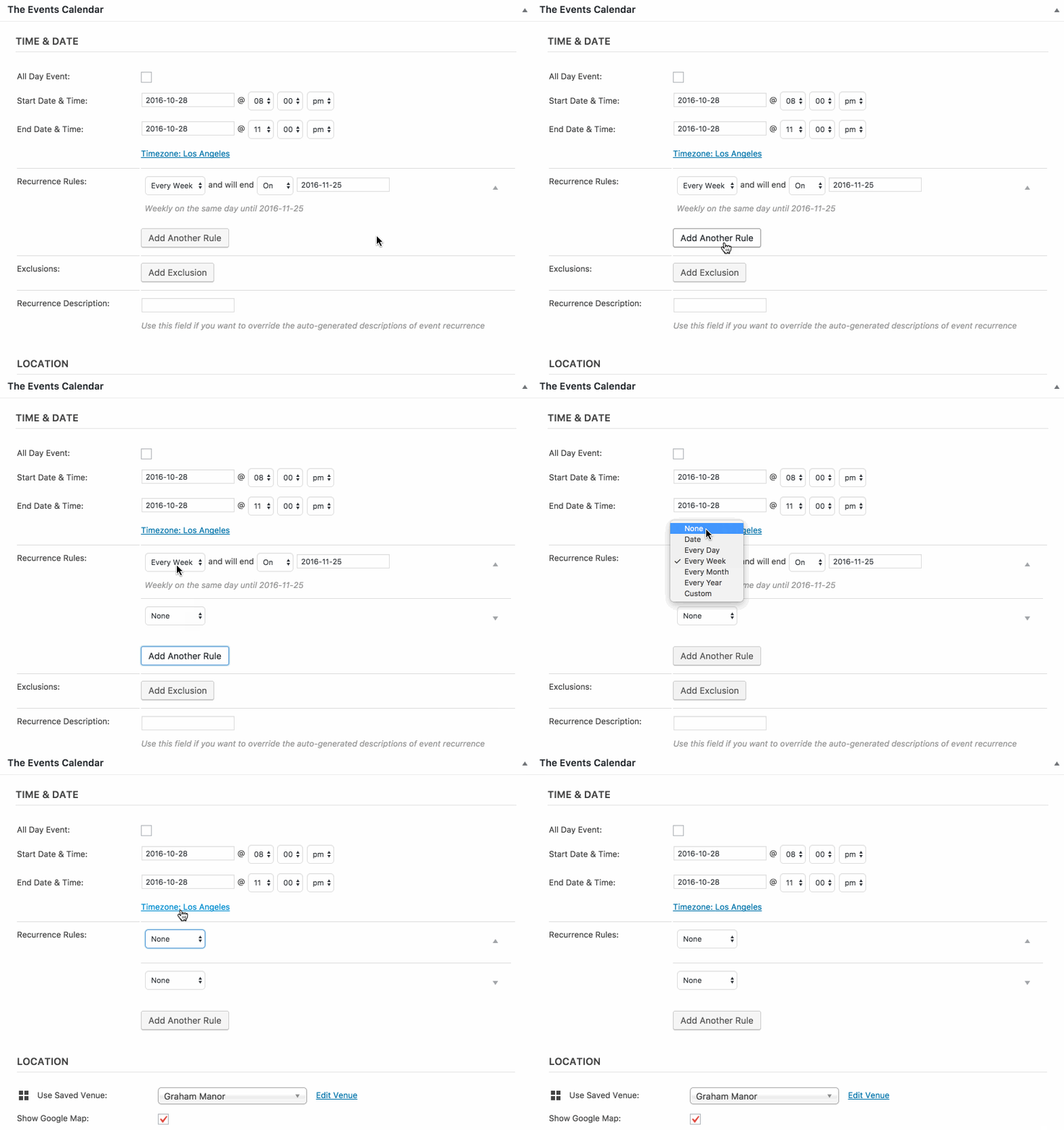
That will prevent the rule from being included in the mix.
Cheers!
GeoffMemberRight on and cheers right back at ya!
Geoff
MemberHi David,
Oh man, so sorry about this — you are definitely not going mad.
I can absolutely see why you would assume that activating Community Events would automatically add a button to the front end of the calendar. I mean, the two plugins complement one another and it seems reasonable to expect that they would automatically link together visually as well as technically.
However, that is not the case. Instead, it does require you to either add a link to your site’s menu. Similarly, you can add a link to header or footer of the calendar by going to Events > Settings > display and typing in a link or HTML button in the “Advanced Template Settings” section (screenshot).
I’ve flagged this topic for the team to review and consider the idea of designing something into the layout when both plugins are active and at least writing up a step-by-step guide in our Knowledgebase as a resource for other with this question in the future.
Thanks so much,
GeoffMemberHi Tracie, nice to see you again!
The layout for your event is coming together nicely. 🙂
It looks like the theme styles are telling the meta labels to fill 45% of the space, which is causing the separation to be that far apart.
I dug into your stylesheet a little bit and it was admittedly tough to find the exact line of CSS to modify. The theme seems to have created it’s own custom CSS classes and they’re a little tough to parse out.
That said, please give this a try by adding it to your theme’s style.css file or using the Simple Custom CSS plugin:
#tribe-events-content.tribe-events-single .cmsmasters_single_event_meta .tribe-events-meta-group .cmsmasters_event_meta_info .cmsmasters_event_meta_info_item .cmsmasters_event_meta_info_item_title {
width: 25% !important;
}
Hopefully that does the trick. If not, I’d be happy to try again but (and I know I’ve mentioned this in another thread) the theme author will likely be much more effective to support the custom code.
Thanks!
GeoffMemberHi Thomas,
I’m sorry for the frustrations here and I know this comment is an offshoot of an already existing thread you and I are chatting about.
I would certainly be interested to get more details and to elaborate on your thoughts about how recurrence settings could be improved.
In fact, we have a feature request forum where we would love to see those. If you would be so kind as to open a thread there, then we would greatly appreciate it. Doing so will ensure the ideas get on our radar and are considered accordingly.
When you open the feature request, it would be awesome to know specifically:
- Where do you envision that setting being? In the event editor, the general calendar settings, both, or somewhere else entirely?
- What impact would the setting have as far as applying changes to one or more specific events at a time?
- Would there be a way to clear the settings for more one event at a time?
- Would the setting clear all of an event’s recurrence settings? If so, would that be any different from creating a duplicate of the parent event in the series and starting from scratch?
Thanks again for your feedback and I look forward to seeing your thoughts in our feature request forum.
Thanks,
GeoffMemberHey Thomas,
I’m certainly sorry to hear that duplicator plugin was not effective for you. I have used it quite extensively on a number of sites with no problems, but it’s definitely helpful to know that isn’t always the case.
I changed my settings to 3 months a couple of hours ago to see if it would generate January and still nothing. How long should this take? Can I force it?
I mentioned it in my last reply, but the change in recurrence settings should not affect events that have already been published before the settings were changed. In other words, I do not believe there is a way to force it and your confirmation to recreate the event after the restore and then delete the original event is the sound way to go:
So it looks like after the restore, I should create a new event, redo the complex reoccurrence rules and then delete the old series?
Cheers,
GeoffNovember 2, 2016 at 3:34 pm in reply to: Can Pro edition display a public/priv calendars/fully integrate all wordpress? #1186646MemberOh gotcha! Glad to hear you have a booking system in place!
No worries at all as far as that is concerned. You can absolutely link to the booking system where visitors can purchase tickets rather than using Event Tickets and Event Tickets Plus.
The mobile layout should be fairly well optimized for small screens (example screenshot) but it is possible that the styles are being overridden by styles in the theme. You’re welcome to shoot me a link and I can tell for sure or perhaps provide you with some CSS tips that might help.
Cheers!
GeoffMemberHi James,
Thanks for checking out Event Aggregator! We’re pretty excited about it and I hope it’s a great fit for your site. 🙂
Great question. Event Aggregator allows you to create scheduled imports of events from Facebook and allows you to import either from your personal Facebook account, or any public Facebook page or group. In other words, there is no need to have your personal account directly connected to each Facebook source that is set up for import.
The only reason you would need to create separate scheduled imports from Facebook is if you are importing from different Facebook pages or groups. If all the events you are importing are from the same Facebook page or group, then you only need to set up the one import. Otherwise, yes, a separate import would need to be created for each Facebook source.
Does this help answer your question? Please let me know.
Cheers!
GeoffNovember 2, 2016 at 9:51 am in reply to: Need to Downgrade 3 Events Cal Plugins – Not Sure the Secret Sauce #1186446MemberHowdy Heather,
Ha! No chuckles at all. We know everyone uses a wide range of different hosting services, so nothing but mad respect from us over here at Modern Tribe. 🙂
But, ack! They had to delete all our plugins?! That’s no good and I’m sorry for the hot mess here.
It would be awesome if you could simply the run the latest and greatest versions, but I totally get that’s tough given the hosting situation. For example, The Events Calendar comes bundled with a new service called Event Aggregator that effectively takes the place of Facebook Events and allows you to import loads more events without taxing your host in the process — that means no more of those 500 error timeouts.
We actually gave you a complimentary license for Event Aggregator in your account, so that will be ready for you when the time comes to update back to 4.3+.
In the meantime, it does indeed look like you have the correct combination of plugins and versions that I would have recommended off the bat since those were the last stable releases for each one leading up to 4.3.
If the timeouts are still happening, then I’m afraid that it’s more a case of hosting power than the combination of plugins. Admittedly, Facebook Events was not the most scalable solution for importing a large number of events because it had the effect of putting a heavy burden on any given hosting server.
How many imports are you running with Facebook Events? Would it be possible (though I know not ideal) to cut the number of automatic imports?
Also, is there absolutely no possibility of updating to The Events Calendar 4.3? The reason I’m digging here is that I really do think using Event Aggregator in the place of Facebook Events will help substantially and wipe out those nasty 500 error timeouts.
Cheers!
Geoff -
AuthorPosts