

Forum Replies Created
-
AuthorPosts
-
February 13, 2018 at 3:27 am in reply to: Importing Facebook events and reservations with Paypal #1451452
Courtney
MemberHi Amy
It sounds like you’d need a series of plugins. First, The Events Calendar and Event Tickets, both of which are FREE 🙂
Then you’d need Event Aggregator to import events from Facebook.
Finally, you’d also need Event Tickets Plus to sell tickets. At this time, we rely upon 3rd party providers for the e-commerce process to use PayPal. We currently support WooCommerce or Easy Digital Downloads. Read more about each option’s features and payment gateways.
Is there anything else I can help you with?
Thanks
Courtney 🙂February 13, 2018 at 3:24 am in reply to: I needed to buy the event ticket plus, not the events calendar pro. Help #1451449MemberHi there
We’d be happy to help sort that out for you.
Please send an email to support [at] theeventscalendar [.] com.
Thanks
Courtney 🙂MemberHi Karen
Are you able to reproduce the same issue using a default theme, such as Twenty Seventeen https://wordpress.org/themes/twentyseventeen/?
To help us better diagnose what might be happening here, can you share your System Info https://theeventscalendar.com/knowledgebase/sharing-sys-info/?
Thanks
Courtney 🙂MemberHi Chris
So sorry to say, but without your System Info https://theeventscalendar.com/knowledgebase/sharing-sys-info/, it’s a little hard to tell what is happening on your site. Can you provide us with that information?
I have a hunch that countdown timer you are seeing is part of your theme.
We do offer Calendar View Shortcodes and Widget Shortcodes with Events Calendar Pro exclusively.
I believe https://theeventscalendar.com/knowledgebase/pro-widget-shortcodes/#countdown-shortcode would be our countdown shortcode (and also is a widget in WordPress) that will meet your needs.
You can see a screenshot of that on our demo site: https://wpshindig.com/event-widgets/
Is there anything else I can help you with?
Thanks
Courtney 🙂MemberHi Mike
I do see your account in our system. Please visit https://theeventscalendar.com/wp-login.php and use the same email that you’ve submitted this form with. At the bottom, select the “Forgot Your Password”. For security purposes (and because we’re on a public forum), I cannot provide you with your password. You will need to hit that reset link.
Thanks
Courtney 🙂MemberHi Adrian
We can certainly do that. We do offer 30 day refunds if you find the plugin does not meet your needs. It’s just a matter of submitting a refund request form at https://theeventscalendar.com/knowledgebase/refund-policy/.
Thanks
Courtney 🙂MemberHi there
I’m so sorry you weren’t able to get this working. I did look for any support tickets that you may have submitted but don’t see any on your account. I’d really love to assist you by testing out the source you are importing from and seeing if we are able to reproduce the issue. It is very important to us that Event Aggregator work as expected. Is there anything I can do to better support you?
We do offer 30 day refunds if you find the plugin does not meet your needs. It’s just a matter of submitting a refund request form at https://theeventscalendar.com/knowledgebase/refund-policy/. s
Thanks
Courtney 🙂February 12, 2018 at 12:34 pm in reply to: Facebook import not working after WordPress migration #1451032MemberThis reply is private.
MemberHi Pete
I checked in with our non-profit account manager. She requested that you send an email to support [at] theeventscalendar [.] com. She can issue you a key that will last longer.
Thanks
Courtney 🙂February 12, 2018 at 12:29 pm in reply to: Facebook import not working after WordPress migration #1451026MemberHi there
I would like to try issuing you a new license key. I’ll send that as a private reply, but you can also find it at My Account » Licenses. I have extended your license by another 6 weeks.
Please use the new license to see if this works for you.
Thanks
Courtney 🙂MemberThis reply is private.
MemberHello Ben
Can you start by going through our Testing for Conflicts Guide https://theeventscalendar.com/knowledgebase/testing-for-conflicts/? I am wondering if you might have a plugin or theme conflict.
We recommend conducting these tests on a staging server (https://theeventscalendar.com/knowledgebase/creating-using-wordpress-staging-site/).
Begin by deactivating all other plugins, using a theme such as Twenty Seventeen https://wordpress.org/themes/twentyseventeen/, and see if the issue still persists.
Also, double check for any other updates available (Dashboard » Updates).
Please let me know if the issue still persists after these tests.
Thanks
Courtney 🙂MemberHi Daniel
Yes, the renewal is the same price as the initial purchase.
Thanks
Courtney 🙂MemberHey Tara
Yep, The Events Calendar and its relatetd products are full of generated pages, whether the main /Events page, or tags, categories, venues, organizers, etc.
The shortcode will not support Filter Bar. I’m hoping our developers will have that implemented in the near future, but as of yet, I haven’t heard an exact date on that. https://tribe.uservoice.com/forums/195723-feature-ideas/suggestions/17840326-make-filter-bar-compatible-with-shortcoded-calenda is our place to vote on that, and to be notified when we make that available.
For the additional fields name change, after changing the name at Events » Settings » Additional Fields; you’ll need to also change it in Events » Settings » Filters » Age » Title. That should get it renamed on the front end as well.
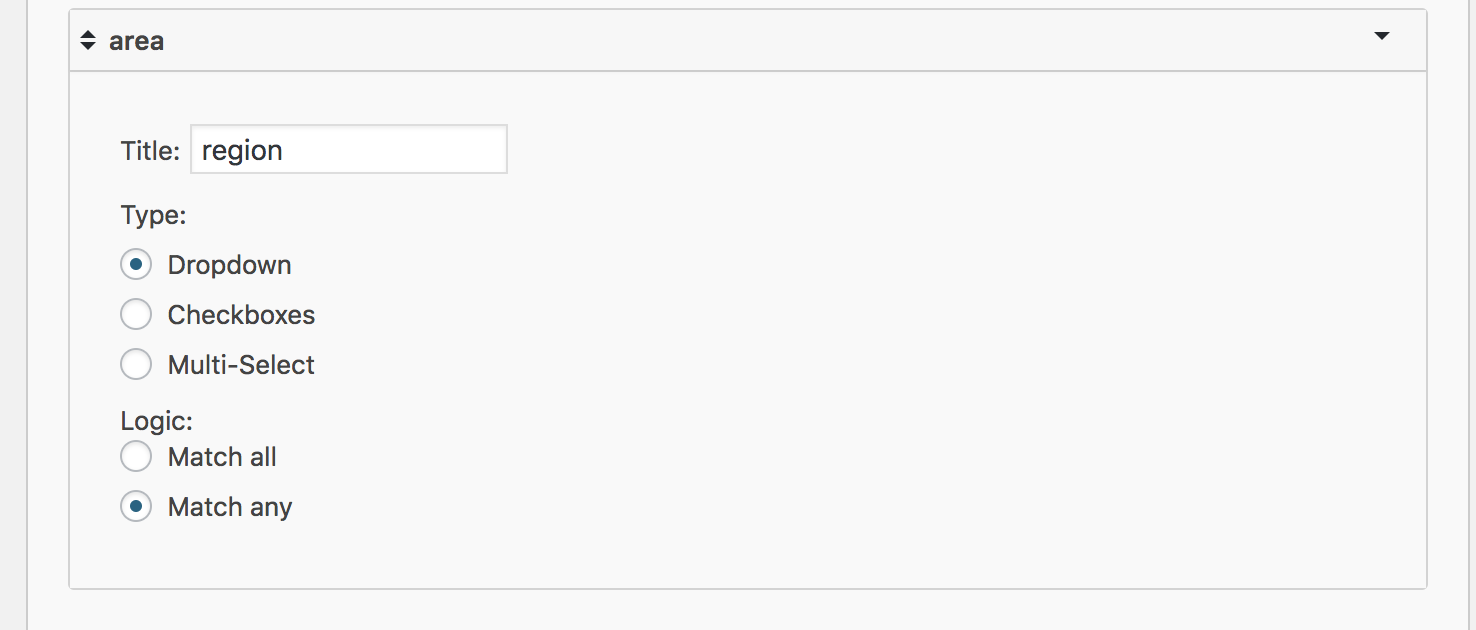
Let me know if that works for you.
Thanks
Courtney 🙂MemberGreat Fan
Let us how if we can help you again.
Thanks
Courtney 🙂 -
AuthorPosts