Forum Replies Created
-
AuthorPosts
-
Cliff
MemberSteve, thanks for testing.
I think the issue is that your theme’s page.php file does not load comments_template()
Check out this advice: https://wordpress.org/support/topic/how-to-allow-comments-on-pages#post-1042844
Let me know if that’s enough information for you to get things sorted out.
MemberLeone,
I visited your main calendar at http://vdausa.org/calendar/ and that event DOES appear there as an all-day event:

Is this not how it displays for you?
MemberThanks for all the info. I’m glad to hear running all the latest versions of plugins and theme fixed it for you.
MemberGlad it worked!
MemberKevin, you could add some CSS like this:
div#event_custom table#event-meta tr:nth-child(3) {
display: none;
}
Change the number ‘3’ to whatever works for your setup (#1 “Additional Fields”, #2 is the first custom field, #3 is the second custom field)
Let me know if that accomplishes what you’re looking to do.
MemberThanks for the details. Here’s a snippet that may come in handy too:
Here’s a snippet that may come in handy too: https://gist.github.com/jesseeproductions/f4937c82325ab152cb24
MemberPlease provide details how you determined WooCommerce plugin is the cause.
Additionally, please answer the questions I asked in my previous reply.
Thank you.
MemberDefinitely not. Just replacing the folders/files on the server (not messing with the database) won’t affect any event data.
November 9, 2015 at 9:17 pm in reply to: My formatting is all over the place on a fresh install #1023583MemberThere are a few things I can suggest for you to determine the cause of the Photo view not working for the main calendar nor for a category’s Photo view.
1)
There could be quite a few things that would lead to a plugin or theme conflict, and I’m curious about a few things. Would you mind enabling WP_DEBUG and sharing any PHP errors you see while navigating your site’s home page, events page, single-event pages, and any other of your site’s pages relevant to this ticket?
Once you share your WP_DEBUG findings, we may be able to get an idea of any plugin or theme conflicts.
Please enable WP_DEBUG on your site. You’ll need to edit to your site’s wp-config.php file and change this line of code:
define('WP_DEBUG', false);to this:define('WP_DEBUG', true);
(or add this line of code if you can’t find mention of ‘WP_DEBUG’ in your wp-config.php file)If any errors do appear while navigating your site’s pages, please copy and paste them in their entirety into a new ticket reply — along with the URL of where you saw the error(s) — and make sure you set it as a Private reply.
2)
Could you try temporarily activating the default Twenty Fifteen theme, and seeing if the issue persists.
If disabling the theme fixes it, we have narrowed the issue down to a theme conflict. Do you have any theme overrides for the Events Calendar? If so could you try disabling them by renaming your [themename]/tribe-events/ folder to ‘tribe-events-bak’. Did that fix it?
If the issue persists in the default Twenty Fifteen theme, then we have a different set of debugging steps. Please keep the Twenty Fifteen theme enabled, and also disable any plugins other than the ones from Modern Tribe to see if that fixes it. If it does, please try re-enabling the plugins one at a time until the issue resurfaces. When it does resurface, can you let me know which plugin caused that to happen?
Let us know what you find. 🙂
MemberHi Lara.
It looks like you were trying to follow along with our Themer’s Guide (but incorrectly used ‘config-events-calendar’ instead of ‘tribe-events’… unless I’m missing something specific to Enfold theme)
Anyway, if you’re editing the parent Enfold theme, you’d need to download a fresh copy from them.
We always recommend using a child theme for any theme modifications.
If you need more help, please provide some additional details for me.
Thanks.
MemberHi Natalie. Sorry for the frustrating issue. Let’s try to figure this one out…
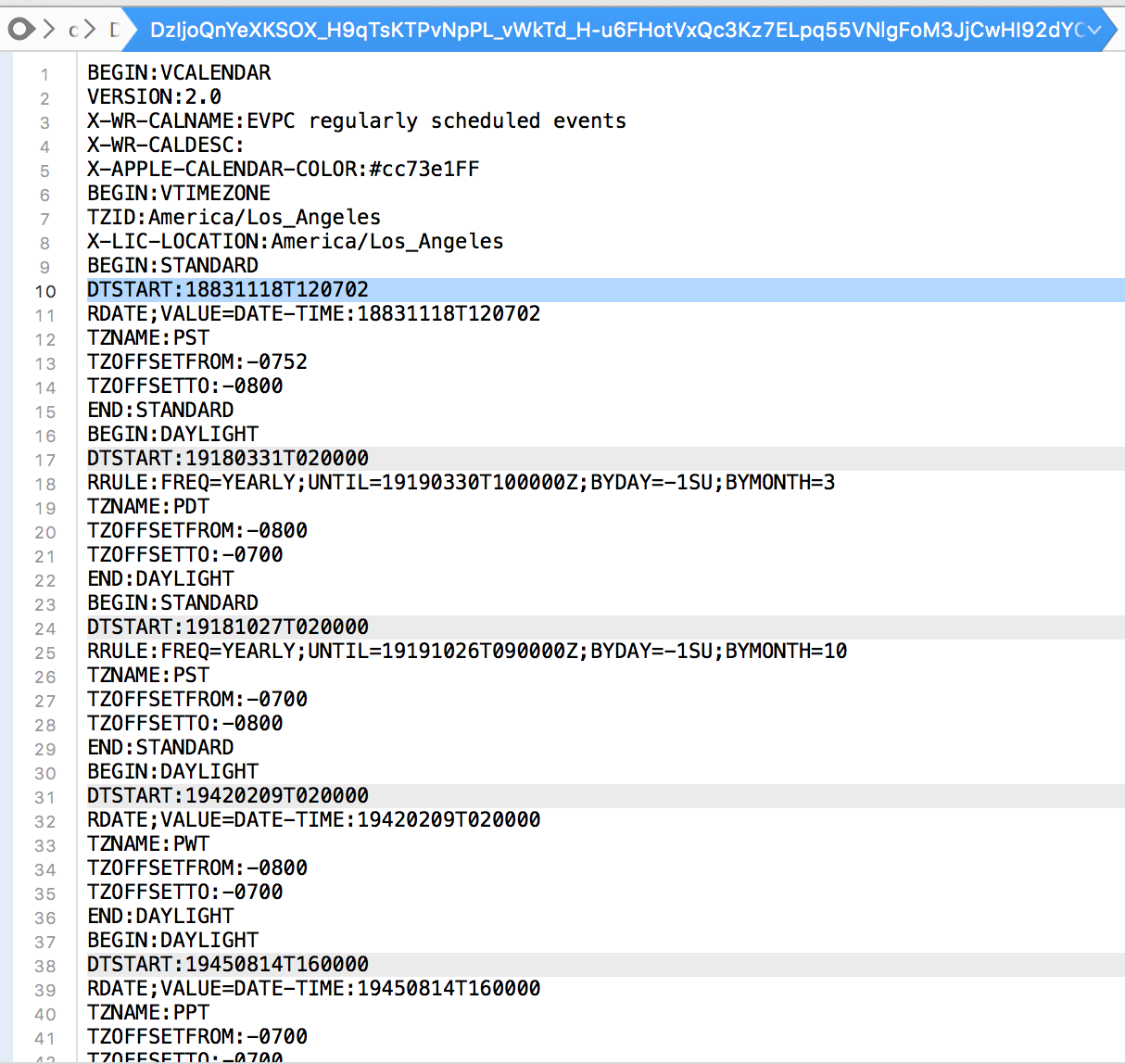
I downloaded the iCal file you linked to and opened it up in a text editor to see the actual file content (instead of what a calendar program would interpret it as).
I saw that the DTSTART (iCal’s name for “start date and time”) fields were all WAY in the past… the oldest is from 1883!!! and the most recent date is November 2007.

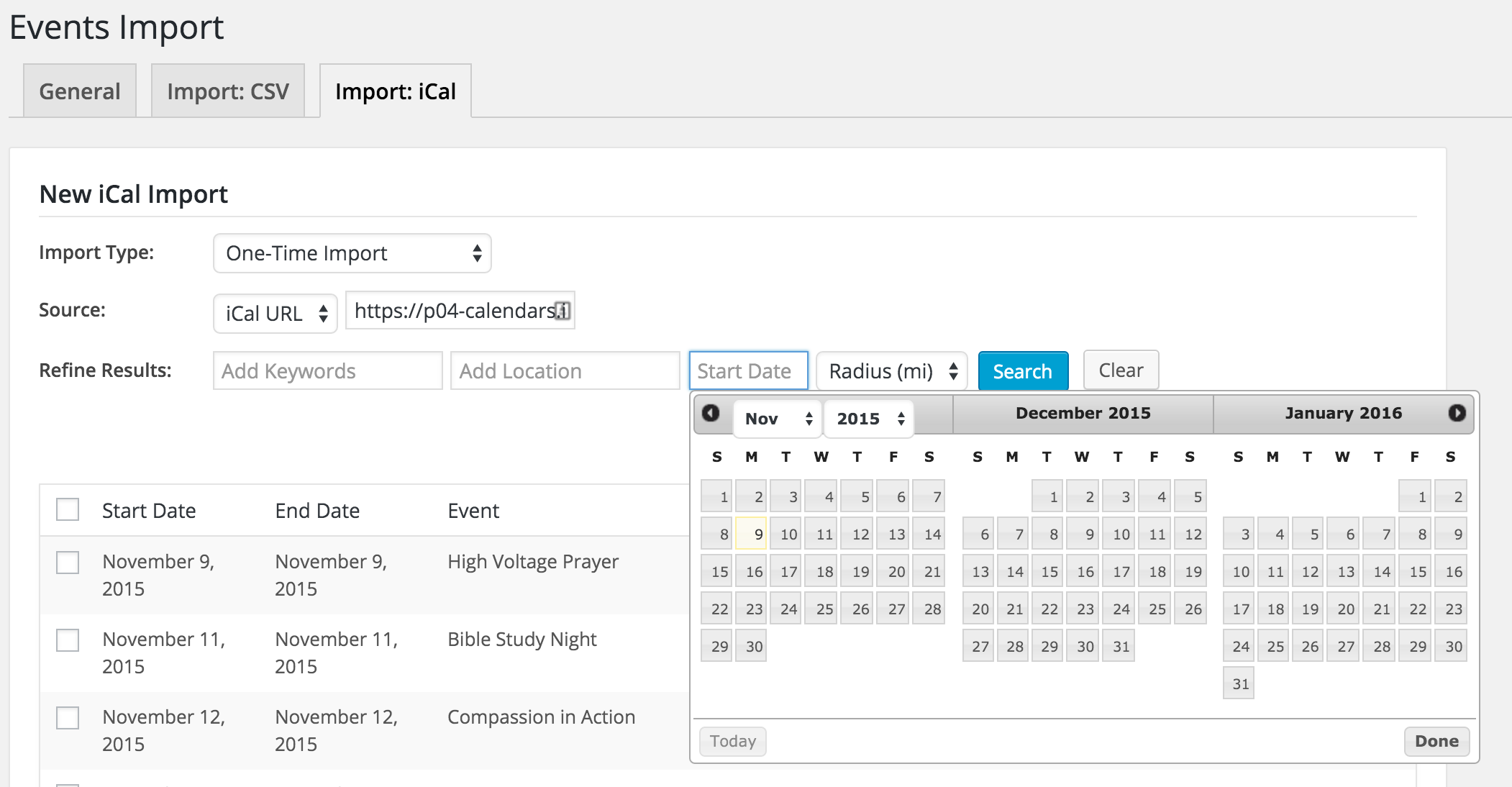
So, I’m guessing the issue is that the iCal importer’s previewer is showing things inaccurately more so than the import isn’t working correctly.
At this page, do you have a Start Date filled in (it is filled in by default and you may not have noticed)?

I’m looking forward to hearing back from you so we can continue getting your import setup as desired.
FYI: Just a heads up that the iCal Importer currently imports recurring events (i.e. a series of events) as individual events (i.e. not connected in a series).
MemberHey Steve.
I see there is no comment form at this Event single page: http://www.fitness.net.nz/event/2015-queenstown-marathon/
But there is at this single Post: http://www.fitness.net.nz/fitness-articles/half-marathon-training/
So that tells me your theme does have a comments.php file, which is a good start.
You might try changing this setting: wp-admin > Events > Settings > Display > “Events template” option
Does it make the comments form appear on the Event single page?
If not, would you mind grabbing your system information and pasting it here? Make sure to use the “Set as private reply” checkbox to protect your private information from the public.
You can find the system info by going to WP Admin > Events > Settings, clicking on the “Help” tab, and scrolling down to the “System Information” box. (Or by going to [yoursite]/wp-admin/edit.php?post_type=tribe_events&page=tribe-events-calendar&tab=help)
That will give me a lot of extra information to help diagnose the problem.
MemberHowdy.
I see you own both PRO and Community Events.
PRO adds the ‘additional fields’ functionality. If you add fields via PRO, they’ll also appear on the Community Events submission form.
You’ll also need to reference this help article to customize the “required” fields and any error checking to perform on them: https://theeventscalendar.com/knowledgebase/required-fields-for-events-submission-form/
Please let me know how this goes for you.
MemberHi Tiffany.
If I understand your issue fully, your month view featured images ARE showing, just that they’re way too big, right? At least this is what I’m seeing at http://www.fullcirclevenice.org/events/month/
I think simply adding max-width: 100% to those images is all you’re needing. Try this CSS rule:
.tribe-events-tooltip .tribe-events-event-thumb img { max-width: 100%; }You can add custom CSS code via your child theme’s style.css file or via a plugin like Simple Custom CSS or, my favorite, Jetpack. Jetpack supports regular CSS and the LESS and Sass pre-processors.
Let me know how it goes for you and if there’s anything else I can help with.
MemberHi Jacob. I see what you mean.
There’s a z-index issue/conflict with the Events Calendar’s styling and your theme’s navigation.
No worries. I tested and as long as we override the View As picker’s z-index to be 29 or less, it’ll hide behind your top navigation (on desktop; I didn’t test mobile).
Here’s the CSS that may help:
#tribe-bar-views .tribe-bar-views-list { z-index: 25; }You can add custom CSS code via your child theme’s style.css file or via a plugin like Simple Custom CSS or, my favorite, Jetpack. Jetpack supports regular CSS and the LESS and Sass pre-processors.
I hope this helps.
-
AuthorPosts