
Home › Forums › Calendar Products › Events Calendar PRO › My Event page doesnt show up anymore
- This topic has 14 replies, 3 voices, and was last updated 10 years, 8 months ago by
Support Droid.
-
AuthorPosts
-
November 6, 2015 at 3:28 pm #1022710
Lori
ParticipantI want to know what happened to my calendar. Yesterday and today it was working well and suddenly is not displayed on my page events. the views that I have listed are per month and list but now I do not see on my website. I want to know what has happened, because I do not touch anything on my website. I want an answer as quickly as possible. please
November 7, 2015 at 9:32 pm #1022971Cliff
MemberHi Lori. I’m very sorry to hear of this. I hope to help you resolve it ASAP.
When you updated our plugin(s), maybe you updated some other, non-Modern Tribe things too (WP core, a theme, non-MT plugin)? Just a thought. Whether this is the case or not, to start our troubleshooting, would you mind enabling WP_DEBUG and sharing any PHP errors you see while navigating your site’s home page, events page, single-event pages, and any other of your site’s pages relevant to this ticket?
Once you share your WP_DEBUG findings, we may be able to get an idea of any plugin or theme conflicts.
Please enable WP_DEBUG on your site. You’ll need to edit to your site’s wp-config.php file and change this line of code:
define('WP_DEBUG', false);to this:define('WP_DEBUG', true);
(or add this line of code if you can’t find mention of ‘WP_DEBUG’ in your wp-config.php file)If any errors do appear while navigating your site’s pages, please copy and paste them in their entirety into a new ticket reply — along with the URL of where you saw the error(s) — and make sure you set it as a Private reply.
===
If you don’t see any WP_DEBUG messages while browsing your site, could you try temporarily activating the default Twenty Fifteen theme, and seeing if the issue persists.
If disabling the theme fixes it, we have narrowed the issue down to a theme conflict. Do you have any theme overrides for the Events Calendar? If so could you try disabling them by renaming your [themename]/tribe-events/ folder to ‘tribe-events-bak’. Did that fix it?
If the issue persists in the default Twenty Fifteen theme, then we have a different set of debugging steps. Please keep the Twenty Fifteen theme enabled, and also disable any plugins other than the ones from Modern Tribe to see if that fixes it. If it does, please try re-enabling the plugins one at a time until the issue resurfaces. When it does resurface, can you let me know which plugin caused that to happen?
===
If you can’t figure out any WP_DEBUG messages or theme or plugin conflicts, would you mind grabbing your system information and pasting it here? Make sure to use the “Set as private reply” checkbox to protect your private information from the public.
You can find the system info by going to WP Admin > Events > Settings, clicking on the “Help” tab, and scrolling down to the “System Information” box. (Or by going to [yoursite]/wp-admin/edit.php?post_type=tribe_events&page=tribe-events-calendar&tab=help)
That will give me a lot of extra information to help diagnose the problem.
I look forward to hearing back from you and helping solve any problems.
November 8, 2015 at 2:28 pm #1023075ParticipantThis reply is private.
November 8, 2015 at 3:13 pm #1023081MemberYou said WP_DEBUG did report some issues? If yes, what were they?
All our plugins do work in Twenty Fifteen, plus your report of things not working all of a sudden lead me to believe there’s a problem. In other words, regardless of cause, something’s not right.
Maybe try changing your main calendar slug to something else, like ‘calendar’ instead of ‘events’ and see if that works. If it does, change it back to ‘events’ and re-save your site’s permalinks and see if that makes it work again.
You might also try changing permalinks to the various options (especially the ‘default’/ugly permalinks and see if that makes things work).
Sorry, but https://cldup.com/G-KC4du6Tb.jpg was too small an image for me to read its text.
Maybe try changing to Avada parent theme as active theme instead of your child theme.
Please let me know what you discover, if anything.
November 8, 2015 at 4:17 pm #1023086ParticipantThis reply is private.
November 8, 2015 at 8:30 pm #1023122MemberThanks for that WP_DEBUG message.
The message says the error is coming from the Avada theme.
Thanks for the more readable screenshot.
No, I didn’t receive your system information in this thread.
===
Here’s what to do:
NOTE: Don’t forget to use a fresh/new browser after each update, activation/deactivation, and other troubleshooting steps! Check http://www.refreshyourcache.com/ for how-to.
Make sure you have the latest version of the Avada theme and test if the problem(s) goes away.
If you were already on their latest version or updating to their latest version didn’t solve the problem, could you try temporarily activating the default Twenty Fifteen theme and seeing if the issue persists?
If disabling the theme fixes it, we have narrowed the issue down to a theme conflict. Do you have any theme overrides for the Events Calendar? If so could you try disabling them by renaming your [themename]/tribe-events/ folder to ‘tribe-events-bak’. Did that fix it?
If the issue persists in the default Twenty Fifteen theme, then we have a different set of debugging steps. Please keep the Twenty Fifteen theme enabled, and also disable any plugins other than the ones from Modern Tribe to see if that fixes it. If it does, please try re-enabling the plugins one at a time until the issue resurfaces. When it does resurface, can you let me know which plugin caused that to happen?
===
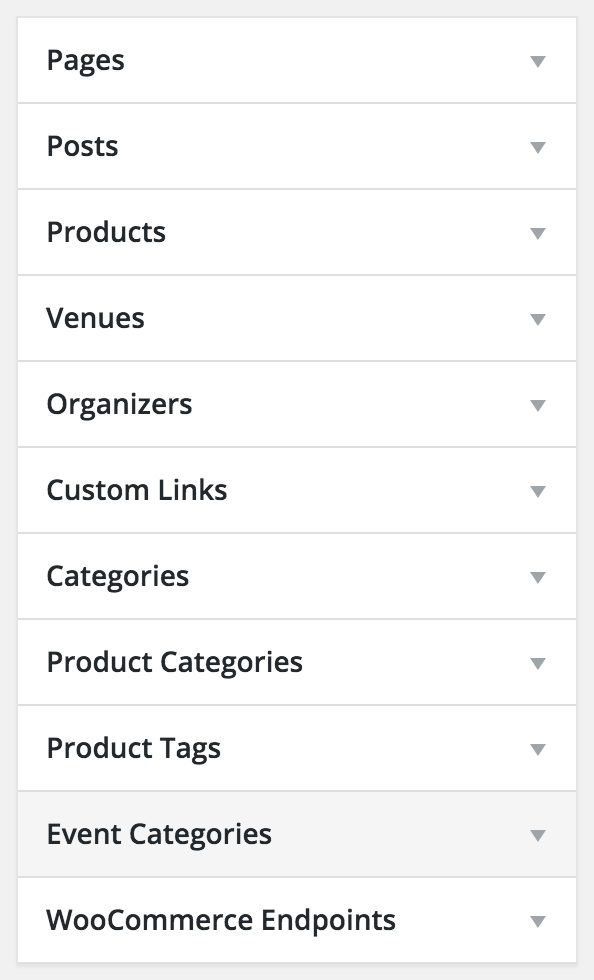
For something not showing up in your navigation menu, you might need to review your wp-admin > Appearance > Menus and customize your WordPress menu(s) that is active on your site’s main navigation.
Reference: https://codex.wordpress.org/Appearance_Menus_Screen#Custom_Post_Types_and_Taxonomies
Note there are additional sections of menu items. If you change the Events Calendar’s settings so the slug changes, you’ll probably need to update your menu manually afterward, too.

===
Finally, as for any styling edits (e.g. too much space), you’ll need to contact Avada support to ask why the appearance is the way it is.
I hope this information helps toward resolving your issue.
November 9, 2015 at 9:16 am #1023292ParticipantThis reply is private.
November 9, 2015 at 7:31 pm #1023559MemberLori, I’m glad to hear you figured out one issue.
What was the resolution?
How do you know WooCommerce (from WooThemes) and/or WooCommerce Event Tickets (from us) is causing the issue?
Do you have the latest versions of all your plugins and of WordPress and of your theme?
The more information you provide, the more likely we’ll be able to figure things out quickly.
Thanks and sorry again you’re having these frustrations. I look forward to hearing back from you.
November 9, 2015 at 11:10 pm #1023596ParticipantHi Cliff,
The plugin that is causing the problem is Woocommerce (from WooThemes). My others plugins are working good even WooCommerce Event Tickets (from you).
How I can fix that problem because that plugin is really important for my website. when I activate the woocommerce plugin something happened that hide my event page. I really need you help ASAP because that is how I sale my events tickets.Sincerely,
November 10, 2015 at 11:36 am #1023879MemberPlease provide details how you determined WooCommerce plugin is the cause.
Additionally, please answer the questions I asked in my previous reply.
Thank you.
November 10, 2015 at 2:38 pm #1023955ParticipantThis reply is private.
November 10, 2015 at 8:34 pm #1024011MemberThanks for the additional information.
Does your event page(s) work correctly if WooCommerce is active but WooTickets is inactive?
Basically, I’m wondering if any of these combinations DOES work:
- TEC core + WooCommerce
- TEC core + PRO + WooCommerce
- TEC core + PRO + WooCommerce + Filter Bar
- TEC core + Filter Bar + WooCommerce
Thanks for testing. I look forward to your reply.
November 11, 2015 at 12:22 am #1024094ParticipantThis reply is private.
November 11, 2015 at 3:00 pm #1024368MemberLori,
We’re not seeing other reports of our calendar plugins having issues with WooCommerce, and, if you’re certain the issue is with WooCommerce (e.g. WooCommerce settings, WooCommerce database tables, WooCommerce error messages, etc.), then you’ll need to contact WooThemes Support.
If you need additional support from us, please either reply to this thread or open a new thread if you discover a new issue.
Thank you.
February 18, 2016 at 8:31 am #1075570KeymasterThis topic has not been active for quite some time and will now be closed.
If you still need assistance please simply open a new topic (linking to this one if necessary)
and one of the team will be only too happy to help. -
AuthorPosts
- The topic ‘My Event page doesnt show up anymore’ is closed to new replies.