Forum Replies Created
-
AuthorPosts
-
Cliff
MemberSorry about that. Of those highlighted lines in the code, do NOT remove the ‘do_action’ lines. Leave those in. You can just comment out (instead of fully removing) the ‘tribe_get_template_part’ line and that’s all.
Please let me know if this gets things working for you as desired.
Thanks!
MemberHi. Thanks for testing and confirming. I’m glad there’s a workaround for now (at least for the short-term).
I’ll mark this ticket as Pending Fix, which means this thread should receive a reply once the applicable fix has been released. I apologize for this issue and appreciate your understanding and patience.
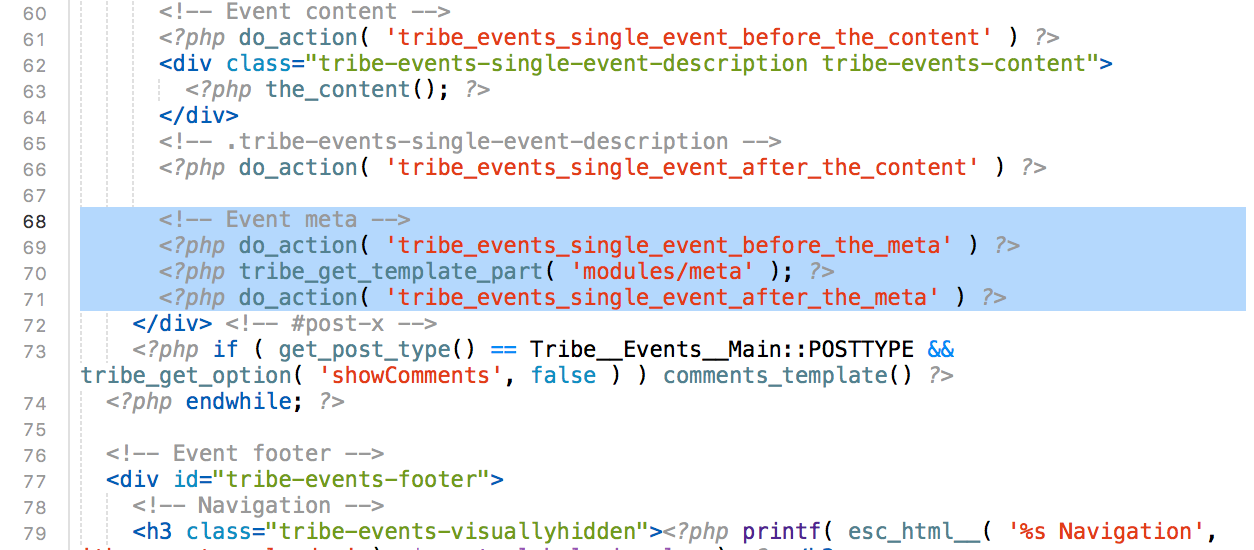
MemberThanks for the screenshot. I see you want the entire meta area removed.
Please make sure you’re using a child theme and reference our Themer’s Guide.
You’ll want to override this file — /wp-content/plugins/the-events-calendar/src/views/single-event.php — in your own theme by creating a file at [your-child-theme]/tribe-events/single-event.php
Basically just copy the file from the plugin folder to that child theme folder and remove these lines from the child theme’s version of the file:

I hope this information helps you accomplish what you’re wanting.
Please let me know how it goes for you.
MemberHi Mats. Thanks for the helpful info.
I visited the page and experienced the same — the time of day dropdown not dropping down.
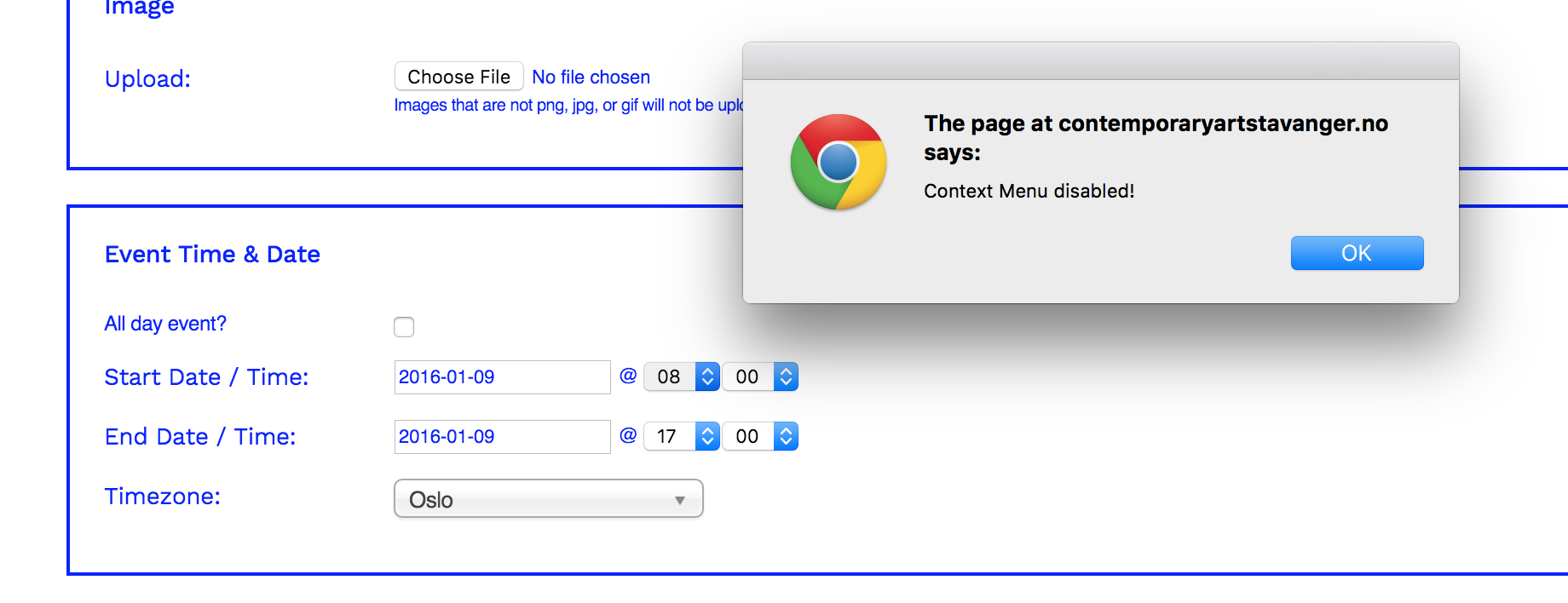
I right-clicked it to open in Chrome Inspector and saw this notification:

Then, I opened Chrome Inspector via keyboard shortcut and saw this in the Console:

So maybe that’ll help point you in the right direction of what’s causing the issue.
If it doesn’t, please follow our Testing for Conflicts Guide and see if that helps narrow down the cause of this.
Let us know what you find out.
Thanks.
Let me know if there’s anything else I can help with.
MemberExcellent! 🙂
January 8, 2016 at 1:50 pm in reply to: ticket not showing on event page after upgrade to events ticket plus #1052814MemberHugues,
Using the same versions of PHP, WP, and plugins you reported using, our testers couldn’t replicate what you’re experiencing.
Could you please follow our Testing for Conflicts Guide and see if that helps narrow down the cause of this.
Let us know what you find out.
Thanks.
January 8, 2016 at 1:33 pm in reply to: Recurring Events 404 on public site and not editable in #1052812MemberMike, thanks for the additional testing.
I was thinking it was one issue but now realize it’s actually a different one.
Unfortunately, we don’t have a fix for this issue at this time. The one other time we had it, the user chose to manually recreate all events, since that solved the issue for them.
Is that a possible solution for you?
If not, please provide information on how many total events and how many recurring events you have.
Thank you.
MemberThis might be what you’re looking for: https://wordpress.org/plugins/the-events-calendar-category-colors/ (third party so we don’t guarantee it)
===
Assuming that solves your question, here’s info for the future:
You can share screenshots with us by uploading to a free service and sharing a link. Several good options include:
- Dropbox (how-to)
- CloudApp (how-to)
- Jing (easy annotations)
- Flickr
- Google Drive
- or another one of your choice
You may choose to set your reply to “Private” if you don’t want the links to be as publicly-accessible.
January 8, 2016 at 12:32 pm in reply to: Can I get the individual variables in $venue_details? #1052790MemberHi Brendan.
You might want to check out the tribe_get_full_address filter or, if that’s not sufficient, reference our Themer’s Guide.
I hope that helps get you what you need.
Thanks!
MemberHi Rob. Please know that we’d like each question to be in its own forum post for clarity and quality of replies.
1) import feed font color
I am not sure where/what you’re referring to regarding colors. Would you mind sending me a screenshot / mockup of what you’d like to see?
2) import category and/or importing venues
I’m unclear what exactly you’re asking. Are you asking about categories set upon import or new venues being included in the import?
Thanks.
January 8, 2016 at 11:52 am in reply to: ticket orders do not appear on page 'tickets-orders' #1052770MemberHi Jason. Thanks for your question.
Yes, you must mark the WooCommerce ticket order as Complete in order for it to show up in your list of purchased tickets.
The list of purchased tickets is just that — tickets that have been fully purchased.
You may search for or create a new idea at our plugin’s UserVoice page.
This allows others who are interested in that feature to easily voice their support. We frequently review suggestions there to find out which ones are popular, then we implement as many of them as we can.
Once you post it, feel free to link to it from here in case anyone comes across this forum thread in the future.
Thank you.
MemberHi. Thanks for your question.
If I understood your question correctly, I’m unable to replicate such behavior on my local test site with Twenty Fifteen theme. Please watch this GIF animation for reference.
Please follow our Testing for Conflicts Guide and see if that helps narrow down the cause of this.
Let us know what you find out.
Thanks.
P.S. KrystalKnapp, in this forum we try to keep our threads focused on just one issue to ensure we answer each question. Please start a new thread for your issue. Thanks for your understanding.
MemberHi Ching.
Could you please send me a screenshot/mockup of what you want removed, plus a link to the event the screenshot came from?
Thank you.
MemberHi Kit.
Sorry you’re experiencing this.
Please send me a screenshot of your wp-admin post editor of this event’s tickets area.
Also, would you mind grabbing your system information and pasting it here? Make sure to use the “Set as private reply” checkbox to protect your private information from the public.
You can find the system info by going to WP Admin > Events > Settings > Help tab > System Information section — or by going to [yoursite]/wp-admin/edit.php?page=tribe-common&tab=help&post_type=tribe_events#tribe-system-info
That will give me a lot of extra information to help diagnose the problem.
January 8, 2016 at 11:05 am in reply to: ticket not showing on event page after upgrade to events ticket plus #1052741MemberHi Hugues.
To my understanding, a ticket created via WooTickets should be inherited by Event Tickets Plus (and therefore WooTickets plugin be deactivated/uninstalled).
I’m having our developers take a closer look and will get back to you.
@rbinteractive, sorry you’re having this issue too. Please create your own separate ticket.Please include your system information in your ticket.
You can find the system info by going to WP Admin > Events > Settings > Help tab > System Information section — or by going to [yoursite]/wp-admin/edit.php?page=tribe-common&tab=help&post_type=tribe_events#tribe-system-info
That will give us extra information to help diagnose the problem.
-
AuthorPosts