Forum Replies Created
-
AuthorPosts
-
January 8, 2016 at 9:50 am in reply to: Importer: How to import description for venues & organizers? #1052710
Cliff
MemberHi Abby.
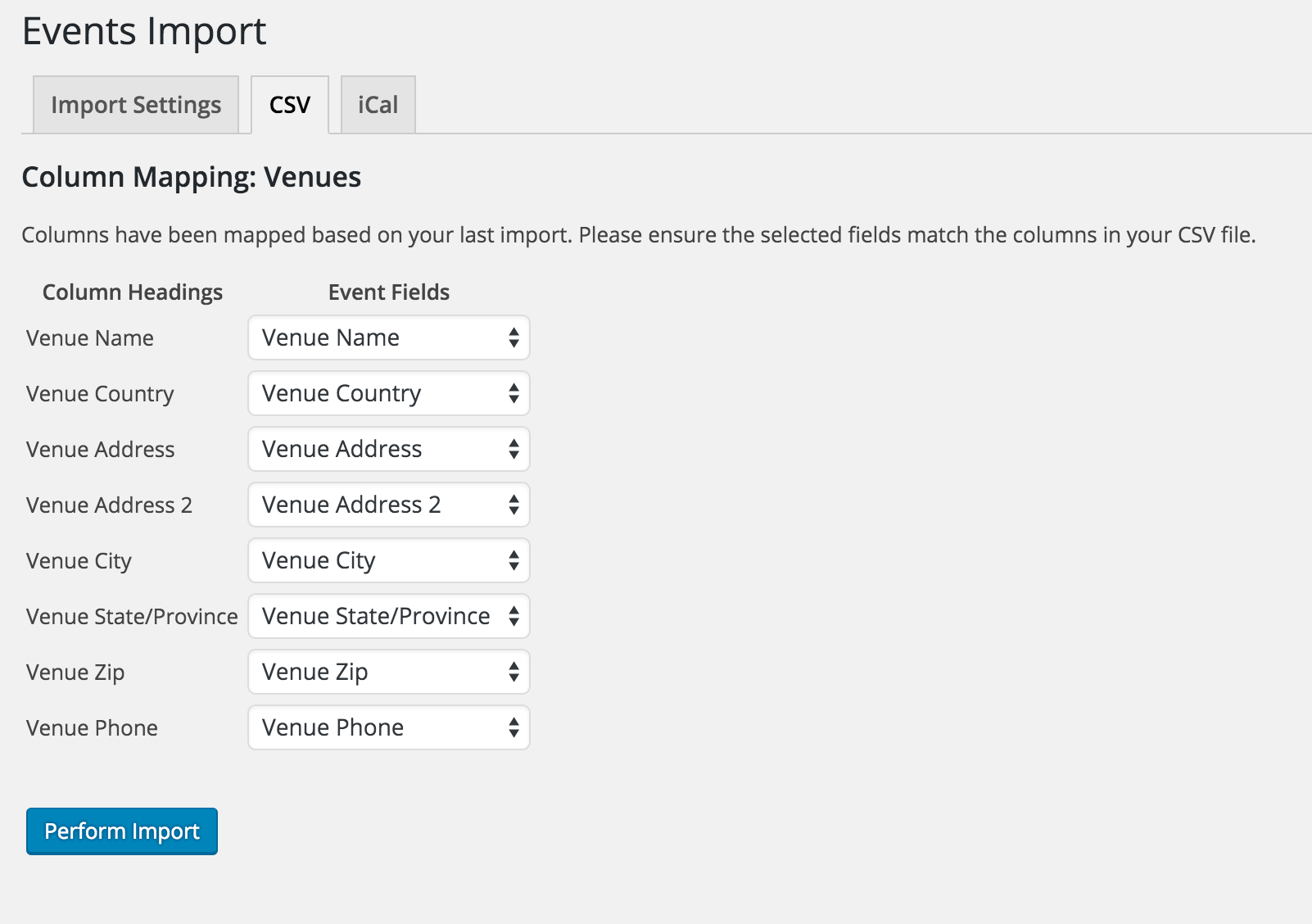
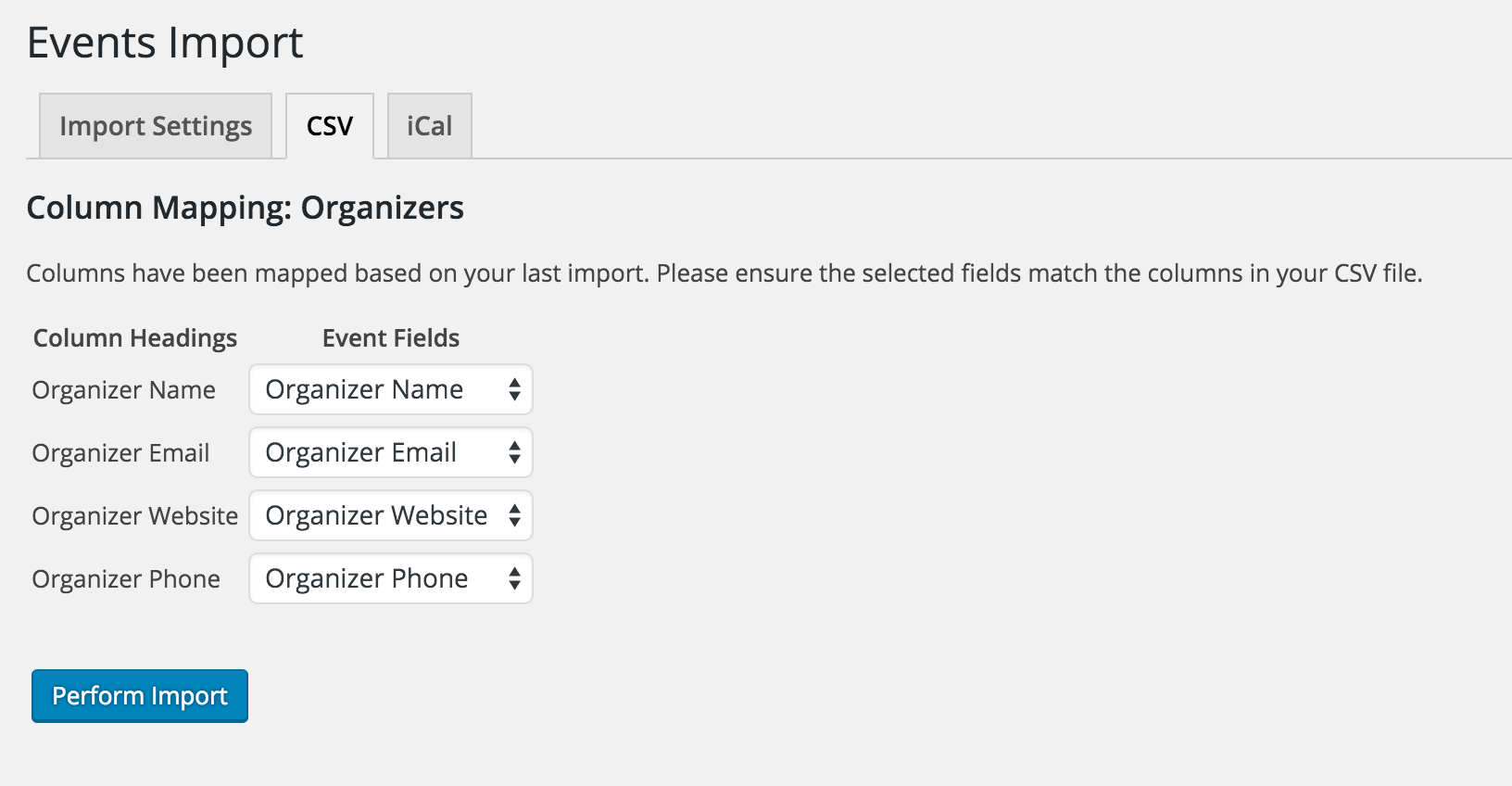
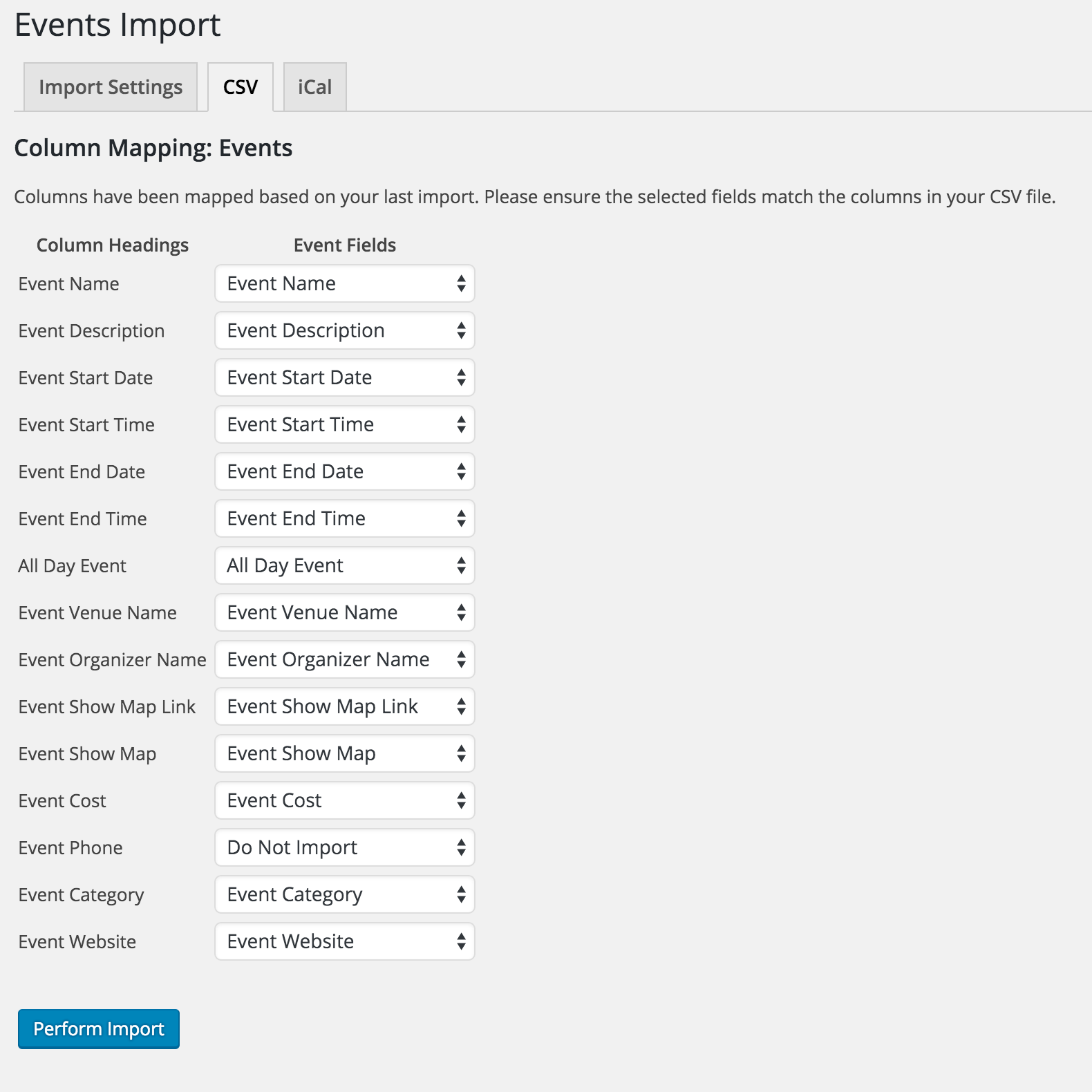
We have a help article about importing. Following are all the available import fields currently available:
Venues import

Organizers import

Events import

Note that a “Description” field isn’t available for Organizers or Venues imports.
However, I agree the “Description” field should exist for importing Venues and Organizers (like it does for Events).
I’ve ticketed this as a to-do for our developers, although there are no guarantees if/when it’ll be completed. (I also suggested adding other missing fields too.)
Sorry this isn’t currently part of the features.
Thanks for your understanding.
January 8, 2016 at 8:10 am in reply to: Need to translate community event add page for different languages? #1052604MemberThanks, Asko. That’s helpful information.
Your thread is actually regarding 2 known bugs:
- The Community Events settings page shouldn’t be hard-coding “add” in the URL
- The URL should support non-Roman characters
I’ll mark this ticket as Pending Fix, which means this thread should receive a reply once the applicable fix has been released. I apologize for this issue and appreciate your understanding and patience.
MemberThanks for letting me know I answered your question. Have a great day!
MemberThanks for letting me know testing on a fresh copy of WP solved the issue for you.
MemberMira, we don’t have any demo of the front-end view of events from a Facebook import, but they’d look just like a manually-created event on our calendar.
Please let me know if there are any other pre-sales questions I can help with regarding Facebook Importer.
January 8, 2016 at 7:50 am in reply to: Anyone else still having problems with excluding recurring events? #1052597MemberThanks for testing. This is one of our known bugs. I’ll mark this ticket as Pending Fix, which means this thread should receive a reply once the applicable fix has been released (sorry, no ETA). I apologize for this issue and appreciate your understanding and patience.
You may choose to use the universal (albeit uncommon and therefore potentially confusing) YYYY MM DD format or proceed however else you choose to.
Thank you.
January 8, 2016 at 7:46 am in reply to: Recurring Events 404 on public site and not editable in #1052595MemberThanks for the detailed reply.
Could you try setting it to the first option, “2016-01-15”, then re-save one of your pretty permalinks (not “Plain”) and see if the issue is resolved?
Then create a new recurring event (don’t look at your past events, just create a new one) and see what URLs get generated for that series.
Thanks.
MemberKrystal, thanks for sharing and, yes, please create your own ticket if you haven’t already.
MemberWhoops, I got thrown off thinking along the lines of iCal Importer, not exporting from TEC/PRO. Thanks for clarifying.
I just tested an export from my local testing site and it’s not all on one line. (You can open iCal files in any text editor or code editor to see).
Please follow our Testing for Conflicts Guide and see if that helps narrow down what the conflict is that’s causing the export to be on all one line.
Let us know what you find out.
Thanks.
MemberThe cost field is definitely a numeric field only. 🙂
However, the Filter Bar has some options in its “cost” field settings. Maybe some combination of “cost” value (e.g. zero not blank) can be made to work with Filter Bar’s settings.
Let me know if you need anything else.
Thanks.
MemberHi Chad. Thanks for your question.
Here’s what our plugin does by default on Twenty Fifteen WordPress default theme:

I see your site looks considerably different. I didn’t see “previous month” or “next month” links on your calendar’s List View or Month View.
As such, please direct your question to your theme provider.
Thanks for your understanding. Please let me know if there’s any helpful information from them.
January 7, 2016 at 3:28 pm in reply to: Need to translate community event add page for different languages? #1052180MemberHi Asko. Thanks for your question.
The issue is that wp-admin > Events > Settings > Community tab > “Edit slug community” setting displays the English (i.e. hard-coded) link to the community links.
Your Community Events form should then be available at the language-specific URL. For example, in French:
- mydomain/events/community/ajouter/
If it’s not, please choose your language in WordPress general settings, then re-save your Permalinks settings.
Please let me know how it works for you.
Thanks.
MemberHi. Thanks for your question.
We’ve got these instructions:
- Translating the premium plugins
- Translating The Events Calendar (free/core plugin)
Please reference that information and let me know if you need any further assistance.
MemberHi. Sorry you’re having this issue.
Please follow our Testing for Conflicts Guide and see if that helps narrow down the cause of this.
Let us know what you find out.
Thanks.
MemberHi Laura.
Filter Bar already includes a “Cost” filter, as you stated, but I don’t quite understand what exactly you’re wanting — where is the Yes/No coming from?
You could buy PRO to add a custom field and then Filter Bar would be able to use PRO’s custom field(s) — reference: https://theeventscalendar.com/knowledgebase/configuring-filter-bar/#layout
Last but not least, we have a pretty great Refund Policy so you can buy one or many of our add-ons and thoroughly test them.
Let me know if you have any follow-up questions.
-
AuthorPosts