Forum Replies Created
-
AuthorPosts
-
August 10, 2016 at 12:23 pm in reply to: Recurring events/main loop/functions.php/and settings :) #1150153
Cliff
MemberAwesome job, Brook, and thanks for letting us know, Jennifer. Good work!
August 10, 2016 at 7:48 am in reply to: Cannot limit number of upcoming events with shortcode & mini calendar #1149968MemberExcellent. Glad to hear. Thanks.
August 10, 2016 at 7:46 am in reply to: Monthly View widget displays on laptop but not on iPad or iPhone #1149963MemberDoes it possibly only display when you’re logged in? Because I don’t see it on Mac Chrome or Safari.
Do you have any “widget logic” type of plugin (allowing different widgets to show in different scenarios)? If yes, you might want to check those settings.
MemberYou’re welcome. Have a great rest of your week.
August 9, 2016 at 8:33 pm in reply to: Monthly View widget displays on laptop but not on iPad or iPhone #1149840MemberHi Zeno. Thanks for the link. Unfortunately, I don’t know which area of your site is “Footer Area 1”, and I didn’t see any of our widgets in your home page’s footer area.
Could you please provide some screenshots of when the widget is and is not appearing?
If it appears on your laptop’s browser, does it disappear if you make your laptop’s browser window narrower (about the size of a tablet or phone screen)?
MemberHi Nicole (or Frank?)
Thanks for that screenshot. Sorry this is happening for you.
Do you have the capability to see what the page source of that email is — or some way to determine what the img src actually is? For example, in Chrome you could right-click that missing QR code image and then click “Copy Image Address” and paste that here.
MemberThis reply is private.
August 9, 2016 at 8:23 pm in reply to: Conflict – Events Calendar Pro plugin interferes with the theme #1149837MemberHi, Alina. Sorry this is happening for you.
Initial page load at http://cepdarmandie.com/evenements/ did appear like your screenshot. Reloading the page worked (i.e. the page was styled) but threw this console error: “You have included the Google Maps API multiple times on this page. This may cause unexpected errors.” (If needed, you may reference our KB article Using Google Chrome Developer Tools.) You should deactivate the other Google Maps plugin you’re using on your site to fix this console error.
Because you said it’s a theme conflict, I’d suggest following our recommended troubleshooting steps just to verify:
There might be some new updates available. Could you please make sure all your Modern Tribe plugins (and WordPress core) are at their latest versions?
Once you verify you’re on the latest versions, please test to see if the issue is still happening for you.
If it is, please follow our Testing for Conflicts Guide (basically switch to TwentySixteen theme and deactivate all plugins and custom code other than Modern Tribe plugins) and see if that helps narrow down the cause of this.
If it doesn’t, please enable WP_DEBUG and WP_DEBUG_LOG and share any PHP errors you see while changing tickets quantity, navigating your site’s home page, events page, single-event pages, and any other of your site’s pages relevant to this ticket.
Then, please share your System Information (while in Testing for Conflicts mode).
You might also see if you can spot any console errors at your site. (If needed, you may reference our KB article Using Google Chrome Developer Tools.)
Let us know what you find out.
Thanks.
MemberHi Edina.
Thanks for your purchase.
I do not recognize that ai1ec shortcode. You could reference our plugin’s widgets and shortcodes documentation.
Also, please know that you must also have The Events Calendar free/core plugin activated as well as Events Calendar PRO.
Please let me know if I can be of further help on this issue.
MemberHi Amal / Isabelle.
In our forums, we try to keep our threads focused on just one issue to ensure we answer each question. Please keep this in mind for the future and start a new thread for each unrelated issue (Google Maps issue, for example).
Additionally, we cannot CC additional emails, but you can modify the email that gets notifications at your My Account page.
Thanks for your understanding.
===
To answer your question about the View As selector…
If you remove the ID from div#tribe-bar-views (such as via jQuery), then add this CSS:
ul.tribe-bar-views-list {
display: none;
}
then remove the class from div.tribe-bar-views-inner
then it should look like this.
I hope that helps answer your question. Let me know if not.
MemberHi, Wendy.
Our Pre-Sales forum doesn’t allow Private Replies.
Please reference our help article, Do you offer discounts for nonprofit organizations?
You’ll need to follow those instructions, and your application will be re-evaluated according to our current policies.
Thank you.
MemberHi.
hide_upcoming is referring to upcoming events — i.e. events in the future.
I’m not sure if this is what you’re needing, but it may help:
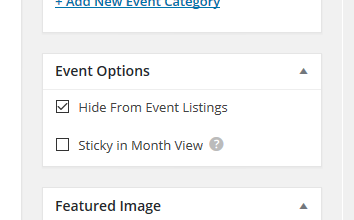
If you’re referring to this checkbox, it creates a boolean value for the _EventHideFromUpcoming meta key, so you could use tribe_get_events() — additional reference — along with https://codex.wordpress.org/Class_Reference/WP_Query#Custom_Field_Parameters
Please let me know if this helped.
August 9, 2016 at 7:52 pm in reply to: Cannot limit number of upcoming events with shortcode & mini calendar #1149828MemberHi. Thanks for asking about our plugin’s shortcodes.
You should be able to add count=8 to limit it to 8 results.
Please let me know if this answers your question.
MemberHi Doug.
I believe you’re requesting the same thing as one of our existing feature requests: Bookings Plugin or Feature
Typically, adding your vote there allows us to gauge interest in this particular feature request, which helps us prioritize our development efforts. However, I see that it was recently changed to “Declined” status.
That being said, Event Tickets Plus enables you to sell tickets for events via your eCommerce plugin of choice (e.g. WooCommerce). You can run your regular products store (e.g. selling books) via WooCommerce on the same site as well. But if you want to sell books at the same time as selling a ticket, that’s not possible by default but you could probably pull something like that off programmatically.
If you need some coding help, you may want to ask your developer or reference our documentation and list of known customizers.
Last but not least, we have a pretty great Refund Policy so you can buy one or many of our add-ons and thoroughly test them.
Let me know if you have any follow-up questions.
MemberExcellent. Thanks for sharing for others in the future as well!
-
AuthorPosts